
hamburger-menu icon
เลือกภาษา

Form 47BU – Application for a Business Skills (Permanent) Visa

  1. ภาษา ภาษาอังกฤษ
  2. ประเทศ ออสเตรเลีย
  3. กิจกรรม ธุรกิจและการลงทุน
Form 47BU – Application for a Business Skills (Permanent) Visa

Form 47BU – Application for a Business Skills (Permanent) Visa

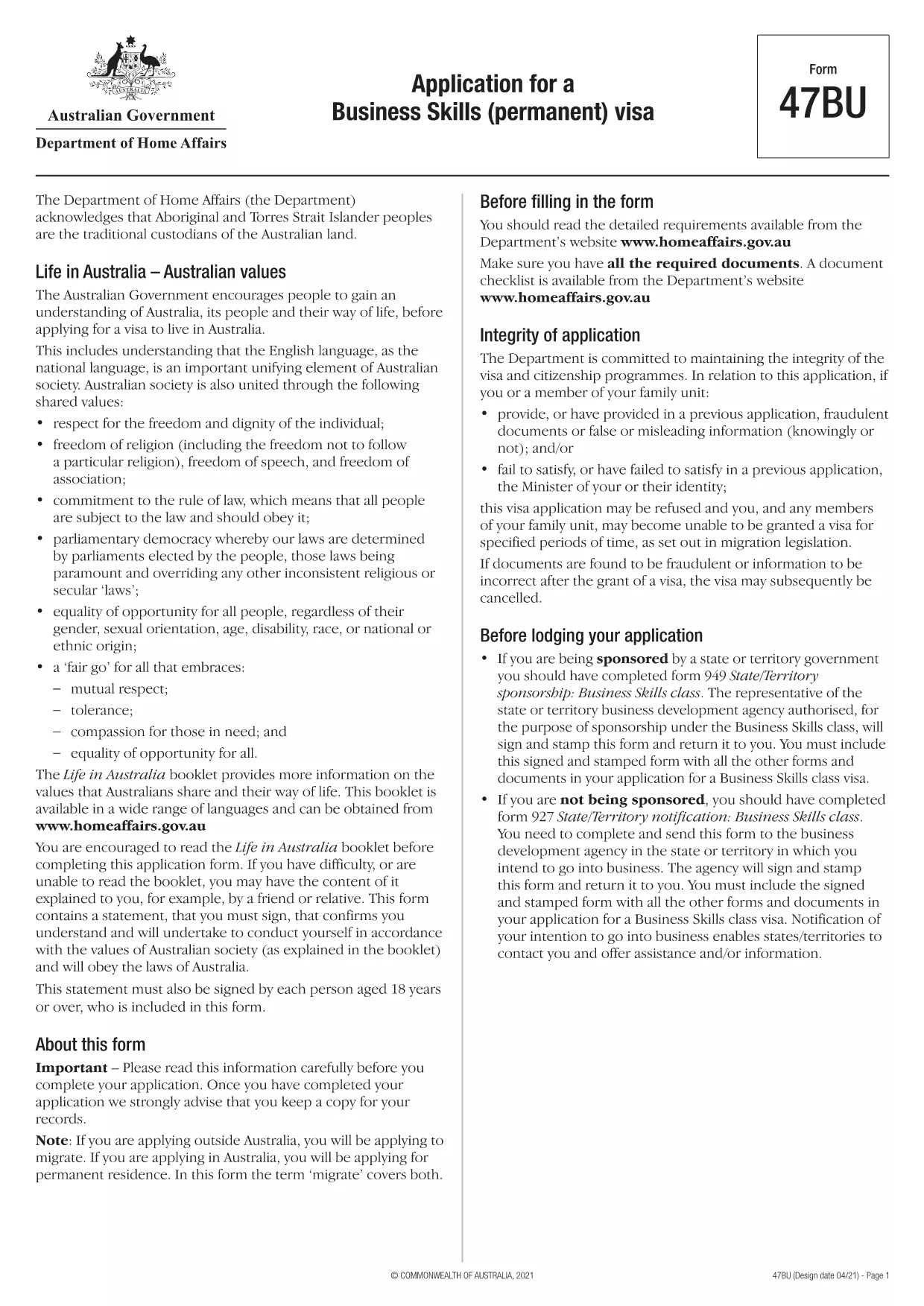
The Form 47BU is the official Department of Home Affairs document used by entrepreneurs and business owners who want to apply for a permanent Business Skills visa (subclass 132) in Australia. This fillable PDF lets you provide personal, business, and sponsorship details required for a successful application.

What is Form 47BU?

Form 47BU collects information about the applicant’s business experience, investment plans, and the state or territory sponsor’s endorsement. It must be submitted together with other supporting documents such as the Business Plan, Financial Statements, and the sponsor’s Form 1318.

How to Fill Out Form 47BU Online with Formize

Instead of downloading the PDF and editing it in a separate editor, you can complete the form directly on our site:

  1. Click the "Fill out this form" button below.
  2. Wait a few seconds while the Formize PDF Filler app loads.
  3. Enter your details in each field – the interface is drag‑and‑drop friendly and auto‑saves.
  4. When finished, click Save & Download to get the completed PDF ready for submission.

Common Mistakes to Avoid

  • Leaving sections blank: Every field marked with an asterisk (*) is mandatory.
  • Mismatched sponsor details: Ensure the state/territory sponsor’s name and signature match the endorsement letter.
  • Incorrect dates: Use the DD/MM/YYYY format as required by Australian immigration.
  • Uploading the wrong version: Always use the latest 47BU PDF (downloaded from the link below).

Eligibility & Supporting Documents

Before you start, confirm that you meet the basic eligibility criteria for a Business Skills (permanent) visa, including:

  • Minimum business turnover of AUD 1 million for the last two fiscal years.
  • Ownership of at least 30 % of the business.
  • State or territory sponsorship.

Attach the following documents when you submit the form:

  • Business Plan (minimum 12 pages).
  • Financial statements and tax returns.
  • Sponsor’s Form 1318 and supporting letter.
  • Proof of assets and investment funds.

Where to Find Help

If you need assistance, consult the Department of Home Affairs website or a registered migration agent. Our fillable PDF is designed to reduce errors, but professional advice can ensure your application meets all legal requirements.

Download the official Form 47BU (PDF)

คำถามที่พบบ่อย
  • What is the purpose of Form 47BU?

    Form 47BU is used to apply for a permanent Business Skills visa (subclass 132). It captures personal, business, and sponsorship details required by the Department of Home Affairs.

  • Can I edit Form 47BU on a mobile device?

    Yes. The Formize fillable PDF works on smartphones and tablets, allowing you to complete the form on any device with an internet connection.

  • Do I need a certified translation if my documents are not in English?

    All supporting documents submitted with Form 47BU must be in English or accompanied by a certified translation.

  • How many pages does the completed Form 47BU have?

    The form itself is 7 pages long, but you will attach additional supporting documents as required.

  • Is there a fee to use Formize’s fillable PDF?

    No. Formize provides the fillable version of Form 47BU for free. The visa application fee is paid directly to the Australian Department of Home Affairs.

  • What should I do if I make a mistake after downloading the PDF?

    Return to the Formize page, click "Fill out this form" again, and re‑enter the corrected information. The tool will generate a new, clean PDF.

  • Do I need a sponsor to submit Form 47BU?

    Yes. A state or territory government sponsor must endorse your application and provide a signed Form 1318.

ทำอย่างไร

วิธีกรอก Form 47BU ฟรีทางออนไลน์ใน 4 ขั้นตอนง่ายๆ:

  1. 1
    Click the Fill‑out Button
    Press the "Fill out this form" button on the page to launch the Formize PDF Filler.
  2. 2
    Wait for the App to Load
    The fillable interface loads in a few seconds; no download is required.
  3. 3
    Enter Your Information
    Complete each field, using the on‑screen guidance for format and mandatory sections.
  4. 4
    Save and Download
    When all sections are filled, click "Save & Download" to obtain the completed PDF ready for submission.
สร้างแอป PDF Filler
เกี่ยวกับ

แบบฟอร์มธุรกิจและการลงทุน

Form 47BU เป็นหนึ่งในรูปแบบที่ใช้ในบริบทของการเริ่มต้น การจัดการ หรือการลงทุนในธุรกิจ หน่วยงานของรัฐ สถาบันการเงิน หรือหน่วยงานกำกับดูแลมักกำหนดให้แบบฟอร์มเหล่านี้รวบรวมข้อมูล จัดตั้งนิติบุคคล หรือปฏิบัติตามกฎและข้อบังคับเฉพาะที่เกี่ยวข้องกับการดำเนินธุรกิจและการลงทุน แบบฟอร์มเฉพาะอาจแตกต่างกันไปขึ้นอยู่กับลักษณะของธุรกิจหรือกิจกรรมการลงทุน นี่คือตัวอย่างบางส่วนของแบบฟอร์ม "ธุรกิจและการลงทุน":

แบบฟอร์มจดทะเบียนธุรกิจ: แบบฟอร์มเหล่านี้ใช้เพื่อจดทะเบียนองค์กรธุรกิจกับหน่วยงานรัฐบาลที่เหมาะสม พวกเขารวบรวมข้อมูลเกี่ยวกับชื่อธุรกิจ โครงสร้างทางกฎหมาย (เช่น การเป็นเจ้าของคนเดียว ห้างหุ้นส่วน บริษัท) ที่อยู่ธุรกิจ รายละเอียดการเป็นเจ้าของ และข้อมูลที่จำเป็นอื่น ๆ ที่จำเป็นสำหรับการยอมรับทางกฎหมาย

เอกสารการจดทะเบียน: หากก่อตั้งบริษัทหรือบริษัท จะต้องยื่นเอกสารต่างๆ เพื่อสร้างนิติบุคคล โดยทั่วไปเอกสารเหล่านี้ประกอบด้วยข้อบังคับเกี่ยวกับการจัดตั้งบริษัท ข้อบังคับ ข้อตกลงผู้ถือหุ้น และแบบฟอร์มอื่นๆ ที่เกี่ยวข้อง

การยื่นขอใบอนุญาตประกอบธุรกิจ: ธุรกิจบางแห่งจำเป็นต้องมีใบอนุญาตเฉพาะหรือใบอนุญาตเพื่อดำเนินการตามกฎหมาย การยื่นขอใบอนุญาตประกอบธุรกิจรวบรวมข้อมูลเกี่ยวกับลักษณะของธุรกิจ ที่ตั้ง รายละเอียดการเป็นเจ้าของ และการปฏิบัติตามกฎระเบียบที่เกี่ยวข้อง

แบบฟอร์มการเปิดบัญชีการลงทุน: ผู้ลงทุนที่ต้องการเปิดบัญชีการลงทุนกับสถาบันการเงินหรือบริษัทนายหน้าซื้อขายหลักทรัพย์อาจต้องกรอกแบบฟอร์มเปิดบัญชี แบบฟอร์มเหล่านี้รวบรวมข้อมูลส่วนบุคคล วัตถุประสงค์ในการลงทุน การยอมรับความเสี่ยง และรายละเอียดอื่น ๆ ที่เกี่ยวข้องเพื่อสร้างบัญชีของนักลงทุน

ข้อตกลงการเป็นหุ้นส่วน: เมื่อเข้าสู่การเป็นหุ้นส่วน โดยปกติแล้วพันธมิตรจะสร้างข้อตกลงการเป็นหุ้นส่วนที่ระบุข้อกำหนดและเงื่อนไขของความสัมพันธ์ทางธุรกิจของตน ข้อตกลงนี้อาจรวมถึงข้อกำหนดที่เกี่ยวข้องกับการแบ่งปันผลกำไร การตัดสินใจ การบริจาค และด้านอื่นๆ ของความร่วมมือ

ข้อตกลงไม่เปิดเผยข้อมูล (NDA): NDA มักใช้ในธุรกรรมทางธุรกิจเพื่อปกป้องข้อมูลที่ละเอียดอ่อนหรือความลับทางการค้า ข้อตกลงเหล่านี้ช่วยให้มั่นใจได้ว่าฝ่ายต่างๆ ที่เกี่ยวข้องกับธุรกรรมทางธุรกิจหรือการลงทุนจะรักษาความลับเกี่ยวกับข้อมูลเฉพาะที่แบ่งปันระหว่างการทำธุรกรรม

แบบฟอร์มใบสมัครสินเชื่อหรือการจัดหาเงินทุน: ธุรกิจที่กำลังมองหาการจัดหาเงินทุนหรือสินเชื่อจากสถาบันการเงินอาจต้องกรอกแบบฟอร์มใบสมัครสินเชื่อ แบบฟอร์มเหล่านี้รวบรวมข้อมูลเกี่ยวกับการเงินของธุรกิจ ประวัติเครดิต หลักประกัน และรายละเอียดอื่นๆ ที่จำเป็นสำหรับกระบวนการอนุมัติสินเชื่อ

การยื่นเรื่องหลักทรัพย์: สำหรับธุรกิจที่เกี่ยวข้องกับการออกหลักทรัพย์ เช่น หุ้นหรือพันธบัตร การยื่นเรื่องหลักทรัพย์ต่างๆ อาจจำเป็นต้องปฏิบัติตามกฎหมายและข้อบังคับด้านหลักทรัพย์ แบบฟอร์มเหล่านี้ประกอบด้วยหนังสือชี้ชวน คำชี้แจงการจดทะเบียน รายงานประจำปี และการเปิดเผยข้อมูลอื่นๆ

แบบฟอร์มและข้อกำหนดเฉพาะอาจแตกต่างกันไปขึ้นอยู่กับประเทศ อุตสาหกรรม และธุรกิจเฉพาะหรือกิจกรรมการลงทุน สิ่งสำคัญคือต้องปรึกษาหน่วยงานรัฐบาล ผู้เชี่ยวชาญด้านกฎหมาย หรือสถาบันการเงินที่เกี่ยวข้องเพื่อรับข้อมูลที่ถูกต้องและทันสมัยเกี่ยวกับแบบฟอร์มที่จำเป็นสำหรับธุรกิจเฉพาะหรือกิจกรรมที่เกี่ยวข้องกับการลงทุน

คุณสมบัติ

PDF ฟิลเลอร์

วิธีที่ง่ายที่สุดในการกรอกแบบฟอร์ม PDF ทางออนไลน์

  • กรอก Form 47BU อย่างรวดเร็ว
    กำลังมองหาวิธีเติม Form 47BU ทางออนไลน์อย่างรวดเร็วอยู่ใช่ไหม ด้วยตัวกรอกแบบฟอร์ม PDF ออนไลน์ฟรีของเรา คุณจะรู้วิธีแก้ไขและกรอกเอกสาร PDF นี้ในเวลาไม่ถึงนาที
  • โปรแกรมแก้ไข PDF ออนไลน์ที่ใช้งานง่าย
    เบื่อกับการพิมพ์ไฟล์ PDF เพื่อให้คุณสามารถแก้ไขได้ก่อนที่จะสแกนซ้ำและส่งกลับหรือไม่? แก้ไขเอกสาร PDF ออนไลน์ฟรี ใช้โปรแกรมแก้ไข PDF ออนไลน์ของเราเพื่อประหยัดเวลาและกระดาษ
  • เครื่องมือที่ยอดเยี่ยมสำหรับทุกแพลตฟอร์ม
    สงสัยวิธีเติม Form 47BU บน Mac หรืออาจใช้ตัวเติม PDF ฟรีได้อย่างไร เครื่องมือ PDF ออนไลน์ของเราทำงานได้บนทุกแพลตฟอร์ม
  • การจัดเก็บไฟล์ที่ปลอดภัย
    ไฟล์ "Form 47BU" ที่เสร็จสมบูรณ์จะถูกจัดเก็บไว้ในฐานข้อมูลที่ปลอดภัยซึ่งจัดการโดย Amazon Cloud hosting คุณสามารถลบไฟล์ของคุณออกจากระบบของเราได้ตลอดเวลา ไม่ว่าในกรณีใด ไฟล์เหล่านี้จะถูกลบโดยอัตโนมัติหลังจากผ่านไป 24 ชั่วโมง
  • สนทนากับ Form 47BU
    แชทกับ "Form 47BU" บน Chatize ที่เป็นผู้ช่วยอ่าน PDF ฟรี ถามคำถามและรับคำตอบจาก "Form 47BU" เพียงคลิกที่ปุ่ม แชทด้วยเอกสาร ด้านบน

ลบเซสชันการบรรจุ

ลบเซสชันการกรอกข้อมูลที่เลือกหรือไม่?ในกรณีนี้ความคืบหน้าในการกรอกแบบฟอร์มจะหายไป

ลบเซสชันการแก้ไข

ลบเซสชันการแก้ไขที่เลือกหรือไม่ ในกรณีนี้ ความคืบหน้าในการสร้างและแก้ไขแบบฟอร์มจะหายไป