hamburger-menu icon
เลือกภาษา

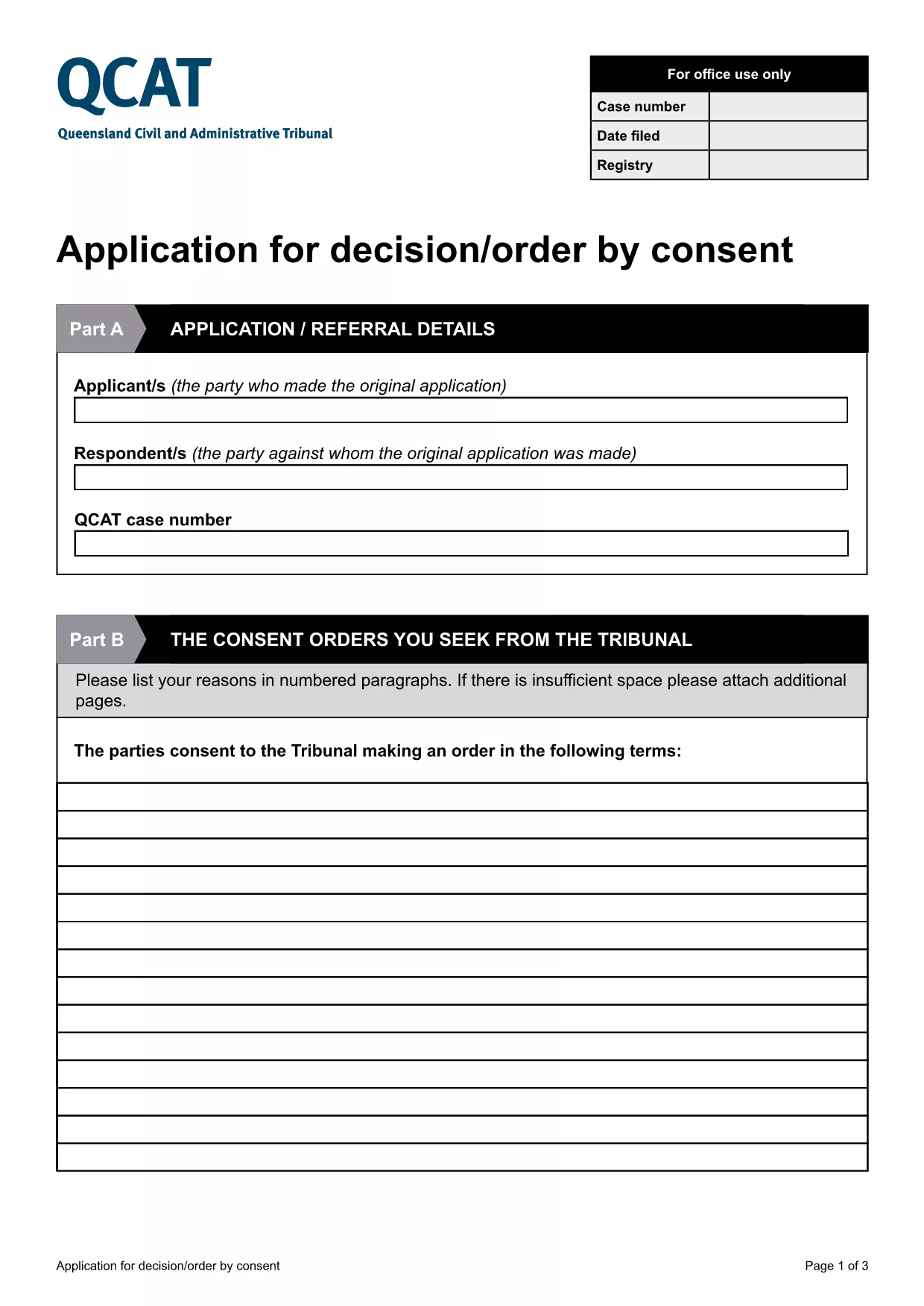
Application for Consent Orders (QCAT)

  1. ประเทศ ออสเตรเลีย
  2. ภาษา ภาษาอังกฤษ
  3. แผนก Civil and Administrative Tribunal
  4. กิจกรรม Legal Forms
Application for Consent Orders (QCAT)

What Is a Consent Order Application?

A consent order is a legally binding agreement approved by the Queensland Civil and Administrative Tribunal (QCAT). The Application for Consent Orders lets parties request the Tribunal to formalise their agreement without a hearing, saving time and costs.

Key Sections of the QCAT Consent Order Form

The fillable PDF is divided into clear sections:

  • Party Details – names, contact information, and representation.
  • Proposed Orders – a concise description of what each party is agreeing to.
  • Supporting Documents – attach any evidence or agreements that back up the application.
  • Signature & Declaration – both parties sign to confirm the information is true and that they understand the order will be enforceable.

How to Complete the Form Online

Instead of downloading and editing the PDF on your computer, simply click the "Fill out this form" button below. The Formize PDF Filler app will load directly in your browser, allowing you to type, check boxes, and add signatures instantly.

Common Mistakes to Avoid

  • Leaving any required field blank – QCAT will reject an incomplete application.
  • Providing vague or ambiguous order terms – be specific to avoid later disputes.
  • Submitting incorrect contact details – the Tribunal needs accurate information to communicate with you.
  • Failing to attach supporting documents – missing evidence can delay approval.

Where to Submit Your Application

When the form is fully completed and signed, you can submit it:

  • Online via the QCAT e‑filing portal (recommended).
  • By mail to the QCAT registry address listed on the form.
  • In person at any QCAT registry office.

For the fastest processing, choose the online option and keep a copy of the confirmation email.

คำถามที่พบบ่อย
  • Do I need a lawyer to fill out the consent order application?

    A lawyer is not required, but you may wish to seek legal advice if the terms are complex or if you are unsure about any clause.

  • Can I make changes after I have submitted the form?

    Yes, you can request to amend the application before the Tribunal makes a decision, but you must provide a clear reason and any new supporting documents.

  • Is the online Formize filler secure?

    All data entered in the Formize PDF Filler is encrypted in transit and never stored on our servers after you submit or download the completed form.

  • What happens if the Tribunal rejects my consent order?

    If the Tribunal finds the proposed orders unlawful or unclear, it will return the application with reasons. You can then revise the terms and resubmit.

  • Do I need to pay a fee to file a consent order with QCAT?

    Filing a consent order is generally free, but if you choose to lodge the application in person or by post, standard filing fees may apply. Check the QCAT website for the latest fee schedule.

  • Can I attach supporting documents electronically?

    Yes. The fillable PDF allows you to upload PDFs, images, or scanned copies of agreements, receipts, or any other evidence that supports your application.

  • How long does it take for QCAT to process a consent order?

    When all information is complete, QCAT usually issues a decision within 5‑10 business days. Complex cases may take longer.

ทำอย่างไร

วิธีกรอก consent order application ฟรีทางออนไลน์ใน 5 ขั้นตอนง่ายๆ:

  1. 1
    Click the Fill‑out Button
    Press the "Fill out this form" button on the page. The Formize PDF Filler will open in a new browser tab.
  2. 2
    Wait for the Filler to Load
    A short loading screen appears while the fillable PDF is prepared. This usually takes only a few seconds.
  3. 3
    Enter Your Information
    Type directly into each field, select check‑boxes, and upload any supporting documents required by the form.
  4. 4
    Review and Sign
    Use the built‑in e‑signature tool to sign the declaration. Double‑check that all required sections are completed.
  5. 5
    Submit or Download
    When you’re satisfied, click "Submit" to send the form to QCAT or "Download" to save a copy for your records.
สร้างแอป PDF Filler
เกี่ยวกับ

เทมเพลต consent order application

ด้วยชุดคุณสมบัติดั้งเดิมสำหรับการดูและกรอกเอกสาร PDF รวมกับประโยชน์ของเว็บแอปพลิเคชันและเค้าโครงที่ตอบสนอง คุณสามารถสร้าง consent order application ให้เสร็จภายในไม่กี่นาที

คุณสมบัติ

PDF ฟิลเลอร์

วิธีที่ง่ายที่สุดในการกรอกแบบฟอร์ม PDF ทางออนไลน์

  • กรอก consent order application อย่างรวดเร็ว
    กำลังมองหาวิธีเติม consent order application ทางออนไลน์อย่างรวดเร็วอยู่ใช่ไหม ด้วยตัวกรอกแบบฟอร์ม PDF ออนไลน์ฟรีของเรา คุณจะรู้วิธีแก้ไขและกรอกเอกสาร PDF นี้ในเวลาไม่ถึงนาที
  • โปรแกรมแก้ไข PDF ออนไลน์ที่ใช้งานง่าย
    เบื่อกับการพิมพ์ไฟล์ PDF เพื่อให้คุณสามารถแก้ไขได้ก่อนที่จะสแกนซ้ำและส่งกลับหรือไม่? แก้ไขเอกสาร PDF ออนไลน์ฟรี ใช้โปรแกรมแก้ไข PDF ออนไลน์ของเราเพื่อประหยัดเวลาและกระดาษ
  • เครื่องมือที่ยอดเยี่ยมสำหรับทุกแพลตฟอร์ม
    สงสัยวิธีเติม consent order application บน Mac หรืออาจใช้ตัวเติม PDF ฟรีได้อย่างไร เครื่องมือ PDF ออนไลน์ของเราทำงานได้บนทุกแพลตฟอร์ม
  • การจัดเก็บไฟล์ที่ปลอดภัย
    ไฟล์ "consent order application" ที่เสร็จสมบูรณ์จะถูกจัดเก็บไว้ในฐานข้อมูลที่ปลอดภัยซึ่งจัดการโดย Amazon Cloud hosting คุณสามารถลบไฟล์ของคุณออกจากระบบของเราได้ตลอดเวลา ไม่ว่าในกรณีใด ไฟล์เหล่านี้จะถูกลบโดยอัตโนมัติหลังจากผ่านไป 24 ชั่วโมง
  • สนทนากับ consent order application
    แชทกับ "consent order application" บน Chatize ที่เป็นผู้ช่วยอ่าน PDF ฟรี ถามคำถามและรับคำตอบจาก "consent order application" เพียงคลิกที่ปุ่ม แชทด้วยเอกสาร ด้านบน

ลบเซสชันการบรรจุ

ลบเซสชันการกรอกข้อมูลที่เลือกหรือไม่?ในกรณีนี้ความคืบหน้าในการกรอกแบบฟอร์มจะหายไป

ลบเซสชันการแก้ไข

ลบเซสชันการแก้ไขที่เลือกหรือไม่ ในกรณีนี้ ความคืบหน้าในการสร้างและแก้ไขแบบฟอร์มจะหายไป