hamburger-menu icon
เลือกภาษา

Form 43 – Request to Load Goods onto Ship (Fillable PDF)

  1. ประเทศ ออสเตรเลีย
  2. ภาษา ภาษาอังกฤษ
  3. กิจกรรม Import/Export
  4. แผนก Customs
Form 43 – Request to Load Goods onto Ship (Fillable PDF)

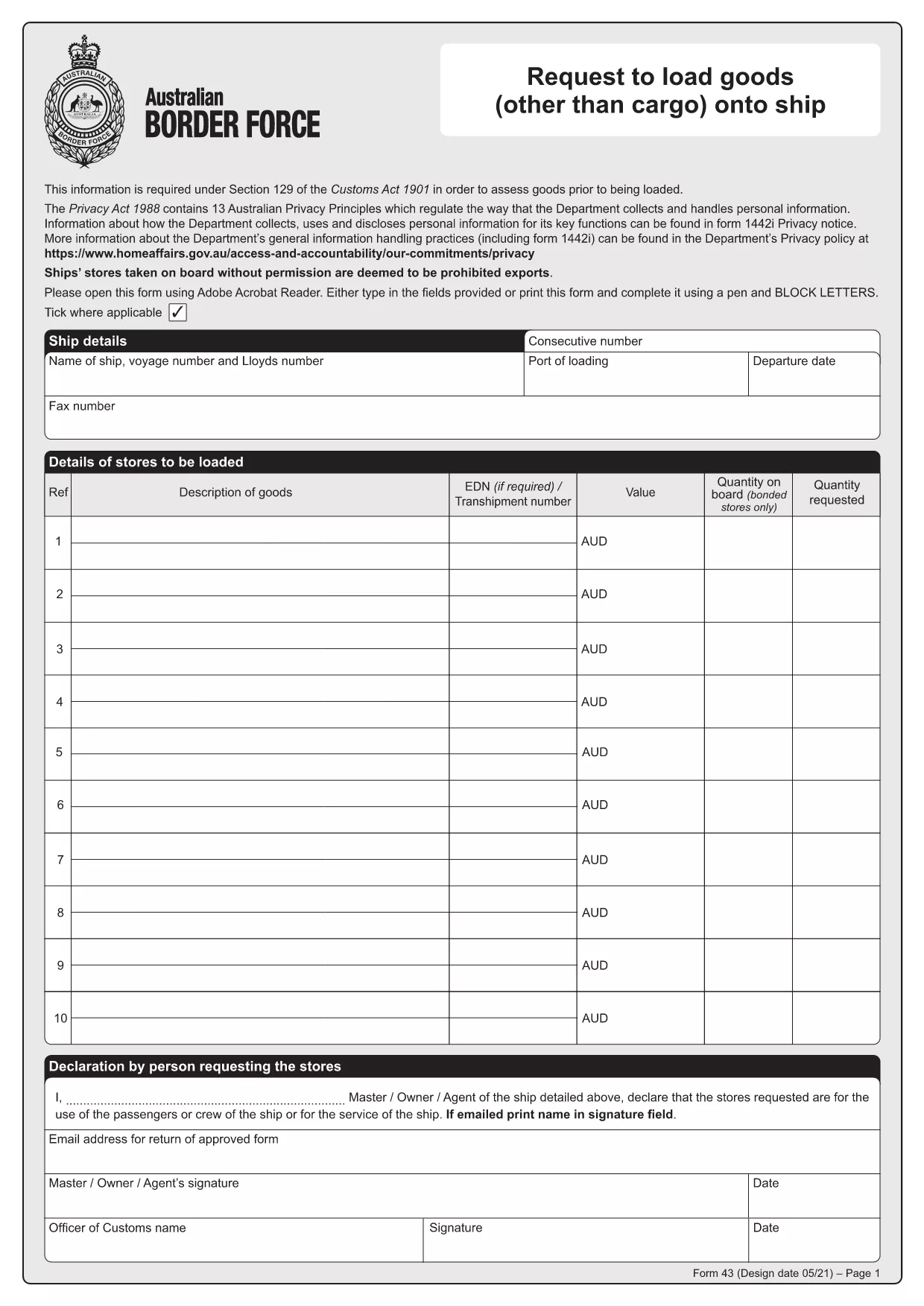
Form 43 is the Australian Border Force (ABF) customs form used when ship stores or other goods are taken on board a vessel without prior permission. It records essential details about the ship, the supplier, the goods, and the customs officer’s approval.

Whether you are a ship captain, a logistics officer, or a supplier, having a quick, fillable version of Form 43 saves time and reduces errors. With Formize’s online PDF filler, you can complete the form directly in your browser – no extra software required.

  • Instant download: Get the official PDF in seconds.
  • Online filling: Click “Fill out this form” and the Formize PDF Filler loads automatically.
  • Secure storage: Save a copy to your device or cloud storage after you submit.

Below you’ll find step‑by‑step instructions, common pitfalls, and answers to the most frequently asked questions about Form 43.

คำถามที่พบบ่อย
  • What is the purpose of Form 43?

    Form 43 records the request to load ship stores or other goods onto a vessel without prior customs permission, ensuring the goods are documented and approved.

  • Can I edit the PDF on my phone?

    Yes. The Formize PDF Filler works on all modern browsers, including mobile Safari and Chrome, so you can complete the form on a smartphone or tablet.

  • Do I need a PDF editor to fill Form 43?

    No. The online filler lets you fill, sign, and save the form without installing any PDF editor.

  • Is the downloaded PDF an official version?

    Absolutely. The file is the official Form 43 PDF provided by the Australian Border Force, unchanged and ready for submission.

  • What common mistakes should I avoid?

    Make sure all dates are in DD/MM/YYYY format, double‑check the ship’s registration number, and ensure the customs officer’s signature field is left blank for them to sign later.

  • How long is Form 43 valid after submission?

    The form remains valid for the duration of the voyage it covers. Keep a saved copy for your records in case customs request it later.

  • Can I submit Form 43 electronically to customs?

    Customs usually requires a printed copy with the officer’s signature, but you can email a PDF copy for preliminary review if your port authority allows it.

ทำอย่างไร

วิธีกรอก Form 43 PDF ฟรีทางออนไลน์ใน 4 ขั้นตอนง่ายๆ:

  1. 1
    Step 1 – Click the Fill Button
    On this page, click the bright “Fill out this form” button. The Formize PDF Filler app will open in a new tab.
  2. 2
    Step 2 – Wait for the Filler to Load
    The online filler loads the official Form 43 PDF automatically. This usually takes only a few seconds.
  3. 3
    Step 3 – Enter the Required Information
    Type directly into each field: ship details, supplier name, description of goods, dates, and customs officer approval. All fields are searchable and auto‑save.
  4. 4
    Step 4 – Save or Print Your Completed Form
    When you finish, click “Save” to download a filled PDF to your device, or click “Print” to produce a hard copy for submission to customs.
สร้างแอป PDF Filler
เกี่ยวกับ

เทมเพลต Form 43 PDF

ด้วยชุดคุณสมบัติดั้งเดิมสำหรับการดูและกรอกเอกสาร PDF รวมกับประโยชน์ของเว็บแอปพลิเคชันและเค้าโครงที่ตอบสนอง คุณสามารถสร้าง Form 43 PDF ให้เสร็จภายในไม่กี่นาที

คุณสมบัติ

PDF ฟิลเลอร์

วิธีที่ง่ายที่สุดในการกรอกแบบฟอร์ม PDF ทางออนไลน์

  • กรอก Form 43 PDF อย่างรวดเร็ว
    กำลังมองหาวิธีเติม Form 43 PDF ทางออนไลน์อย่างรวดเร็วอยู่ใช่ไหม ด้วยตัวกรอกแบบฟอร์ม PDF ออนไลน์ฟรีของเรา คุณจะรู้วิธีแก้ไขและกรอกเอกสาร PDF นี้ในเวลาไม่ถึงนาที
  • โปรแกรมแก้ไข PDF ออนไลน์ที่ใช้งานง่าย
    เบื่อกับการพิมพ์ไฟล์ PDF เพื่อให้คุณสามารถแก้ไขได้ก่อนที่จะสแกนซ้ำและส่งกลับหรือไม่? แก้ไขเอกสาร PDF ออนไลน์ฟรี ใช้โปรแกรมแก้ไข PDF ออนไลน์ของเราเพื่อประหยัดเวลาและกระดาษ
  • เครื่องมือที่ยอดเยี่ยมสำหรับทุกแพลตฟอร์ม
    สงสัยวิธีเติม Form 43 PDF บน Mac หรืออาจใช้ตัวเติม PDF ฟรีได้อย่างไร เครื่องมือ PDF ออนไลน์ของเราทำงานได้บนทุกแพลตฟอร์ม
  • การจัดเก็บไฟล์ที่ปลอดภัย
    ไฟล์ "Form 43 PDF" ที่เสร็จสมบูรณ์จะถูกจัดเก็บไว้ในฐานข้อมูลที่ปลอดภัยซึ่งจัดการโดย Amazon Cloud hosting คุณสามารถลบไฟล์ของคุณออกจากระบบของเราได้ตลอดเวลา ไม่ว่าในกรณีใด ไฟล์เหล่านี้จะถูกลบโดยอัตโนมัติหลังจากผ่านไป 24 ชั่วโมง
  • สนทนากับ Form 43 PDF
    แชทกับ "Form 43 PDF" บน Chatize ที่เป็นผู้ช่วยอ่าน PDF ฟรี ถามคำถามและรับคำตอบจาก "Form 43 PDF" เพียงคลิกที่ปุ่ม แชทด้วยเอกสาร ด้านบน

ลบเซสชันการบรรจุ

ลบเซสชันการกรอกข้อมูลที่เลือกหรือไม่?ในกรณีนี้ความคืบหน้าในการกรอกแบบฟอร์มจะหายไป

ลบเซสชันการแก้ไข

ลบเซสชันการแก้ไขที่เลือกหรือไม่ ในกรณีนี้ ความคืบหน้าในการสร้างและแก้ไขแบบฟอร์มจะหายไป