
hamburger-menu icon
เลือกภาษา

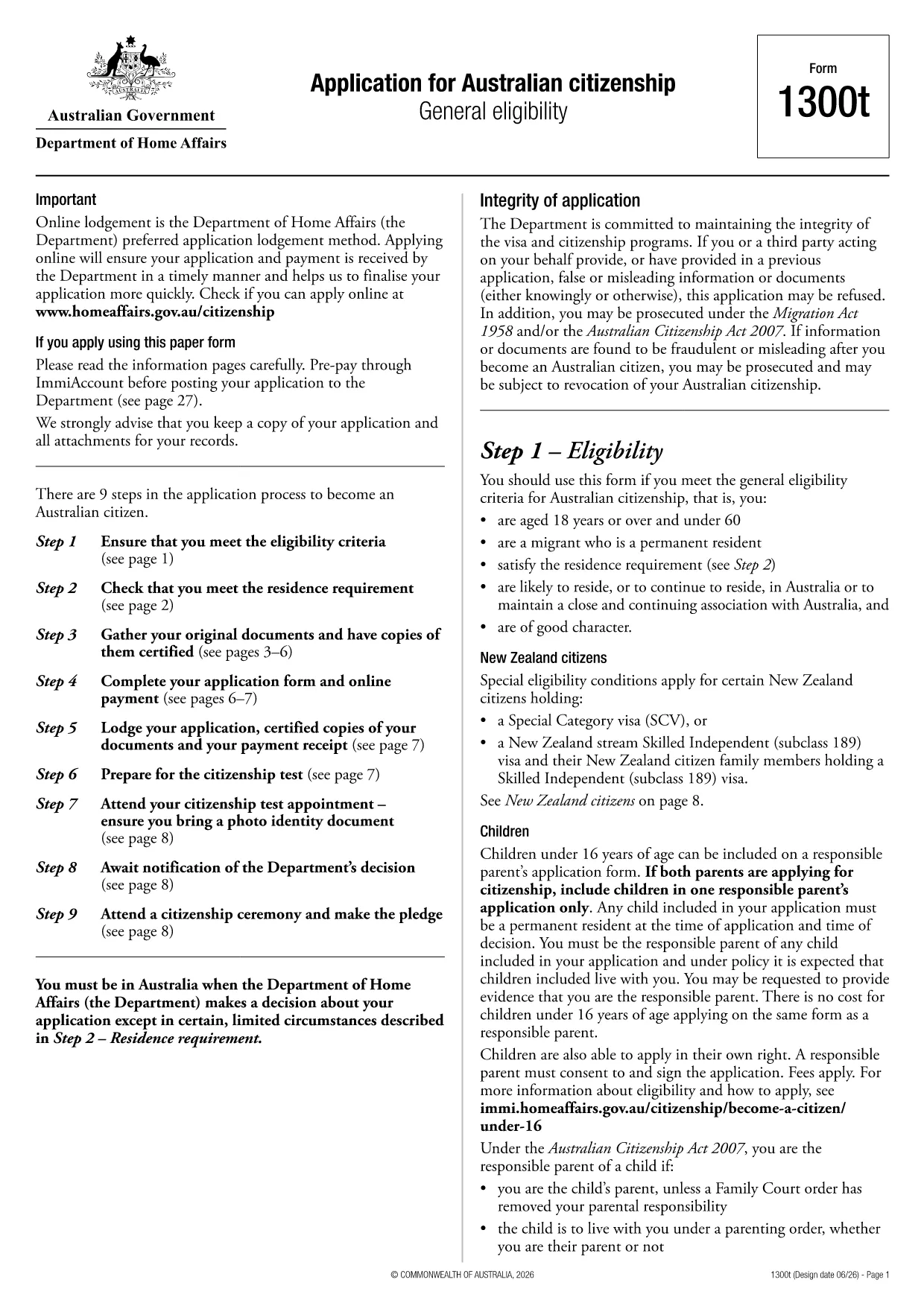
Looking for a quick way to complete the Australian Citizenship Application (Form 1300t)? You’ve come to the right place. This page lets you download the official PDF, fill it out instantly in your browser, and avoid the hassle of printing and scanning.

What Is Form 1300t?

Form 1300t is the Department of Home Affairs’ official application for Australian citizenship under the general eligibility pathway. The form collects personal details, residency history, character information, and supporting documents.

Eligibility Requirements

  • Be a permanent resident of Australia.
  • Have lived in Australia for at least 4 years, with at least 12 months as a permanent resident.
  • Pass the citizenship test and meet character requirements.

How to Fill the Form Online with Formize

Instead of downloading the PDF and editing it in a separate program, simply click the "Fill out this form" button on this page. The Formize PDF Filler app will load, letting you complete every field directly in your browser.

Common Mistakes to Avoid

  • Leaving any mandatory field blank – the filler will highlight missing information.
  • Providing outdated passport numbers or addresses.
  • Skipping the declaration section; it must be signed electronically.

Where to Submit Your Application

After completing the form, download the filled PDF and submit it through the Department of Home Affairs online portal or mail it to the address listed in the instructions.

Ready to start? Click the button below and let Formize do the heavy lifting.

คำถามที่พบบ่อย
  • Can I submit Form 1300t online?

    Yes. After filling the form with Formize, you can upload the completed PDF directly to the Department of Home Affairs online portal.

  • Is the Formize filler secure?

    Absolutely. All data is processed locally in your browser and is not stored on our servers.

  • Do I need a PDF editor to use this form?

    No. Formize provides a full fillable interface, so you never need a separate PDF editor.

  • What if I make a mistake after downloading?

    You can reopen the downloaded PDF in Formize, edit the fields again, and re‑download the corrected version.

  • How long does it take to process the citizenship application?

    Processing times vary, but most applications are reviewed within 12‑24 months after submission.

  • Do I need to attach supporting documents to the PDF?

    Supporting documents are submitted separately through the online portal or by mail, as instructed in the form's guidelines.

  • Is there a fee for submitting Form 1300t?

    Yes, a citizenship application fee applies. Check the Home Affairs website for the current amount.

  • Can I save my progress and finish later?

    Formize allows you to export a partially completed PDF, which you can reopen later to continue filling.

ทำอย่างไร

วิธีกรอก Australian citizenship form ฟรีทางออนไลน์ใน 6 ขั้นตอนง่ายๆ:

  1. 1
    Click the Fill‑out button
    Press the "Fill out this form" button on this page. The Formize PDF Filler will open in a new tab.
  2. 2
    Wait for the filler to load
    The application loads fully editable fields. This usually takes a few seconds.
  3. 3
    Enter your details
    Complete each section – personal information, residency history, character declarations, and signatures.
  4. 4
    Review and validate
    Use the built‑in validation to ensure no required fields are missing or incorrectly formatted.
  5. 5
    Download the completed PDF
    When you’re satisfied, click "Download" to save the filled form to your device.
  6. 6
    Submit to the Department
    Upload the saved PDF to the Home Affairs online portal or print and mail it as instructed.
สร้างแอป PDF Filler
เกี่ยวกับ

แบบฟอร์มการเป็นพลเมือง

Australian citizenship form เป็นหนึ่งในแบบฟอร์มการเป็นพลเมืองที่เป็นเอกสารที่ใช้ในการยื่นขอสัญชาติในประเทศหนึ่งๆ รูปแบบและข้อกำหนดที่แน่นอนสำหรับการเป็นพลเมืองจะแตกต่างกันไปในแต่ละประเทศ แต่โดยทั่วไปแล้ว กระบวนการเกี่ยวข้องกับการให้ข้อมูลส่วนบุคคลและหลักฐานการมีสิทธิ์ได้รับสัญชาติ

ในสหรัฐอเมริกา แบบฟอร์มขอสัญชาติที่พบมากที่สุดคือ N-400 Application for Naturalization แบบฟอร์มนี้ใช้โดยผู้อยู่อาศัยถาวรตามกฎหมาย (ผู้ถือกรีนการ์ด) เพื่อยื่นขอสัญชาติสหรัฐฯ แบบฟอร์มขอข้อมูลส่วนบุคคล เช่น ชื่อ วันเกิด และข้อมูลติดต่อ ตลอดจนข้อมูลเกี่ยวกับสถานะการเข้าเมืองของผู้สมัคร ประวัติอาชญากรรม และข้อกำหนดคุณสมบัติอื่นๆ

ประเทศอื่น ๆ อาจมีรูปแบบและข้อกำหนดต่าง ๆ สำหรับการเป็นพลเมือง แต่โดยทั่วไปแล้วกระบวนการพื้นฐานเกี่ยวข้องกับการให้ข้อมูลเกี่ยวกับภูมิหลังของผู้สมัครและการปฏิบัติตามเกณฑ์คุณสมบัติบางประการ ซึ่งอาจรวมถึงการผ่านการทดสอบการเป็นพลเมือง การแสดงความรู้เกี่ยวกับประวัติศาสตร์และการปกครองของประเทศ และการแสดงความสามารถในภาษาของประเทศนั้น

สิ่งสำคัญคือต้องสังเกตว่าขั้นตอนการขอสัญชาติอาจซับซ้อนและใช้เวลานาน ขอแนะนำให้บุคคลที่ต้องการขอสัญชาติปรึกษากับทนายความด้านการย้ายถิ่นฐานหรือผู้เชี่ยวชาญที่มีคุณสมบัติเหมาะสมเพื่อช่วยนำทางกระบวนการและตรวจสอบให้แน่ใจว่าได้ปฏิบัติตามแบบฟอร์มและข้อกำหนดที่จำเป็นทั้งหมด

คุณสมบัติ

PDF ฟิลเลอร์

วิธีที่ง่ายที่สุดในการกรอกแบบฟอร์ม PDF ทางออนไลน์

  • กรอก Australian citizenship form อย่างรวดเร็ว
    กำลังมองหาวิธีเติม Australian citizenship form ทางออนไลน์อย่างรวดเร็วอยู่ใช่ไหม ด้วยตัวกรอกแบบฟอร์ม PDF ออนไลน์ฟรีของเรา คุณจะรู้วิธีแก้ไขและกรอกเอกสาร PDF นี้ในเวลาไม่ถึงนาที
  • โปรแกรมแก้ไข PDF ออนไลน์ที่ใช้งานง่าย
    เบื่อกับการพิมพ์ไฟล์ PDF เพื่อให้คุณสามารถแก้ไขได้ก่อนที่จะสแกนซ้ำและส่งกลับหรือไม่? แก้ไขเอกสาร PDF ออนไลน์ฟรี ใช้โปรแกรมแก้ไข PDF ออนไลน์ของเราเพื่อประหยัดเวลาและกระดาษ
  • เครื่องมือที่ยอดเยี่ยมสำหรับทุกแพลตฟอร์ม
    สงสัยวิธีเติม Australian citizenship form บน Mac หรืออาจใช้ตัวเติม PDF ฟรีได้อย่างไร เครื่องมือ PDF ออนไลน์ของเราทำงานได้บนทุกแพลตฟอร์ม
  • การจัดเก็บไฟล์ที่ปลอดภัย
    ไฟล์ "Australian citizenship form" ที่เสร็จสมบูรณ์จะถูกจัดเก็บไว้ในฐานข้อมูลที่ปลอดภัยซึ่งจัดการโดย Amazon Cloud hosting คุณสามารถลบไฟล์ของคุณออกจากระบบของเราได้ตลอดเวลา ไม่ว่าในกรณีใด ไฟล์เหล่านี้จะถูกลบโดยอัตโนมัติหลังจากผ่านไป 24 ชั่วโมง
  • สนทนากับ Australian citizenship form
    แชทกับ "Australian citizenship form" บน Chatize ที่เป็นผู้ช่วยอ่าน PDF ฟรี ถามคำถามและรับคำตอบจาก "Australian citizenship form" เพียงคลิกที่ปุ่ม แชทด้วยเอกสาร ด้านบน

ลบเซสชันการบรรจุ

ลบเซสชันการกรอกข้อมูลที่เลือกหรือไม่?ในกรณีนี้ความคืบหน้าในการกรอกแบบฟอร์มจะหายไป

ลบเซสชันการแก้ไข

ลบเซสชันการแก้ไขที่เลือกหรือไม่ ในกรณีนี้ ความคืบหน้าในการสร้างและแก้ไขแบบฟอร์มจะหายไป