hamburger-menu icon
เลือกภาษา

APS Application Form – Fillable PDF

  1. ภาษา ภาษาอังกฤษ
  2. ประเทศ ออสเตรเลีย
  3. กิจกรรม Employment
  4. แผนก Infrastructure
APS Application Form – Fillable PDF

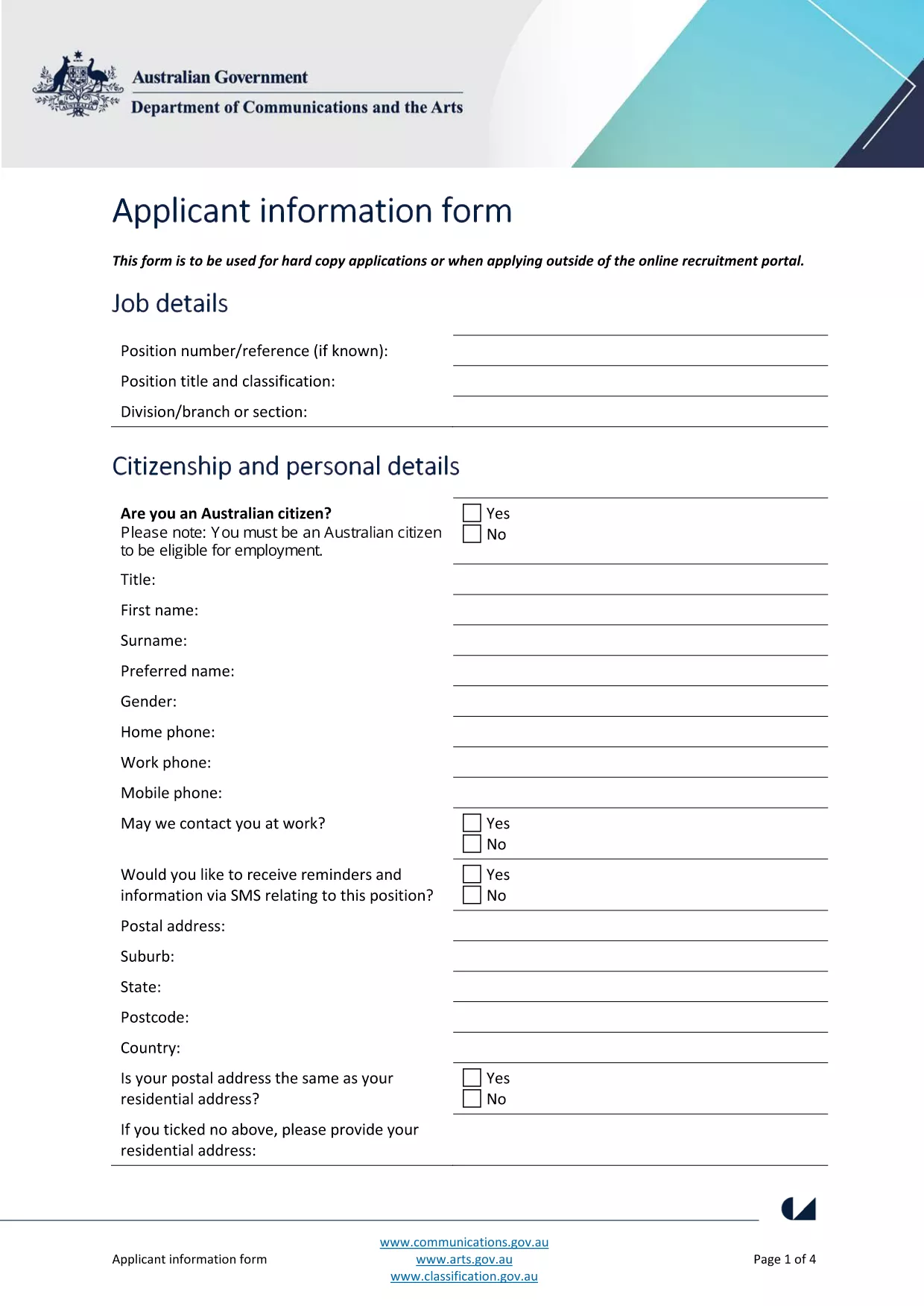
The Australian Public Service (APS) uses a standard Application Form for most entry‑level and graduate roles. This fillable PDF lets you enter your personal details, work experience, and qualifications directly on the page, then submit the completed file to the hiring agency.

What Is the APS Application Form?

The form is a government‑issued document that collects the information required to assess your suitability for APS positions. It includes sections for:

  • Personal details (name, contact, residency)
  • Education and qualifications
  • Employment history and achievements
  • Skills, competencies and security declarations

How to Complete the Form with Formize

Instead of downloading the PDF and opening a separate editor, simply click the "Fill out this form" button on this page. The Formize PDF Filler app loads in your browser, letting you:

  1. Enter data in each field with keyboard or drop‑down menus.
  2. Save a copy to your computer at any time.
  3. Validate required fields before submitting.

When you’re done, click **Submit** to download the completed PDF or email it directly to the recruiting agency.

Common Mistakes & Tips for a Perfect Submission

  • Missing required fields: The Formize filler highlights empty mandatory sections in red.
  • Incorrect date formats: Use DD/MM/YYYY as shown in the example fields.
  • Spelling errors: Run the built‑in spell‑check before saving.
  • Oversized files: Keep attachments (e.g., resumes) under 2 MB to avoid upload errors.

Where to Send Your Completed Application

After saving the filled PDF, follow the specific job posting instructions. Most APS vacancies request the file as an attachment in the online recruitment portal, or via a designated government email address.

Need more guidance? Review the official applicant information guide for detailed eligibility criteria.

คำถามที่พบบ่อย
  • Do I need Adobe Acrobat to fill the APS form?

    No. Formize’s online PDF filler works in any modern browser, so you don’t need Acrobat or any extra software.

  • Can I edit the form after I’ve saved it?

    Yes. Open the saved PDF again with Formize, make changes, and re‑save. All data remains editable.

  • Is my personal data safe when I use Formize?

    Formize processes the PDF locally in your browser; no data is stored on external servers, ensuring privacy and security.

  • What if the PDF won’t load?

    Refresh the page and click the "Fill out this form" button again. If the problem persists, clear your browser cache or try a different browser.

  • Can I print a hard‑copy after filling the form?

    Absolutely. After saving, open the PDF in any viewer and print it like any standard document.

  • Do I need to sign the PDF digitally?

    The APS form accepts a scanned signature or a typed name in the signature field. Upload a scanned signature if required.

ทำอย่างไร

วิธีกรอก APS application form ฟรีทางออนไลน์ใน 4 ขั้นตอนง่ายๆ:

  1. 1
    Open the Fillable Form
    Click the "Fill out this form" button on the page. The Formize PDF Filler loads instantly in your browser.
  2. 2
    Enter Your Information
    Type directly into each highlighted field. Use drop‑down menus for dates, states, and yes/no answers.
  3. 3
    Validate and Save
    The filler checks required fields automatically. When all sections are green, click "Save" to download the completed PDF.
  4. 4
    Submit Your Application
    Attach the saved PDF to the APS vacancy posting or email it to the address listed in the job advert.
สร้างแอป PDF Filler
เกี่ยวกับ

เทมเพลต APS application form

ด้วยชุดคุณสมบัติดั้งเดิมสำหรับการดูและกรอกเอกสาร PDF รวมกับประโยชน์ของเว็บแอปพลิเคชันและเค้าโครงที่ตอบสนอง คุณสามารถสร้าง APS application form ให้เสร็จภายในไม่กี่นาที

คุณสมบัติ

PDF ฟิลเลอร์

วิธีที่ง่ายที่สุดในการกรอกแบบฟอร์ม PDF ทางออนไลน์

  • กรอก APS application form อย่างรวดเร็ว
    กำลังมองหาวิธีเติม APS application form ทางออนไลน์อย่างรวดเร็วอยู่ใช่ไหม ด้วยตัวกรอกแบบฟอร์ม PDF ออนไลน์ฟรีของเรา คุณจะรู้วิธีแก้ไขและกรอกเอกสาร PDF นี้ในเวลาไม่ถึงนาที
  • โปรแกรมแก้ไข PDF ออนไลน์ที่ใช้งานง่าย
    เบื่อกับการพิมพ์ไฟล์ PDF เพื่อให้คุณสามารถแก้ไขได้ก่อนที่จะสแกนซ้ำและส่งกลับหรือไม่? แก้ไขเอกสาร PDF ออนไลน์ฟรี ใช้โปรแกรมแก้ไข PDF ออนไลน์ของเราเพื่อประหยัดเวลาและกระดาษ
  • เครื่องมือที่ยอดเยี่ยมสำหรับทุกแพลตฟอร์ม
    สงสัยวิธีเติม APS application form บน Mac หรืออาจใช้ตัวเติม PDF ฟรีได้อย่างไร เครื่องมือ PDF ออนไลน์ของเราทำงานได้บนทุกแพลตฟอร์ม
  • การจัดเก็บไฟล์ที่ปลอดภัย
    ไฟล์ "APS application form" ที่เสร็จสมบูรณ์จะถูกจัดเก็บไว้ในฐานข้อมูลที่ปลอดภัยซึ่งจัดการโดย Amazon Cloud hosting คุณสามารถลบไฟล์ของคุณออกจากระบบของเราได้ตลอดเวลา ไม่ว่าในกรณีใด ไฟล์เหล่านี้จะถูกลบโดยอัตโนมัติหลังจากผ่านไป 24 ชั่วโมง
  • สนทนากับ APS application form
    แชทกับ "APS application form" บน Chatize ที่เป็นผู้ช่วยอ่าน PDF ฟรี ถามคำถามและรับคำตอบจาก "APS application form" เพียงคลิกที่ปุ่ม แชทด้วยเอกสาร ด้านบน

ลบเซสชันการบรรจุ

ลบเซสชันการกรอกข้อมูลที่เลือกหรือไม่?ในกรณีนี้ความคืบหน้าในการกรอกแบบฟอร์มจะหายไป

ลบเซสชันการแก้ไข

ลบเซสชันการแก้ไขที่เลือกหรือไม่ ในกรณีนี้ ความคืบหน้าในการสร้างและแก้ไขแบบฟอร์มจะหายไป