
hamburger-menu icon
เลือกภาษา

Form 1149 – Application for Sponsorship of a Family Visitor (Visitor Visa 600)

  1. ประเทศ ออสเตรเลีย
  2. ภาษา ภาษาอังกฤษ
  3. กิจกรรม เข้าร่วมหรือพาครอบครัว
Form 1149 – Application for Sponsorship of a Family Visitor (Visitor Visa 600)

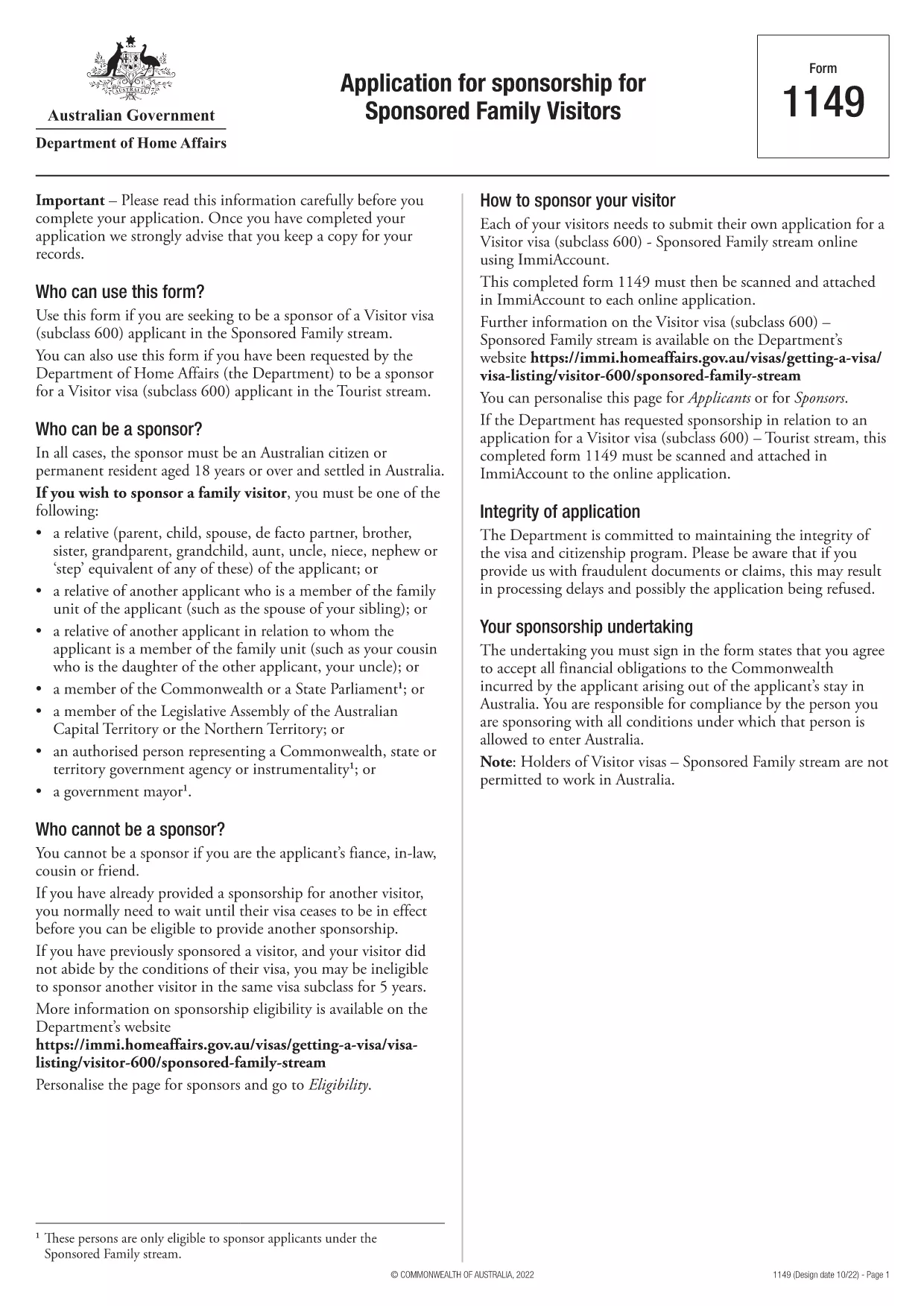
Form 1149 is the official Application for Sponsorship for Sponsored Family Visitors used by Australian citizens or permanent residents who wish to sponsor a relative, a member of the Commonwealth, or a state parliamentarian for a Visitor visa (subclass 600). The form outlines the sponsor’s obligations, eligibility criteria, and any security bond requirements.

Traditionally the form is a static PDF that must be printed, handwritten, and mailed. With Formize you can complete the same form entirely online – just click Fill out this form and let our secure PDF filler do the work.

What Is Form 1149?

Form 1149 collects detailed information about the sponsor (name, address, citizenship status), the invited visitor (relationship, passport details, travel dates), and the financial support the sponsor will provide. It also asks about any previous sponsorships and the sponsor’s ability to meet the visa conditions.

Who Needs to Complete This Form?

  • Australian citizens or permanent residents sponsoring a family member for a Visitor visa (subclass 600).
  • Members of the Commonwealth or state parliament who are inviting a guest for official duties.
  • Anyone required to provide a security bond for the visitor’s stay.

How to Fill Form 1149 Online with Formize

Follow these simple steps to complete the form without printing:

  1. Click the Fill out this form button on this page.
  2. Wait a few seconds while the Formize PDF Filler loads the fillable version of Form 1149.
  3. Enter all required details in the highlighted fields. The filler validates dates, passport numbers, and numeric entries in real‑time.
  4. Review the summary page, correct any highlighted errors, and click Submit to download the completed PDF.
  5. Print the signed PDF (if a physical signature is required) and attach it to your visa application package.

Common Mistakes to Avoid

  • Incorrect passport numbers: Double‑check each digit; a single typo can delay processing.
  • Missing sponsor’s financial details: Provide clear evidence of income or savings to satisfy the bond requirement.
  • Leaving optional fields blank: If a field asks for “previous sponsorships”, answer “None” rather than leaving it empty.
  • Using an outdated version: Always use the latest PDF – the link on this page points to the current 2024 version.

Where to Submit the Completed Form

After filling and printing the form, include it with the Visitor visa (subclass 600) application packet and submit to the Department of Home Affairs either online via ImmiAccount or by post to the address indicated in the visa instructions.

Using Formize’s online filler saves time, reduces errors, and ensures you are working with the most up‑to‑date version of Form 1149.

คำถามที่พบบ่อย
  • Who can act as a sponsor on Form 1149?

    Only Australian citizens or permanent residents may sponsor a family visitor for a subclass 600 visa. Commonwealth or state parliament members may also sponsor for official visits.

  • Do I need to provide a security bond?

    A bond is required if the sponsor cannot demonstrate sufficient financial capacity. The amount is determined by the Department of Home Affairs based on the visitor’s length of stay and circumstances.

  • Can I submit the form electronically?

    Yes. Fill the form online with Formize, download the completed PDF, and attach it to your ImmiAccount submission. Some cases may still require a printed, signed copy.

  • How long is Form 1149 valid?

    The form does not have an expiry date, but you should use the latest version available on the Department of Home Affairs website.

  • What common errors cause delays?

    Incorrect passport numbers, missing financial information, and leaving optional fields blank are the most frequent reasons for processing delays.

  • Is there a fee to use Formize’s PDF filler?

    Formize offers a free basic filler for most government forms, including Form 1149. Premium features are optional and not required for this form.

  • Do I need to sign the PDF digitally?

    A digital signature is accepted for most online submissions. If you submit a paper application, print the PDF and sign it with a pen.

ทำอย่างไร

วิธีกรอก Form 1149 ฟรีทางออนไลน์ใน 5 ขั้นตอนง่ายๆ:

  1. 1
    Open the Fillable Form
    Click the "Fill out this form" button on this page. The Formize PDF Filler will open in a new tab.
  2. 2
    Enter Your Details
    Fill each highlighted field with accurate information. The tool validates entries in real time.
  3. 3
    Review and Correct Errors
    Check the summary page for any highlighted errors, correct them, and confirm the data.
  4. 4
    Download the Completed PDF
    Click "Submit" to download the fully completed PDF. Print and sign if a physical signature is required.
  5. 5
    Attach to Your Visa Application
    Include the signed PDF with your Visitor visa (subclass 600) application and submit to the Department of Home Affairs.
สร้างแอป PDF Filler
เกี่ยวกับ

เข้าร่วมหรือนำแบบฟอร์มครอบครัว

Form 1149 เป็นหนึ่งในแบบฟอร์มใบสมัครที่บุคคลใช้เพื่อสนับสนุนและอำนวยความสะดวกในการอพยพหรือการรวมตัวของสมาชิกในครอบครัวในประเทศอื่น แบบฟอร์มเหล่านี้มักจะเกี่ยวข้องกับโครงการหรือนโยบายการย้ายถิ่นฐานตามครอบครัวที่อนุญาตให้บุคคลที่อาศัยอยู่ในประเทศใดประเทศหนึ่งแล้วสามารถพาสมาชิกในครอบครัวโดยตรงมาเข้าร่วมได้ แบบฟอร์มเฉพาะอาจแตกต่างกันไปขึ้นอยู่กับประเทศและระบบตรวจคนเข้าเมือง แต่นี่คือตัวอย่างทั่วไปบางส่วน:

แบบฟอร์มใบสมัครเป็นผู้อุปถัมภ์ครอบครัว: นี่เป็นแบบฟอร์มหลักที่ใช้โดยบุคคลที่ต้องการอุปถัมภ์สมาชิกในครอบครัวในการย้ายถิ่นฐาน โดยจะรวบรวมข้อมูลเกี่ยวกับผู้สนับสนุน (บุคคลที่อาศัยอยู่ในประเทศนี้แล้ว) และสมาชิกในครอบครัวที่ได้รับการอุปถัมภ์ รวมถึงความสัมพันธ์ รายละเอียดส่วนบุคคล และเอกสารประกอบ

แบบฟอร์มการสมัครวีซ่าผู้อยู่ในอุปการะ: ในระบบตรวจคนเข้าเมืองบางระบบ บุคคลที่อาศัยอยู่ในประเทศหนึ่งแล้วอาจยื่นขอวีซ่าผู้อยู่ในอุปการะเพื่อพาสมาชิกในครอบครัวใกล้ชิด เช่น คู่สมรส บุตร หรือพ่อแม่ แบบฟอร์มคำร้องขอวีซ่าขึ้นอยู่กับการรวบรวมข้อมูลเกี่ยวกับผู้สนับสนุน สมาชิกในครอบครัวที่อยู่ในความอุปการะ ความสัมพันธ์ของพวกเขา และเอกสารประกอบ

หนังสือรับรองการสนับสนุน: ในบางประเทศ ผู้สนับสนุนอาจต้องส่งหนังสือรับรองการสนับสนุน ซึ่งเป็นเอกสารทางกฎหมายที่ยืนยันความรับผิดชอบทางการเงินของพวกเขาสำหรับสมาชิกในครอบครัวที่ได้รับการสนับสนุน เอกสารนี้มักประกอบด้วยรายละเอียดเกี่ยวกับรายได้ ทรัพย์สิน และความสามารถในการเลี้ยงดูสมาชิกในครอบครัวทางการเงิน

แบบฟอร์มการตรวจสุขภาพ: สมาชิกในครอบครัวที่ได้รับการสนับสนุนสำหรับการย้ายถิ่นฐานอาจต้องเข้ารับการตรวจสุขภาพเพื่อให้แน่ใจว่าพวกเขามีคุณสมบัติตรงตามข้อกำหนดด้านสุขภาพของประเทศปลายทาง แบบฟอร์มการตรวจสุขภาพจะรวบรวมข้อมูลด้านสุขภาพที่จำเป็นและผลการทดสอบ

แบบฟอร์มเอกสารความสัมพันธ์: เพื่อพิสูจน์ความสัมพันธ์ทางครอบครัวระหว่างผู้สนับสนุนและสมาชิกในครอบครัวที่ได้รับการสนับสนุน อาจจำเป็นต้องใช้เอกสารต่างๆ สิ่งเหล่านี้อาจรวมถึงสูติบัตร ทะเบียนสมรส เอกสารการรับบุตรบุญธรรม หรือหลักฐานสนับสนุนอื่นๆ เกี่ยวกับความสัมพันธ์ในครอบครัว

สิ่งสำคัญที่ควรทราบก็คือแบบฟอร์มและข้อกำหนดเฉพาะอาจแตกต่างกันไปอย่างมาก ขึ้นอยู่กับประเทศ ตลอดจนกฎหมายและนโยบายคนเข้าเมือง ขอแนะนำให้ปรึกษาเว็บไซต์อย่างเป็นทางการของหน่วยงานตรวจคนเข้าเมืองหรือขอคำแนะนำทางกฎหมายเพื่อรับข้อมูลที่ถูกต้องและทันสมัยเกี่ยวกับแบบฟอร์มและกระบวนการที่จำเป็นสำหรับการสนับสนุนหรือพาสมาชิกในครอบครัวไปยังประเทศใดประเทศหนึ่ง

คุณสมบัติ

PDF ฟิลเลอร์

วิธีที่ง่ายที่สุดในการกรอกแบบฟอร์ม PDF ทางออนไลน์

  • กรอก Form 1149 อย่างรวดเร็ว
    กำลังมองหาวิธีเติม Form 1149 ทางออนไลน์อย่างรวดเร็วอยู่ใช่ไหม ด้วยตัวกรอกแบบฟอร์ม PDF ออนไลน์ฟรีของเรา คุณจะรู้วิธีแก้ไขและกรอกเอกสาร PDF นี้ในเวลาไม่ถึงนาที
  • โปรแกรมแก้ไข PDF ออนไลน์ที่ใช้งานง่าย
    เบื่อกับการพิมพ์ไฟล์ PDF เพื่อให้คุณสามารถแก้ไขได้ก่อนที่จะสแกนซ้ำและส่งกลับหรือไม่? แก้ไขเอกสาร PDF ออนไลน์ฟรี ใช้โปรแกรมแก้ไข PDF ออนไลน์ของเราเพื่อประหยัดเวลาและกระดาษ
  • เครื่องมือที่ยอดเยี่ยมสำหรับทุกแพลตฟอร์ม
    สงสัยวิธีเติม Form 1149 บน Mac หรืออาจใช้ตัวเติม PDF ฟรีได้อย่างไร เครื่องมือ PDF ออนไลน์ของเราทำงานได้บนทุกแพลตฟอร์ม
  • การจัดเก็บไฟล์ที่ปลอดภัย
    ไฟล์ "Form 1149" ที่เสร็จสมบูรณ์จะถูกจัดเก็บไว้ในฐานข้อมูลที่ปลอดภัยซึ่งจัดการโดย Amazon Cloud hosting คุณสามารถลบไฟล์ของคุณออกจากระบบของเราได้ตลอดเวลา ไม่ว่าในกรณีใด ไฟล์เหล่านี้จะถูกลบโดยอัตโนมัติหลังจากผ่านไป 24 ชั่วโมง
  • สนทนากับ Form 1149
    แชทกับ "Form 1149" บน Chatize ที่เป็นผู้ช่วยอ่าน PDF ฟรี ถามคำถามและรับคำตอบจาก "Form 1149" เพียงคลิกที่ปุ่ม แชทด้วยเอกสาร ด้านบน

ลบเซสชันการบรรจุ

ลบเซสชันการกรอกข้อมูลที่เลือกหรือไม่?ในกรณีนี้ความคืบหน้าในการกรอกแบบฟอร์มจะหายไป

ลบเซสชันการแก้ไข

ลบเซสชันการแก้ไขที่เลือกหรือไม่ ในกรณีนี้ ความคืบหน้าในการสร้างและแก้ไขแบบฟอร์มจะหายไป