hamburger-menu icon
เลือกภาษา

Form 1194 – Certification of Immigration Status (Fillable PDF)

  1. ภาษา ภาษาอังกฤษ
  2. ประเทศ ออสเตรเลีย
  3. กิจกรรม ออกจากออสเตรเลีย
Form 1194 – Certification of Immigration Status (Fillable PDF)

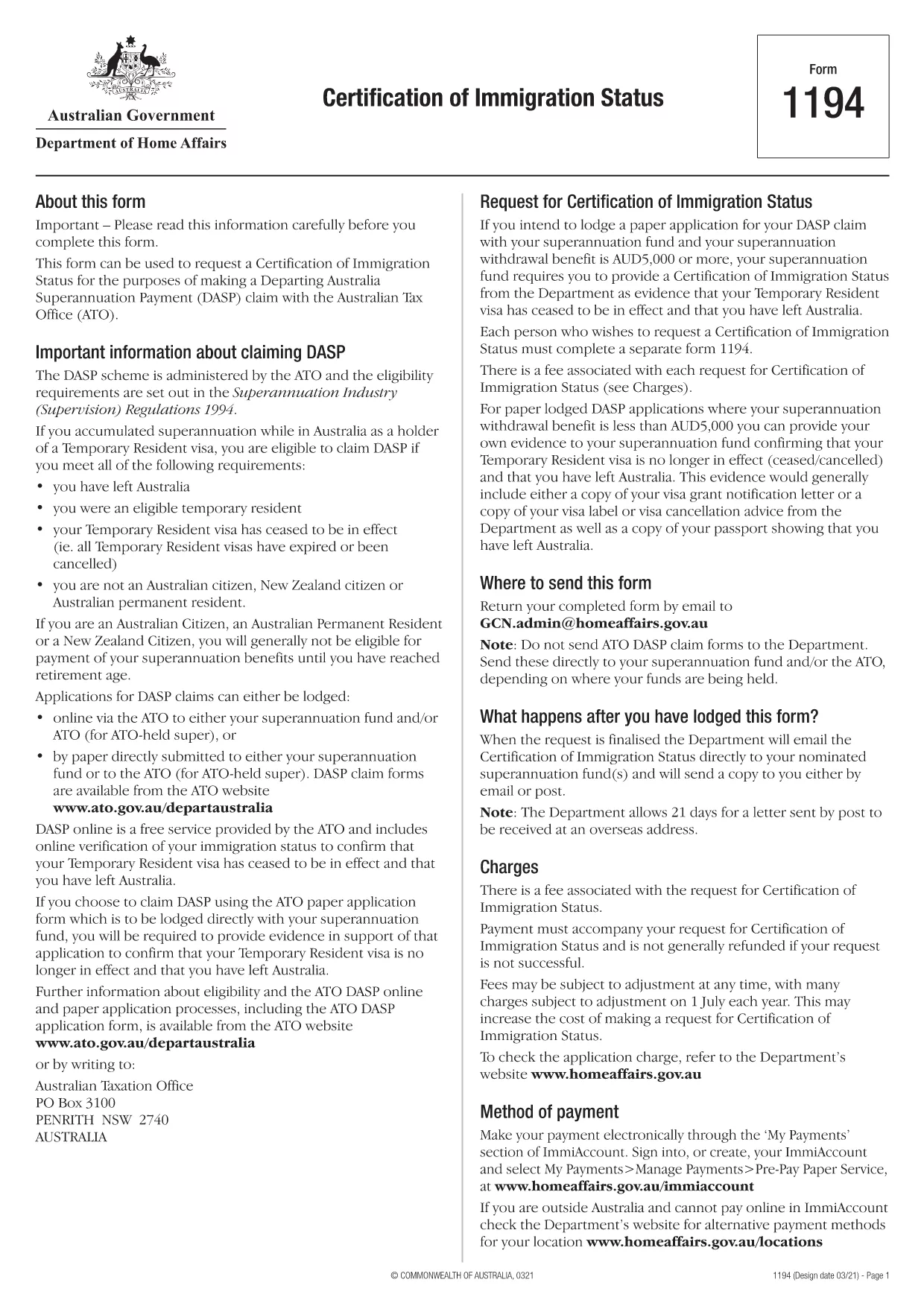
Form 1194 is the official Australian Certification of Immigration Status used when you need to prove your visa status for a Departing Australia Superannuation Payment (DASP) claim, bank verification, or any other official purpose. The form is required for former temporary residents who have left Australia and no longer hold citizenship or permanent residency.

What is Form 1194 and when do you need it?

The Department of Home Affairs issues Form 1194 to certify whether you are a former temporary resident, a New Zealand citizen, or an Australian permanent resident. You will need this certification if you are:

  • Applying for a DASP claim with your superannuation fund.
  • Providing proof of immigration status to a financial institution.
  • Requesting the cancellation of a Temporary Resident visa.

Key sections of Form 1194 explained

Form 1194 contains four main parts:

  1. Applicant details – name, date of birth, passport number, and contact information.
  2. Visa information – visa subclass, grant date, and expiry date.
  3. Certification request – choose whether you need a certification of status or a visa cancellation.
  4. Signature & declaration – sign and date the form to confirm the information is correct.

How to complete Form 1194 online with Formize

Instead of downloading, printing, and scanning, you can fill the form directly in your browser using Formize’s secure PDF filler. Follow these simple steps:

Common mistakes to avoid

  • Leaving the passport number blank – the form will be rejected.
  • Using an outdated visa subclass number.
  • Forgetting to sign the declaration page.
  • Submitting the form to the wrong department (it must go to the Department of Home Affairs).

Where to submit the completed form

Once you have filled and signed Form 1194, you can submit it by:

  • Mailing it to the address printed on the form.
  • Uploading a scanned copy via the Department of Home Affairs online portal.

Make sure to keep a copy of the signed PDF for your records.

คำถามที่พบบ่อย
  • Do I need to print Form 1194 after filling it online?

    No. The Formize filler creates a fully signed PDF that you can download and submit electronically or print if you prefer.

  • Can I use Form 1194 if I am still a permanent resident?

    Form 1194 is intended for former temporary residents or New Zealand citizens. Permanent residents should use the appropriate Australian citizenship or residency certification form.

  • How long does it take for the Department to process the certification?

    Processing times vary, but most certifications are issued within 10‑15 business days after receipt of the complete form.

  • Is there a fee to submit Form 1194?

    There is no fee for the certification itself, but some superannuation funds may charge a small administrative fee for DASP processing.

  • What should I do if I make a mistake after submitting?

    Contact the Department of Home Affairs immediately. You may need to submit a corrected form with a brief explanation of the error.

  • Can I submit Form 1194 via email?

    Yes, you can email the signed PDF to the address provided on the form, but ensure the file is not password‑protected.

  • Is the Formize filler secure?

    Formize uses end‑to‑end encryption and complies with Australian privacy standards, keeping your personal data safe.

ทำอย่างไร

วิธีกรอก Form 1194 ฟรีทางออนไลน์ใน 4 ขั้นตอนง่ายๆ:

  1. 1
    Open the fillable form
    Click the **Fill out this form** button on this page. The Formize PDF Filler app will load the PDF directly in your browser.
  2. 2
    Enter your information
    Type your details into each field – the form automatically saves your entries as you go.
  3. 3
    Add your signature
    Use the built‑in e‑signature tool to sign the declaration section. No printer needed.
  4. 4
    Download or share
    When you’re finished, click **Download PDF** to save a copy or **Share Link** to email it directly to the Department of Home Affairs.
สร้างแอป PDF Filler
เกี่ยวกับ

เทมเพลต Form 1194

ด้วยชุดคุณสมบัติดั้งเดิมสำหรับการดูและกรอกเอกสาร PDF รวมกับประโยชน์ของเว็บแอปพลิเคชันและเค้าโครงที่ตอบสนอง คุณสามารถสร้าง Form 1194 ให้เสร็จภายในไม่กี่นาที

คุณสมบัติ

PDF ฟิลเลอร์

วิธีที่ง่ายที่สุดในการกรอกแบบฟอร์ม PDF ทางออนไลน์

  • กรอก Form 1194 อย่างรวดเร็ว
    กำลังมองหาวิธีเติม Form 1194 ทางออนไลน์อย่างรวดเร็วอยู่ใช่ไหม ด้วยตัวกรอกแบบฟอร์ม PDF ออนไลน์ฟรีของเรา คุณจะรู้วิธีแก้ไขและกรอกเอกสาร PDF นี้ในเวลาไม่ถึงนาที
  • โปรแกรมแก้ไข PDF ออนไลน์ที่ใช้งานง่าย
    เบื่อกับการพิมพ์ไฟล์ PDF เพื่อให้คุณสามารถแก้ไขได้ก่อนที่จะสแกนซ้ำและส่งกลับหรือไม่? แก้ไขเอกสาร PDF ออนไลน์ฟรี ใช้โปรแกรมแก้ไข PDF ออนไลน์ของเราเพื่อประหยัดเวลาและกระดาษ
  • เครื่องมือที่ยอดเยี่ยมสำหรับทุกแพลตฟอร์ม
    สงสัยวิธีเติม Form 1194 บน Mac หรืออาจใช้ตัวเติม PDF ฟรีได้อย่างไร เครื่องมือ PDF ออนไลน์ของเราทำงานได้บนทุกแพลตฟอร์ม
  • การจัดเก็บไฟล์ที่ปลอดภัย
    ไฟล์ "Form 1194" ที่เสร็จสมบูรณ์จะถูกจัดเก็บไว้ในฐานข้อมูลที่ปลอดภัยซึ่งจัดการโดย Amazon Cloud hosting คุณสามารถลบไฟล์ของคุณออกจากระบบของเราได้ตลอดเวลา ไม่ว่าในกรณีใด ไฟล์เหล่านี้จะถูกลบโดยอัตโนมัติหลังจากผ่านไป 24 ชั่วโมง
  • สนทนากับ Form 1194
    แชทกับ "Form 1194" บน Chatize ที่เป็นผู้ช่วยอ่าน PDF ฟรี ถามคำถามและรับคำตอบจาก "Form 1194" เพียงคลิกที่ปุ่ม แชทด้วยเอกสาร ด้านบน

ลบเซสชันการบรรจุ

ลบเซสชันการกรอกข้อมูลที่เลือกหรือไม่?ในกรณีนี้ความคืบหน้าในการกรอกแบบฟอร์มจะหายไป

ลบเซสชันการแก้ไข

ลบเซสชันการแก้ไขที่เลือกหรือไม่ ในกรณีนี้ ความคืบหน้าในการสร้างและแก้ไขแบบฟอร์มจะหายไป