
hamburger-menu icon
เลือกภาษา

Form 157N – Student Guardian Arrangement (Fillable PDF)

  1. ภาษา ภาษาอังกฤษ
  2. ประเทศ ออสเตรเลีย
  3. กิจกรรม ศึกษา
Form 157N – Student Guardian Arrangement (Fillable PDF)

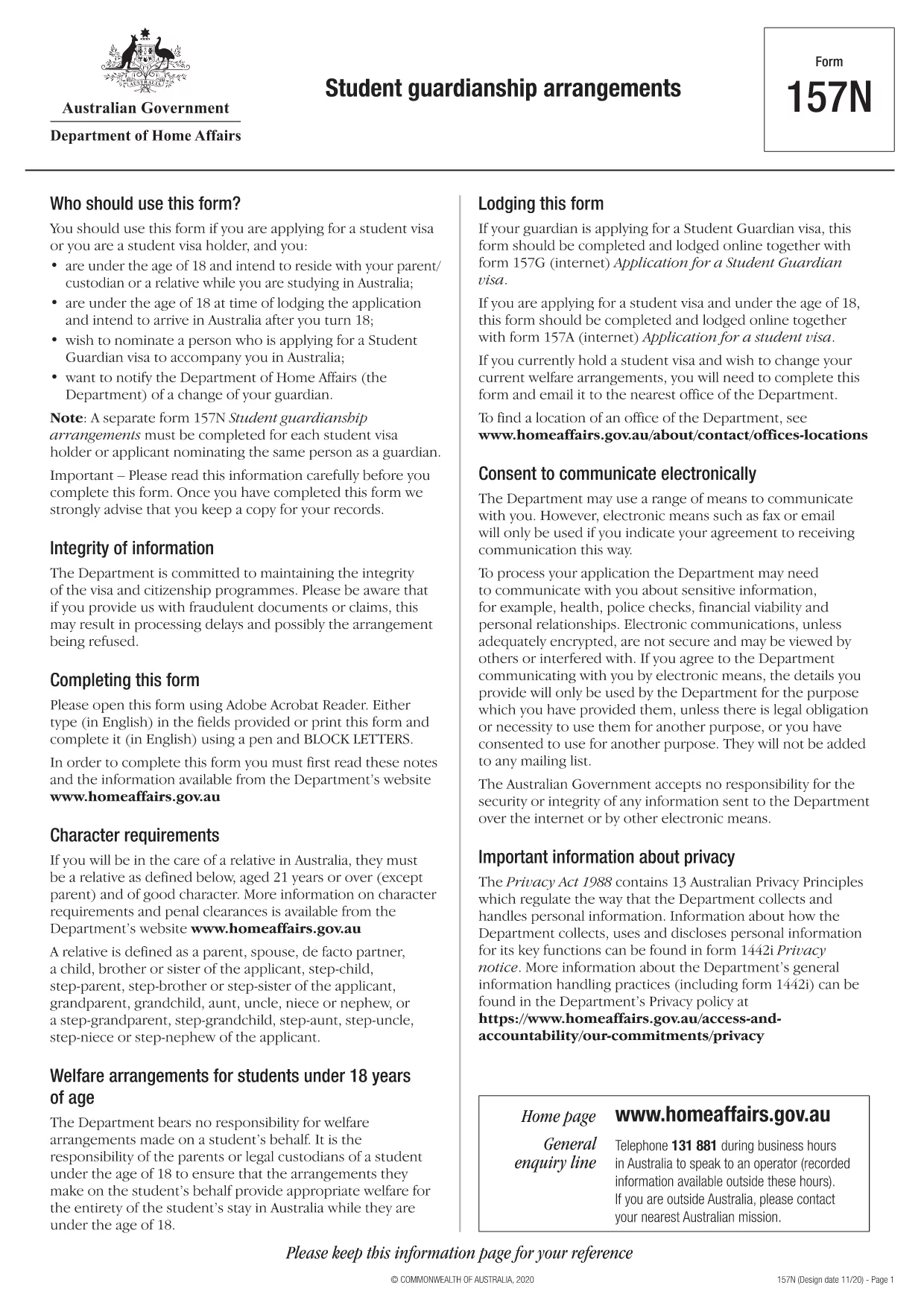
Form 157N is the official Australian document used to nominate a guardian for a student visa holder. Whether you are a parent, legal guardian, or an approved welfare provider, this form must be completed for every student who requires a guardian while studying in Australia.

What is Form 157N?

The Student Guardianship Arrangements – Form 157N captures details about the student, the proposed guardian, and the nature of the guardianship agreement. It is required by the Department of Home Affairs for visa subclasses 500, 590, and related student visas.

When and Who Must Complete Form 157N

  • Any new student visa applicant who needs a guardian in Australia.
  • Current visa holders who change their guardian or wish to add a second guardian.
  • Educational institutions acting on behalf of a student to nominate a welfare provider.

How to Fill Out Form 157N with Formize

Instead of downloading the PDF and editing it manually, use our Formize PDF Filler – a fast, secure, and fully fillable online solution.

Common Mistakes to Avoid

  • Leaving any mandatory field blank (marked with an asterisk *).
  • Submitting an outdated passport number for the guardian.
  • Providing an Australian address that does not belong to the guardian.
  • Failing to sign and date the form in the correct places.

Where to Submit the Completed Form

After you have filled the form online, download the completed PDF and attach it to your visa application through ImmiAccount, or email it to your education provider if they handle the submission.

Need help? Review our step‑by‑step guide below or check the FAQs for quick answers.

คำถามที่พบบ่อย
  • Do I need to fill out a separate Form 157N for each student?

    Yes. Every student visa holder who nominates a guardian must have an individual Form 157N, even if the same guardian is named for multiple students.

  • Can I use the same PDF for a change of guardian?

    For a change of guardian you must complete a new Form 157N (sometimes referenced as Form 157N‑N). Submit the new form together with supporting evidence of the change.

  • Is an electronic signature accepted?

    The Department of Home Affairs accepts electronic signatures made within an approved PDF filler such as Formize. Ensure the signature field is marked as signed before downloading.

  • What happens if I forget to sign the form?

    An unsigned Form 157N will be rejected, causing delays in visa processing. The Formize validator will alert you to any missing signatures.

  • Do I need to provide proof of the guardian’s relationship to the student?

    Yes. Attach supporting documents (e.g., birth certificate, adoption papers, or legal guardianship order) alongside the completed Form 157N.

  • Can I save my progress and finish later?

    Formize allows you to save a draft locally. Click **Save Draft** before closing the browser, then reopen the saved file to continue.

  • Is there a fee to use Formize’s PDF filler?

    No. Formize provides free online filling for government forms like Form 157N. There are no hidden charges.

  • What if I submit the wrong guardian’s details?

    You must submit a corrected Form 157N as soon as the error is discovered. The Department will treat the new submission as the official record.

ทำอย่างไร

วิธีกรอก Form 157N ฟรีทางออนไลน์ใน 5 ขั้นตอนง่ายๆ:

  1. 1
    Open the Fillable Form
    Click the **Fill out this form** button on this page. The Formize PDF Filler app will load the Form 157N directly in your browser.
  2. 2
    Enter Your Details
    Complete each field—student information, guardian details, and signatures—using your keyboard. All fields are interactive and save automatically.
  3. 3
    Review and Validate
    Use the built‑in validation to check for missing or incorrectly formatted data. Correct any highlighted errors before proceeding.
  4. 4
    Download the Completed PDF
    When you’re satisfied, click **Download PDF**. The file will be saved with all your entries intact, ready for upload to ImmiAccount.
  5. 5
    Submit with Your Visa Application
    Attach the downloaded PDF to your student visa application or provide it to your education provider as instructed.
สร้างแอป PDF Filler
เกี่ยวกับ

แบบฟอร์มการศึกษา

Form 157N เป็นหนึ่งในเอกสารที่ใช้ในบริบทของการศึกษาหรือการศึกษาเชิงวิชาการ โดยทั่วไปแล้ว นักศึกษา สถาบันการศึกษา หรือองค์กรวิจัยจะใช้แบบฟอร์มเหล่านี้เพื่อรวบรวมและจัดการข้อมูลที่เกี่ยวข้องกับการศึกษา โครงการวิจัย หรือกระบวนการทางวิชาการ รูปแบบเฉพาะที่ใช้อาจแตกต่างกันไปขึ้นอยู่กับลักษณะของการศึกษาหรือการวิจัยที่กำลังดำเนินการ นี่คือตัวอย่างแบบฟอร์มการศึกษาบางส่วน:

แบบฟอร์มใบสมัคร: นักเรียนจะใช้แบบฟอร์มเหล่านี้เมื่อสมัครเข้าเรียนในสถาบันการศึกษาหรือโปรแกรมการศึกษาเฉพาะด้าน พวกเขารวบรวมข้อมูลส่วนบุคคล ประวัติการศึกษา และรายละเอียดอื่น ๆ ที่จำเป็นสำหรับกระบวนการรับเข้าเรียน

แบบฟอร์มลงทะเบียนหลักสูตร: นักเรียนมักจะต้องกรอกแบบฟอร์มลงทะเบียนหลักสูตรเพื่อลงทะเบียนในหลักสูตรหรือวิชาเฉพาะ แบบฟอร์มเหล่านี้ช่วยให้นักเรียนสามารถเลือกหลักสูตรที่ต้องการสำหรับภาคการศึกษาหรือปีการศึกษาที่กำลังจะมาถึง

แบบฟอร์มข้อเสนอการวิจัย: เมื่อเริ่มต้นโครงการวิจัย นักวิจัยอาจต้องส่งแบบฟอร์มข้อเสนอการวิจัย แบบฟอร์มนี้สรุปวัตถุประสงค์ วิธีการ ระยะเวลา และทรัพยากรที่จำเป็นสำหรับการศึกษาวิจัยที่เสนอ

แบบฟอร์มการรับทราบและยินยอม: ในการวิจัยที่เกี่ยวข้องกับอาสาสมัครในมนุษย์ แบบฟอร์มการรับทราบและยินยอมจะใช้เพื่อให้แน่ใจว่าผู้เข้าร่วมได้รับข้อมูลอย่างครบถ้วนเกี่ยวกับวัตถุประสงค์ ความเสี่ยง ผลประโยชน์ และขั้นตอนของการศึกษา ผู้เข้าร่วมให้ความยินยอมโดยลงนามในแบบฟอร์มเหล่านี้ก่อนเข้าร่วมการวิจัย

แบบฟอร์มสำรวจหรือแบบสอบถาม: นักวิจัยมักใช้แบบฟอร์มสำรวจหรือแบบสอบถามเพื่อรวบรวมข้อมูลจากผู้เข้าร่วมการศึกษา แบบฟอร์มเหล่านี้ประกอบด้วยชุดคำถามที่ออกแบบมาเพื่อรวบรวมข้อมูลเฉพาะที่เกี่ยวข้องกับการศึกษาวิจัย

แบบฟอร์มรายงานความก้าวหน้าของการศึกษา: ในบางโปรแกรมการศึกษาหรือโครงการวิจัย นักศึกษาหรือนักวิจัยอาจจำเป็นต้องส่งรายงานความก้าวหน้าเป็นประจำ แบบฟอร์มเหล่านี้จะติดตามความคืบหน้า ความสำเร็จ ความท้าทาย และขั้นตอนต่อไปของการศึกษาหรือการวิจัย

แบบฟอร์มวิทยานิพนธ์หรือวิทยานิพนธ์: นักศึกษาที่กำลังศึกษาระดับปริญญาขั้นสูงอาจต้องกรอกแบบฟอร์มต่างๆ ที่เกี่ยวข้องกับวิทยานิพนธ์หรือวิทยานิพนธ์ของตน แบบฟอร์มเหล่านี้ประกอบด้วยแบบฟอร์มข้อเสนอ แบบฟอร์มการอนุมัติของคณะกรรมการ และแบบฟอร์มการส่งขั้นสุดท้าย และอื่นๆ อีกมากมาย

แบบฟอร์มการสมัครเรียนต่อต่างประเทศ: นักเรียนที่สมัครหลักสูตรการศึกษาต่อต่างประเทศมักจะต้องกรอกแบบฟอร์มใบสมัครเฉพาะที่รวบรวมข้อมูลเกี่ยวกับจุดหมายปลายทางการศึกษาเป้าหมาย เป้าหมายทางวิชาการ ความสามารถทางภาษา และรายละเอียดอื่น ๆ ที่เกี่ยวข้อง

นี่เป็นเพียงตัวอย่างบางส่วนของแบบฟอร์มการศึกษาที่ใช้กันทั่วไปในด้านการศึกษาหรือการวิจัย แบบฟอร์มและข้อกำหนดเฉพาะอาจแตกต่างกันไปขึ้นอยู่กับสถาบัน โปรแกรม หรือโครงการวิจัย สิ่งสำคัญคือต้องปรึกษาสถาบันการศึกษาหรือองค์กรวิจัยเพื่อขอข้อมูลที่ถูกต้องและทันสมัยเกี่ยวกับแบบฟอร์มการศึกษาที่จำเป็นสำหรับงานวิชาการหรือการวิจัยโดยเฉพาะ

คุณสมบัติ

PDF ฟิลเลอร์

วิธีที่ง่ายที่สุดในการกรอกแบบฟอร์ม PDF ทางออนไลน์

  • กรอก Form 157N อย่างรวดเร็ว
    กำลังมองหาวิธีเติม Form 157N ทางออนไลน์อย่างรวดเร็วอยู่ใช่ไหม ด้วยตัวกรอกแบบฟอร์ม PDF ออนไลน์ฟรีของเรา คุณจะรู้วิธีแก้ไขและกรอกเอกสาร PDF นี้ในเวลาไม่ถึงนาที
  • โปรแกรมแก้ไข PDF ออนไลน์ที่ใช้งานง่าย
    เบื่อกับการพิมพ์ไฟล์ PDF เพื่อให้คุณสามารถแก้ไขได้ก่อนที่จะสแกนซ้ำและส่งกลับหรือไม่? แก้ไขเอกสาร PDF ออนไลน์ฟรี ใช้โปรแกรมแก้ไข PDF ออนไลน์ของเราเพื่อประหยัดเวลาและกระดาษ
  • เครื่องมือที่ยอดเยี่ยมสำหรับทุกแพลตฟอร์ม
    สงสัยวิธีเติม Form 157N บน Mac หรืออาจใช้ตัวเติม PDF ฟรีได้อย่างไร เครื่องมือ PDF ออนไลน์ของเราทำงานได้บนทุกแพลตฟอร์ม
  • การจัดเก็บไฟล์ที่ปลอดภัย
    ไฟล์ "Form 157N" ที่เสร็จสมบูรณ์จะถูกจัดเก็บไว้ในฐานข้อมูลที่ปลอดภัยซึ่งจัดการโดย Amazon Cloud hosting คุณสามารถลบไฟล์ของคุณออกจากระบบของเราได้ตลอดเวลา ไม่ว่าในกรณีใด ไฟล์เหล่านี้จะถูกลบโดยอัตโนมัติหลังจากผ่านไป 24 ชั่วโมง
  • สนทนากับ Form 157N
    แชทกับ "Form 157N" บน Chatize ที่เป็นผู้ช่วยอ่าน PDF ฟรี ถามคำถามและรับคำตอบจาก "Form 157N" เพียงคลิกที่ปุ่ม แชทด้วยเอกสาร ด้านบน

ลบเซสชันการบรรจุ

ลบเซสชันการกรอกข้อมูลที่เลือกหรือไม่?ในกรณีนี้ความคืบหน้าในการกรอกแบบฟอร์มจะหายไป

ลบเซสชันการแก้ไข

ลบเซสชันการแก้ไขที่เลือกหรือไม่ ในกรณีนี้ ความคืบหน้าในการสร้างและแก้ไขแบบฟอร์มจะหายไป