
hamburger-menu icon
เลือกภาษา

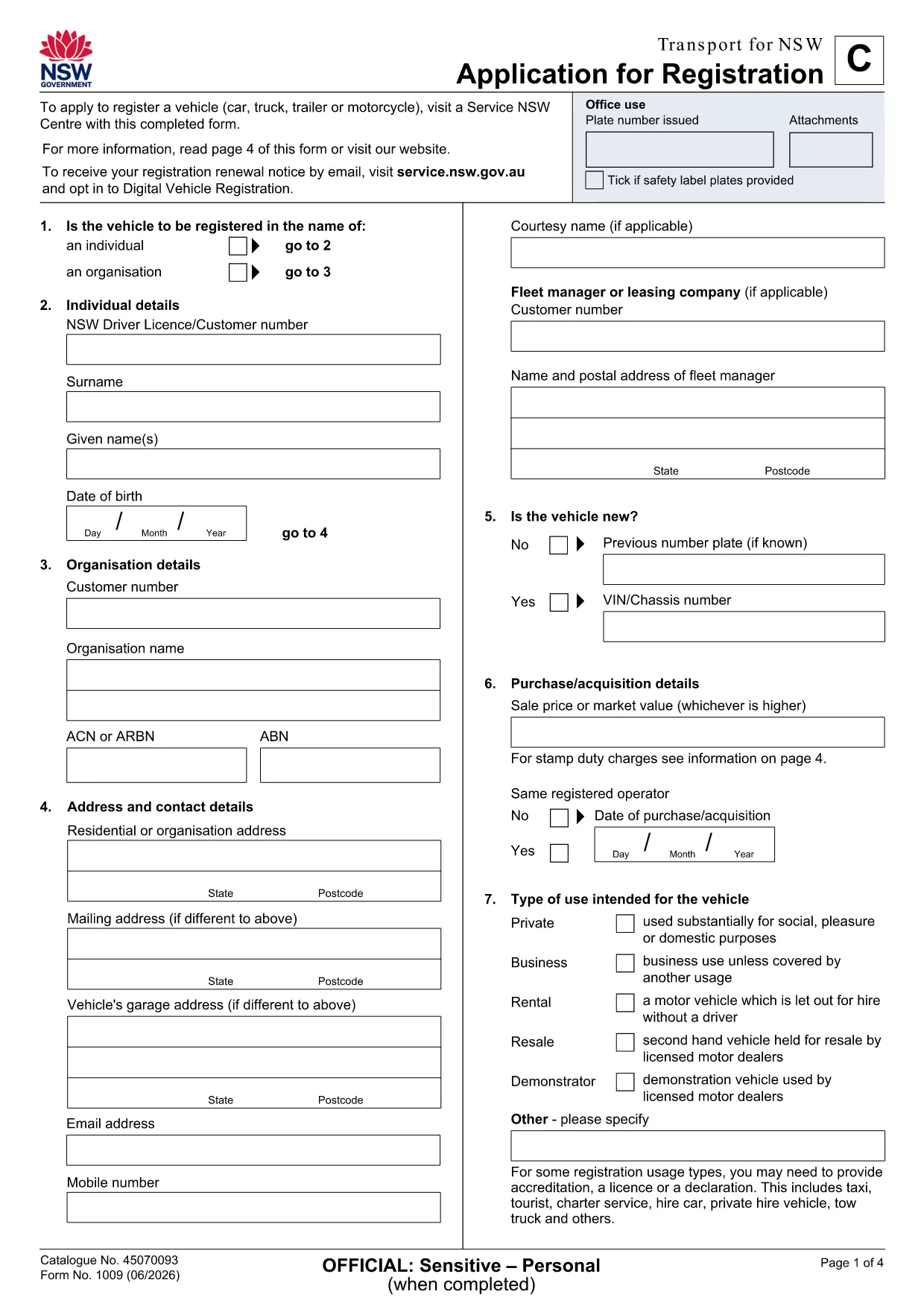
Application Form Receipt – Fillable PDF

  1. ภาษา ภาษาอังกฤษ
  2. ประเทศ ออสเตรเลีย
  3. แผนก Transport
  4. กิจกรรม ทะเบียนรถ
Application Form Receipt – Fillable PDF

Need a quick, reliable way to capture proof that an application has been submitted and paid for? Our Application Form Receipt is a fillable PDF that lets you record all essential details—date, applicant name, reference numbers, payment amount, and signatures—without printing or scanning.

Why Use a Fillable Application Form Receipt?

  • Instant editing: Open the PDF in the Formize PDF Filler app and type directly into the fields.
  • Accurate records: Built‑in validation reduces data‑entry errors.
  • Secure sharing: Save as a locked PDF or email the completed receipt directly from the app.
  • Free download: No hidden fees, no registration required.

How to Complete the Receipt Form Online

Simply click the “Fill out this form” button on this page. The Formize PDF Filler will load the document, and you can start entering information right away.

Common Mistakes to Avoid

  • Leaving required fields blank – the filler will highlight missing data.
  • Using the wrong date format – the form expects DD/MM/YYYY.
  • Uploading a non‑fillable version – always use the provided fillable PDF.

Where to Submit Your Completed Form

After saving the finished receipt, you can:

  • Upload it to the relevant government portal (e.g., Transport NSW).
  • Email it to the department that requested the receipt.
  • Print a hard copy for your records.

Need more guidance? The step‑by‑step guide below walks you through the entire process.

คำถามที่พบบ่อย
  • What is an Application Form Receipt?

    It is a documented proof that you have submitted an application and, if applicable, paid any associated fees. The receipt records key details for both the applicant and the receiving agency.

  • Do I need special software to fill out the PDF?

    No. The Formize PDF Filler works in any modern browser, so you can complete the form without installing additional programs.

  • Can I edit the receipt after I have saved it?

    Yes. Open the saved PDF again with Formize, make the necessary changes, and re‑save. Just ensure the final version is the one you submit.

  • Is the download free?

    Absolutely. The fillable Application Form Receipt PDF is provided at no cost.

  • What should I do if a field is highlighted in red?

    A red highlight means the field is required or contains an invalid entry. Fill in the correct information and the highlight will disappear.

  • Can I use this receipt for other types of applications?

    The form is designed for transport‑related applications, but the structure works for any situation where a receipt of submission is needed.

ทำอย่างไร

วิธีกรอก application form receipt ฟรีทางออนไลน์ใน 4 ขั้นตอนง่ายๆ:

  1. 1
    Open the Fillable Form
    Click the “Fill out this form” button on the page. The Formize PDF Filler app will open the receipt PDF in your browser.
  2. 2
    Enter Your Information
    Type directly into each highlighted field – applicant name, date, reference number, amount paid, and signatures.
  3. 3
    Validate & Save
    The app checks for missing or incorrectly formatted data. Once all fields are valid, click “Save” to download the completed PDF.
  4. 4
    Submit the Receipt
    Upload the saved PDF to the required portal, email it to the requesting agency, or print a hard copy for your records.
สร้างแอป PDF Filler
เกี่ยวกับ

แบบฟอร์มทะเบียนรถ

application form receipt เป็นหนึ่งในแบบฟอร์มทะเบียนยานพาหนะที่เป็นเอกสารที่ใช้ในการจดทะเบียนยานยนต์กับหน่วยงานของรัฐที่เกี่ยวข้อง โดยทั่วไปคือกรมยานยนต์ (DMV) หรือหน่วยงานที่เทียบเท่า แบบฟอร์มเหล่านี้จำเป็นเมื่อบุคคลซื้อยานพาหนะใหม่หรือใช้แล้ว โอนกรรมสิทธิ์ยานพาหนะ หรือย้ายไปยังเขตอำนาจศาลใหม่พร้อมยานพาหนะ

แบบฟอร์มทะเบียนรถยนต์อาจแตกต่างกันไปตามเขตอำนาจศาล แต่โดยทั่วไปแล้วแบบฟอร์มดังกล่าวจำเป็นต้องมีข้อมูลต่อไปนี้:

ข้อมูลยานพาหนะ: รวมถึงรายละเอียดเกี่ยวกับยานพาหนะ เช่น ยี่ห้อ รุ่น ปี หมายเลขประจำตัวยานพาหนะ (VIN) และการอ่านมาตรวัดระยะทาง

ข้อมูลเจ้าของ: แบบฟอร์มนี้ต้องการข้อมูลเกี่ยวกับเจ้าของรถ รวมถึงชื่อ ที่อยู่ ข้อมูลติดต่อ และหมายเลขใบอนุญาตขับขี่

หลักฐานการเป็นเจ้าของ: อาจจำเป็นต้องมีหลักฐานการเป็นเจ้าของ เช่น ใบรับรองชื่อ ใบขาย หรือใบรับรองแหล่งกำเนิดสินค้าของผู้ผลิต (สำหรับรถยนต์ใหม่) ทั้งนี้ขึ้นอยู่กับสถานการณ์

ข้อมูลการประกันภัย: โดยทั่วไปจะต้องมีหลักฐานการประกันภัยรถยนต์ที่ถูกต้อง ซึ่งอาจรวมถึงการระบุหมายเลขกรมธรรม์ วันที่คุ้มครอง และรายละเอียดบริษัทประกันภัย

การชำระค่าธรรมเนียม: การจดทะเบียนยานพาหนะเกี่ยวข้องกับการชำระค่าธรรมเนียมต่างๆ เช่น ค่าธรรมเนียมการจดทะเบียน ภาษี และค่าใช้จ่ายอื่นๆ ที่เฉพาะเจาะจงสำหรับเขตอำนาจศาล

นอกเหนือจากข้อกำหนดพื้นฐานเหล่านี้แล้ว เขตอำนาจศาลบางแห่งอาจมีแบบฟอร์มหรือข้อกำหนดด้านเอกสารเพิ่มเติม ตัวอย่างเช่น ผลการทดสอบการปล่อยมลพิษ การตรวจสอบความปลอดภัย หรือหลักฐานการอยู่อาศัยอาจจำเป็นในบางพื้นที่

เมื่อกรอกแบบฟอร์มทะเบียนรถและส่งแล้ว หน่วยงานของรัฐจะออกใบรับรองการจดทะเบียน ป้ายทะเบียน และสติ๊กเกอร์ทะเบียน เอกสารเหล่านี้ระบุว่ารถยนต์ได้รับการจดทะเบียนถูกต้องตามกฎหมายและได้รับอนุญาตให้ใช้งานบนถนนสาธารณะ

สิ่งสำคัญคือต้องทราบว่าข้อกำหนดในการจดทะเบียนยานพาหนะอาจแตกต่างกันอย่างมากตามเขตอำนาจศาล ดังนั้นจึงขอแนะนำให้ปรึกษา DMV ในพื้นที่หรือหน่วยงานที่เทียบเท่าสำหรับแบบฟอร์มและขั้นตอนเฉพาะที่เกี่ยวข้องกับสถานที่ของคุณ

คุณสมบัติ

PDF ฟิลเลอร์

วิธีที่ง่ายที่สุดในการกรอกแบบฟอร์ม PDF ทางออนไลน์

  • กรอก application form receipt อย่างรวดเร็ว
    กำลังมองหาวิธีเติม application form receipt ทางออนไลน์อย่างรวดเร็วอยู่ใช่ไหม ด้วยตัวกรอกแบบฟอร์ม PDF ออนไลน์ฟรีของเรา คุณจะรู้วิธีแก้ไขและกรอกเอกสาร PDF นี้ในเวลาไม่ถึงนาที
  • โปรแกรมแก้ไข PDF ออนไลน์ที่ใช้งานง่าย
    เบื่อกับการพิมพ์ไฟล์ PDF เพื่อให้คุณสามารถแก้ไขได้ก่อนที่จะสแกนซ้ำและส่งกลับหรือไม่? แก้ไขเอกสาร PDF ออนไลน์ฟรี ใช้โปรแกรมแก้ไข PDF ออนไลน์ของเราเพื่อประหยัดเวลาและกระดาษ
  • เครื่องมือที่ยอดเยี่ยมสำหรับทุกแพลตฟอร์ม
    สงสัยวิธีเติม application form receipt บน Mac หรืออาจใช้ตัวเติม PDF ฟรีได้อย่างไร เครื่องมือ PDF ออนไลน์ของเราทำงานได้บนทุกแพลตฟอร์ม
  • การจัดเก็บไฟล์ที่ปลอดภัย
    ไฟล์ "application form receipt" ที่เสร็จสมบูรณ์จะถูกจัดเก็บไว้ในฐานข้อมูลที่ปลอดภัยซึ่งจัดการโดย Amazon Cloud hosting คุณสามารถลบไฟล์ของคุณออกจากระบบของเราได้ตลอดเวลา ไม่ว่าในกรณีใด ไฟล์เหล่านี้จะถูกลบโดยอัตโนมัติหลังจากผ่านไป 24 ชั่วโมง
  • สนทนากับ application form receipt
    แชทกับ "application form receipt" บน Chatize ที่เป็นผู้ช่วยอ่าน PDF ฟรี ถามคำถามและรับคำตอบจาก "application form receipt" เพียงคลิกที่ปุ่ม แชทด้วยเอกสาร ด้านบน

ลบเซสชันการบรรจุ

ลบเซสชันการกรอกข้อมูลที่เลือกหรือไม่?ในกรณีนี้ความคืบหน้าในการกรอกแบบฟอร์มจะหายไป

ลบเซสชันการแก้ไข

ลบเซสชันการแก้ไขที่เลือกหรือไม่ ในกรณีนี้ ความคืบหน้าในการสร้างและแก้ไขแบบฟอร์มจะหายไป