hamburger-menu icon
เลือกภาษา

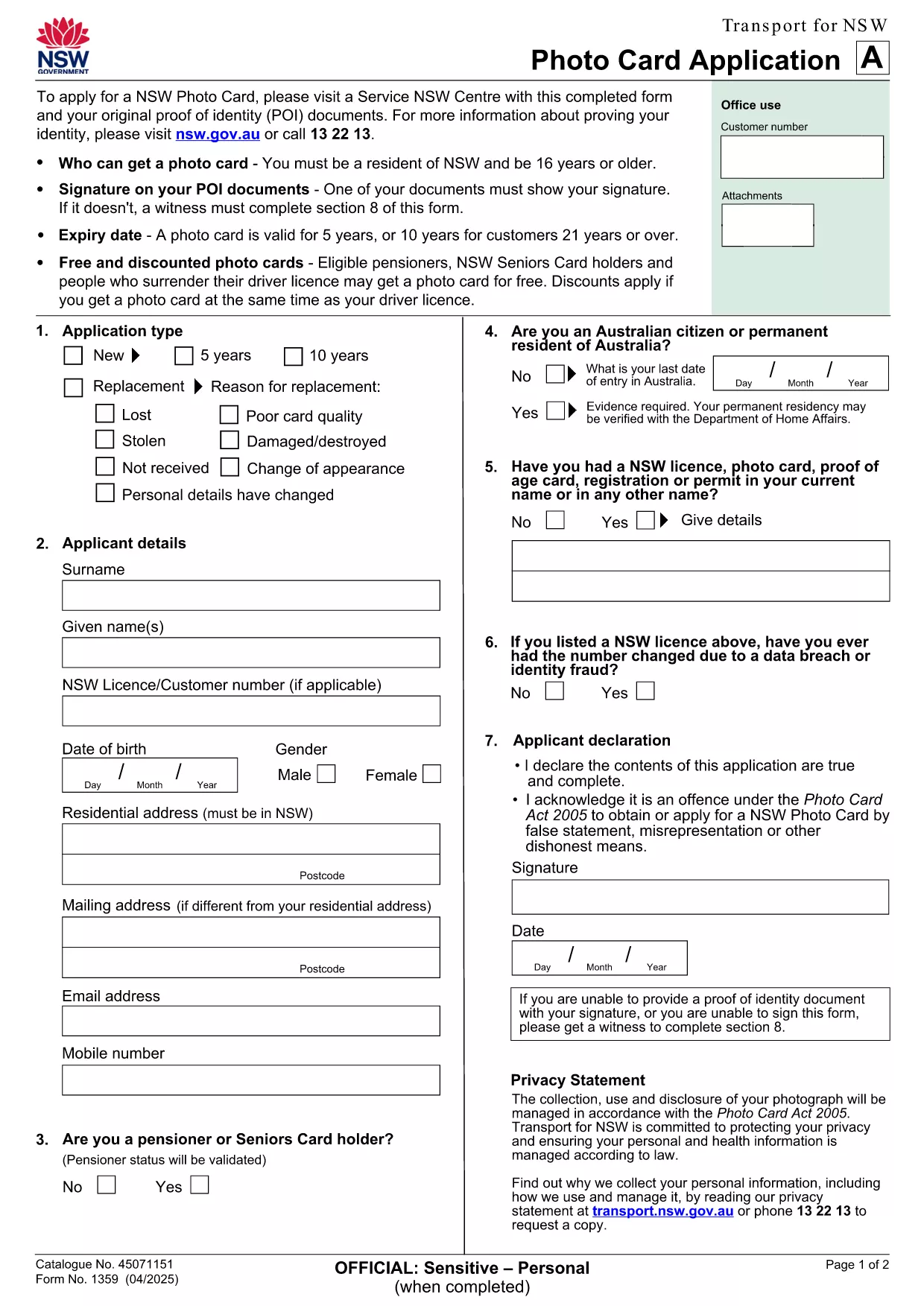
NSW Photo Card Application Form (Fillable PDF)

  1. ประเทศ ออสเตรเลีย
  2. ภาษา ภาษาอังกฤษ
  3. กิจกรรม Identification
  4. แผนก Transport
NSW Photo Card Application Form (Fillable PDF)

Need a new Photo Card in New South Wales? The official NSW Photo Card application form requires a recent photograph of yourself. With Formize, you can download the PDF, attach your picture, and complete the entire form online – no printer or scanner needed.

Why a Photo Card Application Needs a Picture

The Photo Card is a government‑issued ID that verifies your identity. A clear, recent picture helps officers match the card to the holder quickly and reduces fraud.

How to Fill Out the NSW Photo Card Form Online

  1. Click the "Fill out this form" button on this page.
  2. Wait for the Formize PDF Filler app to load (usually a few seconds).
  3. Upload a high‑resolution photo (JPEG or PNG, 2 MB max).
  4. Complete the personal‑details sections – name, address, date of birth, etc.
  5. Review the entered data, then click Save or Print to submit at your nearest Service Centre.

Common Mistakes & Tips

  • Wrong photo size: Use a passport‑style headshot with a plain background.
  • Missing signature: The digital signature field must be filled; you can sign with your mouse or touch screen.
  • Incorrect address format: Follow the example shown on the form to avoid processing delays.

Download & Save Your Completed Form

After you finish, you can download a copy of the completed PDF for your records. Bring the printed form and your original photo to a Service Centre, or submit it digitally if your centre accepts e‑submissions.

Need help? The Service Centre staff can assist with identity verification and photo quality checks.

คำถามที่พบบ่อย
  • Do I need a passport‑style photo for the NSW Photo Card?

    Yes. The photo must be a clear headshot with a plain background, taken within the last 12 months.

  • Can I submit the form without printing it?

    Most Service Centres require a printed form, but some locations accept a saved PDF on a USB drive. Check with your local centre.

  • What file formats are accepted for the picture?

    JPEG and PNG files are supported, up to 2 MB in size.

  • Is there a fee for the Photo Card?

    A standard Photo Card costs $30. Seniors and pensioners may be eligible for a free card.

  • How long does it take to receive the card after submission?

    The card is mailed to your address within 3 weeks of submitting the completed application.

  • Can I edit the form after I’ve saved it?

    Yes. Open the saved PDF in Formize again, make changes, and re‑save before you submit.

  • What should I do if my photo is rejected?

    You’ll be asked to provide a new picture that meets the requirements. Bring a compliant photo to the Service Centre for a quick replacement.

ทำอย่างไร

วิธีกรอก NSW photo card application ฟรีทางออนไลน์ใน 5 ขั้นตอนง่ายๆ:

  1. 1
    Open the Fillable Form
    Click the "Fill out this form" button on this page. The Formize PDF Filler will open in a new tab.
  2. 2
    Upload Your Photo
    Select the photo field, then choose a recent passport‑style picture (JPEG/PNG, max 2 MB). The image will appear instantly.
  3. 3
    Enter Your Details
    Type in your name, address, date of birth, and any other required information. All fields are searchable and auto‑save.
  4. 4
    Add Your Signature
    Use the signature box to draw your signature with a mouse, trackpad, or touchscreen.
  5. 5
    Review and Save
    Check every field for accuracy, then click "Save PDF" to download the completed form or "Print" to take it to a Service Centre.
สร้างแอป PDF Filler
เกี่ยวกับ

เทมเพลต NSW photo card application

ด้วยชุดคุณสมบัติดั้งเดิมสำหรับการดูและกรอกเอกสาร PDF รวมกับประโยชน์ของเว็บแอปพลิเคชันและเค้าโครงที่ตอบสนอง คุณสามารถสร้าง NSW photo card application ให้เสร็จภายในไม่กี่นาที

คุณสมบัติ

PDF ฟิลเลอร์

วิธีที่ง่ายที่สุดในการกรอกแบบฟอร์ม PDF ทางออนไลน์

  • กรอก NSW photo card application อย่างรวดเร็ว
    กำลังมองหาวิธีเติม NSW photo card application ทางออนไลน์อย่างรวดเร็วอยู่ใช่ไหม ด้วยตัวกรอกแบบฟอร์ม PDF ออนไลน์ฟรีของเรา คุณจะรู้วิธีแก้ไขและกรอกเอกสาร PDF นี้ในเวลาไม่ถึงนาที
  • โปรแกรมแก้ไข PDF ออนไลน์ที่ใช้งานง่าย
    เบื่อกับการพิมพ์ไฟล์ PDF เพื่อให้คุณสามารถแก้ไขได้ก่อนที่จะสแกนซ้ำและส่งกลับหรือไม่? แก้ไขเอกสาร PDF ออนไลน์ฟรี ใช้โปรแกรมแก้ไข PDF ออนไลน์ของเราเพื่อประหยัดเวลาและกระดาษ
  • เครื่องมือที่ยอดเยี่ยมสำหรับทุกแพลตฟอร์ม
    สงสัยวิธีเติม NSW photo card application บน Mac หรืออาจใช้ตัวเติม PDF ฟรีได้อย่างไร เครื่องมือ PDF ออนไลน์ของเราทำงานได้บนทุกแพลตฟอร์ม
  • การจัดเก็บไฟล์ที่ปลอดภัย
    ไฟล์ "NSW photo card application" ที่เสร็จสมบูรณ์จะถูกจัดเก็บไว้ในฐานข้อมูลที่ปลอดภัยซึ่งจัดการโดย Amazon Cloud hosting คุณสามารถลบไฟล์ของคุณออกจากระบบของเราได้ตลอดเวลา ไม่ว่าในกรณีใด ไฟล์เหล่านี้จะถูกลบโดยอัตโนมัติหลังจากผ่านไป 24 ชั่วโมง
  • สนทนากับ NSW photo card application
    แชทกับ "NSW photo card application" บน Chatize ที่เป็นผู้ช่วยอ่าน PDF ฟรี ถามคำถามและรับคำตอบจาก "NSW photo card application" เพียงคลิกที่ปุ่ม แชทด้วยเอกสาร ด้านบน

ลบเซสชันการบรรจุ

ลบเซสชันการกรอกข้อมูลที่เลือกหรือไม่?ในกรณีนี้ความคืบหน้าในการกรอกแบบฟอร์มจะหายไป

ลบเซสชันการแก้ไข

ลบเซสชันการแก้ไขที่เลือกหรือไม่ ในกรณีนี้ ความคืบหน้าในการสร้างและแก้ไขแบบฟอร์มจะหายไป