hamburger-menu icon
เลือกภาษา

VIT Application Form – Fillable PDF

  1. ภาษา ภาษาอังกฤษ
  2. ประเทศ ออสเตรเลีย
  3. แผนก Victorian Institute of Technology
  4. กิจกรรม Application Forms
VIT Application Form – Fillable PDF

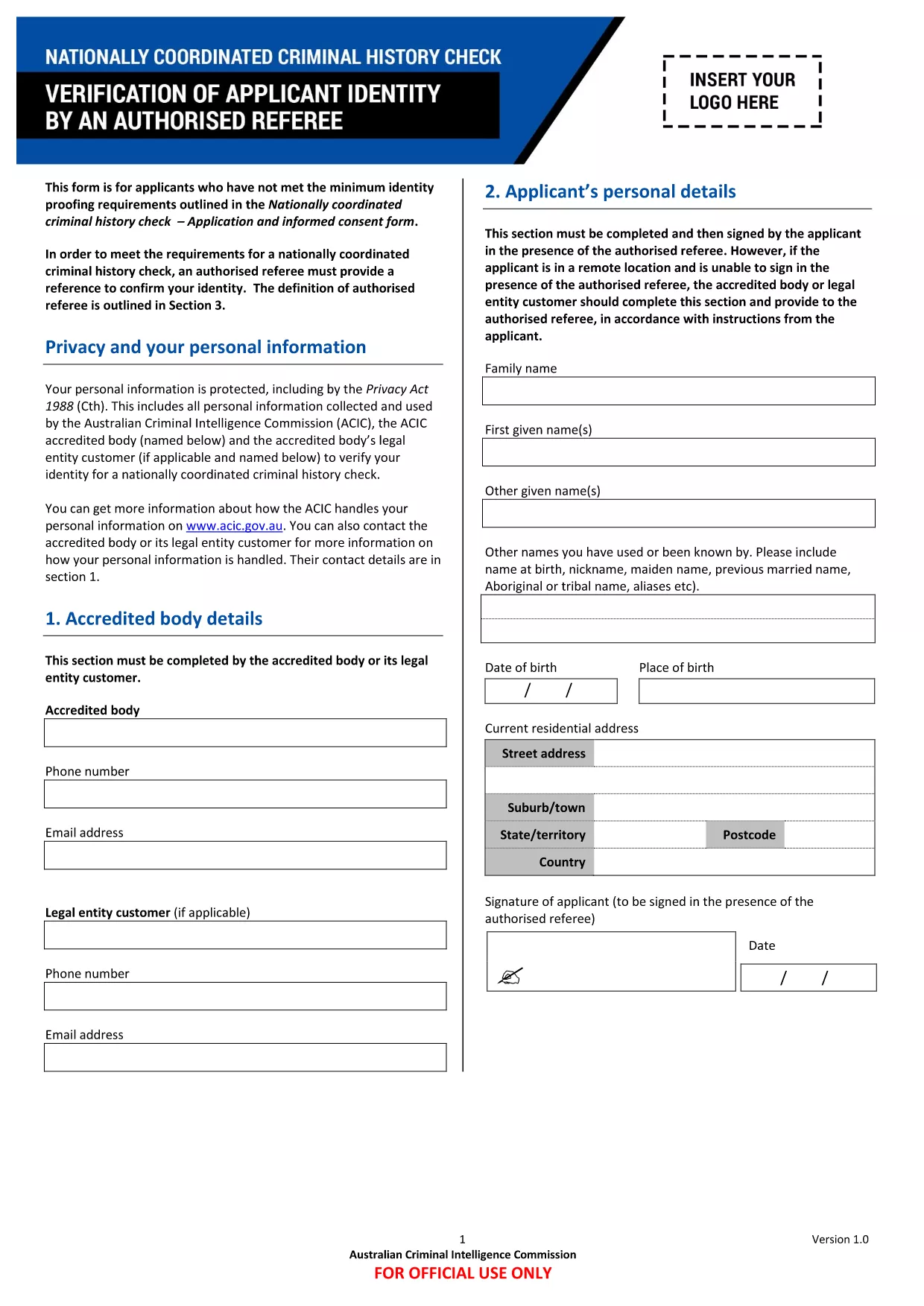
The VIT application form is required for prospective students, staff, and authorised referees who need to meet the identity‑proofing requirements for the Nationally Coordinated Criminal History Check. This fillable PDF lets you complete the form directly in your browser—no Adobe Reader or other software needed.

Using Formize’s secure PDF filler, you can:

  • Enter data into each field instantly.
  • Save your progress and return later.
  • Submit the completed form directly to VIT.

Below you’ll find everything you need to know about the form, how to fill it correctly, and what to expect after submission.

คำถามที่พบบ่อย
  • Do I need Adobe Acrobat to fill this form?

    No. The Formize PDF Filler works in any modern browser, so you can complete the form without installing additional software.

  • Can I print a hard copy after I finish?

    Yes. After saving, click the “Print” option in the PDF filler to generate a printable version of your completed form.

  • What if I make a mistake?

    Each field can be edited at any time before you submit. Simply click the field again, correct the entry, and save.

  • Is my personal data protected?

    Formize uses SSL encryption for all data transmission. Your information is stored securely and is only accessible by VIT’s authorized staff.

  • Do I need an authorised referee to complete this form?

    Yes. The form includes a section for an authorised referee to confirm your identity, as required by the national criminal history check.

  • How long does it take for VIT to process the form?

    Processing times vary, but most submissions are reviewed within 5‑7 business days after receipt.

ทำอย่างไร

วิธีกรอก VIT application form ฟรีทางออนไลน์ใน 4 ขั้นตอนง่ายๆ:

  1. 1
    Open the Fillable Form
    Click the “Fill out this form” button on the page. The Formize PDF Filler app loads instantly in your browser.
  2. 2
    Enter Your Information
    Navigate through each section, typing the required details into the highlighted fields.
  3. 3
    Save Your Progress
    Use the “Save” button at any time to store a draft. You can close the browser and return later without losing data.
  4. 4
    Submit Securely
    When all fields are complete, click “Submit”. Your form is encrypted and sent directly to VIT’s processing team.
สร้างแอป PDF Filler
เกี่ยวกับ

เทมเพลต VIT application form

ด้วยชุดคุณสมบัติดั้งเดิมสำหรับการดูและกรอกเอกสาร PDF รวมกับประโยชน์ของเว็บแอปพลิเคชันและเค้าโครงที่ตอบสนอง คุณสามารถสร้าง VIT application form ให้เสร็จภายในไม่กี่นาที

คุณสมบัติ

PDF ฟิลเลอร์

วิธีที่ง่ายที่สุดในการกรอกแบบฟอร์ม PDF ทางออนไลน์

  • กรอก VIT application form อย่างรวดเร็ว
    กำลังมองหาวิธีเติม VIT application form ทางออนไลน์อย่างรวดเร็วอยู่ใช่ไหม ด้วยตัวกรอกแบบฟอร์ม PDF ออนไลน์ฟรีของเรา คุณจะรู้วิธีแก้ไขและกรอกเอกสาร PDF นี้ในเวลาไม่ถึงนาที
  • โปรแกรมแก้ไข PDF ออนไลน์ที่ใช้งานง่าย
    เบื่อกับการพิมพ์ไฟล์ PDF เพื่อให้คุณสามารถแก้ไขได้ก่อนที่จะสแกนซ้ำและส่งกลับหรือไม่? แก้ไขเอกสาร PDF ออนไลน์ฟรี ใช้โปรแกรมแก้ไข PDF ออนไลน์ของเราเพื่อประหยัดเวลาและกระดาษ
  • เครื่องมือที่ยอดเยี่ยมสำหรับทุกแพลตฟอร์ม
    สงสัยวิธีเติม VIT application form บน Mac หรืออาจใช้ตัวเติม PDF ฟรีได้อย่างไร เครื่องมือ PDF ออนไลน์ของเราทำงานได้บนทุกแพลตฟอร์ม
  • การจัดเก็บไฟล์ที่ปลอดภัย
    ไฟล์ "VIT application form" ที่เสร็จสมบูรณ์จะถูกจัดเก็บไว้ในฐานข้อมูลที่ปลอดภัยซึ่งจัดการโดย Amazon Cloud hosting คุณสามารถลบไฟล์ของคุณออกจากระบบของเราได้ตลอดเวลา ไม่ว่าในกรณีใด ไฟล์เหล่านี้จะถูกลบโดยอัตโนมัติหลังจากผ่านไป 24 ชั่วโมง
  • สนทนากับ VIT application form
    แชทกับ "VIT application form" บน Chatize ที่เป็นผู้ช่วยอ่าน PDF ฟรี ถามคำถามและรับคำตอบจาก "VIT application form" เพียงคลิกที่ปุ่ม แชทด้วยเอกสาร ด้านบน

ลบเซสชันการบรรจุ

ลบเซสชันการกรอกข้อมูลที่เลือกหรือไม่?ในกรณีนี้ความคืบหน้าในการกรอกแบบฟอร์มจะหายไป

ลบเซสชันการแก้ไข

ลบเซสชันการแก้ไขที่เลือกหรือไม่ ในกรณีนี้ ความคืบหน้าในการสร้างและแก้ไขแบบฟอร์มจะหายไป