hamburger-menu icon
เลือกภาษา

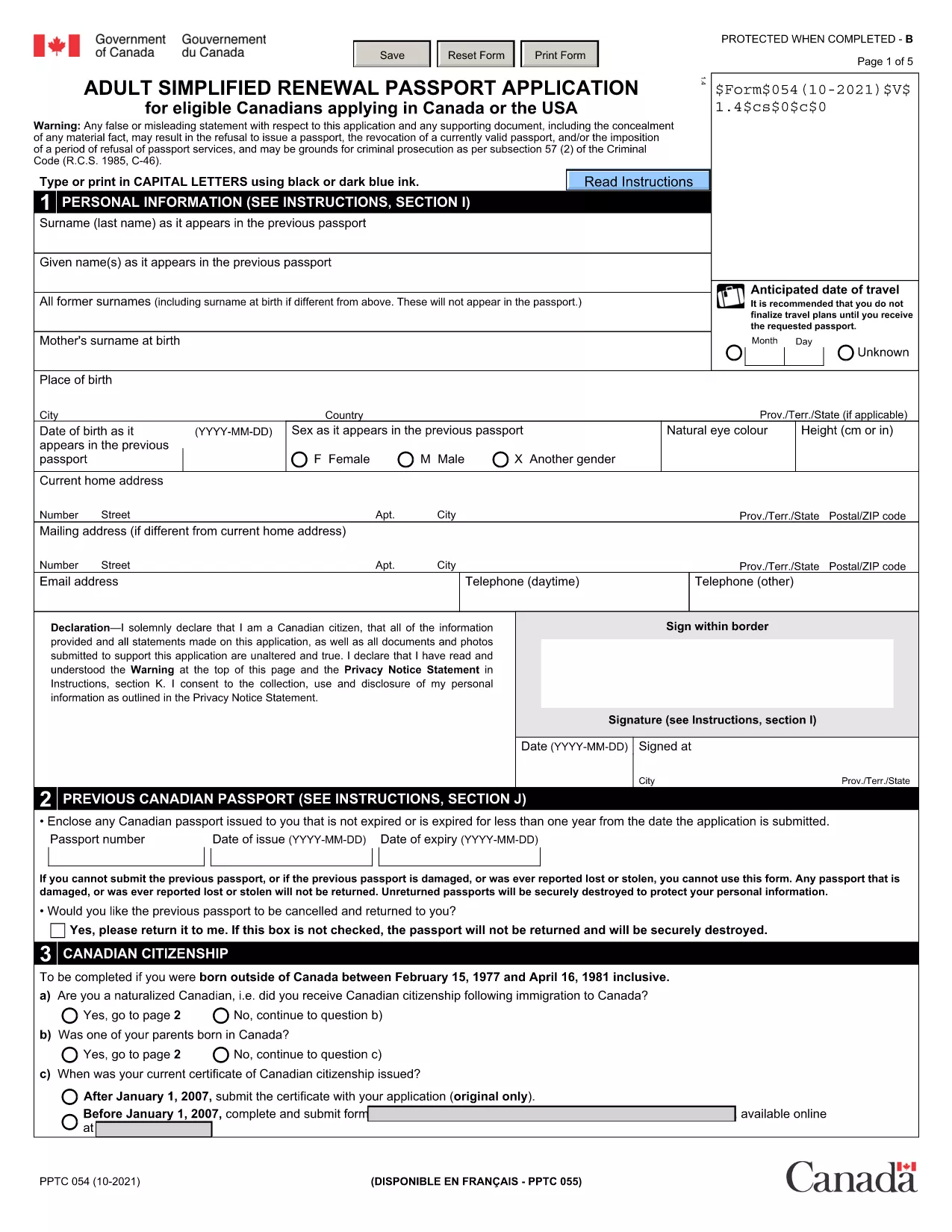
Fillable Canadian Passport Renewal Form (PPTC‑054)

  1. ภาษา ภาษาอังกฤษ
  2. ประเทศ แคนาดา
  3. แผนก Immigration, Refugees and Citizenship Canada
  4. กิจกรรม Passport Renewal
Fillable Canadian Passport Renewal Form (PPTC‑054)

Need to renew your Canadian passport quickly? The Adult Simplified Renewal Passport Application (form PPTC‑054) is the official, government‑approved document for eligible Canadians. With Formize you can open the fillable PDF directly in your browser, complete it, and download a signed copy—no extra software required.

What Is the PPTC‑054 Renewal Form?

PPTC‑054 is the streamlined renewal form used by Canadian citizens whose passports have expired or are about to expire. It collects personal details, travel history, and a guarantor’s signature, then forwards the information to Immigration, Refugees and Citizenship Canada (IRCC) for processing.

Who Can Use This Simplified Application?

  • Canadian adults (18 years or older) with a previously issued passport.
  • Applicants whose most recent passport is still valid or has expired within the last 12 months.
  • Those who meet the eligibility criteria listed on the form (no name change, no lost passport, etc.).

How to Complete the Form Online with Formize

Follow these three easy steps and you’ll have a completed, printable PDF in minutes:

  1. Click the "Fill out this form" button on this page.
  2. Wait a few seconds while the Formize PDF Filler app loads the fillable version of PPTC‑054.
  3. Enter your information, add a digital signature, and click Download to save the finished form.

Common Mistakes to Avoid

  • Leaving required fields blank – the form will not submit if any mandatory section is empty.
  • Using an invalid guarantor – the guarantor must meet the IRCC criteria (Canadian citizen, 18 + years old, known for at least 2 years).
  • Incorrect passport number format – double‑check the series of letters and numbers on your current passport.

Where to Submit Your Completed Application

After downloading the filled PDF, include it with your passport photos, payment receipt, and any supporting documents, then mail or deliver the package to the nearest Passport Canada Office or a participating Service Canada centre. For detailed mailing addresses, visit the IRCC website.

Ready to start? Click the button below and let Formize handle the heavy lifting.

คำถามที่พบบ่อย
  • Do I need to print the form before filling it out?

    No. With Formize you fill the PDF directly in your browser and download the completed version.

  • Can I use this form if my passport was lost or stolen?

    No. PPTC‑054 is only for standard renewals. Lost or stolen passports require a different application (PPTC 040).

  • How long does the renewal process take after I submit?

    Processing typically takes 10‑20 business days for standard service; express service may be faster for an additional fee.

  • What payment methods are accepted for the passport fee?

    Accepted methods include credit/debit cards, money orders, and certified checks. Check the IRCC website for the most current list.

  • Is the digital signature legally valid?

    Yes. Formize creates a compliant electronic signature that meets Canadian e‑signing standards for passport applications.

  • Can I save my progress and finish later?

    The Formize app allows you to download a partially completed PDF, which you can reopen later to finish.

  • Do I need a guarantor for this renewal?

    A guarantor is required unless you qualify for the “no‑guarantor” option listed on the form (e.g., certain diplomatic applicants).

  • Where can I find passport photos that meet IRCC standards?

    Use a professional photo studio that follows IRCC guidelines, or follow the online photo specifications on the IRCC website.

ทำอย่างไร

วิธีกรอก Canadian passport renewal form ฟรีทางออนไลน์ใน 3 ขั้นตอนง่ายๆ:

  1. 1
    Click the Fill‑out Button
    Press the “Fill out this form” button on the page to launch the Formize PDF Filler.
  2. 2
    Wait for the Filler to Load
    The fillable version of PPTC‑054 loads in a few seconds—no download required.
  3. 3
    Enter Your Details and Sign
    Complete each field, add your digital signature, then click Download to save the finished PDF.
สร้างแอป PDF Filler
เกี่ยวกับ

เทมเพลต Canadian passport renewal form

ด้วยชุดคุณสมบัติดั้งเดิมสำหรับการดูและกรอกเอกสาร PDF รวมกับประโยชน์ของเว็บแอปพลิเคชันและเค้าโครงที่ตอบสนอง คุณสามารถสร้าง Canadian passport renewal form ให้เสร็จภายในไม่กี่นาที

คุณสมบัติ

PDF ฟิลเลอร์

วิธีที่ง่ายที่สุดในการกรอกแบบฟอร์ม PDF ทางออนไลน์

  • กรอก Canadian passport renewal form อย่างรวดเร็ว
    กำลังมองหาวิธีเติม Canadian passport renewal form ทางออนไลน์อย่างรวดเร็วอยู่ใช่ไหม ด้วยตัวกรอกแบบฟอร์ม PDF ออนไลน์ฟรีของเรา คุณจะรู้วิธีแก้ไขและกรอกเอกสาร PDF นี้ในเวลาไม่ถึงนาที
  • โปรแกรมแก้ไข PDF ออนไลน์ที่ใช้งานง่าย
    เบื่อกับการพิมพ์ไฟล์ PDF เพื่อให้คุณสามารถแก้ไขได้ก่อนที่จะสแกนซ้ำและส่งกลับหรือไม่? แก้ไขเอกสาร PDF ออนไลน์ฟรี ใช้โปรแกรมแก้ไข PDF ออนไลน์ของเราเพื่อประหยัดเวลาและกระดาษ
  • เครื่องมือที่ยอดเยี่ยมสำหรับทุกแพลตฟอร์ม
    สงสัยวิธีเติม Canadian passport renewal form บน Mac หรืออาจใช้ตัวเติม PDF ฟรีได้อย่างไร เครื่องมือ PDF ออนไลน์ของเราทำงานได้บนทุกแพลตฟอร์ม
  • การจัดเก็บไฟล์ที่ปลอดภัย
    ไฟล์ "Canadian passport renewal form" ที่เสร็จสมบูรณ์จะถูกจัดเก็บไว้ในฐานข้อมูลที่ปลอดภัยซึ่งจัดการโดย Amazon Cloud hosting คุณสามารถลบไฟล์ของคุณออกจากระบบของเราได้ตลอดเวลา ไม่ว่าในกรณีใด ไฟล์เหล่านี้จะถูกลบโดยอัตโนมัติหลังจากผ่านไป 24 ชั่วโมง
  • สนทนากับ Canadian passport renewal form
    แชทกับ "Canadian passport renewal form" บน Chatize ที่เป็นผู้ช่วยอ่าน PDF ฟรี ถามคำถามและรับคำตอบจาก "Canadian passport renewal form" เพียงคลิกที่ปุ่ม แชทด้วยเอกสาร ด้านบน

ลบเซสชันการบรรจุ

ลบเซสชันการกรอกข้อมูลที่เลือกหรือไม่?ในกรณีนี้ความคืบหน้าในการกรอกแบบฟอร์มจะหายไป

ลบเซสชันการแก้ไข

ลบเซสชันการแก้ไขที่เลือกหรือไม่ ในกรณีนี้ ความคืบหน้าในการสร้างและแก้ไขแบบฟอร์มจะหายไป