
hamburger-menu icon
เลือกภาษา

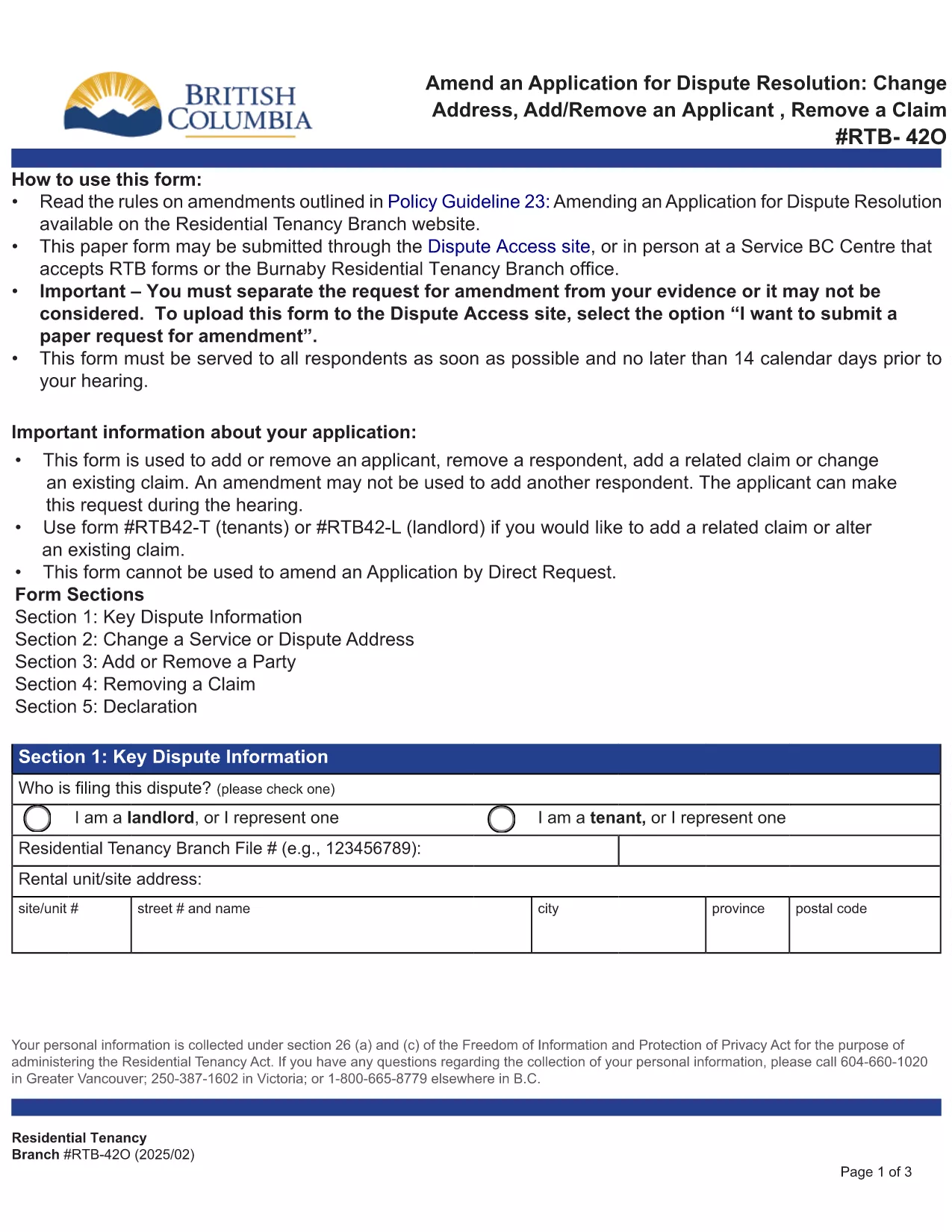
RTB‑42O – Amend an Application for Dispute Resolution (Fillable PDF)

  1. ภาษา ภาษาอังกฤษ
  2. ประเทศ แคนาดา
  3. กิจกรรม การเช่า
  4. สถานะ บริติชโคลัมเบีย
RTB‑42O – Amend an Application for Dispute Resolution (Fillable PDF)

What is the RTB‑42O Form?

The RTB‑42O is the official Residential Tenancy Branch (RTB) form used in British Columbia to request an amendment to an existing dispute‑resolution application. It allows tenants or landlords to change claims, add parties, or correct information after the original filing.

When and Who Should Use RTB‑42O?

  • Tenants or landlords who need to add, delete, or modify a claim.
  • Parties who must change an address, add a co‑tenant, or correct a mistake.
  • Anyone who has already submitted an RTB‑59 or RTB‑42T application and needs to update it before the hearing.

How to Complete the RTB‑42O Online

Instead of downloading and editing the PDF manually, simply click the "Fill out this form" button below. The Formize PDF Filler app will load the fillable version instantly.

  1. Click Fill out this form on the page.
  2. Wait a few seconds while the Formize PDF Filler loads.
  3. Enter your information in each highlighted field. Required fields are marked with an asterisk (*).
  4. Review the entered data for accuracy.
  5. Click Save & Download to get a completed PDF you can email to the RTB.

Common Mistakes to Avoid

  • Leaving required fields blank – the form will not submit.
  • Using an old case number; always copy the number from your original application.
  • Submitting the form after the RTB deadline – check the Rules of Procedure for timing.

Submit and Save Your Completed Form

After you have filled the form, download the PDF, attach it to an email addressed to rtb@gov.bc.ca, and include your original application reference number. Keep a copy for your records.

คำถามที่พบบ่อย
  • What is the purpose of the RTB‑42O form?

    The RTB‑42O allows tenants or landlords to amend an existing dispute‑resolution application – adding or removing claims, parties, or correcting details.

  • Can I fill out RTB‑42O on a mobile device?

    Yes. The Formize PDF Filler works on smartphones, tablets and desktop browsers, providing a responsive fillable experience.

  • Do I need to pay a fee to submit an amendment?

    No additional fee is required to submit an RTB‑42O amendment, but the original application fee (usually $100) still applies.

  • How long do I have to submit an amendment after filing the original application?

    Amendments must be filed before the hearing date or within the time limits set out in RTB Rule 4.0.1. Check the latest Rules of Procedure for exact deadlines.

  • What happens if I make a mistake on the RTB‑42O?

    If required fields are left blank or information is incorrect, the RTB will return the form for correction. Use the fillable version to avoid common errors.

  • Do I need a lawyer to complete the RTB‑42O?

    No. The form is designed for self‑representation. However, you may seek legal advice if the amendment is complex.

ทำอย่างไร

วิธีกรอก RTB-42O ฟรีทางออนไลน์ใน 5 ขั้นตอนง่ายๆ:

  1. 1
    Open the Fillable Form
    Click the “Fill out this form” button on the page. The Formize PDF Filler loads the RTB‑42O automatically.
  2. 2
    Enter Your Details
    Fill every highlighted field, especially those marked with *. Use the original application number for reference.
  3. 3
    Review & Validate
    Check all entries for accuracy. The filler will highlight any missing required information.
  4. 4
    Download the Completed PDF
    When you’re satisfied, click “Save & Download”. The PDF is ready to email to the Residential Tenancy Branch.
  5. 5
    Submit to the RTB
    Attach the completed PDF to an email addressed to rt​b@gov.bc.ca, include your original case number, and keep a copy for your records.
สร้างแอป PDF Filler
เกี่ยวกับ

แบบฟอร์มสำหรับเจ้าของบ้านและ/หรือผู้เช่าเพื่อเสนอการดำเนินการเกี่ยวกับสัญญาเช่า

RTB-42O คือประเภทของข้อตกลงการเช่าที่อยู่อาศัยที่ใช้โดยเจ้าของบ้านส่วนตัวและสมาคมที่อยู่อาศัยส่วนใหญ่

มีหลายเรื่องที่เจ้าของบ้านหรือผู้เช่าต้องปฏิบัติตามกฎเกณฑ์ที่กำหนดไว้ในข้อบังคับ ในบางกรณี อาจจำเป็นต้องกรอกแบบฟอร์มที่เรียกว่า 'แบบฟอร์มที่กำหนด' ซึ่งเสนอการดำเนินการที่อาจส่งผลกระทบต่อคู่สัญญาอีกฝ่ายหนึ่งในข้อตกลงการเช่า

แบบฟอร์มนี้เรียกว่าแบบฟอร์มที่กำหนดเนื่องจากข้อความในแบบฟอร์มได้รับการร่างอย่างรอบคอบเพื่อให้แน่ใจว่าบุคคลที่กรอกแบบฟอร์มและบุคคลที่ให้บริการอาจเข้าใจสิ่งที่เสนอและสิ่งที่พวกเขาอาจตอบสนอง การไม่ให้บริการแบบฟอร์มที่ถูกต้องอาจทำให้การดำเนินการที่เสนอเป็นโมฆะ

คุณไม่สามารถแก้ไขข้อความในแบบฟอร์มเหล่านี้ได้ เว้นแต่จะมีแบบฟอร์มระบุว่าคุณสามารถทำได้ หากคุณเปลี่ยนข้อความ แบบฟอร์มอาจใช้ไม่ได้ คุณต้องปฏิบัติตามระยะเวลาการแจ้งที่กำหนดไว้ในแบบฟอร์มด้วย

คุณสมบัติ

PDF ฟิลเลอร์

วิธีที่ง่ายที่สุดในการกรอกแบบฟอร์ม PDF ทางออนไลน์

  • กรอก RTB-42O อย่างรวดเร็ว
    กำลังมองหาวิธีเติม RTB-42O ทางออนไลน์อย่างรวดเร็วอยู่ใช่ไหม ด้วยตัวกรอกแบบฟอร์ม PDF ออนไลน์ฟรีของเรา คุณจะรู้วิธีแก้ไขและกรอกเอกสาร PDF นี้ในเวลาไม่ถึงนาที
  • โปรแกรมแก้ไข PDF ออนไลน์ที่ใช้งานง่าย
    เบื่อกับการพิมพ์ไฟล์ PDF เพื่อให้คุณสามารถแก้ไขได้ก่อนที่จะสแกนซ้ำและส่งกลับหรือไม่? แก้ไขเอกสาร PDF ออนไลน์ฟรี ใช้โปรแกรมแก้ไข PDF ออนไลน์ของเราเพื่อประหยัดเวลาและกระดาษ
  • เครื่องมือที่ยอดเยี่ยมสำหรับทุกแพลตฟอร์ม
    สงสัยวิธีเติม RTB-42O บน Mac หรืออาจใช้ตัวเติม PDF ฟรีได้อย่างไร เครื่องมือ PDF ออนไลน์ของเราทำงานได้บนทุกแพลตฟอร์ม
  • การจัดเก็บไฟล์ที่ปลอดภัย
    ไฟล์ "RTB-42O" ที่เสร็จสมบูรณ์จะถูกจัดเก็บไว้ในฐานข้อมูลที่ปลอดภัยซึ่งจัดการโดย Amazon Cloud hosting คุณสามารถลบไฟล์ของคุณออกจากระบบของเราได้ตลอดเวลา ไม่ว่าในกรณีใด ไฟล์เหล่านี้จะถูกลบโดยอัตโนมัติหลังจากผ่านไป 24 ชั่วโมง
  • สนทนากับ RTB-42O
    แชทกับ "RTB-42O" บน Chatize ที่เป็นผู้ช่วยอ่าน PDF ฟรี ถามคำถามและรับคำตอบจาก "RTB-42O" เพียงคลิกที่ปุ่ม แชทด้วยเอกสาร ด้านบน

ลบเซสชันการบรรจุ

ลบเซสชันการกรอกข้อมูลที่เลือกหรือไม่?ในกรณีนี้ความคืบหน้าในการกรอกแบบฟอร์มจะหายไป

ลบเซสชันการแก้ไข

ลบเซสชันการแก้ไขที่เลือกหรือไม่ ในกรณีนี้ ความคืบหน้าในการสร้างและแก้ไขแบบฟอร์มจะหายไป