hamburger-menu icon
เลือกภาษา

Punjab Birth Certificate Application Form (Fillable PDF)

  1. ประเทศ อินเดีย
  2. ภาษา ภาษาอังกฤษ
  3. กิจกรรม Birth Certificate
  4. แผนก Birth & Death Registration
กรอกแบบฟอร์มนี้
Punjab Birth Certificate Application Form (Fillable PDF)

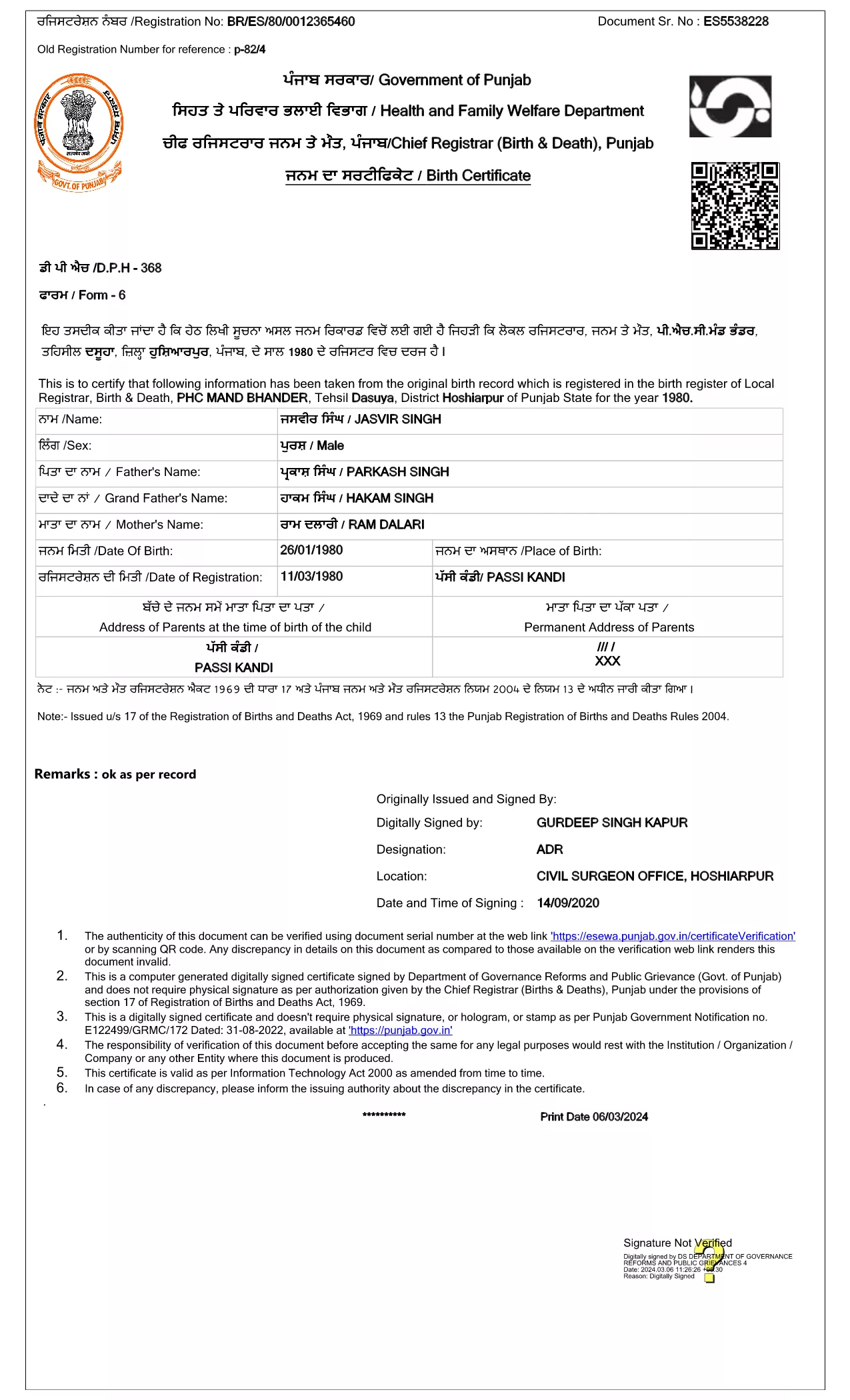
The Punjab Birth Certificate Application Form is the government‑approved document you need to obtain a certified birth record for a child born in Punjab, India. This form is now available as a fillable PDF, allowing you to complete it directly in your browser using the Formize PDF Filler – no printer, scanner, or physical signatures required.

Why Use the Official Fillable PDF?

Using the official fillable PDF ensures that your submission complies with the Registration of Births and Deaths Act, 1969. The digital signature from the Department of Governance Reforms and Public Grievance guarantees authenticity, speeds up processing, and eliminates the need for manual handling.

How to Fill the Punjab Birth Certificate Form Online

Simply click the "Fill out this form" button on the page, wait for the Formize PDF Filler app to load, and start entering the required details. The interface is intuitive: click a field, type your answer, and move to the next section. When you’re done, save the completed PDF and submit it to the local registration office.

Required Documents & Information

  • Child’s full name (as per parents’ records)
  • Date and place of birth (village/town, district)
  • Parents’ full names, ages, and occupations
  • Proof of identity for at least one parent (Aadhaar, Voter ID, etc.)
  • Hospital discharge summary or midwife’s certificate (if applicable)

Common Mistakes to Avoid

  • Leaving mandatory fields blank – the form will not submit.
  • Using unofficial abbreviations for place names.
  • Uploading an outdated version of the PDF (always use the latest link provided).
  • Providing mismatched names between the birth record and parents’ IDs.

Follow the steps below to ensure a smooth, error‑free submission.

คำถามที่พบบ่อย
  • Is the Punjab birth certificate form free to download?

    Yes, the official fillable PDF is provided by the Punjab government at no cost. You only pay any standard processing fees when you submit the completed form.

  • Can I submit the filled PDF online?

    Most districts still require a physical copy, but many accept a digital PDF via email or the e‑services portal. Check your local office’s guidelines.

  • What if I make a mistake after saving the PDF?

    Open the saved PDF again in the Formize PDF Filler, correct the error, and re‑save. The form is fully editable until you finalize it.

  • Do I need a digital signature?

    The PDF is pre‑signed by the Department of Governance Reforms and Public Grievance, so no additional digital signature is required from you.

  • How long does processing take after submission?

    Processing times vary by district, typically ranging from 7 to 15 business days once the complete application and supporting documents are received.

  • What documents are required to accompany the application?

    You’ll need a parent’s ID proof (Aadhaar, Voter ID, etc.), the hospital discharge summary or midwife’s certificate, and any other documents specified by your local office.

  • Can I request a duplicate birth certificate using this form?

    Yes. Select the “Duplicate Certificate” option in the form and provide the original certificate number if available.

ทำอย่างไร

วิธีกรอก Punjab birth certificate ฟรีทางออนไลน์ใน 4 ขั้นตอนง่ายๆ:

  1. 1
    Open the Fillable Form
    Click the "Fill out this form" button on the page. The Formize PDF Filler will load automatically in a new tab.
  2. 2
    Enter Your Information
    Fill each highlighted field with the required details. Use the tab key or click to move between sections.
  3. 3
    Save and Review
    When all fields are completed, click "Save" to download the filled PDF. Review it for any errors before submission.
  4. 4
    Submit to the Local Office
    Print the saved PDF (if required) or submit the digital copy to your nearest Birth & Death Registration office as instructed.
สร้างแอป PDF Filler
เกี่ยวกับ

เทมเพลต Punjab birth certificate

ด้วยชุดคุณสมบัติดั้งเดิมสำหรับการดูและกรอกเอกสาร PDF รวมกับประโยชน์ของเว็บแอปพลิเคชันและเค้าโครงที่ตอบสนอง คุณสามารถสร้าง Punjab birth certificate ให้เสร็จภายในไม่กี่นาที

คุณสมบัติ

PDF ฟิลเลอร์

วิธีที่ง่ายที่สุดในการกรอกแบบฟอร์ม PDF ทางออนไลน์

  • กรอก Punjab birth certificate อย่างรวดเร็ว
    กำลังมองหาวิธีเติม Punjab birth certificate ทางออนไลน์อย่างรวดเร็วอยู่ใช่ไหม ด้วยตัวกรอกแบบฟอร์ม PDF ออนไลน์ฟรีของเรา คุณจะรู้วิธีแก้ไขและกรอกเอกสาร PDF นี้ในเวลาไม่ถึงนาที
  • โปรแกรมแก้ไข PDF ออนไลน์ที่ใช้งานง่าย
    เบื่อกับการพิมพ์ไฟล์ PDF เพื่อให้คุณสามารถแก้ไขได้ก่อนที่จะสแกนซ้ำและส่งกลับหรือไม่? แก้ไขเอกสาร PDF ออนไลน์ฟรี ใช้โปรแกรมแก้ไข PDF ออนไลน์ของเราเพื่อประหยัดเวลาและกระดาษ
  • เครื่องมือที่ยอดเยี่ยมสำหรับทุกแพลตฟอร์ม
    สงสัยวิธีเติม Punjab birth certificate บน Mac หรืออาจใช้ตัวเติม PDF ฟรีได้อย่างไร เครื่องมือ PDF ออนไลน์ของเราทำงานได้บนทุกแพลตฟอร์ม
  • การจัดเก็บไฟล์ที่ปลอดภัย
    ไฟล์ "Punjab birth certificate" ที่เสร็จสมบูรณ์จะถูกจัดเก็บไว้ในฐานข้อมูลที่ปลอดภัยซึ่งจัดการโดย Amazon Cloud hosting คุณสามารถลบไฟล์ของคุณออกจากระบบของเราได้ตลอดเวลา ไม่ว่าในกรณีใด ไฟล์เหล่านี้จะถูกลบโดยอัตโนมัติหลังจากผ่านไป 24 ชั่วโมง
  • สนทนากับ Punjab birth certificate
    แชทกับ "Punjab birth certificate" บน Chatize ที่เป็นผู้ช่วยอ่าน PDF ฟรี ถามคำถามและรับคำตอบจาก "Punjab birth certificate" เพียงคลิกที่ปุ่ม แชทด้วยเอกสาร ด้านบน

ลบเซสชันการบรรจุ

ลบเซสชันการกรอกข้อมูลที่เลือกหรือไม่?ในกรณีนี้ความคืบหน้าในการกรอกแบบฟอร์มจะหายไป

ลบเซสชันการแก้ไข

ลบเซสชันการแก้ไขที่เลือกหรือไม่ ในกรณีนี้ ความคืบหน้าในการสร้างและแก้ไขแบบฟอร์มจะหายไป