
hamburger-menu icon
เลือกภาษา

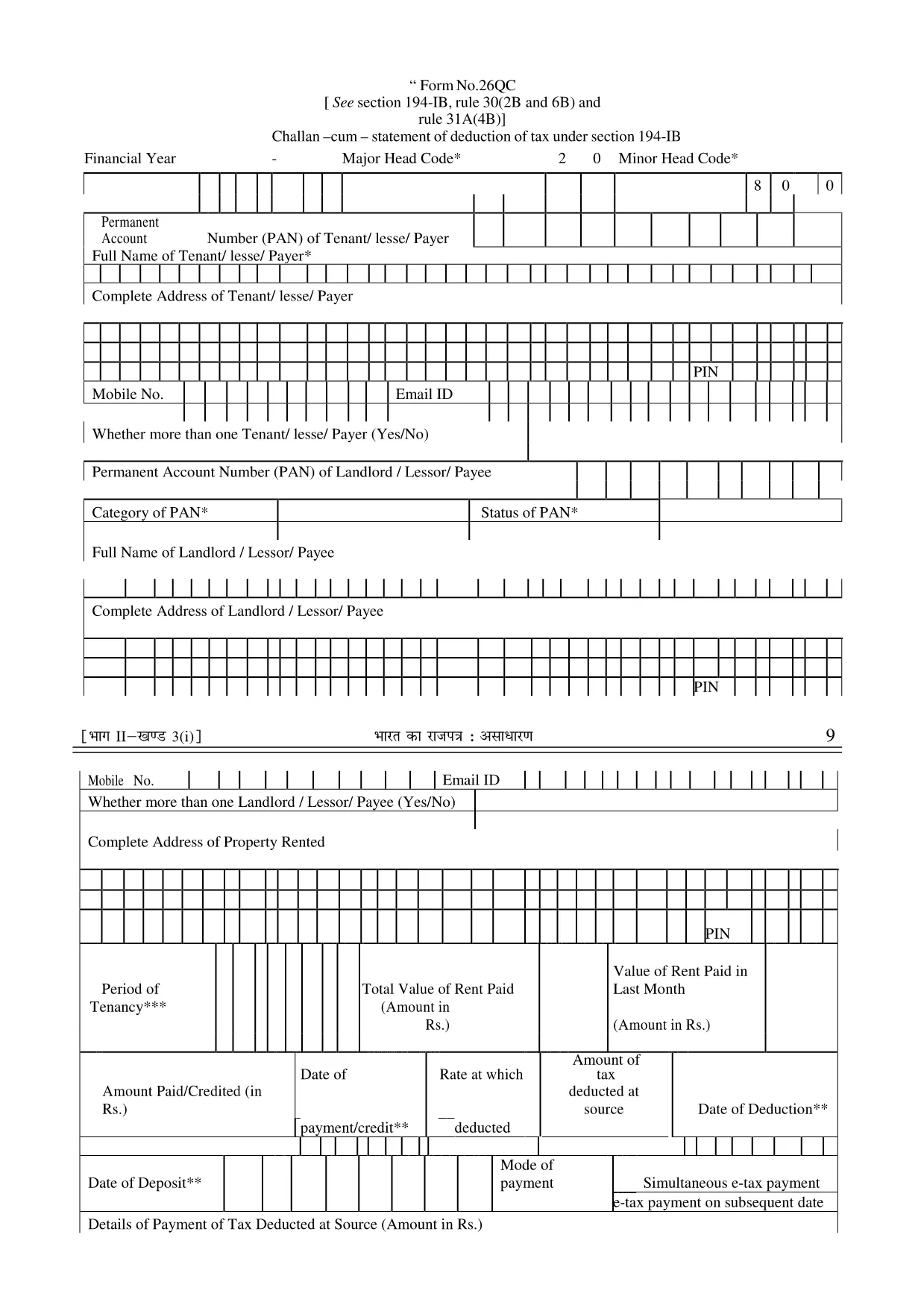
Form 26QC – Fillable PDF for TDS Section 194‑IB

  1. ภาษา ภาษาอังกฤษ
  2. ประเทศ อินเดีย
  3. กิจกรรม ภาษี
Form 26QC – Fillable PDF for TDS Section 194‑IB

Form 26QC is the official challan‑cum‑statement used to report tax deducted at source (TDS) under Section 194‑IB of the Indian Income Tax Act. It is required when you deduct tax on payments made to non‑resident individuals or foreign companies for services rendered in India.

What is Form 26QC?

This form consolidates details of the deductor, deductee, and the TDS amount. It must be filed electronically through the TDS portal and is a prerequisite for generating the TDS certificate (Form 16A).

How to Fill Form 26QC Online

Instead of downloading and editing the PDF manually, simply click the "Fill out this form" button on this page. The Formize PDF Filler app will load in your browser, allowing you to complete every field directly online.

Common Mistakes to Avoid

  • Entering the wrong PAN of the deductee – always double‑check the 10‑digit number.
  • Missing the deductor’s TAN – the form will be rejected without it.
  • Incorrect financial year format – use the FY as "2024‑25".
  • Leaving the "Nature of Payment" blank – select the correct category from the drop‑down.

Download & Save the Fillable PDF

If you prefer an offline copy, you can download the original fillable PDF from the link below. The file is fully editable and compatible with any PDF reader.

Where to Submit the Completed Form

After filling the form, submit it through the TDS Reconciliation Portal. Keep a copy of the acknowledgment for your records.

คำถามที่พบบ่อย
  • Who needs to file Form 26QC?

    Any deductor who withholds tax on payments to non‑resident individuals or foreign entities under Section 194‑IB must file Form 26QC.

  • What is the deadline for filing Form 26QC?

    Form 26QC must be filed by the 15th day of the month following the month in which the TDS was deducted.

  • Can I print the filled form after using Formize?

    Yes. Once you have completed the form online, you can download a printable PDF version.

  • Do I need a digital signature on Form 26QC?

    A digital signature is not mandatory for Form 26QC, but the form must be submitted through the authorized TDS portal.

  • Is there a fee to use the Formize PDF Filler?

    No. Formize provides a free, secure online filler for this form.

  • What should I do if I make a mistake after submission?

    You can file a corrected Form 26QC within the same financial year, referencing the original acknowledgment number.

  • Is Form 26QC the same as Form 26QB?

    No. Form 26QB is for TDS on securities transactions, while Form 26QC is specific to Section 194‑IB deductions.

  • Can I use the same form for multiple deductees?

    Each deductor‑deductee transaction requires a separate entry within the same Form 26QC file.

ทำอย่างไร

วิธีกรอก Form 26QC ฟรีทางออนไลน์ใน 5 ขั้นตอนง่ายๆ:

  1. 1
    Click the Fill Button
    Press the "Fill out this form" button on the page. The Formize PDF Filler will open in a new tab.
  2. 2
    Wait for the Filler to Load
    Give the app a few seconds to initialize. All form fields will become editable.
  3. 3
    Enter All Required Details
    Complete each section – deductor information, deductee PAN, payment details, and TDS amount.
  4. 4
    Validate and Review
    Use the built‑in validation to check for missing or incorrect entries, then review the completed form.
  5. 5
    Save or Submit
    Download the filled PDF for your records or directly upload it to the TDS portal as required.
สร้างแอป PDF Filler
เกี่ยวกับ

แบบฟอร์มกรมสรรพากร

Form 26QC เป็นหนึ่งในแบบฟอร์มอย่างเป็นทางการที่กรมภาษีเงินได้ของอินเดียใช้เพื่อจัดการและเก็บภาษีเงินได้ ผู้เสียภาษีใช้แบบฟอร์มเหล่านี้เพื่อรายงานรายได้ การหักเงิน และความรับผิดทางภาษีต่อหน่วยงานด้านภาษี

แบบฟอร์มกรมสรรพากรที่ใช้กันทั่วไปในอินเดียมีดังนี้

ITR-1 (Sahaj): แบบฟอร์มนี้ใช้โดย บุคคลที่มีรายได้จากเงินเดือน บ้านหลังหนึ่ง และแหล่งอื่นๆ เช่น ดอกเบี้ย เงินบำนาญ หรือเงินบำนาญของครอบครัว ใช้ได้กับบุคคลที่มีรายได้รวมไม่เกิน 3,000 บาท 50 แสน.

ITR-2: แบบฟอร์มนี้ใช้โดยบุคคลธรรมดาและชาวฮินดู ครอบครัวที่ไม่มีการแบ่งแยก (HUF) ที่มีรายได้จากแหล่งอื่นที่ไม่ใช่ธุรกิจหรือวิชาชีพ ใช้ได้กับบุคคลที่มีรายได้รวมเกิน 3,000 บาทขึ้นไป 50 แสน หรือมีสินทรัพย์/รายได้ต่างประเทศ

ITR-3: แบบฟอร์มนี้ใช้โดยบุคคลและ HUF มีรายได้จากธุรกิจหรือวิชาชีพ ใช้ได้กับบุคคลที่มีรายได้จากบริษัทหุ้นส่วนและผู้ประกอบอาชีพที่ประกอบวิชาชีพ

ITR-4 (Sugam): แบบฟอร์มนี้ใช้โดย บุคคล HUF และบริษัท (นอกเหนือจาก LLP) ที่ได้เลือกใช้โครงการจัดเก็บภาษีแบบสันนิษฐานภายใต้มาตรา 44AD, 44ADA หรือ 44AE ของพระราชบัญญัติภาษีเงินได้

แบบฟอร์ม 16: แบบฟอร์มนี้จัดทำโดยนายจ้างให้กับลูกจ้างและมีรายละเอียด ของเงินเดือน การหักภาษี ณ ที่จ่าย (TDS) และข้อมูลอื่นๆ ที่เกี่ยวข้อง ช่วยให้พนักงานยื่นแบบแสดงรายการภาษีเงินได้ได้อย่างถูกต้องแม่นยำ

แบบฟอร์ม 26AS: นี่ไม่ใช่แบบฟอร์ม แต่เป็นใบแจ้งยอดภาษีรวมประจำปี ที่ให้ข้อมูลสรุปเกี่ยวกับภาษี เช่น TDS ภาษีล่วงหน้า และภาษีการประเมินตนเองที่ผู้เสียภาษีจ่าย ช่วยให้ผู้เสียภาษีตรวจสอบหนี้สินภาษีของตนในขณะที่ยื่นแบบแสดงรายการภาษีเงินได้

นี่เป็นเพียงตัวอย่างเล็กๆ น้อยๆ ของแบบฟอร์มกรมสรรพากรในอินเดีย แบบฟอร์มและข้อกำหนดเฉพาะอาจแตกต่างกันไปขึ้นอยู่กับลักษณะของรายได้ หมวดหมู่ของผู้เสียภาษี และกฎหมายภาษีที่ใช้บังคับในอินเดีย สิ่งสำคัญคือต้องปรึกษาเว็บไซต์อย่างเป็นทางการของกรมภาษีเงินได้ของอินเดีย (www.incometaxindia.gov.in) หรือขอคำแนะนำจากผู้เชี่ยวชาญเพื่อรับข้อมูลที่ถูกต้องและเป็นปัจจุบันเกี่ยวกับ แบบฟอร์มภาษีเงินได้เฉพาะที่เกี่ยวข้องกับสถานการณ์ภาษีของคุณในอินเดีย

คุณสมบัติ

PDF ฟิลเลอร์

วิธีที่ง่ายที่สุดในการกรอกแบบฟอร์ม PDF ทางออนไลน์

  • กรอก Form 26QC อย่างรวดเร็ว
    กำลังมองหาวิธีเติม Form 26QC ทางออนไลน์อย่างรวดเร็วอยู่ใช่ไหม ด้วยตัวกรอกแบบฟอร์ม PDF ออนไลน์ฟรีของเรา คุณจะรู้วิธีแก้ไขและกรอกเอกสาร PDF นี้ในเวลาไม่ถึงนาที
  • โปรแกรมแก้ไข PDF ออนไลน์ที่ใช้งานง่าย
    เบื่อกับการพิมพ์ไฟล์ PDF เพื่อให้คุณสามารถแก้ไขได้ก่อนที่จะสแกนซ้ำและส่งกลับหรือไม่? แก้ไขเอกสาร PDF ออนไลน์ฟรี ใช้โปรแกรมแก้ไข PDF ออนไลน์ของเราเพื่อประหยัดเวลาและกระดาษ
  • เครื่องมือที่ยอดเยี่ยมสำหรับทุกแพลตฟอร์ม
    สงสัยวิธีเติม Form 26QC บน Mac หรืออาจใช้ตัวเติม PDF ฟรีได้อย่างไร เครื่องมือ PDF ออนไลน์ของเราทำงานได้บนทุกแพลตฟอร์ม
  • การจัดเก็บไฟล์ที่ปลอดภัย
    ไฟล์ "Form 26QC" ที่เสร็จสมบูรณ์จะถูกจัดเก็บไว้ในฐานข้อมูลที่ปลอดภัยซึ่งจัดการโดย Amazon Cloud hosting คุณสามารถลบไฟล์ของคุณออกจากระบบของเราได้ตลอดเวลา ไม่ว่าในกรณีใด ไฟล์เหล่านี้จะถูกลบโดยอัตโนมัติหลังจากผ่านไป 24 ชั่วโมง
  • สนทนากับ Form 26QC
    แชทกับ "Form 26QC" บน Chatize ที่เป็นผู้ช่วยอ่าน PDF ฟรี ถามคำถามและรับคำตอบจาก "Form 26QC" เพียงคลิกที่ปุ่ม แชทด้วยเอกสาร ด้านบน

ลบเซสชันการบรรจุ

ลบเซสชันการกรอกข้อมูลที่เลือกหรือไม่?ในกรณีนี้ความคืบหน้าในการกรอกแบบฟอร์มจะหายไป

ลบเซสชันการแก้ไข

ลบเซสชันการแก้ไขที่เลือกหรือไม่ ในกรณีนี้ ความคืบหน้าในการสร้างและแก้ไขแบบฟอร์มจะหายไป