hamburger-menu icon
เลือกภาษา

Anganwadi Application Form – Fill Online Instantly

  1. ประเทศ อินเดีย
  2. ภาษา ภาษาอังกฤษ
  3. แผนก Women and Child Development
  4. กิจกรรม Child Development
กรอกแบบฟอร์มนี้
Anganwadi Application Form – Fill Online Instantly

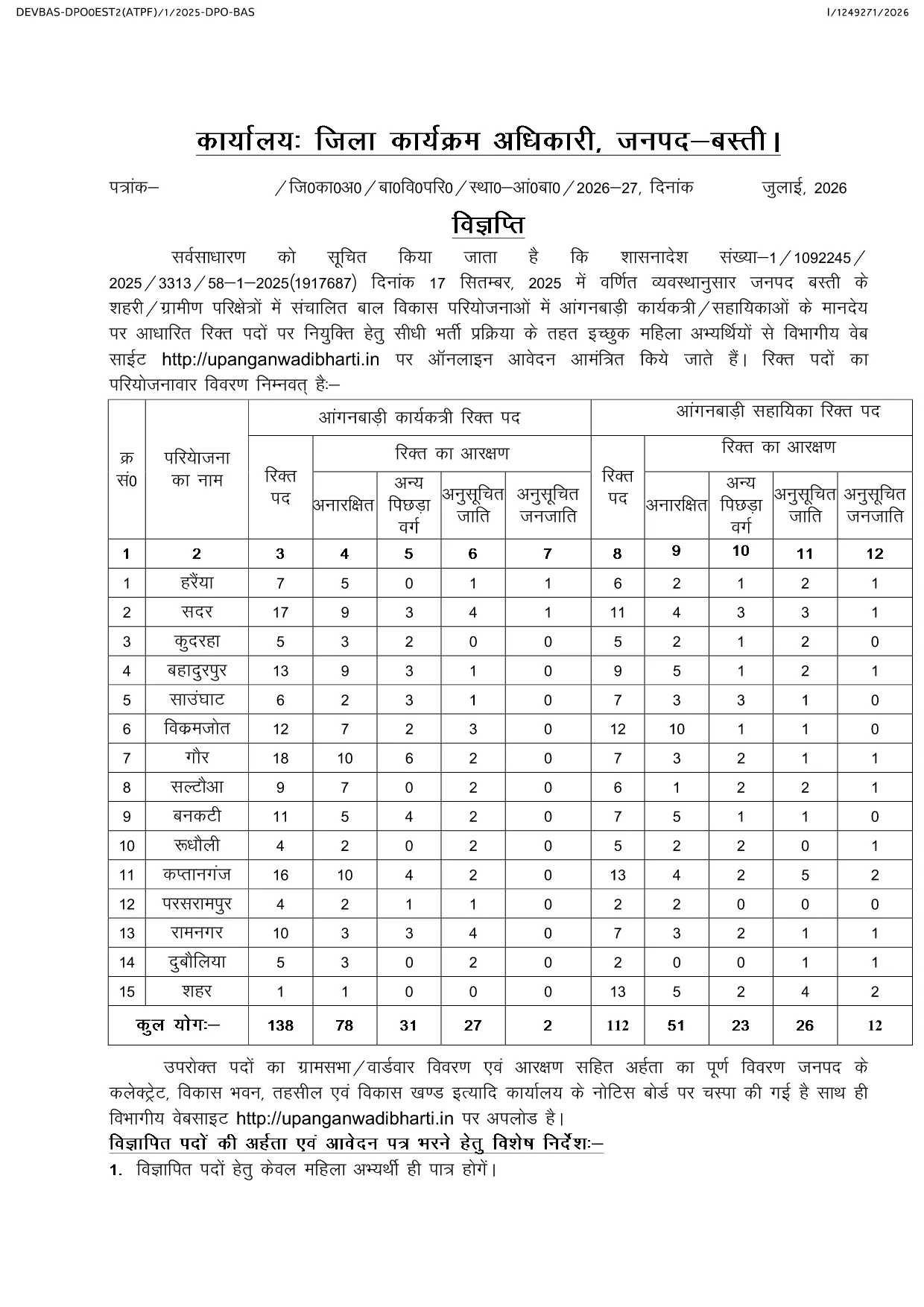
Looking for the official Anganwadi application form for the latest recruitment cycle? Formize lets you open the PDF directly in your browser, fill every field, and submit without ever downloading or printing. The form is fully compatible with the Uttar Pradesh Anganwadi Worker Bharti 2026 notification and follows the Integrated Child Development Services (ICDS) guidelines.

Why Choose Formize for Anganwadi Forms

  • Instant loading of the official PDF – no extra software required.
  • All fields are editable and auto‑saved while you work.
  • Secure, browser‑based filling keeps your personal data private.
  • One‑click download of the completed PDF for submission.

How to Complete the Anganwadi Application Online

Simply click the "Fill out this form" button below. The Formize PDF Filler app will load the document, and you can start entering your details right away.

Eligibility & Required Documents

Before you begin, make sure you meet the basic criteria and have the following documents ready:

  • Age between 18 and 35 years (relaxations applicable as per UP government rules).
  • Minimum educational qualification: 10+2 or equivalent.
  • Proof of residence in the village/ward you are applying for.
  • Recent passport‑size photograph, signature, and scanned ID proof.

Common Mistakes to Avoid

  • Leaving mandatory fields blank – the form will not submit.
  • Uploading photos that do not meet size or format requirements.
  • Entering incorrect village or ward codes – double‑check the official notification.
  • Failing to review the preview before final submission.

Ready to start? Click the button below, fill out the form, and submit your application with confidence.

คำถามที่พบบ่อย
  • Is there any fee to fill the Anganwadi application form online?

    No. The Anganwadi application form is completely free to fill and download using Formize.

  • Can I edit the form after I have downloaded it?

    Yes. The PDF remains fully editable, but it is recommended to complete and review the form before the first download to avoid errors.

  • What file formats are accepted for photo and signature uploads?

    Upload JPG or PNG images. The maximum file size is 200 KB for each image.

  • Do I need a PDF reader to use Formize?

    No. Formize works entirely in the browser, so you do not need any additional PDF software.

  • How can I be sure my data is secure?

    All data is processed locally in your browser and never stored on our servers unless you choose to download the completed PDF.

  • What should I do if I encounter an error while filling the form?

    Refresh the page and reopen the form. If the problem persists, clear your browser cache or try a different browser.

  • When is the last date to submit the Anganwadi application?

    The last date varies by district. Refer to the official notification linked on the page for the exact deadline for your district.

ทำอย่างไร

วิธีกรอก Anganwadi application form ฟรีทางออนไลน์ใน 4 ขั้นตอนง่ายๆ:

  1. 1
    Open the Form
    Click the "Fill out this form" button on the page. The Formize PDF Filler app will load the Anganwadi application PDF directly in your browser.
  2. 2
    Enter Your Details
    Complete each field—personal information, education, residence, and upload your photo and signature. All changes are saved automatically.
  3. 3
    Review & Validate
    Use the preview function to double‑check every entry. Ensure all mandatory fields are filled and documents meet the size requirements.
  4. 4
    Download & Submit
    After confirming the preview, click the download button to save the filled PDF. Submit the file according to the instructions in the official notification.
สร้างแอป PDF Filler
เกี่ยวกับ

เทมเพลต Anganwadi application form

ด้วยชุดคุณสมบัติดั้งเดิมสำหรับการดูและกรอกเอกสาร PDF รวมกับประโยชน์ของเว็บแอปพลิเคชันและเค้าโครงที่ตอบสนอง คุณสามารถสร้าง Anganwadi application form ให้เสร็จภายในไม่กี่นาที

คุณสมบัติ

PDF ฟิลเลอร์

วิธีที่ง่ายที่สุดในการกรอกแบบฟอร์ม PDF ทางออนไลน์

  • กรอก Anganwadi application form อย่างรวดเร็ว
    กำลังมองหาวิธีเติม Anganwadi application form ทางออนไลน์อย่างรวดเร็วอยู่ใช่ไหม ด้วยตัวกรอกแบบฟอร์ม PDF ออนไลน์ฟรีของเรา คุณจะรู้วิธีแก้ไขและกรอกเอกสาร PDF นี้ในเวลาไม่ถึงนาที
  • โปรแกรมแก้ไข PDF ออนไลน์ที่ใช้งานง่าย
    เบื่อกับการพิมพ์ไฟล์ PDF เพื่อให้คุณสามารถแก้ไขได้ก่อนที่จะสแกนซ้ำและส่งกลับหรือไม่? แก้ไขเอกสาร PDF ออนไลน์ฟรี ใช้โปรแกรมแก้ไข PDF ออนไลน์ของเราเพื่อประหยัดเวลาและกระดาษ
  • เครื่องมือที่ยอดเยี่ยมสำหรับทุกแพลตฟอร์ม
    สงสัยวิธีเติม Anganwadi application form บน Mac หรืออาจใช้ตัวเติม PDF ฟรีได้อย่างไร เครื่องมือ PDF ออนไลน์ของเราทำงานได้บนทุกแพลตฟอร์ม
  • การจัดเก็บไฟล์ที่ปลอดภัย
    ไฟล์ "Anganwadi application form" ที่เสร็จสมบูรณ์จะถูกจัดเก็บไว้ในฐานข้อมูลที่ปลอดภัยซึ่งจัดการโดย Amazon Cloud hosting คุณสามารถลบไฟล์ของคุณออกจากระบบของเราได้ตลอดเวลา ไม่ว่าในกรณีใด ไฟล์เหล่านี้จะถูกลบโดยอัตโนมัติหลังจากผ่านไป 24 ชั่วโมง
  • สนทนากับ Anganwadi application form
    แชทกับ "Anganwadi application form" บน Chatize ที่เป็นผู้ช่วยอ่าน PDF ฟรี ถามคำถามและรับคำตอบจาก "Anganwadi application form" เพียงคลิกที่ปุ่ม แชทด้วยเอกสาร ด้านบน

ลบเซสชันการบรรจุ

ลบเซสชันการกรอกข้อมูลที่เลือกหรือไม่?ในกรณีนี้ความคืบหน้าในการกรอกแบบฟอร์มจะหายไป

ลบเซสชันการแก้ไข

ลบเซสชันการแก้ไขที่เลือกหรือไม่ ในกรณีนี้ ความคืบหน้าในการสร้างและแก้ไขแบบฟอร์มจะหายไป