
hamburger-menu icon
เลือกภาษา

Form 1040‑NR Schedule NEC (SP) – Fillable PDF

  1. ประเทศ สหรัฐอเมริกา
  2. ภาษา สเปน
  3. กิจกรรม ภาษี
  4. แผนก สรรพากรพื้นที่
Form 1040‑NR Schedule NEC (SP) – Fillable PDF

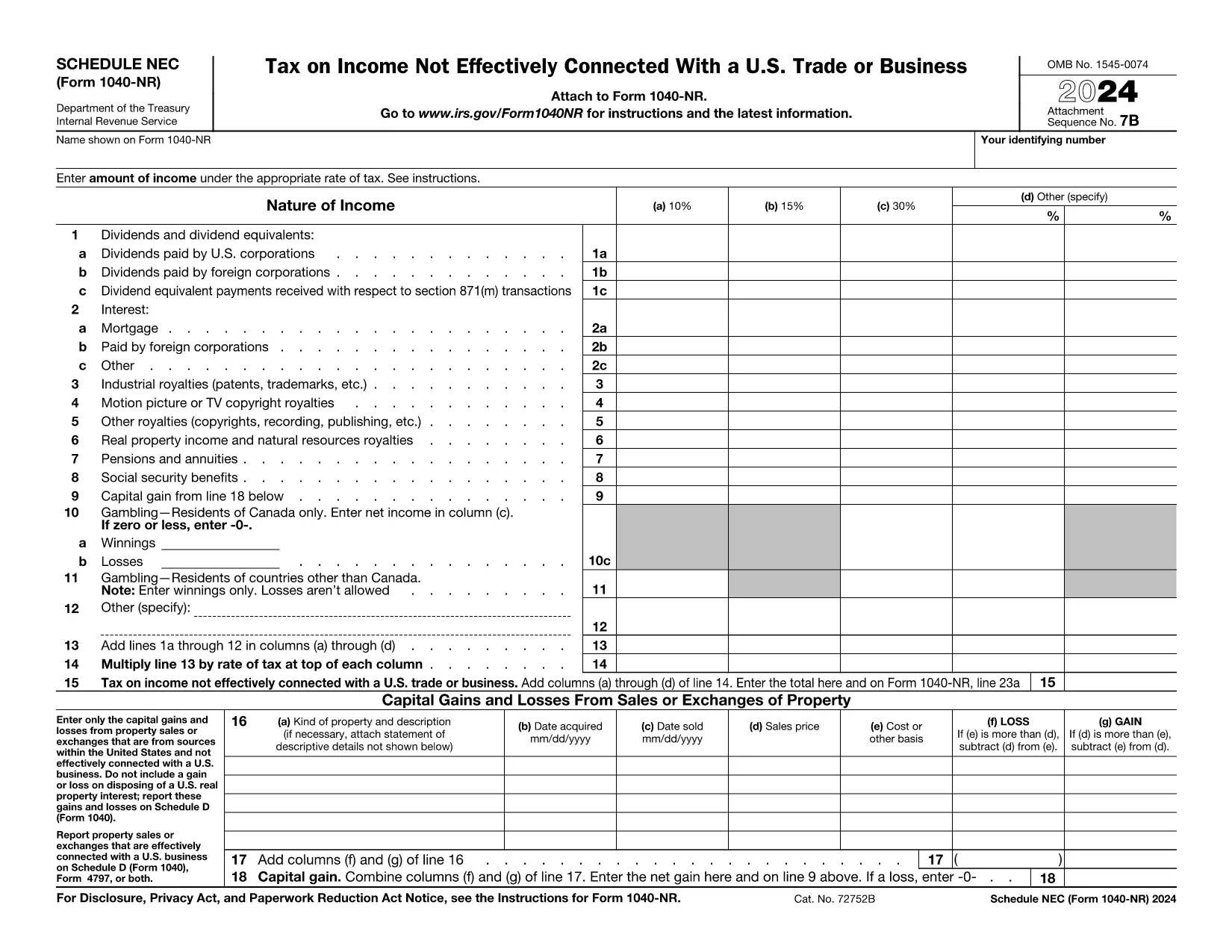
The Schedule NEC (SP) is the supplemental page attached to the Form 1040‑NR that reports income not effectively connected with a U.S. trade or business (non‑ECI). It is used by nonresident aliens to calculate the tax on U.S. source income such as dividends, interest, and certain capital gains.

This page lets you access a fillable PDF version of Schedule NEC (SP) that works directly with Formize’s online PDF Filler. No extra software is required – simply click the button, fill in your numbers, and download the completed form.

What Is Schedule NEC (SP)?

Schedule NEC (SP) separates taxable U.S. source income into three rate columns (10 %, 15 %, 30 % or a treaty‑adjusted rate). Each line corresponds to a specific type of income, allowing you to apply the correct withholding or treaty rate before the total is carried to Form 1040‑NR.

How to Fill Out Schedule NEC (SP) Online

Using Formize’s PDF filler, the process is streamlined:

  • Enter your personal information at the top of the form.
  • Select the appropriate tax‑rate column for each income item.
  • Enter the dollar amount for each line (dividends, interest, royalties, etc.).
  • The filler automatically totals each column and calculates the overall tax liability.
  • Save or download the completed PDF to attach to your Form 1040‑NR filing.

Common Mistakes to Avoid

  • Mixing ECI with non‑ECI income: Only non‑effectively connected items belong on Schedule NEC.
  • Using the wrong tax‑rate column: Verify treaty rates before selecting columns (a‑d).
  • Leaving lines blank: Even a $0 entry should be entered to keep the form complete.
  • Forgetting to attach Schedule NEC to Form 1040‑NR: The Schedule is not filed separately.

Where to Find Tax Treaty Information

The IRS maintains a list of current U.S. tax treaties. Visit the IRS Tax Treaties page to confirm the reduced rate or exemption that applies to your country of residence.

Download the Fillable PDF

Ready to start? Click the button below, let Formize load the fillable version of Schedule NEC (SP), and complete your non‑resident tax reporting in minutes.

คำแนะนำ

คำถามที่พบบ่อย
  • Who must file Schedule NEC (SP) with Form 1040‑NR?

    Any nonresident alien who has U.S. source income that is not effectively connected with a U.S. trade or business must report that income on Schedule NEC (SP).

  • What is the difference between columns (a)–(d) on the schedule?

    Columns (a)–(c) represent the standard 10 %, 15 %, and 30 % tax rates. Column (d) is for a treaty‑adjusted rate or another special rate specified by a tax treaty.

  • Can I use the same PDF for the 2023 and 2024 tax years?

    The Schedule NEC layout changes only rarely. Verify the year on the PDF header; the linked fillable version is the most recent version available.

  • Do I need to attach supporting documents for each income line?

    Generally, you do not attach separate documents to Schedule NEC, but keep the source statements (e.g., 1099‑INT, 1099‑DIV) in case the IRS requests verification.

  • How do I know which treaty rate applies to me?

    Check the IRS “U.S. Tax Treaties” webpage for the treaty between the United States and your country of residence. The treaty will specify reduced rates or exemptions for each type of income.

  • Is the fillable PDF compatible with Mac and Windows?

    Yes. Formize’s online filler works in all modern browsers on macOS, Windows, and Linux without additional software.

ทำอย่างไร

วิธีกรอก Form 1040-NR Schedule NEC ฟรีทางออนไลน์ใน 5 ขั้นตอนง่ายๆ:

  1. 1
    Open the Fillable Form
    Click the “Fill out this form” button on the page. The Formize PDF Filler will open in a new window.
  2. 2
    Wait for the Filler to Load
    A brief loading screen appears while the fillable PDF is prepared. This only takes a few seconds.
  3. 3
    Enter Your Information
    Type your personal details and income amounts directly into the fields. The filler automatically formats numbers and totals columns.
  4. 4
    Review and Save
    Double‑check all entries, then click “Save” or “Download” to obtain the completed Schedule NEC (SP) PDF.
  5. 5
    Attach to Form 1040‑NR
    Print or electronically attach the finished Schedule NEC to your Form 1040‑NR when filing your U.S. nonresident tax return.
สร้างแอป PDF Filler
เกี่ยวกับ

แบบฟอร์มภาษี

Form 1040-NR Schedule NEC เป็นหนึ่งในแบบฟอร์มภาษีที่เป็นเอกสารที่ใช้ในการรายงานข้อมูลที่เกี่ยวข้องกับภาษีไปยังหน่วยงานด้านภาษีที่เกี่ยวข้อง มีแบบฟอร์มภาษีหลายประเภท รวมถึงแบบฟอร์มภาษีของรัฐบาลกลาง รัฐ และท้องถิ่น ซึ่งอาจแตกต่างกันไปขึ้นอยู่กับสถานการณ์และสถานที่ของผู้เสียภาษี

คุณสมบัติ

PDF ฟิลเลอร์

วิธีที่ง่ายที่สุดในการกรอกแบบฟอร์ม PDF ทางออนไลน์

  • กรอก Form 1040-NR Schedule NEC อย่างรวดเร็ว
    กำลังมองหาวิธีเติม Form 1040-NR Schedule NEC ทางออนไลน์อย่างรวดเร็วอยู่ใช่ไหม ด้วยตัวกรอกแบบฟอร์ม PDF ออนไลน์ฟรีของเรา คุณจะรู้วิธีแก้ไขและกรอกเอกสาร PDF นี้ในเวลาไม่ถึงนาที
  • โปรแกรมแก้ไข PDF ออนไลน์ที่ใช้งานง่าย
    เบื่อกับการพิมพ์ไฟล์ PDF เพื่อให้คุณสามารถแก้ไขได้ก่อนที่จะสแกนซ้ำและส่งกลับหรือไม่? แก้ไขเอกสาร PDF ออนไลน์ฟรี ใช้โปรแกรมแก้ไข PDF ออนไลน์ของเราเพื่อประหยัดเวลาและกระดาษ
  • เครื่องมือที่ยอดเยี่ยมสำหรับทุกแพลตฟอร์ม
    สงสัยวิธีเติม Form 1040-NR Schedule NEC บน Mac หรืออาจใช้ตัวเติม PDF ฟรีได้อย่างไร เครื่องมือ PDF ออนไลน์ของเราทำงานได้บนทุกแพลตฟอร์ม
  • การจัดเก็บไฟล์ที่ปลอดภัย
    ไฟล์ "Form 1040-NR Schedule NEC" ที่เสร็จสมบูรณ์จะถูกจัดเก็บไว้ในฐานข้อมูลที่ปลอดภัยซึ่งจัดการโดย Amazon Cloud hosting คุณสามารถลบไฟล์ของคุณออกจากระบบของเราได้ตลอดเวลา ไม่ว่าในกรณีใด ไฟล์เหล่านี้จะถูกลบโดยอัตโนมัติหลังจากผ่านไป 24 ชั่วโมง
  • สนทนากับ Form 1040-NR Schedule NEC
    แชทกับ "Form 1040-NR Schedule NEC" บน Chatize ที่เป็นผู้ช่วยอ่าน PDF ฟรี ถามคำถามและรับคำตอบจาก "Form 1040-NR Schedule NEC" เพียงคลิกที่ปุ่ม แชทด้วยเอกสาร ด้านบน

ลบเซสชันการบรรจุ

ลบเซสชันการกรอกข้อมูลที่เลือกหรือไม่?ในกรณีนี้ความคืบหน้าในการกรอกแบบฟอร์มจะหายไป

ลบเซสชันการแก้ไข

ลบเซสชันการแก้ไขที่เลือกหรือไม่ ในกรณีนี้ ความคืบหน้าในการสร้างและแก้ไขแบบฟอร์มจะหายไป