
hamburger-menu icon
เลือกภาษา

Form 1040 Schedule 1 – Fillable PDF

  1. ประเทศ สหรัฐอเมริกา
  2. ภาษา ภาษาอังกฤษ
  3. กิจกรรม ภาษี
  4. แผนก สรรพากรพื้นที่
Form 1040 Schedule 1 – Fillable PDF

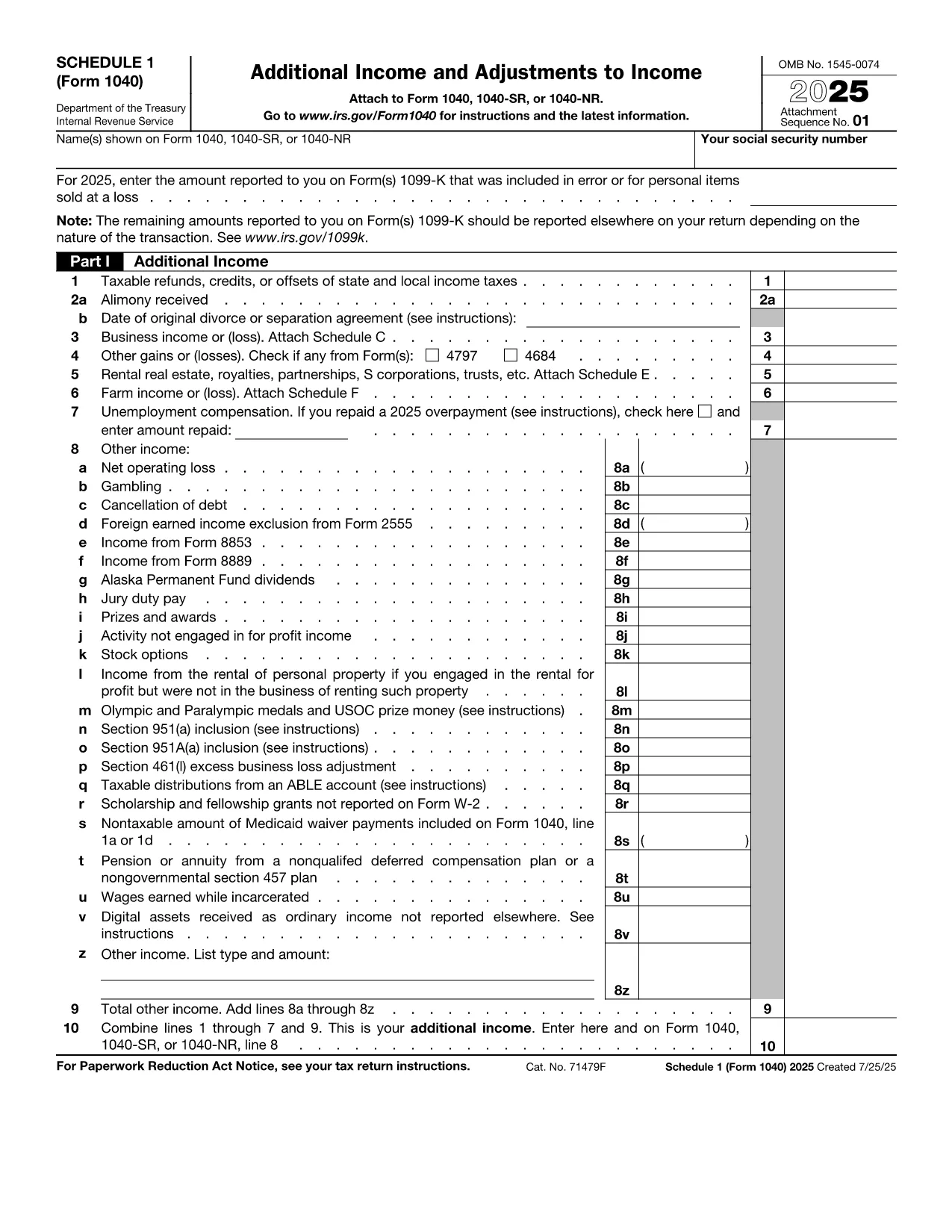
The IRS Form 1040 Schedule 1 is an essential supplement to the main U.S. Individual Income Tax Return (Form 1040). It captures additional income, adjustments to income, and certain credits that don’t fit on the primary form. With Formize’s fillable PDF, you can complete Schedule 1 directly in your browser—no extra software required.

What Is Form 1040 Schedule 1?

Schedule 1 (Form 1040) reports:

  • Business income or loss (self‑employment)
  • Rental real estate, royalties, partnerships, S corporations, trusts
  • Unemployment compensation, alimony received, and other income
  • Adjustments such as educator expenses, student loan interest, and IRA contributions

Filling this schedule accurately can lower your taxable income and increase your refund.

How to Complete the Fillable PDF on Formize

Follow the simple steps below to finish Schedule 1 online:

  1. Click the "Fill out this form" button on this page.
  2. Wait a few seconds while the Formize PDF Filler app loads the fillable version of Schedule 1.
  3. Enter your information in each field. The interface highlights required fields and validates numbers in real time.
  4. When you’re done, press Save & Download to get a completed PDF you can print or attach to your electronic filing.

Common Mistakes to Avoid

Even with a fillable form, errors can happen. Keep an eye out for these frequent pitfalls:

  • Leaving required fields blank – the Formize validator will flag them before you download.
  • Mismatching line numbers between Schedule 1 and the main Form 1040.
  • Using the wrong tax year version – always verify the year on the PDF header.
  • Forgetting signatures – the signature line must be signed by hand after printing.

Where to Submit Your Completed Form

After downloading the filled PDF, you can:

  • Attach it to your electronic filing through approved tax software.
  • Print, sign, and mail it with the rest of your Form 1040 package.

Make sure to keep a copy for your records.

คำแนะนำ

  • Form 1040 และ 1040-SR Instructions - การ สั่ง สอน สําหรับ Form 1040 หรือ Form 1040-SR, การคืนภาษีรายบุคคลสหรัฐ
คำถามที่พบบ่อย
  • Who must file Form 1040 Schedule 1?

    Anyone who has additional income, adjustments, or credits not reported on the main Form 1040 must attach Schedule 1. This includes self‑employment income, unemployment compensation, and certain deductions.

  • Can I file Schedule 1 electronically?

    Yes. Most tax software accepts the filled PDF as part of an electronic submission. Ensure you sign the final Form 1040 by hand after printing, if required.

  • What is the deadline for filing Schedule 1?

    Schedule 1 follows the same deadline as Form 1040 – typically April 15 of the year following the tax year, with extensions available until October 15.

  • Do I need a PDF reader to use the fillable form?

    No. The Formize filler runs entirely in your browser, so you don’t need Adobe Acrobat or any other PDF reader to complete the form.

  • Is the fillable PDF free to use?

    Yes. Formize provides the fillable version of Schedule 1 at no cost. You only pay if you choose premium services, which are optional.

  • What should I do if I make a mistake after downloading?

    You can reopen the saved PDF in any PDF editor, correct the fields, and re‑download. For major errors, it’s often easier to start a new fillable session.

ทำอย่างไร

วิธีกรอก Form 1040 Schedule 1 ฟรีทางออนไลน์ใน 4 ขั้นตอนง่ายๆ:

  1. 1
    Click the Fill‑out Button
    Press the "Fill out this form" button on the page to launch the Formize PDF Filler.
  2. 2
    Wait for the Filler to Load
    A short loading screen appears while the fillable Schedule 1 PDF is prepared in the browser.
  3. 3
    Enter Your Information
    Complete each highlighted field. Required fields are marked with an asterisk and validated instantly.
  4. 4
    Save and Download
    When all data is entered, click "Save & Download" to obtain a completed PDF ready for printing or electronic filing.
สร้างแอป PDF Filler
เกี่ยวกับ

แบบฟอร์มภาษี

Form 1040 Schedule 1 เป็นหนึ่งในแบบฟอร์มภาษีที่เป็นเอกสารที่ใช้ในการรายงานรายได้ การหักเงิน และความรับผิดทางภาษีไปยังหน่วยงานด้านภาษีที่เกี่ยวข้อง แบบฟอร์มเหล่านี้เป็นส่วนสำคัญของกระบวนการยื่นภาษีและใช้เพื่อให้แน่ใจว่าบุคคลและธุรกิจปฏิบัติตามกฎหมายภาษีและคำนวณภาระผูกพันทางภาษีได้อย่างถูกต้อง

แบบฟอร์มภาษีเฉพาะที่กำหนดอาจแตกต่างกันไปขึ้นอยู่กับปัจจัยต่างๆ เช่น สถานะการยื่นภาษีของแต่ละบุคคล แหล่งที่มาของรายได้ และกฎหมายภาษีของประเทศ อย่างไรก็ตาม แบบฟอร์มภาษีบางประเภททั่วไปมีดังนี้:

แบบฟอร์มภาษีเงินได้บุคคลธรรมดา: มีการใช้แบบฟอร์มเหล่านี้ เช่น 1040 series ในสหรัฐอเมริกา โดยบุคคลเพื่อรายงานรายได้ เรียกร้องการหักเงินและเครดิต และคำนวณภาระภาษี

แบบฟอร์มภาษีธุรกิจ: ธุรกิจต่างๆ รวมถึงการเป็นเจ้าของแต่เพียงผู้เดียว ห้างหุ้นส่วน บริษัท และบุคคลที่ประกอบอาชีพอิสระ อาจต้องยื่นแบบฟอร์มต่างๆ เพื่อรายงานรายได้ ค่าใช้จ่าย และภาษีที่ค้างชำระ ตัวอย่าง ได้แก่ Schedule C (กำไรหรือขาดทุนจากธุรกิจ) และ แบบฟอร์ม 1120 (การคืนภาษีเงินได้นิติบุคคลของสหรัฐอเมริกา)

แบบฟอร์มภาษีการจ้างงาน: นายจ้างจะต้องรายงานค่าจ้างของลูกจ้าง ตลอดจนหักภาษี ณ ที่จ่ายและนำส่งภาษีเงินเดือน แบบฟอร์มต่างๆ เช่น W-2 (ใบแจ้งยอดค่าจ้างและภาษี) และ 941 (การคืนภาษีของรัฐบาลกลางรายไตรมาสของนายจ้าง) ใช้เพื่อจุดประสงค์นี้

แบบฟอร์มบัญชีการลงทุนและการเกษียณอายุ: แบบฟอร์มเหล่านี้ใช้เพื่อรายงานรายได้จากการลงทุน กำไรจากการลงทุน และการขาดทุน ตลอดจนเงินสมทบและการจัดสรรจากบัญชีการเกษียณอายุ ตัวอย่าง ได้แก่ แบบฟอร์ม 1099-DIV (เงินปันผลและการแจกแจง) และ แบบฟอร์ม 5498 (ข้อมูลการบริจาคของ IRA)

แบบฟอร์มภาษีอสังหาริมทรัพย์และของขวัญ: เมื่อบุคคลเสียชีวิตหรือให้ของขวัญที่สำคัญ แบบฟอร์มเฉพาะ เช่น แบบฟอร์ม 706 (การคืนภาษีอสังหาริมทรัพย์ของสหรัฐอเมริกา (และการโอนรุ่นข้าม)) และ แบบฟอร์ม 709 (ของขวัญของสหรัฐอเมริกา (และรุ่น- การข้ามการโอน) การคืนภาษี) ใช้เพื่อรายงานและคำนวณภาษีทรัพย์สินหรือภาษีของขวัญที่เกี่ยวข้อง

โปรดทราบว่ากฎหมายและแบบฟอร์มภาษีสามารถเปลี่ยนแปลงได้ตลอดเวลา ดังนั้นบุคคลและธุรกิจควรปรึกษาหน่วยงานด้านภาษีที่เกี่ยวข้องหรือขอคำแนะนำด้านภาษีจากผู้เชี่ยวชาญเพื่อให้แน่ใจว่าปฏิบัติตามข้อกำหนดในปัจจุบัน

คุณสมบัติ

PDF ฟิลเลอร์

วิธีที่ง่ายที่สุดในการกรอกแบบฟอร์ม PDF ทางออนไลน์

  • กรอก Form 1040 Schedule 1 อย่างรวดเร็ว
    กำลังมองหาวิธีเติม Form 1040 Schedule 1 ทางออนไลน์อย่างรวดเร็วอยู่ใช่ไหม ด้วยตัวกรอกแบบฟอร์ม PDF ออนไลน์ฟรีของเรา คุณจะรู้วิธีแก้ไขและกรอกเอกสาร PDF นี้ในเวลาไม่ถึงนาที
  • โปรแกรมแก้ไข PDF ออนไลน์ที่ใช้งานง่าย
    เบื่อกับการพิมพ์ไฟล์ PDF เพื่อให้คุณสามารถแก้ไขได้ก่อนที่จะสแกนซ้ำและส่งกลับหรือไม่? แก้ไขเอกสาร PDF ออนไลน์ฟรี ใช้โปรแกรมแก้ไข PDF ออนไลน์ของเราเพื่อประหยัดเวลาและกระดาษ
  • เครื่องมือที่ยอดเยี่ยมสำหรับทุกแพลตฟอร์ม
    สงสัยวิธีเติม Form 1040 Schedule 1 บน Mac หรืออาจใช้ตัวเติม PDF ฟรีได้อย่างไร เครื่องมือ PDF ออนไลน์ของเราทำงานได้บนทุกแพลตฟอร์ม
  • การจัดเก็บไฟล์ที่ปลอดภัย
    ไฟล์ "Form 1040 Schedule 1" ที่เสร็จสมบูรณ์จะถูกจัดเก็บไว้ในฐานข้อมูลที่ปลอดภัยซึ่งจัดการโดย Amazon Cloud hosting คุณสามารถลบไฟล์ของคุณออกจากระบบของเราได้ตลอดเวลา ไม่ว่าในกรณีใด ไฟล์เหล่านี้จะถูกลบโดยอัตโนมัติหลังจากผ่านไป 24 ชั่วโมง
  • สนทนากับ Form 1040 Schedule 1
    แชทกับ "Form 1040 Schedule 1" บน Chatize ที่เป็นผู้ช่วยอ่าน PDF ฟรี ถามคำถามและรับคำตอบจาก "Form 1040 Schedule 1" เพียงคลิกที่ปุ่ม แชทด้วยเอกสาร ด้านบน

ลบเซสชันการบรรจุ

ลบเซสชันการกรอกข้อมูลที่เลือกหรือไม่?ในกรณีนี้ความคืบหน้าในการกรอกแบบฟอร์มจะหายไป

ลบเซสชันการแก้ไข

ลบเซสชันการแก้ไขที่เลือกหรือไม่ ในกรณีนี้ ความคืบหน้าในการสร้างและแก้ไขแบบฟอร์มจะหายไป