
hamburger-menu icon
เลือกภาษา

IRS Form 13287 – Fillable Bank Payment Problem Identification Worksheet

  1. ประเทศ สหรัฐอเมริกา
  2. ภาษา ภาษาอังกฤษ
  3. กิจกรรม ภาษี
  4. แผนก สรรพากรพื้นที่
IRS Form 13287 – Fillable Bank Payment Problem Identification Worksheet

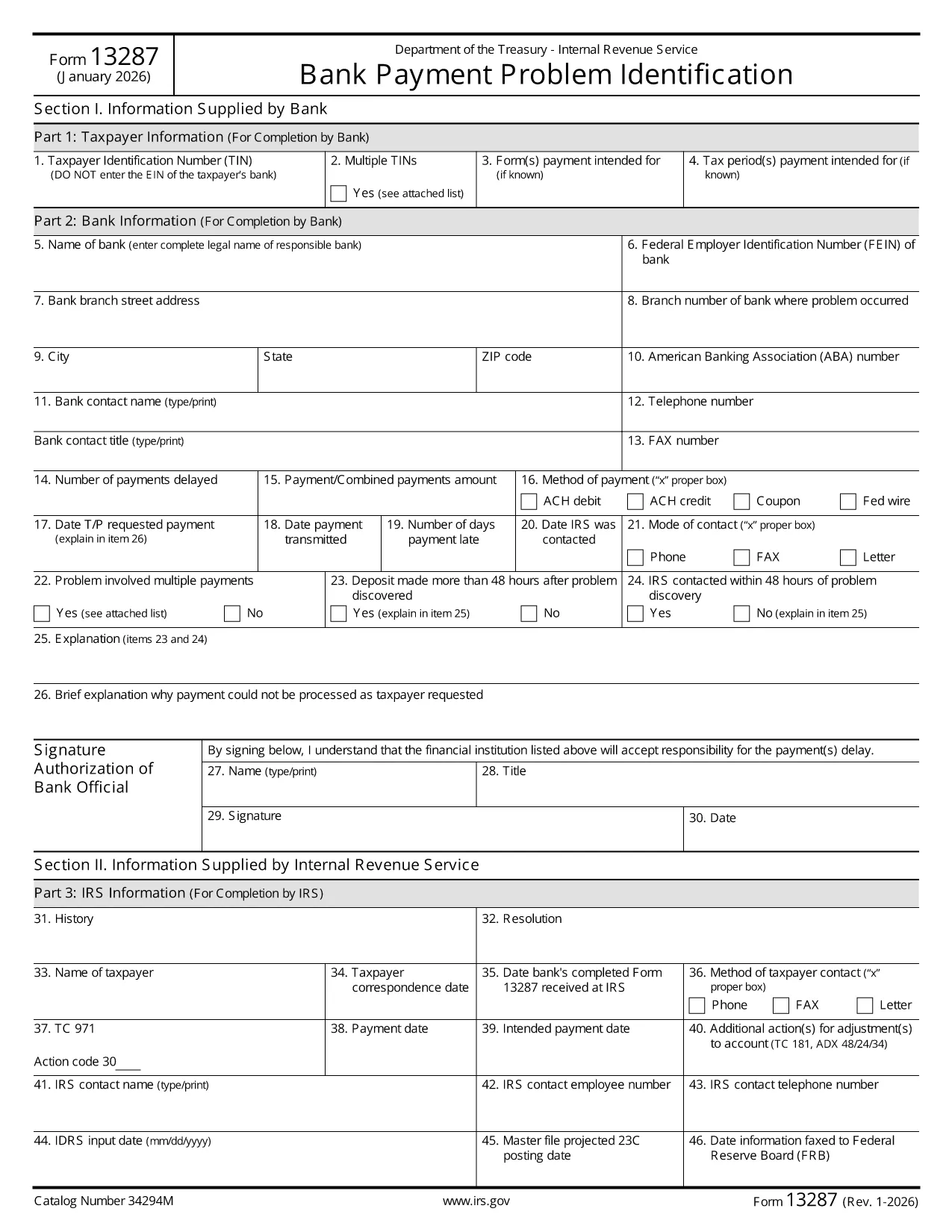
Form 13287, Bank Payment Problem Identification Worksheet, is used by taxpayers when a bank delays forwarding a timely‑received Federal Tax Deposit (FTD) to the U.S. Treasury. If the bank accepts responsibility, the taxpayer may be relieved of the related penalty.

What Is Form 13287?

This IRS worksheet captures details about the delayed deposit, the bank’s response, and the amount of penalty relief being requested. It is typically attached to a written request for penalty abatement.

How to Fill Out Form 13287 Online with Formize

Formize makes the IRS PDF fully interactive without any software download. Follow these simple steps:

  1. Click the "Fill out this form" button on the page.
  2. Wait a few seconds while the Formize PDF Filler app loads.
  3. Enter the required information in each fillable field – the form auto‑saves as you type.
  4. Review the completed worksheet for accuracy.
  5. When you’re satisfied, click Download PDF or Print to obtain a signed copy.

Common Mistakes to Avoid

  • Leaving fields blank: Every line marked with an asterisk (*) is mandatory.
  • Incorrect bank account numbers: Double‑check the routing and account numbers you provide.
  • Missing the bank’s written acknowledgment: Attach the bank’s letter or email confirming the delay.
  • Submitting an unsigned form: Sign the worksheet before mailing it to the IRS.

Where to Submit the Completed Form

After completing Form 13287, attach it to your written request for penalty relief and mail it to the address listed in the instructions (usually the IRS office that issued the penalty notice). For electronic submissions, follow any specific guidance provided in the notice.

FAQs About Form 13287

Below are the most frequently asked questions about this worksheet.

คำถามที่พบบ่อย
  • What is the purpose of Form 13287?

    It documents a bank’s delay in forwarding a Federal Tax Deposit, allowing the taxpayer to request relief from the associated penalty.

  • Do I need to attach a bank’s letter to the form?

    Yes. The IRS requires a written acknowledgment from the bank confirming the delay.

  • Can I file Form 13287 electronically?

    The IRS currently accepts only a printed and signed copy attached to a written request, but you can create the PDF electronically using Formize.

  • How long does the penalty relief process take?

    Processing times vary, but the IRS typically responds within 30‑45 days after receiving a complete request.

  • Is Form 13287 still valid for tax years after 2026?

    Yes. The form is periodically revised, but the current version (Rev. 1‑2026) remains applicable until a new revision is released.

  • What happens if I make a mistake on the form?

    Correct the error, sign the revised form, and resend it with a brief explanation of the correction.

  • Do I need a tax professional to complete Form 13287?

    A professional can help, but the worksheet is straightforward and can be completed by the taxpayer with the guidance provided here.

  • Where can I find the official PDF for Form 13287?

    The official IRS PDF is available at the link below.

ทำอย่างไร

วิธีกรอก Form 13287 ฟรีทางออนไลน์ใน 5 ขั้นตอนง่ายๆ:

  1. 1
    Click the Fill‑out Button
    Press the "Fill out this form" button on the landing page to launch the Formize PDF Filler.
  2. 2
    Wait for the Filler to Load
    A brief loading screen appears while the interactive version of Form 13287 is prepared.
  3. 3
    Enter Your Information
    Complete each fillable field. The app saves your entries automatically.
  4. 4
    Review and Sign
    Check all entries for accuracy, then print and sign the worksheet.
  5. 5
    Download or Print
    Save the completed PDF to your device or print it for mailing to the IRS.
สร้างแอป PDF Filler
เกี่ยวกับ

แบบฟอร์มสรรพากรบริการ (IRS)

Form 13287 เป็นหนึ่งในแบบฟอร์มภาษีอย่างเป็นทางการที่ใช้ในสหรัฐอเมริกาเพื่อรายงานรายได้ การเรียกร้องการหักเงินและเครดิต คำนวณภาระภาษี และปฏิบัติตามภาระผูกพันอื่นๆ ที่เกี่ยวข้องกับภาษี IRS เป็นหน่วยงานรัฐบาลกลางที่รับผิดชอบในการบริหารและบังคับใช้กฎหมายรายได้ภายในสหรัฐอเมริกา

นี่คือตัวอย่างบางส่วนของแบบฟอร์ม Internal Revenue Service:

แบบฟอร์ม 1040: นี่คือแบบฟอร์มการคืนภาษีเงินได้บุคคลธรรมดาหลักที่ผู้เสียภาษีส่วนใหญ่ใช้ ใช้เพื่อรายงานรายได้ประเภทต่างๆ การเรียกร้องการหักเงินและเครดิต การคำนวณภาระภาษี และพิจารณาว่าผู้เสียภาษีมีหนี้ภาษีเพิ่มเติมหรือมีสิทธิ์ได้รับเงินคืนหรือไม่

แบบฟอร์ม 1099: แบบฟอร์ม 1099 มีหลากหลายรูปแบบ เช่น 1099-MISC, 1099-INT, 1099-DIV ฯลฯ แบบฟอร์มเหล่านี้ใช้เพื่อรายงานรายได้ที่บุคคลหรือธุรกิจได้รับจากแหล่งต่างๆ นอกเหนือจากการจ้างงาน เช่น การจ้างงานตนเอง รายได้ ดอกเบี้ยรับ เงินปันผลรับ และรายได้ค่าเช่า

แบบฟอร์ม W-2: นายจ้างใช้แบบฟอร์มนี้เพื่อรายงานค่าจ้างที่จ่ายให้กับลูกจ้างและภาษี ระงับจากค่าจ้างของพวกเขา พนักงานใช้ข้อมูลในแบบฟอร์ม W-2 เพื่อกรอกแบบฟอร์มขอคืนภาษีส่วนบุคคล

แบบฟอร์ม 941: นายจ้างใช้แบบฟอร์มนี้เพื่อรายงานภาษีการจ้างงาน รวมถึงภาษีเงินได้หัก ณ ที่จ่ายของรัฐบาลกลาง ภาษีประกันสังคม และภาษี Medicare สำหรับพนักงาน

แบบฟอร์ม 1065: ห้างหุ้นส่วนใช้เพื่อรายงานรายได้ การหักเงิน และความรับผิดทางภาษี ห้างหุ้นส่วนไม่ต้องจ่ายภาษีเงินได้ พันธมิตรจะรายงานส่วนแบ่งรายได้ของหุ้นส่วนในการคืนภาษีแต่ละรายการแทน

แบบฟอร์ม 1120: นี่คือแบบฟอร์มคืนภาษีเงินได้นิติบุคคลที่บริษัท C ใช้เพื่อรายงานรายได้ การหักเงิน และความรับผิดทางภาษี

แบบฟอร์ม 990: แบบฟอร์มนี้ใช้โดยองค์กรที่ได้รับการยกเว้นภาษี เช่น องค์กรไม่แสวงผลกำไรและองค์กรการกุศล เพื่อ รายงานข้อมูลทางการเงิน กิจกรรม และการปฏิบัติตามกฎหมายภาษีอากร

แบบฟอร์ม 8862: แบบฟอร์มนี้ใช้โดยผู้เสียภาษีที่เคยอ้างสิทธิ์รับเครดิตภาษีเงินได้ (EITC) แต่กลับไม่ได้รับอนุญาตและต้องการจะเรียกร้องอีกครั้ง

นี่เป็นเพียงตัวอย่างเล็กๆ น้อยๆ ของแบบฟอร์ม IRS จำนวนมากที่มีอยู่เพื่อปฏิบัติตามภาระผูกพันที่เกี่ยวข้องกับภาษีต่างๆ แบบฟอร์มเฉพาะที่จำเป็นสำหรับบุคคลหรือธุรกิจขึ้นอยู่กับสถานการณ์เฉพาะ แหล่งที่มาของรายได้ และการหักเงิน ขอแนะนำให้ดูเว็บไซต์อย่างเป็นทางการของ Internal Revenue Service (www.irs.gov) หรือขอคำแนะนำด้านภาษีจากผู้เชี่ยวชาญเพื่อรับข้อมูลที่ถูกต้องและทันสมัยเกี่ยวกับ IRS ที่เฉพาะเจาะจง แบบฟอร์มที่เกี่ยวข้องกับสถานการณ์ทางภาษีของคุณ

คุณสมบัติ

PDF ฟิลเลอร์

วิธีที่ง่ายที่สุดในการกรอกแบบฟอร์ม PDF ทางออนไลน์

  • กรอก Form 13287 อย่างรวดเร็ว
    กำลังมองหาวิธีเติม Form 13287 ทางออนไลน์อย่างรวดเร็วอยู่ใช่ไหม ด้วยตัวกรอกแบบฟอร์ม PDF ออนไลน์ฟรีของเรา คุณจะรู้วิธีแก้ไขและกรอกเอกสาร PDF นี้ในเวลาไม่ถึงนาที
  • โปรแกรมแก้ไข PDF ออนไลน์ที่ใช้งานง่าย
    เบื่อกับการพิมพ์ไฟล์ PDF เพื่อให้คุณสามารถแก้ไขได้ก่อนที่จะสแกนซ้ำและส่งกลับหรือไม่? แก้ไขเอกสาร PDF ออนไลน์ฟรี ใช้โปรแกรมแก้ไข PDF ออนไลน์ของเราเพื่อประหยัดเวลาและกระดาษ
  • เครื่องมือที่ยอดเยี่ยมสำหรับทุกแพลตฟอร์ม
    สงสัยวิธีเติม Form 13287 บน Mac หรืออาจใช้ตัวเติม PDF ฟรีได้อย่างไร เครื่องมือ PDF ออนไลน์ของเราทำงานได้บนทุกแพลตฟอร์ม
  • การจัดเก็บไฟล์ที่ปลอดภัย
    ไฟล์ "Form 13287" ที่เสร็จสมบูรณ์จะถูกจัดเก็บไว้ในฐานข้อมูลที่ปลอดภัยซึ่งจัดการโดย Amazon Cloud hosting คุณสามารถลบไฟล์ของคุณออกจากระบบของเราได้ตลอดเวลา ไม่ว่าในกรณีใด ไฟล์เหล่านี้จะถูกลบโดยอัตโนมัติหลังจากผ่านไป 24 ชั่วโมง
  • สนทนากับ Form 13287
    แชทกับ "Form 13287" บน Chatize ที่เป็นผู้ช่วยอ่าน PDF ฟรี ถามคำถามและรับคำตอบจาก "Form 13287" เพียงคลิกที่ปุ่ม แชทด้วยเอกสาร ด้านบน

ลบเซสชันการบรรจุ

ลบเซสชันการกรอกข้อมูลที่เลือกหรือไม่?ในกรณีนี้ความคืบหน้าในการกรอกแบบฟอร์มจะหายไป

ลบเซสชันการแก้ไข

ลบเซสชันการแก้ไขที่เลือกหรือไม่ ในกรณีนี้ ความคืบหน้าในการสร้างและแก้ไขแบบฟอร์มจะหายไป