
hamburger-menu icon
เลือกภาษา

Form 13615 – Volunteer Standards of Conduct Agreement (Fillable PDF)

  1. ประเทศ สหรัฐอเมริกา
  2. ภาษา ภาษาอังกฤษ
  3. กิจกรรม ภาษี
  4. แผนก สรรพากรพื้นที่
Form 13615 – Volunteer Standards of Conduct Agreement (Fillable PDF)

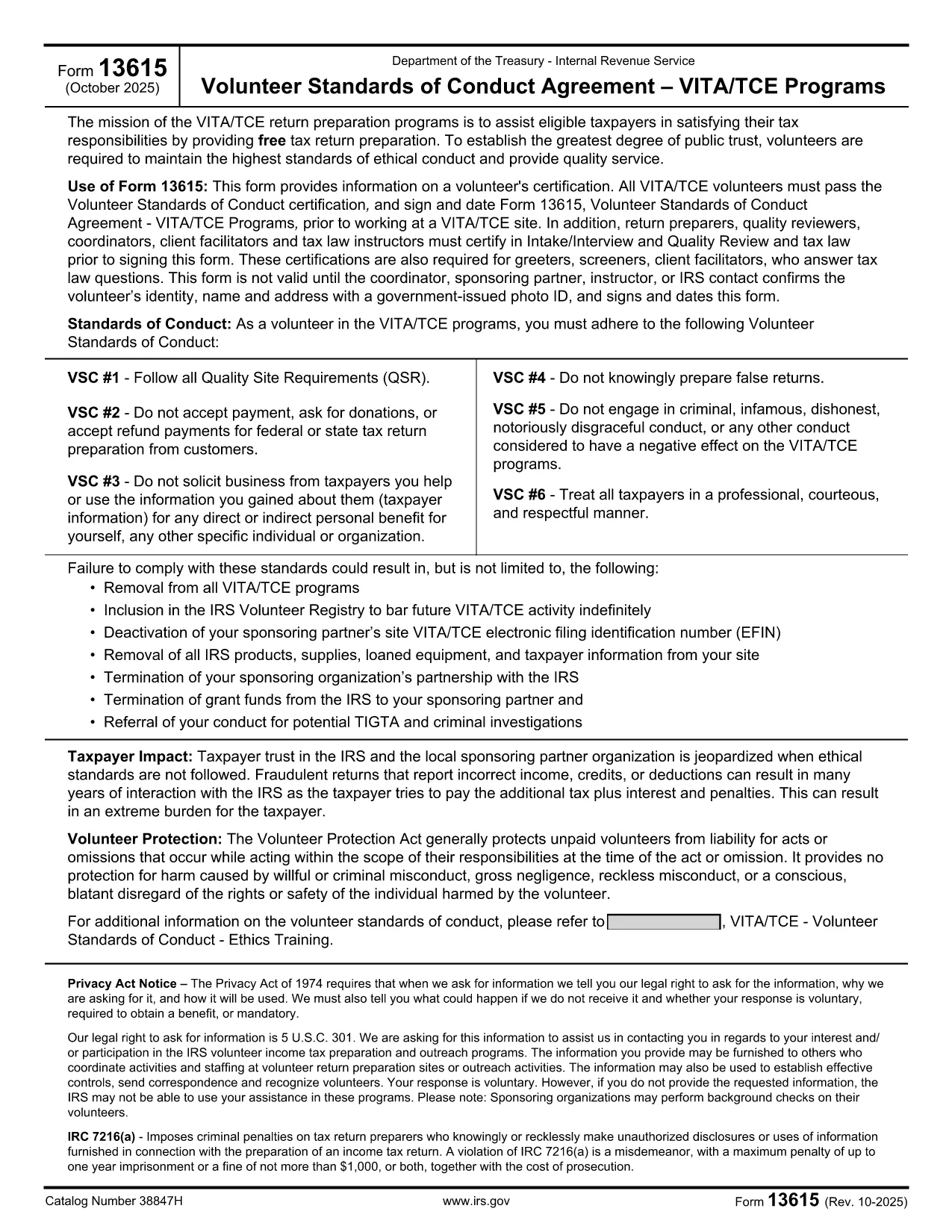
Form 13615 is the Volunteer Standards of Conduct Agreement required for anyone participating in the IRS Volunteer Income Tax Assistance (VITA) or Tax Counseling for the Elderly (TCE) programs. This agreement confirms that volunteers have completed the required training, understand the ethical standards, and agree to follow them while assisting taxpayers.

What Is Form 13615?

The form captures:

  • Volunteer identification (name, address, phone, email)
  • Signature confirming completion of training and testing
  • Agreement to abide by the IRS Volunteer Standards of Conduct

All VITA/TCE volunteers—paid or unpaid—must sign Form 13615 before working at a site. The form is also required for return preparers, quality reviewers, and site coordinators.

Why Use a Fillable PDF with Formize?

Formize’s online PDF filler turns the static IRS PDF into an interactive, browser‑based form. Benefits include:

  • Instant loading – no need to download, install, or print.
  • Auto‑save functionality so you never lose entered data.
  • Secure, encrypted transmission to protect personal information.
  • One‑click printing or electronic submission after completion.

Step‑by‑Step Guide to Completing Form 13615

Follow the steps below to finish the agreement quickly and correctly.

Common Mistakes to Avoid

Even experienced volunteers can slip up. Here are the most frequent errors and how to prevent them:

  • Leaving required fields blank: The form will not submit if any mandatory field is empty.
  • Using an outdated version: Always verify the revision date (current version is Rev. 10‑2025).
  • Incorrect signature format: Use a clear, legible digital signature; avoid stylized fonts.

Where to Find Help

If you need assistance, contact your local VITA/TCE coordinator or consult the IRS Volunteer Training Materials. The Formize platform also includes a built‑in help tooltip for each field.

คำถามที่พบบ่อย
  • Do I need to download Form 13615 before filling it out?

    No. With Formize you can fill out the form directly in your browser. Simply click the **Fill out this form** button and the fillable PDF loads automatically.

  • Is the online filler secure?

    Yes. Formize uses SSL encryption, and all data is stored locally in your browser until you choose to download or print the completed form.

  • Can I save my progress and finish later?

    Absolutely. The filler auto‑saves your entries. When you return, click **Load saved draft** to continue where you left off.

  • What version of Form 13615 should I use?

    Use the most recent revision (Rev. 10‑2025). The PDF linked on this page is always the latest official version from the IRS.

  • Who must sign Form 13615?

    All VITA/TCE volunteers, return preparers, quality reviewers, site coordinators, and tax law instructors must sign the agreement before beginning any volunteer work.

  • What happens if I make a mistake on the form?

    You can edit any field before finalizing. If you have already printed a copy, simply correct the error on a new form and submit the updated version.

  • Do I need a physical signature for IRS filing?

    A clear digital signature is acceptable for the volunteer agreement. If your organization requires a wet signature, print the completed PDF and sign it manually.

  • Where can I find training materials for VITA/TCE?

    Visit the IRS VITA/TCE website or contact your local volunteer coordinator for the latest training manuals and webinars.

ทำอย่างไร

วิธีกรอก Form 13615 ฟรีทางออนไลน์ใน 5 ขั้นตอนง่ายๆ:

  1. 1
    Open the Fillable Form
    Click the **Fill out this form** button on the page. The Formize PDF Filler app will load directly in your browser.
  2. 2
    Enter Your Information
    Complete each required field—name, address, phone, email, and training details. The filler highlights any missing information.
  3. 3
    Add Your Digital Signature
    Use the signature box to type or draw your signature. Make sure it is clear and matches the printed version.
  4. 4
    Review and Save
    Click **Review** to see a summary. Save a copy to your device or cloud storage for your records.
  5. 5
    Submit or Print
    When the form is complete, choose **Print** to produce a hard copy for your VITA/TCE site, or **Download** to send electronically.
สร้างแอป PDF Filler
เกี่ยวกับ

แบบฟอร์มสรรพากรบริการ (IRS)

Form 13615 เป็นหนึ่งในแบบฟอร์มภาษีอย่างเป็นทางการที่ใช้ในสหรัฐอเมริกาเพื่อรายงานรายได้ การเรียกร้องการหักเงินและเครดิต คำนวณภาระภาษี และปฏิบัติตามภาระผูกพันอื่นๆ ที่เกี่ยวข้องกับภาษี IRS เป็นหน่วยงานรัฐบาลกลางที่รับผิดชอบในการบริหารและบังคับใช้กฎหมายรายได้ภายในสหรัฐอเมริกา

นี่คือตัวอย่างบางส่วนของแบบฟอร์ม Internal Revenue Service:

แบบฟอร์ม 1040: นี่คือแบบฟอร์มการคืนภาษีเงินได้บุคคลธรรมดาหลักที่ผู้เสียภาษีส่วนใหญ่ใช้ ใช้เพื่อรายงานรายได้ประเภทต่างๆ การเรียกร้องการหักเงินและเครดิต การคำนวณภาระภาษี และพิจารณาว่าผู้เสียภาษีมีหนี้ภาษีเพิ่มเติมหรือมีสิทธิ์ได้รับเงินคืนหรือไม่

แบบฟอร์ม 1099: แบบฟอร์ม 1099 มีหลากหลายรูปแบบ เช่น 1099-MISC, 1099-INT, 1099-DIV ฯลฯ แบบฟอร์มเหล่านี้ใช้เพื่อรายงานรายได้ที่บุคคลหรือธุรกิจได้รับจากแหล่งต่างๆ นอกเหนือจากการจ้างงาน เช่น การจ้างงานตนเอง รายได้ ดอกเบี้ยรับ เงินปันผลรับ และรายได้ค่าเช่า

แบบฟอร์ม W-2: นายจ้างใช้แบบฟอร์มนี้เพื่อรายงานค่าจ้างที่จ่ายให้กับลูกจ้างและภาษี ระงับจากค่าจ้างของพวกเขา พนักงานใช้ข้อมูลในแบบฟอร์ม W-2 เพื่อกรอกแบบฟอร์มขอคืนภาษีส่วนบุคคล

แบบฟอร์ม 941: นายจ้างใช้แบบฟอร์มนี้เพื่อรายงานภาษีการจ้างงาน รวมถึงภาษีเงินได้หัก ณ ที่จ่ายของรัฐบาลกลาง ภาษีประกันสังคม และภาษี Medicare สำหรับพนักงาน

แบบฟอร์ม 1065: ห้างหุ้นส่วนใช้เพื่อรายงานรายได้ การหักเงิน และความรับผิดทางภาษี ห้างหุ้นส่วนไม่ต้องจ่ายภาษีเงินได้ พันธมิตรจะรายงานส่วนแบ่งรายได้ของหุ้นส่วนในการคืนภาษีแต่ละรายการแทน

แบบฟอร์ม 1120: นี่คือแบบฟอร์มคืนภาษีเงินได้นิติบุคคลที่บริษัท C ใช้เพื่อรายงานรายได้ การหักเงิน และความรับผิดทางภาษี

แบบฟอร์ม 990: แบบฟอร์มนี้ใช้โดยองค์กรที่ได้รับการยกเว้นภาษี เช่น องค์กรไม่แสวงผลกำไรและองค์กรการกุศล เพื่อ รายงานข้อมูลทางการเงิน กิจกรรม และการปฏิบัติตามกฎหมายภาษีอากร

แบบฟอร์ม 8862: แบบฟอร์มนี้ใช้โดยผู้เสียภาษีที่เคยอ้างสิทธิ์รับเครดิตภาษีเงินได้ (EITC) แต่กลับไม่ได้รับอนุญาตและต้องการจะเรียกร้องอีกครั้ง

นี่เป็นเพียงตัวอย่างเล็กๆ น้อยๆ ของแบบฟอร์ม IRS จำนวนมากที่มีอยู่เพื่อปฏิบัติตามภาระผูกพันที่เกี่ยวข้องกับภาษีต่างๆ แบบฟอร์มเฉพาะที่จำเป็นสำหรับบุคคลหรือธุรกิจขึ้นอยู่กับสถานการณ์เฉพาะ แหล่งที่มาของรายได้ และการหักเงิน ขอแนะนำให้ดูเว็บไซต์อย่างเป็นทางการของ Internal Revenue Service (www.irs.gov) หรือขอคำแนะนำด้านภาษีจากผู้เชี่ยวชาญเพื่อรับข้อมูลที่ถูกต้องและทันสมัยเกี่ยวกับ IRS ที่เฉพาะเจาะจง แบบฟอร์มที่เกี่ยวข้องกับสถานการณ์ทางภาษีของคุณ

คุณสมบัติ

PDF ฟิลเลอร์

วิธีที่ง่ายที่สุดในการกรอกแบบฟอร์ม PDF ทางออนไลน์

  • กรอก Form 13615 อย่างรวดเร็ว
    กำลังมองหาวิธีเติม Form 13615 ทางออนไลน์อย่างรวดเร็วอยู่ใช่ไหม ด้วยตัวกรอกแบบฟอร์ม PDF ออนไลน์ฟรีของเรา คุณจะรู้วิธีแก้ไขและกรอกเอกสาร PDF นี้ในเวลาไม่ถึงนาที
  • โปรแกรมแก้ไข PDF ออนไลน์ที่ใช้งานง่าย
    เบื่อกับการพิมพ์ไฟล์ PDF เพื่อให้คุณสามารถแก้ไขได้ก่อนที่จะสแกนซ้ำและส่งกลับหรือไม่? แก้ไขเอกสาร PDF ออนไลน์ฟรี ใช้โปรแกรมแก้ไข PDF ออนไลน์ของเราเพื่อประหยัดเวลาและกระดาษ
  • เครื่องมือที่ยอดเยี่ยมสำหรับทุกแพลตฟอร์ม
    สงสัยวิธีเติม Form 13615 บน Mac หรืออาจใช้ตัวเติม PDF ฟรีได้อย่างไร เครื่องมือ PDF ออนไลน์ของเราทำงานได้บนทุกแพลตฟอร์ม
  • การจัดเก็บไฟล์ที่ปลอดภัย
    ไฟล์ "Form 13615" ที่เสร็จสมบูรณ์จะถูกจัดเก็บไว้ในฐานข้อมูลที่ปลอดภัยซึ่งจัดการโดย Amazon Cloud hosting คุณสามารถลบไฟล์ของคุณออกจากระบบของเราได้ตลอดเวลา ไม่ว่าในกรณีใด ไฟล์เหล่านี้จะถูกลบโดยอัตโนมัติหลังจากผ่านไป 24 ชั่วโมง
  • สนทนากับ Form 13615
    แชทกับ "Form 13615" บน Chatize ที่เป็นผู้ช่วยอ่าน PDF ฟรี ถามคำถามและรับคำตอบจาก "Form 13615" เพียงคลิกที่ปุ่ม แชทด้วยเอกสาร ด้านบน

ลบเซสชันการบรรจุ

ลบเซสชันการกรอกข้อมูลที่เลือกหรือไม่?ในกรณีนี้ความคืบหน้าในการกรอกแบบฟอร์มจะหายไป

ลบเซสชันการแก้ไข

ลบเซสชันการแก้ไขที่เลือกหรือไม่ ในกรณีนี้ ความคืบหน้าในการสร้างและแก้ไขแบบฟอร์มจะหายไป