
hamburger-menu icon
เลือกภาษา

IRS Form 14335 – VITA/TCE Grant Contact Information (Fillable PDF)

  1. ประเทศ สหรัฐอเมริกา
  2. ภาษา ภาษาอังกฤษ
  3. กิจกรรม ภาษี
  4. แผนก สรรพากรพื้นที่
IRS Form 14335 – VITA/TCE Grant Contact Information (Fillable PDF)

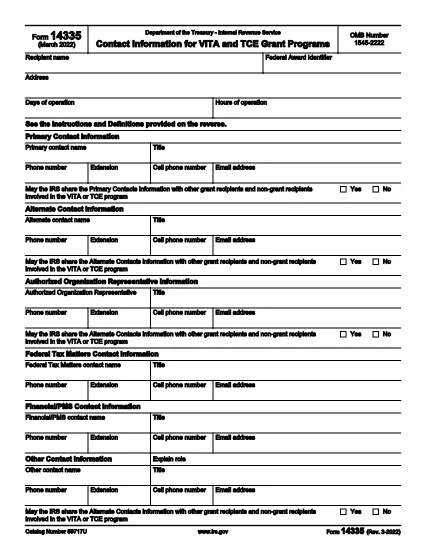
Form 14335 is the official IRS document used by VITA (Volunteer Income Tax Assistance) and TCE (Tax Counseling for the Elderly) grant programs to collect contact information for individuals who can answer questions about the grant. This fillable PDF lets you enter the required details quickly, save a copy for your records, and submit the form electronically.

What Is IRS Form 14335?

The form requests the names, phone numbers, email addresses, and mailing addresses of a primary contact and at least one alternate contact. It also includes a brief definition of each contact’s role and a certification section for the grant recipient.

How to Fill Out Form 14335 Online

Instead of downloading the PDF and opening a separate editor, simply click the "Fill out this form" button on this page. The Formize PDF Filler app will load directly in your browser, providing a seamless, fillable experience.

  • Step 1: Click the button and wait for the filler to appear.
  • Step 2: Complete each field—required fields are marked with an asterisk.
  • Step 3: Review your entries for accuracy.
  • Step 4: Click Save to download a copy or Submit if the grant program offers direct upload.

Common Mistakes to Avoid

  • Leaving the alternate contact section blank – the IRS requires at least one backup contact.
  • Using outdated phone numbers or email addresses.
  • Forgetting to sign the certification section; an unsigned form will be rejected.
  • Entering information that does not match the grant award documentation.

Where to Submit the Completed Form

After filling out Form 14335, follow the instructions provided in your grant award letter. Typically you will either:

  1. Email the PDF to the designated grant administrator.
  2. Upload it through the grant’s online portal.
  3. Mail a printed copy to the address listed in the award notice.

Download the Fillable PDF

If you prefer to work offline, you can still download the official IRS PDF version below. The file is the same document that powers the online filler.

Download IRS Form 14335 (PDF)

คำถามที่พบบ่อย
  • What is the purpose of IRS Form 14335?

    Form 14335 collects contact details for individuals who can answer questions about a VITA or TCE grant. It ensures the IRS can reach the right people if clarification is needed.

  • Do I need to provide both a primary and an alternate contact?

    Yes. The IRS requires at least one primary contact and one alternate contact to guarantee continuity of communication.

  • Can I fill out Form 14335 on a mobile device?

    Absolutely. The Formize PDF Filler is responsive and works on smartphones, tablets, and desktop browsers.

  • Is there a filing fee for Form 14335?

    No. Form 14335 is a free, government‑provided document used solely for grant‑related contact information.

  • What should I do if I make a mistake after submitting?

    Contact the grant administrator immediately and provide a corrected version of the form. Keep a signed copy for your records.

  • Do I need to print and mail the form?

    Only if the grant award instructions specify a paper submission. Many programs now accept an electronic PDF upload or email.

  • How long should I keep a copy of the completed form?

    Retain the signed PDF for at least three years, the same period required for most tax‑related records.

  • Is the PDF downloadable if I prefer offline editing?

    Yes. Use the direct download link at the bottom of the page to obtain the official IRS PDF.

ทำอย่างไร

วิธีกรอก Form 14335 ฟรีทางออนไลน์ใน 5 ขั้นตอนง่ายๆ:

  1. 1
    Click the Fill Out Button
    Press the “Fill out this form” button on this page. The Formize PDF Filler will open in a new browser window.
  2. 2
    Wait for the Filler to Load
    A short loading indicator will appear while the fillable version of Form 14335 is prepared.
  3. 3
    Enter Your Information
    Complete each required field. Use the tab key or click to move between sections.
  4. 4
    Save or Submit
    When finished, click “Save” to download a copy for your records, or click “Submit” if the grant program allows direct upload.
  5. 5
    Confirm Submission
    Check your email for a confirmation message or follow the grant’s instructions to ensure the form was received.
สร้างแอป PDF Filler
เกี่ยวกับ

แบบฟอร์มภาษี

Form 14335 เป็นหนึ่งในแบบฟอร์มภาษีที่เป็นเอกสารที่ใช้ในการรายงานข้อมูลที่เกี่ยวข้องกับภาษีไปยังหน่วยงานด้านภาษีที่เกี่ยวข้อง มีแบบฟอร์มภาษีหลายประเภท รวมถึงแบบฟอร์มภาษีของรัฐบาลกลาง รัฐ และท้องถิ่น ซึ่งอาจแตกต่างกันไปขึ้นอยู่กับสถานการณ์และสถานที่ของผู้เสียภาษี

คุณสมบัติ

PDF ฟิลเลอร์

วิธีที่ง่ายที่สุดในการกรอกแบบฟอร์ม PDF ทางออนไลน์

  • กรอก Form 14335 อย่างรวดเร็ว
    กำลังมองหาวิธีเติม Form 14335 ทางออนไลน์อย่างรวดเร็วอยู่ใช่ไหม ด้วยตัวกรอกแบบฟอร์ม PDF ออนไลน์ฟรีของเรา คุณจะรู้วิธีแก้ไขและกรอกเอกสาร PDF นี้ในเวลาไม่ถึงนาที
  • โปรแกรมแก้ไข PDF ออนไลน์ที่ใช้งานง่าย
    เบื่อกับการพิมพ์ไฟล์ PDF เพื่อให้คุณสามารถแก้ไขได้ก่อนที่จะสแกนซ้ำและส่งกลับหรือไม่? แก้ไขเอกสาร PDF ออนไลน์ฟรี ใช้โปรแกรมแก้ไข PDF ออนไลน์ของเราเพื่อประหยัดเวลาและกระดาษ
  • เครื่องมือที่ยอดเยี่ยมสำหรับทุกแพลตฟอร์ม
    สงสัยวิธีเติม Form 14335 บน Mac หรืออาจใช้ตัวเติม PDF ฟรีได้อย่างไร เครื่องมือ PDF ออนไลน์ของเราทำงานได้บนทุกแพลตฟอร์ม
  • การจัดเก็บไฟล์ที่ปลอดภัย
    ไฟล์ "Form 14335" ที่เสร็จสมบูรณ์จะถูกจัดเก็บไว้ในฐานข้อมูลที่ปลอดภัยซึ่งจัดการโดย Amazon Cloud hosting คุณสามารถลบไฟล์ของคุณออกจากระบบของเราได้ตลอดเวลา ไม่ว่าในกรณีใด ไฟล์เหล่านี้จะถูกลบโดยอัตโนมัติหลังจากผ่านไป 24 ชั่วโมง
  • สนทนากับ Form 14335
    แชทกับ "Form 14335" บน Chatize ที่เป็นผู้ช่วยอ่าน PDF ฟรี ถามคำถามและรับคำตอบจาก "Form 14335" เพียงคลิกที่ปุ่ม แชทด้วยเอกสาร ด้านบน

ลบเซสชันการบรรจุ

ลบเซสชันการกรอกข้อมูลที่เลือกหรือไม่?ในกรณีนี้ความคืบหน้าในการกรอกแบบฟอร์มจะหายไป

ลบเซสชันการแก้ไข

ลบเซสชันการแก้ไขที่เลือกหรือไม่ ในกรณีนี้ ความคืบหน้าในการสร้างและแก้ไขแบบฟอร์มจะหายไป