
hamburger-menu icon
เลือกภาษา

IRS Form 15101 – Provide SSN for Adoptive Child (Fillable PDF)

  1. ประเทศ สหรัฐอเมริกา
  2. ภาษา ภาษาอังกฤษ
  3. กิจกรรม ภาษี
  4. แผนก สรรพากรพื้นที่
IRS Form 15101 – Provide SSN for Adoptive Child (Fillable PDF)

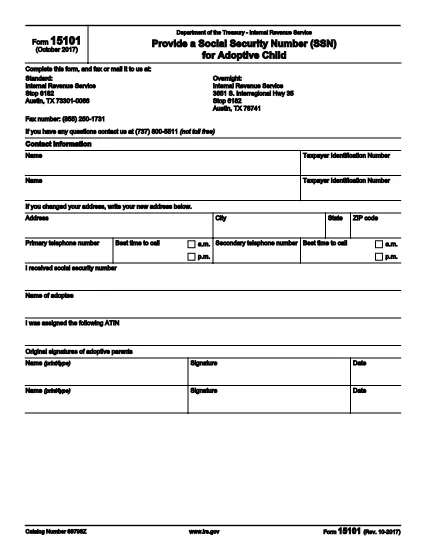
IRS Form 15101, Provide a Social Security Number (SSN) for Adoptive Child, is used by parents who have received an Adoption Taxpayer Identification Number (ATIN) and later obtain the child’s SSN. The form notifies the Internal Revenue Service (IRS) of the new SSN so the ATIN can be retired.

What Is IRS Form 15101?

This one‑page form collects basic contact information for up to two taxpayers, the child’s SSN, the child’s name, and the original ATIN. It is required only after the adoption is final and the child’s SSN is issued.

How to Complete the Form

Follow these steps to fill the form quickly:

  • Enter the name(s) and Social Security Number(s) of the adopting parent(s) at the top.
  • Provide your mailing address, phone numbers, and preferred contact times.
  • Enter the child’s SSN exactly as it appears on the Social Security card.
  • Write the child’s full legal name.
  • Enter the ATIN that was previously assigned.
  • Both parents must sign and date the form.

Common Mistakes to Avoid

  • Leaving the ATIN field blank – the IRS needs this to match the previous filing.
  • Using an outdated address – update your address on Form 8822 if it has changed.
  • Signing only one side when filing jointly – both spouses must sign.
  • Submitting the form before the child’s SSN is officially issued.

Where to Submit the Form

You can mail the completed form to the IRS address printed on the second page, or fax it to (855) 250‑1731. If you received a CP‑561C notice, attach the notice stub before mailing.

Download the Fillable PDF

Click the button below to open the fillable version of Form 15101 directly in the Formize PDF Filler – no extra software needed.

Fill out this form

คำถามที่พบบ่อย
  • Do I need to file Form 15101 if I already have a Social Security number for my child?

    Yes. Form 15101 is required to inform the IRS that the ATIN should be replaced with the child’s SSN.

  • Can I file Form 15101 electronically?

    The IRS does not accept electronic submissions for Form 15101. You must mail or fax the completed form.

  • What if my child’s SSN is denied by the SSA?

    If the Social Security Administration denies the SSN, you can request an ATIN extension by filing Form 15100 and include the SSA denial letter.

  • How long does it take for the IRS to process Form 15101?

    Processing usually takes 4–6 weeks after the IRS receives the completed form.

  • Do I need to attach a copy of the child’s Social Security card?

    No attachment is required. The SSN entered on the form is sufficient.

  • Can I use the same Form 15101 for multiple children?

    Form 15101 is completed separately for each child who receives a new SSN.

  • Is there a fee to download or use the fillable PDF?

    No. The fillable PDF is provided free of charge via Formize.

ทำอย่างไร

วิธีกรอก IRS Form 15101 ฟรีทางออนไลน์ใน 3 ขั้นตอนง่ายๆ:

  1. 1
    Open the Fillable Form
    Click the “Fill out this form” button above. The Formize PDF Filler app will load the fillable version of IRS Form 15101 in your browser.
  2. 2
    Enter Your Information
    Type directly into each field – taxpayer names, SSNs, address, child’s SSN, ATIN, and signatures. The form saves your entries automatically.
  3. 3
    Review & Submit
    Double‑check all entries for accuracy. When finished, download the completed PDF or print it and mail/fax it to the IRS address shown on page 2.
สร้างแอป PDF Filler
เกี่ยวกับ

แบบฟอร์มภาษีของรัฐบาลกลาง

IRS Form 15101 เป็นหนึ่งในแบบฟอร์มภาษีของรัฐบาลกลางที่เป็นเอกสารที่ใช้ในการรายงานและยื่นภาษีเงินได้ของรัฐบาลกลางกับ Internal Revenue Service (IRS) ในสหรัฐอเมริกา บุคคล ธุรกิจ และองค์กรต่างๆ ใช้แบบฟอร์มเหล่านี้เพื่อรายงานรายได้ การหักเงิน และข้อมูลอื่นๆ ที่เกี่ยวข้องที่จำเป็นสำหรับการคำนวณภาระภาษีของรัฐบาลกลาง

แบบฟอร์มภาษีของรัฐบาลกลางที่ใช้กันมากที่สุดคือ แบบฟอร์ม 1040 ซึ่งผู้เสียภาษีแต่ละรายใช้เพื่อรายงานภาษีเงินได้บุคคลธรรมดาของตน แบบฟอร์มอื่นๆ ที่ใช้กันทั่วไป ได้แก่ แบบฟอร์ม 1065 สำหรับพันธมิตร แบบฟอร์ม 1120 สำหรับองค์กร และ แบบฟอร์ม 990 สำหรับองค์กรที่ได้รับการยกเว้นภาษี

โดยทั่วไปแบบฟอร์มภาษีของรัฐบาลกลางกำหนดให้ผู้เสียภาษีรายงานแหล่งที่มาของรายได้ต่างๆ เช่น ค่าจ้าง เงินเดือน และทิป ตลอดจนรายได้จากการลงทุน อสังหาริมทรัพย์ให้เช่า และแหล่งที่มาอื่นๆ แบบฟอร์มนี้ยังอนุญาตให้ผู้เสียภาษีเรียกร้องการหักเงินและเครดิตสำหรับค่าใช้จ่ายต่างๆ เช่น เงินบริจาคเพื่อการกุศล ดอกเบี้ยจำนอง และค่ารักษาพยาบาล

สิ่งสำคัญคือต้องยื่นแบบฟอร์มภาษีของรัฐบาลกลางอย่างถูกต้องและตรงเวลา เนื่องจากการไม่ปฏิบัติตามอาจส่งผลให้ IRS ได้รับโทษและดอกเบี้ย

คุณสมบัติ

PDF ฟิลเลอร์

วิธีที่ง่ายที่สุดในการกรอกแบบฟอร์ม PDF ทางออนไลน์

  • กรอก IRS Form 15101 อย่างรวดเร็ว
    กำลังมองหาวิธีเติม IRS Form 15101 ทางออนไลน์อย่างรวดเร็วอยู่ใช่ไหม ด้วยตัวกรอกแบบฟอร์ม PDF ออนไลน์ฟรีของเรา คุณจะรู้วิธีแก้ไขและกรอกเอกสาร PDF นี้ในเวลาไม่ถึงนาที
  • โปรแกรมแก้ไข PDF ออนไลน์ที่ใช้งานง่าย
    เบื่อกับการพิมพ์ไฟล์ PDF เพื่อให้คุณสามารถแก้ไขได้ก่อนที่จะสแกนซ้ำและส่งกลับหรือไม่? แก้ไขเอกสาร PDF ออนไลน์ฟรี ใช้โปรแกรมแก้ไข PDF ออนไลน์ของเราเพื่อประหยัดเวลาและกระดาษ
  • เครื่องมือที่ยอดเยี่ยมสำหรับทุกแพลตฟอร์ม
    สงสัยวิธีเติม IRS Form 15101 บน Mac หรืออาจใช้ตัวเติม PDF ฟรีได้อย่างไร เครื่องมือ PDF ออนไลน์ของเราทำงานได้บนทุกแพลตฟอร์ม
  • การจัดเก็บไฟล์ที่ปลอดภัย
    ไฟล์ "IRS Form 15101" ที่เสร็จสมบูรณ์จะถูกจัดเก็บไว้ในฐานข้อมูลที่ปลอดภัยซึ่งจัดการโดย Amazon Cloud hosting คุณสามารถลบไฟล์ของคุณออกจากระบบของเราได้ตลอดเวลา ไม่ว่าในกรณีใด ไฟล์เหล่านี้จะถูกลบโดยอัตโนมัติหลังจากผ่านไป 24 ชั่วโมง
  • สนทนากับ IRS Form 15101
    แชทกับ "IRS Form 15101" บน Chatize ที่เป็นผู้ช่วยอ่าน PDF ฟรี ถามคำถามและรับคำตอบจาก "IRS Form 15101" เพียงคลิกที่ปุ่ม แชทด้วยเอกสาร ด้านบน

ลบเซสชันการบรรจุ

ลบเซสชันการกรอกข้อมูลที่เลือกหรือไม่?ในกรณีนี้ความคืบหน้าในการกรอกแบบฟอร์มจะหายไป

ลบเซสชันการแก้ไข

ลบเซสชันการแก้ไขที่เลือกหรือไม่ ในกรณีนี้ ความคืบหน้าในการสร้างและแก้ไขแบบฟอร์มจะหายไป