
hamburger-menu icon
เลือกภาษา

IRS Form 8834 – Fillable PDF for Qualified Electric Vehicle Credit

  1. ประเทศ สหรัฐอเมริกา
  2. ภาษา ภาษาอังกฤษ
  3. กิจกรรม ภาษี
  4. แผนก สรรพากรพื้นที่
IRS Form 8834 – Fillable PDF for Qualified Electric Vehicle Credit

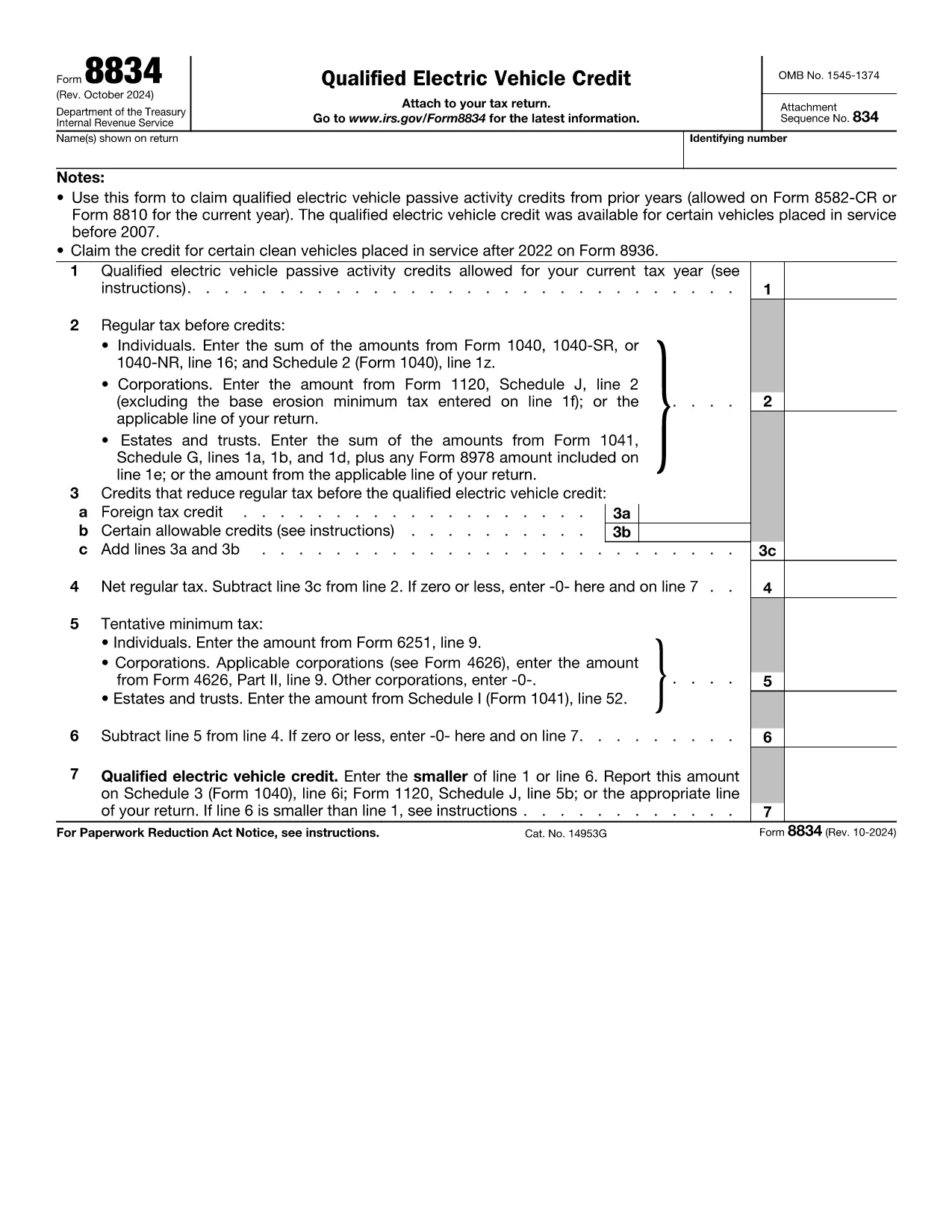
Form 8834, officially titled Qualified Electric Vehicle Credit, is used by taxpayers to claim passive activity credits from qualified electric vehicles placed in service before 2007. Although newer EV credits are reported on Form 8936, many taxpayers still have carry‑forward credits that belong on Form 8834.

What Is Form 8834?

This one‑page IRS form calculates the amount of qualified electric vehicle passive activity credit you can apply to your current tax year. It interacts with other forms such as Form 8582‑CR (individuals) or Form 8810 (corporations) to determine the credit limit.

How to Complete Form 8834 Online

Instead of downloading the PDF and editing it manually, simply click the "Fill out this form" button on this page. The Formize PDF Filler app will load instantly, allowing you to enter data directly in your browser.

  • Enter taxpayer information (name, SSN/EIN) exactly as it appears on your tax return.
  • Provide the credit amount allowed from prior years (Line 1).
  • Input your regular tax before credits (Line 2) and any other credits that reduce your tax (Line 3).
  • Follow the automatic calculations for net regular tax, tentative minimum tax, and the final credit amount.

Common Mistakes to Avoid

  • Using the wrong form: Form 8834 is only for pre‑2007 EV credits. New EV purchases require Form 8936.
  • Incorrect credit limit: Always reference the latest Form 8582‑CR or Form 8810 for the allowable amount.
  • Mismatching tax year: Credits must be claimed in the year you are allowed to use them, not the year the vehicle was purchased.
  • Leaving lines blank: Even a zero value must be entered to avoid IRS processing delays.

Where to Submit the Completed Form

After you finish in Formize, download the completed PDF. Attach it to your federal tax return:

  • Individuals – attach to Schedule 3 (Form 1040), line 6i.
  • Corporations – attach to Form 1120, Schedule J.
  • Estates & Trusts – attach to Form 1041, Schedule G.

Download the Fillable PDF

If you prefer to work offline, you can download the official IRS fillable PDF below. The same file is used by the Formize online filler.

คำถามที่พบบ่อย
  • Who should use Form 8834?

    Taxpayers who have qualified electric vehicle passive activity credits from vehicles placed in service before 2007 and need to claim any unused credit in the current tax year.

  • Can I use Form 8834 for a 2023 EV purchase?

    No. Vehicles placed in service after 2022 are claimed on Form 8936. Form 8834 only covers pre‑2007 credits.

  • Do I need to attach supporting schedules?

    Yes. Include the relevant credit limitation schedules (Form 8582‑CR for individuals or Form 8810 for corporations) that show the allowable credit amount.

  • What if my regular tax is lower than the credit amount?

    The credit you can claim is the lesser of the allowable credit (Line 1) or your net regular tax after other credits (Line 6). Any excess can be carried forward.

  • Is the Formize filler secure?

    Formize uses SSL encryption and processes data locally in your browser, ensuring your personal information remains private.

  • Can I e‑file Form 8834?

    Most commercial tax software accepts the completed PDF as an attachment. Check your software’s instructions for attaching supplemental forms.

  • What common errors cause IRS rejections?

    Missing SSN/EIN, entering a zero on Line 1 when a credit exists, or failing to include the required supporting schedules.

ทำอย่างไร

วิธีกรอก Form 8834 ฟรีทางออนไลน์ใน 6 ขั้นตอนง่ายๆ:

  1. 1
    Click the Fill‑out Button
    Press the “Fill out this form” button on the page to launch the Formize PDF Filler.
  2. 2
    Wait for the Filler to Load
    The web‑based filler loads in seconds; no download or installation is required.
  3. 3
    Enter Your Information
    Fill in taxpayer name, SSN/EIN, credit amounts, and tax liability fields exactly as shown on your return.
  4. 4
    Review Calculations
    The filler automatically computes net regular tax, tentative minimum tax, and the final credit amount.
  5. 5
    Save or Download
    When finished, click “Save” to store the completed PDF in your browser or “Download” to get a copy for your records.
  6. 6
    Submit with Your Tax Return
    Attach the completed Form 8834 to the appropriate schedule of your federal tax return and file as usual.
สร้างแอป PDF Filler
เกี่ยวกับ

แบบฟอร์มสรรพากรบริการ (IRS)

Form 8834 เป็นหนึ่งในแบบฟอร์มภาษีอย่างเป็นทางการที่ใช้ในสหรัฐอเมริกาเพื่อรายงานรายได้ การเรียกร้องการหักเงินและเครดิต คำนวณภาระภาษี และปฏิบัติตามภาระผูกพันอื่นๆ ที่เกี่ยวข้องกับภาษี IRS เป็นหน่วยงานรัฐบาลกลางที่รับผิดชอบในการบริหารและบังคับใช้กฎหมายรายได้ภายในสหรัฐอเมริกา

นี่คือตัวอย่างบางส่วนของแบบฟอร์ม Internal Revenue Service:

แบบฟอร์ม 1040: นี่คือแบบฟอร์มการคืนภาษีเงินได้บุคคลธรรมดาหลักที่ผู้เสียภาษีส่วนใหญ่ใช้ ใช้เพื่อรายงานรายได้ประเภทต่างๆ การเรียกร้องการหักเงินและเครดิต การคำนวณภาระภาษี และพิจารณาว่าผู้เสียภาษีมีหนี้ภาษีเพิ่มเติมหรือมีสิทธิ์ได้รับเงินคืนหรือไม่

แบบฟอร์ม 1099: แบบฟอร์ม 1099 มีหลากหลายรูปแบบ เช่น 1099-MISC, 1099-INT, 1099-DIV ฯลฯ แบบฟอร์มเหล่านี้ใช้เพื่อรายงานรายได้ที่บุคคลหรือธุรกิจได้รับจากแหล่งต่างๆ นอกเหนือจากการจ้างงาน เช่น การจ้างงานตนเอง รายได้ ดอกเบี้ยรับ เงินปันผลรับ และรายได้ค่าเช่า

แบบฟอร์ม W-2: นายจ้างใช้แบบฟอร์มนี้เพื่อรายงานค่าจ้างที่จ่ายให้กับลูกจ้างและภาษี ระงับจากค่าจ้างของพวกเขา พนักงานใช้ข้อมูลในแบบฟอร์ม W-2 เพื่อกรอกแบบฟอร์มขอคืนภาษีส่วนบุคคล

แบบฟอร์ม 941: นายจ้างใช้แบบฟอร์มนี้เพื่อรายงานภาษีการจ้างงาน รวมถึงภาษีเงินได้หัก ณ ที่จ่ายของรัฐบาลกลาง ภาษีประกันสังคม และภาษี Medicare สำหรับพนักงาน

แบบฟอร์ม 1065: ห้างหุ้นส่วนใช้เพื่อรายงานรายได้ การหักเงิน และความรับผิดทางภาษี ห้างหุ้นส่วนไม่ต้องจ่ายภาษีเงินได้ พันธมิตรจะรายงานส่วนแบ่งรายได้ของหุ้นส่วนในการคืนภาษีแต่ละรายการแทน

แบบฟอร์ม 1120: นี่คือแบบฟอร์มคืนภาษีเงินได้นิติบุคคลที่บริษัท C ใช้เพื่อรายงานรายได้ การหักเงิน และความรับผิดทางภาษี

แบบฟอร์ม 990: แบบฟอร์มนี้ใช้โดยองค์กรที่ได้รับการยกเว้นภาษี เช่น องค์กรไม่แสวงผลกำไรและองค์กรการกุศล เพื่อ รายงานข้อมูลทางการเงิน กิจกรรม และการปฏิบัติตามกฎหมายภาษีอากร

แบบฟอร์ม 8862: แบบฟอร์มนี้ใช้โดยผู้เสียภาษีที่เคยอ้างสิทธิ์รับเครดิตภาษีเงินได้ (EITC) แต่กลับไม่ได้รับอนุญาตและต้องการจะเรียกร้องอีกครั้ง

นี่เป็นเพียงตัวอย่างเล็กๆ น้อยๆ ของแบบฟอร์ม IRS จำนวนมากที่มีอยู่เพื่อปฏิบัติตามภาระผูกพันที่เกี่ยวข้องกับภาษีต่างๆ แบบฟอร์มเฉพาะที่จำเป็นสำหรับบุคคลหรือธุรกิจขึ้นอยู่กับสถานการณ์เฉพาะ แหล่งที่มาของรายได้ และการหักเงิน ขอแนะนำให้ดูเว็บไซต์อย่างเป็นทางการของ Internal Revenue Service (www.irs.gov) หรือขอคำแนะนำด้านภาษีจากผู้เชี่ยวชาญเพื่อรับข้อมูลที่ถูกต้องและทันสมัยเกี่ยวกับ IRS ที่เฉพาะเจาะจง แบบฟอร์มที่เกี่ยวข้องกับสถานการณ์ทางภาษีของคุณ

คุณสมบัติ

PDF ฟิลเลอร์

วิธีที่ง่ายที่สุดในการกรอกแบบฟอร์ม PDF ทางออนไลน์

  • กรอก Form 8834 อย่างรวดเร็ว
    กำลังมองหาวิธีเติม Form 8834 ทางออนไลน์อย่างรวดเร็วอยู่ใช่ไหม ด้วยตัวกรอกแบบฟอร์ม PDF ออนไลน์ฟรีของเรา คุณจะรู้วิธีแก้ไขและกรอกเอกสาร PDF นี้ในเวลาไม่ถึงนาที
  • โปรแกรมแก้ไข PDF ออนไลน์ที่ใช้งานง่าย
    เบื่อกับการพิมพ์ไฟล์ PDF เพื่อให้คุณสามารถแก้ไขได้ก่อนที่จะสแกนซ้ำและส่งกลับหรือไม่? แก้ไขเอกสาร PDF ออนไลน์ฟรี ใช้โปรแกรมแก้ไข PDF ออนไลน์ของเราเพื่อประหยัดเวลาและกระดาษ
  • เครื่องมือที่ยอดเยี่ยมสำหรับทุกแพลตฟอร์ม
    สงสัยวิธีเติม Form 8834 บน Mac หรืออาจใช้ตัวเติม PDF ฟรีได้อย่างไร เครื่องมือ PDF ออนไลน์ของเราทำงานได้บนทุกแพลตฟอร์ม
  • การจัดเก็บไฟล์ที่ปลอดภัย
    ไฟล์ "Form 8834" ที่เสร็จสมบูรณ์จะถูกจัดเก็บไว้ในฐานข้อมูลที่ปลอดภัยซึ่งจัดการโดย Amazon Cloud hosting คุณสามารถลบไฟล์ของคุณออกจากระบบของเราได้ตลอดเวลา ไม่ว่าในกรณีใด ไฟล์เหล่านี้จะถูกลบโดยอัตโนมัติหลังจากผ่านไป 24 ชั่วโมง
  • สนทนากับ Form 8834
    แชทกับ "Form 8834" บน Chatize ที่เป็นผู้ช่วยอ่าน PDF ฟรี ถามคำถามและรับคำตอบจาก "Form 8834" เพียงคลิกที่ปุ่ม แชทด้วยเอกสาร ด้านบน

ลบเซสชันการบรรจุ

ลบเซสชันการกรอกข้อมูลที่เลือกหรือไม่?ในกรณีนี้ความคืบหน้าในการกรอกแบบฟอร์มจะหายไป

ลบเซสชันการแก้ไข

ลบเซสชันการแก้ไขที่เลือกหรือไม่ ในกรณีนี้ ความคืบหน้าในการสร้างและแก้ไขแบบฟอร์มจะหายไป