
hamburger-menu icon
เลือกภาษา

Form 8951 – Employee Plans Compliance Resolution System (VCP) Fee Form

  1. ประเทศ สหรัฐอเมริกา
  2. ภาษา ภาษาอังกฤษ
  3. กิจกรรม ภาษี
  4. แผนก สรรพากรพื้นที่
Form 8951 – Employee Plans Compliance Resolution System (VCP) Fee Form

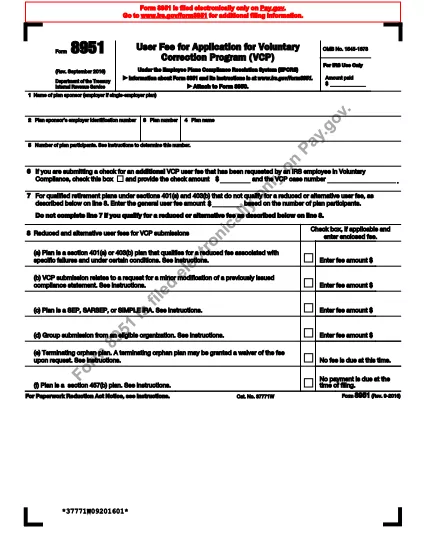
Form 8951 is the official IRS document used to calculate the compliance fee required for a Voluntary Correction Program (VCP) submission under the Employee Plans Compliance Resolution System. Whether you’re a plan sponsor, administrator, or tax professional, our fillable PDF lets you complete the form quickly and accurately.

What Is Form 8951?

The form captures basic plan information – sponsor name, EIN, plan number, participant count, and the applicable fee schedule. It is required whenever you submit a VCP request to correct plan failures.

How to Fill Out Form 8951 Online

Instead of downloading the PDF and using a separate editor, simply click the “Fill out this form” button on this page. The Formize PDF Filler app will open in your browser, and you can start typing immediately.

  • Enter the plan sponsor’s name and EIN.
  • Provide the plan number and plan name.
  • Enter the total number of participants from your most recent Form 5500.
  • Select the correct compliance fee from the schedule shown on lines 7‑8.
  • Check any applicable exception boxes.

Common Mistakes to Avoid

  • Leaving the participant count blank – the IRS will reject the VCP request.
  • Using an outdated fee schedule – always refer to the latest IRS instructions.
  • Misspelling the plan sponsor’s EIN – double‑check the nine‑digit number.
  • Forgetting to sign the form – the electronic signature is captured by the filler.

Download and Save Your Completed Form

After you review all entries, click Save to download a completed PDF, or choose Email to send it directly to your tax advisor or the IRS. Your data stays secure, and no extra software is required.

คำถามที่พบบ่อย
  • What is the purpose of Form 8951?

    Form 8951 is used to calculate and submit the compliance fee that accompanies a Voluntary Correction Program (VCP) request for employee benefit plans.

  • Do I need a separate PDF editor to complete Form 8951?

    No. With Formize you can fill out the form directly in your web browser—no extra software required.

  • Can I submit Form 8951 electronically to the IRS?

    The IRS still requires a printed and signed PDF, but you can print the completed form directly from the filler and mail it with your VCP package.

  • What fee schedule should I use on line 7?

    Use the fee schedule in the current IRS instructions for Form 8951, which is based on the total number of plan participants reported on your latest Form 5500.

  • Is my data safe while using the Formize filler?

    Yes. Formize uses SSL encryption, and the data is processed only in your browser until you choose to save or email the final PDF.

  • Can I save my progress and finish later?

    The online filler lets you download a partially completed PDF at any time, so you can resume editing later.

  • What common errors cause the IRS to reject a VCP submission?

    Missing participant count, incorrect EIN, outdated fee schedule, and unsigned forms are the top reasons for rejection.

  • Where can I find the official instructions for Form 8951?

    The official IRS instructions are included in the PDF linked below and on the IRS website.

ทำอย่างไร

วิธีกรอก Form 8951 ฟรีทางออนไลน์ใน 5 ขั้นตอนง่ายๆ:

  1. 1
    Click the “Fill out this form” button
    Locate the bright button on the page and click it. The Formize PDF Filler will launch in a new browser tab.
  2. 2
    Wait for the filler to load
    The app loads in a few seconds. You’ll see the Form 8951 template with editable fields.
  3. 3
    Enter required information
    Type directly into each field – sponsor name, EIN, plan number, participant count, and fee selection.
  4. 4
    Review and sign
    Double‑check all entries, then use the built‑in e‑signature field to sign the form.
  5. 5
    Save or email the completed PDF
    Choose “Save” to download the finished PDF or “Email” to send it directly to your advisor or the IRS.
สร้างแอป PDF Filler
เกี่ยวกับ

แบบฟอร์มภาษี

Form 8951 เป็นหนึ่งในแบบฟอร์มภาษีที่เป็นเอกสารที่ใช้ในการรายงานข้อมูลที่เกี่ยวข้องกับภาษีไปยังหน่วยงานด้านภาษีที่เกี่ยวข้อง มีแบบฟอร์มภาษีหลายประเภท รวมถึงแบบฟอร์มภาษีของรัฐบาลกลาง รัฐ และท้องถิ่น ซึ่งอาจแตกต่างกันไปขึ้นอยู่กับสถานการณ์และสถานที่ของผู้เสียภาษี

คุณสมบัติ

PDF ฟิลเลอร์

วิธีที่ง่ายที่สุดในการกรอกแบบฟอร์ม PDF ทางออนไลน์

  • กรอก Form 8951 อย่างรวดเร็ว
    กำลังมองหาวิธีเติม Form 8951 ทางออนไลน์อย่างรวดเร็วอยู่ใช่ไหม ด้วยตัวกรอกแบบฟอร์ม PDF ออนไลน์ฟรีของเรา คุณจะรู้วิธีแก้ไขและกรอกเอกสาร PDF นี้ในเวลาไม่ถึงนาที
  • โปรแกรมแก้ไข PDF ออนไลน์ที่ใช้งานง่าย
    เบื่อกับการพิมพ์ไฟล์ PDF เพื่อให้คุณสามารถแก้ไขได้ก่อนที่จะสแกนซ้ำและส่งกลับหรือไม่? แก้ไขเอกสาร PDF ออนไลน์ฟรี ใช้โปรแกรมแก้ไข PDF ออนไลน์ของเราเพื่อประหยัดเวลาและกระดาษ
  • เครื่องมือที่ยอดเยี่ยมสำหรับทุกแพลตฟอร์ม
    สงสัยวิธีเติม Form 8951 บน Mac หรืออาจใช้ตัวเติม PDF ฟรีได้อย่างไร เครื่องมือ PDF ออนไลน์ของเราทำงานได้บนทุกแพลตฟอร์ม
  • การจัดเก็บไฟล์ที่ปลอดภัย
    ไฟล์ "Form 8951" ที่เสร็จสมบูรณ์จะถูกจัดเก็บไว้ในฐานข้อมูลที่ปลอดภัยซึ่งจัดการโดย Amazon Cloud hosting คุณสามารถลบไฟล์ของคุณออกจากระบบของเราได้ตลอดเวลา ไม่ว่าในกรณีใด ไฟล์เหล่านี้จะถูกลบโดยอัตโนมัติหลังจากผ่านไป 24 ชั่วโมง
  • สนทนากับ Form 8951
    แชทกับ "Form 8951" บน Chatize ที่เป็นผู้ช่วยอ่าน PDF ฟรี ถามคำถามและรับคำตอบจาก "Form 8951" เพียงคลิกที่ปุ่ม แชทด้วยเอกสาร ด้านบน

ลบเซสชันการบรรจุ

ลบเซสชันการกรอกข้อมูลที่เลือกหรือไม่?ในกรณีนี้ความคืบหน้าในการกรอกแบบฟอร์มจะหายไป

ลบเซสชันการแก้ไข

ลบเซสชันการแก้ไขที่เลือกหรือไม่ ในกรณีนี้ ความคืบหน้าในการสร้างและแก้ไขแบบฟอร์มจะหายไป