
hamburger-menu icon
เลือกภาษา

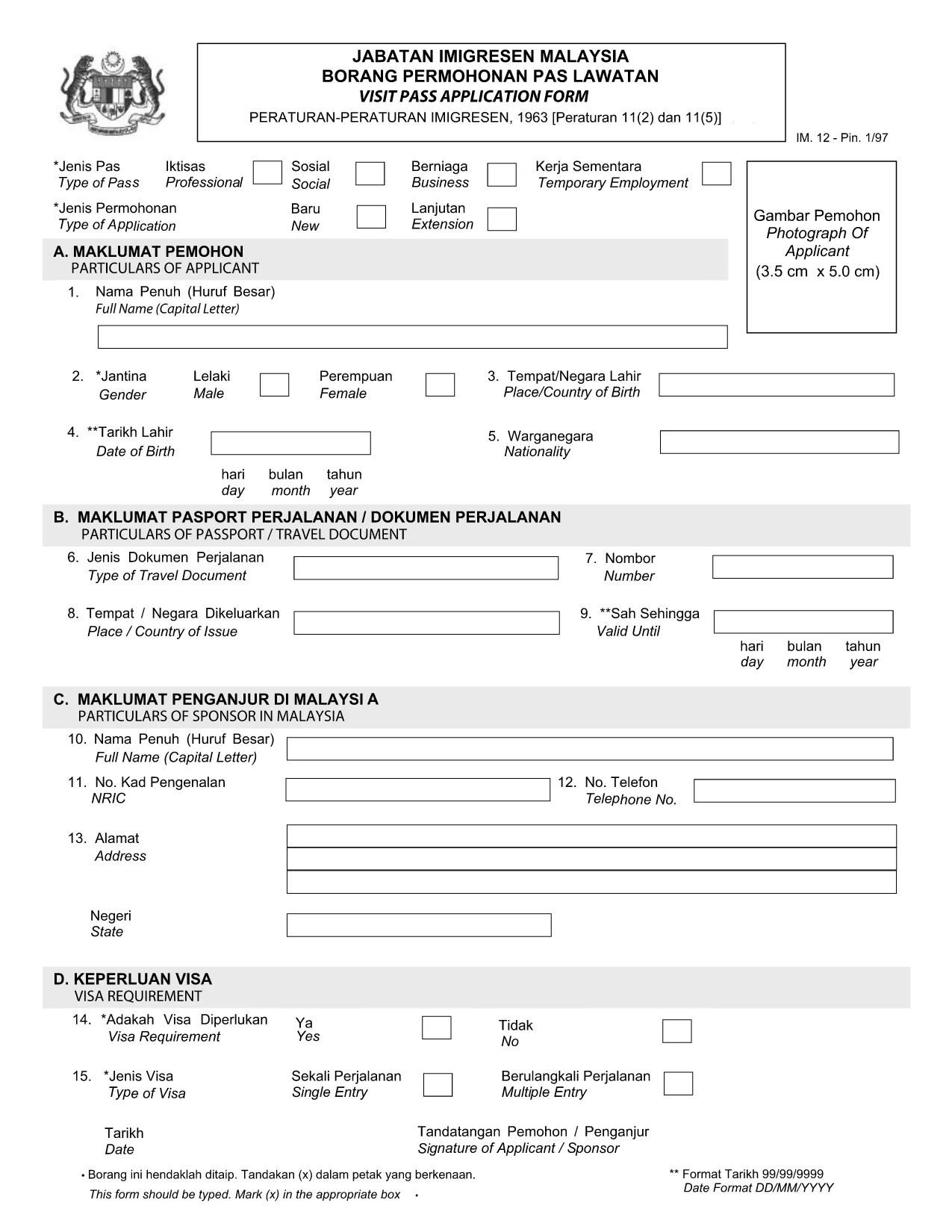
Visit Pass Application Form – Malay Version (Online Fillable)

  1. ภาษา ภาษาอังกฤษ
  2. ประเทศ Malaysia
  3. กิจกรรม วีซ่า
  4. แผนก MOTAC
Visit Pass Application Form – Malay Version (Online Fillable)

Looking for the official Visit Pass application form in Malay? You’ve come to the right place. Formize.com hosts a secure, fillable PDF that lets you complete the MOTAC Visit Pass (IMM.12) form directly in your browser—no extra software required.

Our step‑by‑step guide walks you through every field, highlights common pitfalls, and provides quick answers to the most asked questions. Whether you’re applying for a short‑term visit or a long‑stay pass, the online filler saves you time and ensures your submission meets the Ministry of Tourism, Arts and Culture (MOTAC) requirements.

Why Use the Online Fillable Visit Pass Form

  • Instant access: Click “Fill out this form” and the Formize PDF Filler loads automatically.
  • Save paper: Complete and submit digitally, reducing the need for printed copies.
  • Auto‑validation: The filler checks mandatory fields and format, reducing rejections.
  • Secure storage: Your data stays encrypted on our platform until you download the completed PDF.

How to Complete the Form in Minutes

  1. Click the Fill out this form button below.
  2. Wait a few seconds while the Formize PDF Filler loads the official IMM.12 PDF.
  3. Enter your details exactly as they appear on your passport and supporting documents.
  4. Use the built‑in navigation to jump between sections (Personal Details, Travel History, etc.).
  5. When finished, click Download Completed PDF and submit it to MOTAC as instructed.

Common Mistakes to Avoid

  • Leaving mandatory fields blank – the filler will highlight them in red.
  • Using abbreviations that do not match official IDs (e.g., “MY” instead of “Malaysia”).
  • Uploading an outdated passport photo – ensure the image meets size requirements.
  • Mismatched dates – travel dates must fall within the validity period of your pass.

Download the Official PDF (Malay)

If you prefer to work offline, you can download the original MOTAC Visit Pass form (Malay version) directly from the Ministry’s website. The link below points to the official PDF used by the online filler.

Download Visit Pass Application Form (IMM.12) – PDF

Frequently Asked Questions

Find quick answers to the most common queries about the Visit Pass application process.

คำถามที่พบบ่อย
  • Is the Visit Pass form available in Malay?

    Yes. The official MOTAC form is published in both English and Malay. The fillable version on Formize includes the Malay labels.

  • Do I need any special software to use the online filler?

    No. The Formize PDF Filler works in all modern browsers – Chrome, Firefox, Edge, and Safari.

  • Can I save my progress and return later?

    Yes. Use the “Save Draft” button within the filler to download a partially completed PDF, then reload it later.

  • What documents do I need to attach to the form?

    Typically you’ll need a passport copy, recent photograph, and proof of travel itinerary. Check the MOTAC checklist for your specific case.

  • How long does the online filling process take?

    Most users complete the form in 5‑10 minutes, provided all required information is ready.

  • Is there a fee for submitting the Visit Pass application?

    Yes, MOTAC charges a processing fee. The amount varies by nationality and duration of stay. Refer to the official MOTAC fee schedule.

ทำอย่างไร

วิธีกรอก Visit Pass application form ฟรีทางออนไลน์ใน 4 ขั้นตอนง่ายๆ:

  1. 1
    Open the Fillable Form
    Click the “Fill out this form” button on the page. The Formize PDF Filler will open in a new tab.
  2. 2
    Load the Official PDF
    Wait a few seconds while the system loads the Visit Pass application PDF (IMM.12) from MOTAC.
  3. 3
    Enter Your Information
    Fill in each field using the on‑screen prompts. Required fields are marked with an asterisk.
  4. 4
    Download or Submit
    When all sections are complete, click “Download Completed PDF”. Save the file and follow MOTAC’s submission instructions.
สร้างแอป PDF Filler
เกี่ยวกับ

แบบฟอร์มวีซ่า

Visit Pass application form เป็นหนึ่งในแบบฟอร์มวีซ่าที่เป็นเอกสารที่ใช้ในการยื่นขอวีซ่าเข้าประเทศต่างประเทศ วีซ่าเป็นเอกสารที่อนุญาตให้คนต่างชาติเข้ามา พำนัก และบางครั้งทำงานในต่างประเทศตามระยะเวลาที่กำหนด แบบฟอร์มและข้อกำหนดในการขอวีซ่าจะแตกต่างกันไปตามประเทศและประเภทของวีซ่า

แบบฟอร์มวีซ่ามักต้องการข้อมูลส่วนบุคคล เช่น ชื่อ วันเกิด และข้อมูลหนังสือเดินทาง ตลอดจนข้อมูลเกี่ยวกับวัตถุประสงค์และระยะเวลาของการเดินทาง จุดหมายปลายทาง และไม่ว่าผู้ยื่นคำร้องจะเคยถูกปฏิเสธวีซ่าหรือถูกเนรเทศออกจากประเทศหรือไม่ แบบฟอร์มอาจต้องใช้เอกสารประกอบ เช่น หนังสือเดินทาง รูปถ่าย และหลักฐานการสนับสนุนทางการเงิน

ในสหรัฐอเมริกา แบบฟอร์มวีซ่าที่พบมากที่สุดคือแบบฟอร์ม DS-160 และ DS-260 แบบฟอร์ม DS-160 ใช้ในการสมัครวีซ่าชั่วคราว ในขณะที่แบบฟอร์ม DS-260 ใช้ในการสมัครวีซ่าคนเข้าเมือง แบบฟอร์มเหล่านี้ต้องการข้อมูลโดยละเอียดเกี่ยวกับประวัติส่วนตัวและการเดินทางของผู้สมัคร ตลอดจนเอกสารประกอบ เช่น หนังสือเดินทาง กำหนดการเดินทาง และบันทึกทางการเงิน

ประเทศอื่นๆ อาจมีแบบฟอร์มและข้อกำหนดในการขอวีซ่าที่แตกต่างกัน แต่โดยทั่วไปแล้วกระบวนการพื้นฐานเกี่ยวข้องกับการกรอกคำร้องขอวีซ่า จัดเตรียมเอกสารประกอบ และเข้ารับการสัมภาษณ์กับเจ้าหน้าที่กงสุลที่สถานทูตหรือสถานกงสุลสหรัฐฯ สิ่งสำคัญคือต้องทราบว่าขั้นตอนการยื่นคำร้องขอวีซ่าอาจซับซ้อนและใช้เวลานาน และขอแนะนำให้บุคคลที่ต้องการขอวีซ่าปรึกษากับทนายความตรวจคนเข้าเมืองหรือผู้เชี่ยวชาญที่มีคุณสมบัติเหมาะสมอื่นๆ เพื่อให้แน่ใจว่าตรงตามแบบฟอร์มและข้อกำหนดที่จำเป็นทั้งหมด

คุณสมบัติ

PDF ฟิลเลอร์

วิธีที่ง่ายที่สุดในการกรอกแบบฟอร์ม PDF ทางออนไลน์

  • กรอก Visit Pass application form อย่างรวดเร็ว
    กำลังมองหาวิธีเติม Visit Pass application form ทางออนไลน์อย่างรวดเร็วอยู่ใช่ไหม ด้วยตัวกรอกแบบฟอร์ม PDF ออนไลน์ฟรีของเรา คุณจะรู้วิธีแก้ไขและกรอกเอกสาร PDF นี้ในเวลาไม่ถึงนาที
  • โปรแกรมแก้ไข PDF ออนไลน์ที่ใช้งานง่าย
    เบื่อกับการพิมพ์ไฟล์ PDF เพื่อให้คุณสามารถแก้ไขได้ก่อนที่จะสแกนซ้ำและส่งกลับหรือไม่? แก้ไขเอกสาร PDF ออนไลน์ฟรี ใช้โปรแกรมแก้ไข PDF ออนไลน์ของเราเพื่อประหยัดเวลาและกระดาษ
  • เครื่องมือที่ยอดเยี่ยมสำหรับทุกแพลตฟอร์ม
    สงสัยวิธีเติม Visit Pass application form บน Mac หรืออาจใช้ตัวเติม PDF ฟรีได้อย่างไร เครื่องมือ PDF ออนไลน์ของเราทำงานได้บนทุกแพลตฟอร์ม
  • การจัดเก็บไฟล์ที่ปลอดภัย
    ไฟล์ "Visit Pass application form" ที่เสร็จสมบูรณ์จะถูกจัดเก็บไว้ในฐานข้อมูลที่ปลอดภัยซึ่งจัดการโดย Amazon Cloud hosting คุณสามารถลบไฟล์ของคุณออกจากระบบของเราได้ตลอดเวลา ไม่ว่าในกรณีใด ไฟล์เหล่านี้จะถูกลบโดยอัตโนมัติหลังจากผ่านไป 24 ชั่วโมง
  • สนทนากับ Visit Pass application form
    แชทกับ "Visit Pass application form" บน Chatize ที่เป็นผู้ช่วยอ่าน PDF ฟรี ถามคำถามและรับคำตอบจาก "Visit Pass application form" เพียงคลิกที่ปุ่ม แชทด้วยเอกสาร ด้านบน

ลบเซสชันการบรรจุ

ลบเซสชันการกรอกข้อมูลที่เลือกหรือไม่?ในกรณีนี้ความคืบหน้าในการกรอกแบบฟอร์มจะหายไป

ลบเซสชันการแก้ไข

ลบเซสชันการแก้ไขที่เลือกหรือไม่ ในกรณีนี้ ความคืบหน้าในการสร้างและแก้ไขแบบฟอร์มจะหายไป