
hamburger-menu icon
เลือกภาษา

INZ1253 – Absent Vaccination Documentation Record (Fillable PDF)

  1. ภาษา ภาษาอังกฤษ
  2. ประเทศ นิวซีแลนด์
  3. กิจกรรม สุขภาพ
INZ1253 – Absent Vaccination Documentation Record (Fillable PDF)

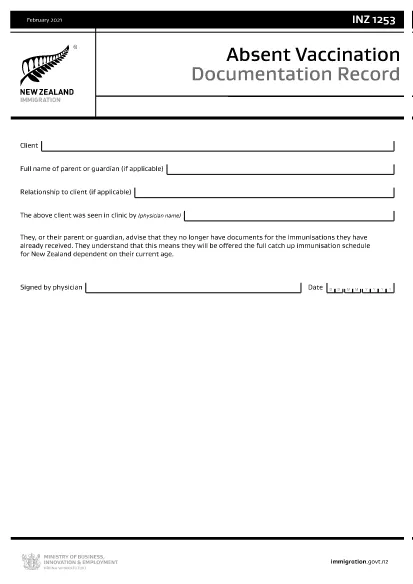
The INZ1253 is the official Absent Vaccination Documentation Record used by Immigration New Zealand when an applicant cannot produce proof of previously received immunisations. This form allows the applicant (or a parent/guardian) to declare the missing records and request the appropriate catch‑up vaccination schedule.

What is the INZ1253 Form?

The form is required for anyone applying for a New Zealand visa or residency who does not have the original vaccination certificates. By completing INZ1253 you acknowledge that you will follow the full catch‑up immunisation schedule based on your age.

How to Complete the INZ1253 Online

Instead of downloading, printing, and scanning, you can fill out the form directly on our site:

  • Click the “Fill out this form” button below.
  • Wait a few seconds while the Formize PDF Filler app loads.
  • Enter the required information in the fillable fields (personal details, reason for missing records, etc.).
  • Save the completed PDF to your device or submit it directly to Immigration New Zealand.

Common Mistakes to Avoid

  • Leaving mandatory fields blank – the system will highlight any missing information before you can save.
  • Using an outdated version – always use the latest INZ1253 PDF provided below.
  • Incorrect date formats – follow the DD/MM/YYYY format as shown in the example.
  • Not signing the form – the electronic signature field must be completed before submission.

Where to Submit the Completed Form

After you have saved the filled PDF, attach it to your visa or residency application through the Immigration New Zealand online portal. If you are applying by paper, include the printed form with your supporting documents.

Need help? Review the FAQs below or contact Immigration New Zealand directly.

คำถามที่พบบ่อย
  • Do I need to print the INZ1253 form after filling it online?

    No. The Formize filler creates a fully signed PDF that can be uploaded directly to the Immigration New Zealand portal.

  • Can I edit the form after I have saved it?

    Yes. Open the saved PDF again with the Formize filler to make any changes, then re‑save.

  • What if I don’t have any vaccination records at all?

    Select “No records available” in the form and provide a brief explanation. You will be scheduled for the full catch‑up immunisation program.

  • Is the electronic signature legally accepted?

    Immigration New Zealand accepts electronic signatures on the INZ1253 when the form is completed using a certified PDF filler like Formize.

  • How long does it take for Immigration New Zealand to process the form?

    Processing times vary, but most applicants receive a response within 5‑10 business days after submission.

ทำอย่างไร

วิธีกรอก INZ1253 ฟรีทางออนไลน์ใน 4 ขั้นตอนง่ายๆ:

  1. 1
    Open the Fillable Form
    Click the “Fill out this form” button on the page. The Formize PDF Filler will launch in your browser.
  2. 2
    Enter Your Details
    Complete each highlighted field – personal information, reason for missing vaccination records, and any additional notes.
  3. 3
    Save or Submit
    When all required fields are filled, click “Save PDF” to download the completed form or use the built‑in “Submit” button to send it directly to Immigration New Zealand.
  4. 4
    Confirm Receipt
    Check your email or the immigration portal for a confirmation that the form has been received.
สร้างแอป PDF Filler
เกี่ยวกับ

แบบฟอร์มใบสมัคร Medicare

INZ1253 เป็นหนึ่งในแบบฟอร์ม Medicare ที่เป็นเอกสารที่ใช้ในกระบวนการต่างๆ ที่เกี่ยวข้องกับโปรแกรม Medicare ซึ่งเป็นโปรแกรมประกันสุขภาพที่บริหารโดยรัฐบาลกลางในสหรัฐอเมริกา Medicare ให้ความคุ้มครองสำหรับบุคคลที่มีสิทธิ์ซึ่งมีอายุ 65 ปีขึ้นไป รวมถึงบุคคลทุพพลภาพหรือสภาวะทางการแพทย์เฉพาะบางประการ

แบบฟอร์ม Medicare ทั่วไปบางฉบับ ได้แก่:

ใบสมัครลงทะเบียน Medicare: แบบฟอร์มนี้ใช้เพื่อสมัครรับสิทธิประโยชน์ Medicare รวมถึงข้อมูลเกี่ยวกับรายละเอียดส่วนบุคคลของผู้สมัคร เช่น ชื่อ ที่อยู่ หมายเลขประกันสังคม และรายละเอียดเกี่ยวกับการประกันสุขภาพในปัจจุบัน

แบบฟอร์มการเรียกร้อง Medicare: แบบฟอร์มเหล่านี้ใช้เพื่อขอเงินชดเชยสำหรับบริการทางการแพทย์หรือเวชภัณฑ์ที่ Medicare ครอบคลุม แบบฟอร์มการเคลมที่แตกต่างกันจะใช้สำหรับบริการประเภทต่างๆ เช่น การพักรักษาในโรงพยาบาล (แบบฟอร์ม UB-04) การบริการของแพทย์ (แบบฟอร์ม CMS-1500) หรืออุปกรณ์ทางการแพทย์ที่คงทน (แบบฟอร์ม DMERC)

แบบฟอร์มแผนยาที่ต้องสั่งโดยแพทย์ Medicare: แบบฟอร์มเหล่านี้ใช้เพื่อลงทะเบียนใน Medicare Part D ซึ่งให้ความคุ้มครองยาที่ต้องสั่งโดยแพทย์ โดยทั่วไปพวกเขาต้องการข้อมูลเกี่ยวกับยาที่กำลังใช้อยู่และอาจรวมถึงรายการยาที่ครอบคลุมสำหรับแผนเฉพาะ

แบบฟอร์มอุทธรณ์ Medicare: หากการเรียกร้อง Medicare ถูกปฏิเสธ หรือหากมีข้อขัดแย้งกับคำตัดสินเรื่องความคุ้มครอง บุคคลทั่วไปสามารถยื่นอุทธรณ์ได้ แบบฟอร์มที่ใช้สำหรับกระบวนการอุทธรณ์จะแตกต่างกันไปขึ้นอยู่กับสถานการณ์เฉพาะและประเภทของความคุ้มครอง Medicare ที่เกี่ยวข้อง

แบบฟอร์มการอนุญาต Medicare: แบบฟอร์มเหล่านี้ใช้เพื่ออนุญาตการเปิดเผยข้อมูลสุขภาพที่ได้รับการคุ้มครองแก่บุคคลหรือองค์กรที่ต้องการเข้าถึงเวชระเบียนเพื่อวัตถุประสงค์ต่างๆ เช่น การประมวลผลการเรียกร้อง หรือการประสานงานการดูแล

แบบฟอร์มการเปลี่ยนแปลง Medicare: แบบฟอร์มเหล่านี้ใช้เพื่อเปลี่ยนแปลงความคุ้มครอง Medicare ที่มีอยู่ เช่น การอัปเดตข้อมูลส่วนบุคคล การเปลี่ยนแพทย์ปฐมภูมิ หรือการเปลี่ยนไปใช้แผนยาตามใบสั่งแพทย์ของ Medicare Advantage หรือ Part D อื่น

สิ่งสำคัญคือต้องทราบว่าแบบฟอร์มและกระบวนการของ Medicare อาจมีความซับซ้อน และขอแนะนำให้บุคคลขอความช่วยเหลือจากโปรแกรม Medicare หรือผู้เชี่ยวชาญด้านสุขภาพที่เชื่อถือได้เพื่อให้แน่ใจว่าพวกเขากรอกแบบฟอร์มที่เหมาะสมอย่างถูกต้องและทันเวลา

คุณสมบัติ

PDF ฟิลเลอร์

วิธีที่ง่ายที่สุดในการกรอกแบบฟอร์ม PDF ทางออนไลน์

  • กรอก INZ1253 อย่างรวดเร็ว
    กำลังมองหาวิธีเติม INZ1253 ทางออนไลน์อย่างรวดเร็วอยู่ใช่ไหม ด้วยตัวกรอกแบบฟอร์ม PDF ออนไลน์ฟรีของเรา คุณจะรู้วิธีแก้ไขและกรอกเอกสาร PDF นี้ในเวลาไม่ถึงนาที
  • โปรแกรมแก้ไข PDF ออนไลน์ที่ใช้งานง่าย
    เบื่อกับการพิมพ์ไฟล์ PDF เพื่อให้คุณสามารถแก้ไขได้ก่อนที่จะสแกนซ้ำและส่งกลับหรือไม่? แก้ไขเอกสาร PDF ออนไลน์ฟรี ใช้โปรแกรมแก้ไข PDF ออนไลน์ของเราเพื่อประหยัดเวลาและกระดาษ
  • เครื่องมือที่ยอดเยี่ยมสำหรับทุกแพลตฟอร์ม
    สงสัยวิธีเติม INZ1253 บน Mac หรืออาจใช้ตัวเติม PDF ฟรีได้อย่างไร เครื่องมือ PDF ออนไลน์ของเราทำงานได้บนทุกแพลตฟอร์ม
  • การจัดเก็บไฟล์ที่ปลอดภัย
    ไฟล์ "INZ1253" ที่เสร็จสมบูรณ์จะถูกจัดเก็บไว้ในฐานข้อมูลที่ปลอดภัยซึ่งจัดการโดย Amazon Cloud hosting คุณสามารถลบไฟล์ของคุณออกจากระบบของเราได้ตลอดเวลา ไม่ว่าในกรณีใด ไฟล์เหล่านี้จะถูกลบโดยอัตโนมัติหลังจากผ่านไป 24 ชั่วโมง
  • สนทนากับ INZ1253
    แชทกับ "INZ1253" บน Chatize ที่เป็นผู้ช่วยอ่าน PDF ฟรี ถามคำถามและรับคำตอบจาก "INZ1253" เพียงคลิกที่ปุ่ม แชทด้วยเอกสาร ด้านบน

ลบเซสชันการบรรจุ

ลบเซสชันการกรอกข้อมูลที่เลือกหรือไม่?ในกรณีนี้ความคืบหน้าในการกรอกแบบฟอร์มจะหายไป

ลบเซสชันการแก้ไข

ลบเซสชันการแก้ไขที่เลือกหรือไม่ ในกรณีนี้ ความคืบหน้าในการสร้างและแก้ไขแบบฟอร์มจะหายไป