
hamburger-menu icon
เลือกภาษา

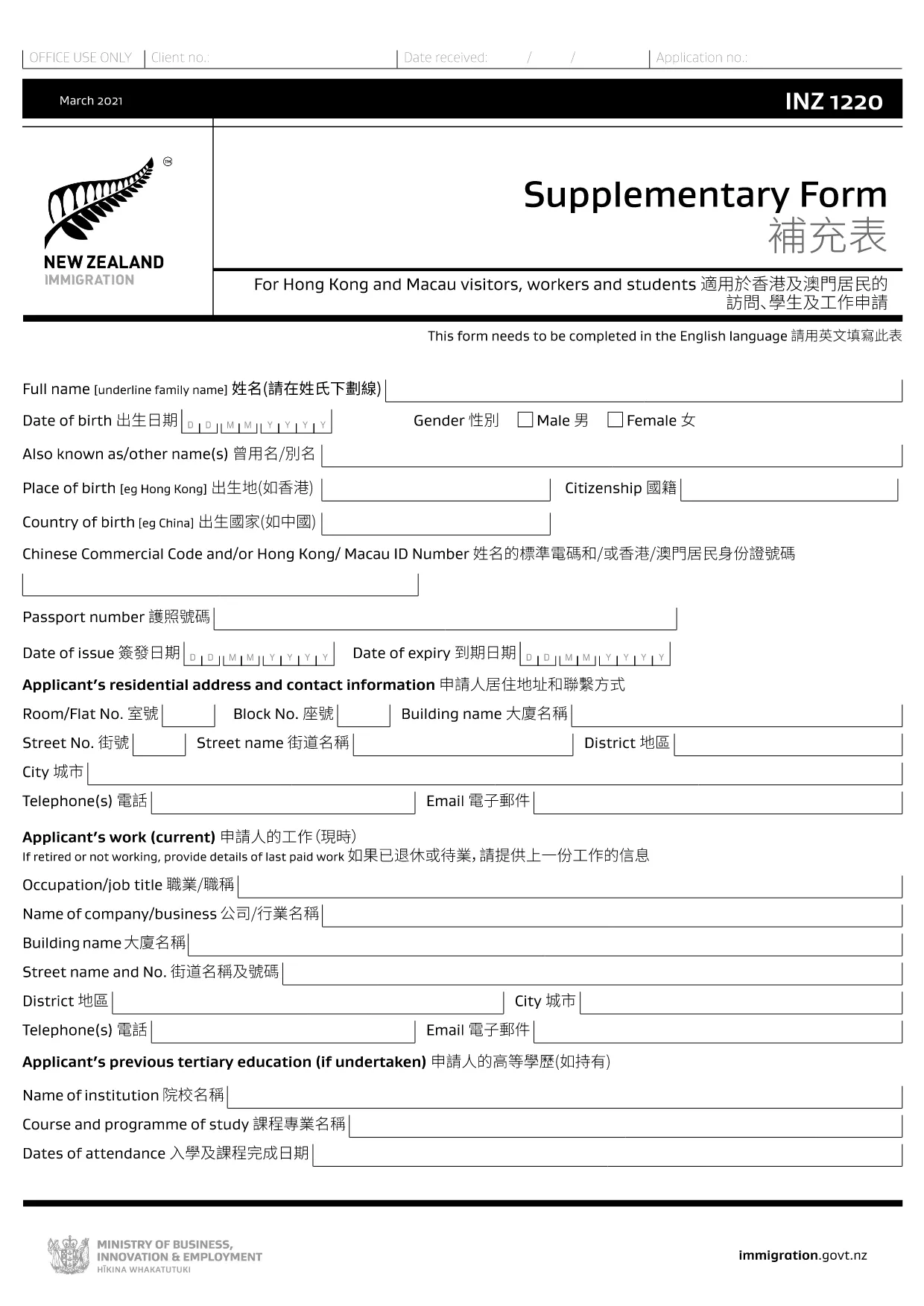
The INZ 1220 Supplementary Form is required by Immigration New Zealand for visitors, workers and students from Hong Kong and Macau who need to provide additional contact details. This fillable PDF lets you complete the form quickly, securely, and without printing.

Our page integrates the Formize PDF Filler app, so you can edit the document directly in your browser. No extra software, no downloads – just click, fill, and submit.

What Is the INZ 1220 Form?

INZ 1220 is a supplementary information sheet that collects the name, address, telephone, and email of a New Zealand contact (friend, family member, or sponsor). It is often requested alongside visa applications to verify local support.

How to Complete the INZ 1220 Online

Follow the simple steps below to fill out the form using Formize:

  • Click the **Fill out this form** button on this page.
  • Wait a few seconds while the Formize PDF Filler loads.
  • Enter the required details in each field – the interface highlights mandatory sections.
  • Review the information for accuracy.
  • Save the completed PDF to your device or download a copy for your records.

Common Mistakes to Avoid

  • Leaving the contact’s phone number incomplete – include country code.
  • Using an outdated email address – Immigration may send important updates.
  • Submitting the form with blank mandatory fields – the filler will flag these before you can save.

Where to Submit the Completed Form

After saving the PDF, attach it to your visa application through the Immigration New Zealand online portal, or email it to the address specified in your application instructions.

FAQs About INZ 1220

Find quick answers to the most common questions below (full FAQ list further down).

คำถามที่พบบ่อย
  • Do I need to print the INZ 1220 form?

    No. Using the Formize PDF Filler you can complete the form entirely online and download the finished PDF.

  • What language is the INZ 1220 form in?

    The official form is in English. If you need a translation, you must provide a certified translation alongside the original.

  • Can I save my progress and finish later?

    Yes. While the Formize app is open, you can click **Save** to download a partially‑filled PDF, then reload it later to continue.

  • Is the contact’s New Zealand address mandatory?

    Yes. Immigration requires a full local address (street, city, postal code) to verify your support network.

  • What if I make a mistake after saving?

    Simply reopen the saved PDF in the Formize filler, correct the error, and save a new version.

  • How many pages is the INZ 1220 form?

    The supplementary form is a single‑page PDF, making it quick to fill and attach.

  • Do I need a digital signature?

    A handwritten signature is required. Print the completed PDF, sign it, then scan or take a clear photo to upload.

  • Where can I find help if I’m stuck?

    The Formize filler includes tooltip help for each field. For further assistance, consult the Immigration New Zealand website.

ทำอย่างไร

วิธีกรอก INZ 1220 ฟรีทางออนไลน์ใน 5 ขั้นตอนง่ายๆ:

  1. 1
    Open the Fillable Form
    Click the **Fill out this form** button on the page. The Formize PDF Filler app will open in a new tab.
  2. 2
    Load the Form
    Wait a few seconds while the INZ 1220 PDF loads. All fields become editable directly in the browser.
  3. 3
    Enter Your Information
    Type the required details (contact name, address, phone, email). Required fields are marked with an asterisk.
  4. 4
    Review and Save
    Check the entered data for errors, then click **Save** to download the completed PDF to your device.
  5. 5
    Submit with Your Visa Application
    Attach the saved INZ 1220 PDF to your Immigration New Zealand online application or email it as instructed.
สร้างแอป PDF Filler
เกี่ยวกับ

แบบฟอร์มการท่องเที่ยว

INZ 1220 เป็นหนึ่งในแบบฟอร์มการท่องเที่ยวที่เป็นเอกสารที่ใช้โดยบุคคลหรือกลุ่มที่วางแผนจะเดินทางเพื่อจุดประสงค์ด้านการท่องเที่ยว แบบฟอร์มเหล่านี้อาจแตกต่างกันไปขึ้นอยู่กับประเทศปลายทางหรือผู้ให้บริการการเดินทาง แต่โดยทั่วไปจะมีข้อมูลเกี่ยวกับผู้เดินทาง กำหนดการเดินทาง และรายละเอียดอื่นๆ ที่เกี่ยวข้อง

รูปแบบการท่องเที่ยวทั่วไป ได้แก่ :

แผนการเดินทาง: แบบฟอร์มนี้แสดงรายการกิจกรรมที่วางแผนไว้ของผู้เดินทาง รวมถึงวันที่ เวลา และสถานที่ของเที่ยวบิน ที่พัก ทัวร์ และกิจกรรมอื่นๆ

การขอวีซ่า: หลายประเทศกำหนดให้นักท่องเที่ยวต้องขอวีซ่าก่อนเข้าประเทศ แบบฟอร์มคำร้องขอวีซ่ามักจะขอข้อมูลส่วนบุคคล รายละเอียดการเดินทาง และเอกสารประกอบ เช่น หนังสือเดินทาง รูปถ่าย หรืองบการเงิน

แบบฟอร์มประกาศสุขภาพ: แบบฟอร์มนี้ใช้เพื่อแจ้งเงื่อนไขทางการแพทย์ใดๆ หรือการสัมผัสกับโรคติดต่อที่อาจเกิดขึ้น เช่น โควิด-19 บางประเทศกำหนดให้ผู้เดินทางตรวจหาเชื้อโควิด-19 เป็นลบก่อนเข้าประเทศ

แบบฟอร์มประกันการเดินทาง: แบบฟอร์มนี้ให้ข้อมูลเกี่ยวกับความคุ้มครองของประกันการเดินทางของผู้เดินทาง รวมถึงประเภทของกรมธรรม์ วงเงินคุ้มครอง และข้อมูลติดต่อในกรณีฉุกเฉิน

แบบฟอร์มใบศุลกากร: บางประเทศกำหนดให้ใช้แบบฟอร์มนี้เพื่อสำแดงสิ่งของใดๆ ที่นำเข้ามาในประเทศ เช่น ของขวัญ ของที่ระลึก หรืออุปกรณ์อิเล็กทรอนิกส์

แบบฟอร์มการจองที่พัก: แบบฟอร์มนี้ให้ข้อมูลเกี่ยวกับที่พักของผู้เดินทาง รวมถึงวันที่เข้าพัก ประเภทห้อง และคำขอพิเศษใดๆ

แบบฟอร์มการท่องเที่ยวอาจเป็นข้อกำหนดของสายการบิน ตัวแทนการท่องเที่ยว โรงแรม หรือผู้ให้บริการการเดินทางอื่นๆ และอาจมีให้ในรูปแบบอิเล็กทรอนิกส์หรือกระดาษ สิ่งสำคัญคือต้องตรวจสอบอย่างรอบคอบและกรอกแบบฟอร์มที่จำเป็นทั้งหมดเพื่อให้แน่ใจว่าประสบการณ์การเดินทางจะราบรื่นและไม่ยุ่งยาก

คุณสมบัติ

PDF ฟิลเลอร์

วิธีที่ง่ายที่สุดในการกรอกแบบฟอร์ม PDF ทางออนไลน์

  • กรอก INZ 1220 อย่างรวดเร็ว
    กำลังมองหาวิธีเติม INZ 1220 ทางออนไลน์อย่างรวดเร็วอยู่ใช่ไหม ด้วยตัวกรอกแบบฟอร์ม PDF ออนไลน์ฟรีของเรา คุณจะรู้วิธีแก้ไขและกรอกเอกสาร PDF นี้ในเวลาไม่ถึงนาที
  • โปรแกรมแก้ไข PDF ออนไลน์ที่ใช้งานง่าย
    เบื่อกับการพิมพ์ไฟล์ PDF เพื่อให้คุณสามารถแก้ไขได้ก่อนที่จะสแกนซ้ำและส่งกลับหรือไม่? แก้ไขเอกสาร PDF ออนไลน์ฟรี ใช้โปรแกรมแก้ไข PDF ออนไลน์ของเราเพื่อประหยัดเวลาและกระดาษ
  • เครื่องมือที่ยอดเยี่ยมสำหรับทุกแพลตฟอร์ม
    สงสัยวิธีเติม INZ 1220 บน Mac หรืออาจใช้ตัวเติม PDF ฟรีได้อย่างไร เครื่องมือ PDF ออนไลน์ของเราทำงานได้บนทุกแพลตฟอร์ม
  • การจัดเก็บไฟล์ที่ปลอดภัย
    ไฟล์ "INZ 1220" ที่เสร็จสมบูรณ์จะถูกจัดเก็บไว้ในฐานข้อมูลที่ปลอดภัยซึ่งจัดการโดย Amazon Cloud hosting คุณสามารถลบไฟล์ของคุณออกจากระบบของเราได้ตลอดเวลา ไม่ว่าในกรณีใด ไฟล์เหล่านี้จะถูกลบโดยอัตโนมัติหลังจากผ่านไป 24 ชั่วโมง
  • สนทนากับ INZ 1220
    แชทกับ "INZ 1220" บน Chatize ที่เป็นผู้ช่วยอ่าน PDF ฟรี ถามคำถามและรับคำตอบจาก "INZ 1220" เพียงคลิกที่ปุ่ม แชทด้วยเอกสาร ด้านบน

ลบเซสชันการบรรจุ

ลบเซสชันการกรอกข้อมูลที่เลือกหรือไม่?ในกรณีนี้ความคืบหน้าในการกรอกแบบฟอร์มจะหายไป

ลบเซสชันการแก้ไข

ลบเซสชันการแก้ไขที่เลือกหรือไม่ ในกรณีนี้ ความคืบหน้าในการสร้างและแก้ไขแบบฟอร์มจะหายไป