hamburger-menu icon
เลือกภาษา

2025 CSE Application Form – Fillable Online

  1. ภาษา ภาษาอังกฤษ
  2. ประเทศ Philippines
  3. แผนก Department of Budget and Management
  4. กิจกรรม Procurement
กรอกแบบฟอร์มนี้
2025 CSE Application Form – Fillable Online

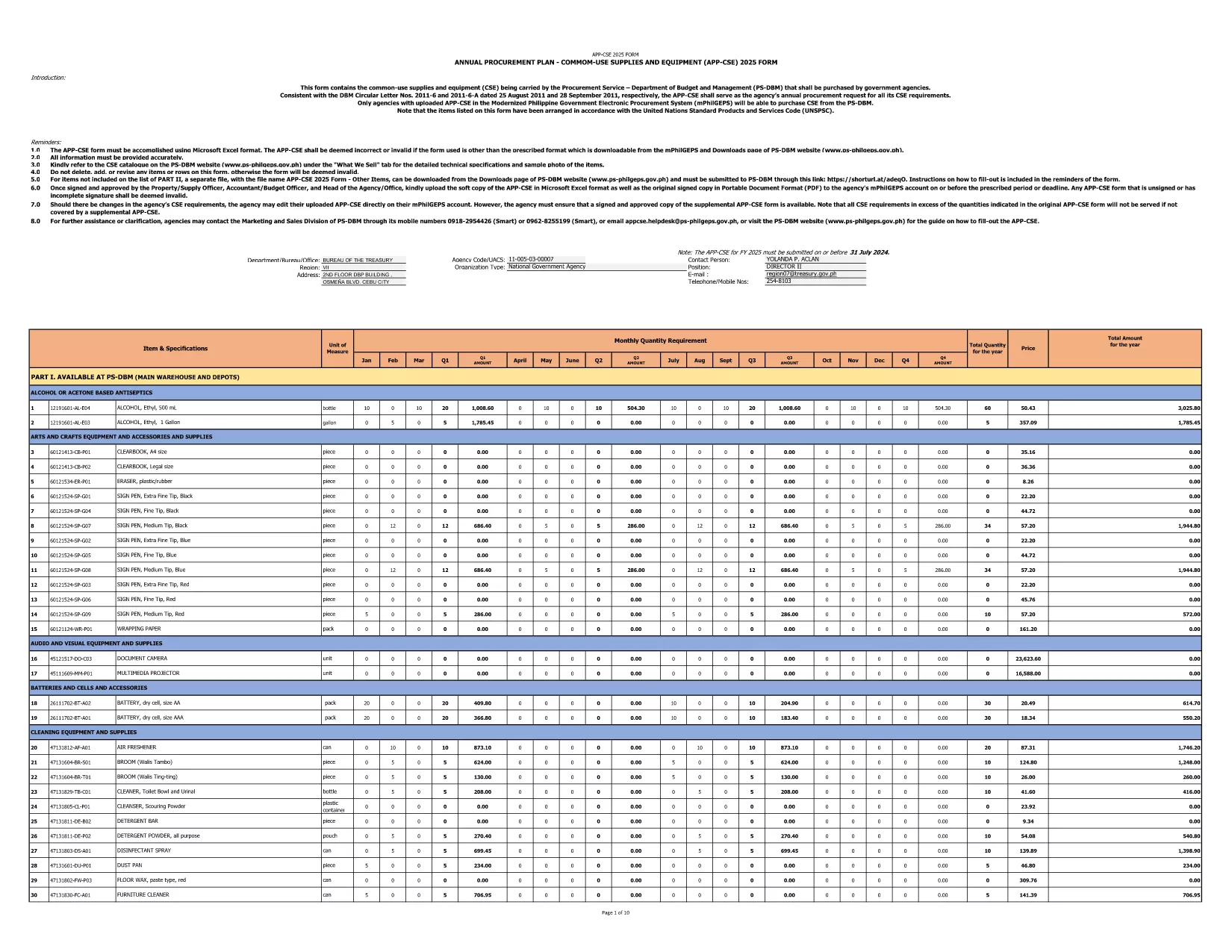
The 2025 CSE (Common‑Use Supplies and Equipment) Application Form is the official document used by Philippine government agencies to request procurement of shared supplies and equipment. This fillable PDF is hosted by the Department of Budget and Management and follows the latest DBM Circular Letters.

What Is the CSE Application Form?

The CSE form consolidates all common‑use items that agencies plan to purchase for the fiscal year. It ensures transparency, avoids duplication, and streamlines the procurement process across the public sector.

How to Complete the Form Online

Instead of downloading the PDF and opening a separate editor, simply click the "Fill out this form" button on this page. The Formize PDF Filler app will load in your browser, letting you enter data directly into the fields.

Common Mistakes to Avoid

  • Leaving required fields blank – the form will flag them before submission.
  • Using the wrong fiscal year – this version is for FY 2025 only.
  • Entering non‑numeric values in budget columns.
  • Forgetting to attach supporting documents where indicated.

Download the Official PDF

If you prefer to keep a local copy, you can download the original PDF from the government site. The file is the same one used by Formize.

Why Use Formize PDF Filler?

Formize provides a secure, browser‑based environment that:

  • Preserves the original formatting of the government form.
  • Auto‑saves your progress, preventing data loss.
  • Allows you to submit the completed form directly to your agency’s procurement portal.

Start filling the 2025 CSE Application Form now and accelerate your agency’s procurement workflow.

คำถามที่พบบ่อย
  • Is this form only for FY 2025?

    Yes. The downloaded PDF is specifically labeled APP‑CSE FY 2025 and follows the 2025 procurement guidelines.

  • Do I need a PDF editor to fill the form?

    No. The Formize PDF Filler works in any modern browser—no extra software is required.

  • Can I save my progress and return later?

    Absolutely. The filler auto‑saves your entries, and you can download a draft PDF at any time.

  • What if I make a mistake after submitting?

    You can download the completed PDF, correct it using Formize, and re‑submit. Always keep a backup copy.

  • Is the form secure?

    Formize uses SSL encryption, and the PDF remains on your device unless you choose to upload it to a secure agency portal.

  • Where can I find guidance on each field?

    Each field includes a tooltip with brief instructions. For detailed guidance, refer to DBM Circular Letter Nos. 2011‑6 and 2011‑6‑A.

  • Can I print the completed form?

    Yes. After filling out the form, click "Print" to generate a printer‑ready version.

ทำอย่างไร

วิธีกรอก CSE application form ฟรีทางออนไลน์ใน 4 ขั้นตอนง่ายๆ:

  1. 1
    Open the Fillable Form
    Click the "Fill out this form" button on the page. The Formize PDF Filler loads instantly in your browser.
  2. 2
    Enter Required Information
    Complete each highlighted field—agency name, item description, quantity, budget, and supporting details.
  3. 3
    Validate and Save
    Use the built‑in validation to check for missing or incorrect entries, then click "Save" to store a copy on your device.
  4. 4
    Submit or Export
    When finished, either submit the form directly to your procurement portal or export it as a completed PDF for offline filing.
สร้างแอป PDF Filler
เกี่ยวกับ

เทมเพลต CSE application form

ด้วยชุดคุณสมบัติดั้งเดิมสำหรับการดูและกรอกเอกสาร PDF รวมกับประโยชน์ของเว็บแอปพลิเคชันและเค้าโครงที่ตอบสนอง คุณสามารถสร้าง CSE application form ให้เสร็จภายในไม่กี่นาที

คุณสมบัติ

PDF ฟิลเลอร์

วิธีที่ง่ายที่สุดในการกรอกแบบฟอร์ม PDF ทางออนไลน์

  • กรอก CSE application form อย่างรวดเร็ว
    กำลังมองหาวิธีเติม CSE application form ทางออนไลน์อย่างรวดเร็วอยู่ใช่ไหม ด้วยตัวกรอกแบบฟอร์ม PDF ออนไลน์ฟรีของเรา คุณจะรู้วิธีแก้ไขและกรอกเอกสาร PDF นี้ในเวลาไม่ถึงนาที
  • โปรแกรมแก้ไข PDF ออนไลน์ที่ใช้งานง่าย
    เบื่อกับการพิมพ์ไฟล์ PDF เพื่อให้คุณสามารถแก้ไขได้ก่อนที่จะสแกนซ้ำและส่งกลับหรือไม่? แก้ไขเอกสาร PDF ออนไลน์ฟรี ใช้โปรแกรมแก้ไข PDF ออนไลน์ของเราเพื่อประหยัดเวลาและกระดาษ
  • เครื่องมือที่ยอดเยี่ยมสำหรับทุกแพลตฟอร์ม
    สงสัยวิธีเติม CSE application form บน Mac หรืออาจใช้ตัวเติม PDF ฟรีได้อย่างไร เครื่องมือ PDF ออนไลน์ของเราทำงานได้บนทุกแพลตฟอร์ม
  • การจัดเก็บไฟล์ที่ปลอดภัย
    ไฟล์ "CSE application form" ที่เสร็จสมบูรณ์จะถูกจัดเก็บไว้ในฐานข้อมูลที่ปลอดภัยซึ่งจัดการโดย Amazon Cloud hosting คุณสามารถลบไฟล์ของคุณออกจากระบบของเราได้ตลอดเวลา ไม่ว่าในกรณีใด ไฟล์เหล่านี้จะถูกลบโดยอัตโนมัติหลังจากผ่านไป 24 ชั่วโมง
  • สนทนากับ CSE application form
    แชทกับ "CSE application form" บน Chatize ที่เป็นผู้ช่วยอ่าน PDF ฟรี ถามคำถามและรับคำตอบจาก "CSE application form" เพียงคลิกที่ปุ่ม แชทด้วยเอกสาร ด้านบน

ลบเซสชันการบรรจุ

ลบเซสชันการกรอกข้อมูลที่เลือกหรือไม่?ในกรณีนี้ความคืบหน้าในการกรอกแบบฟอร์มจะหายไป

ลบเซสชันการแก้ไข

ลบเซสชันการแก้ไขที่เลือกหรือไม่ ในกรณีนี้ ความคืบหน้าในการสร้างและแก้ไขแบบฟอร์มจะหายไป