hamburger-menu icon
เลือกภาษา

EN-AD.02 – Notice of Location or Change of Location Form (Fillable PDF)

  1. ภาษา ภาษาอังกฤษ
  2. ประเทศ United Kingdom
  3. กิจกรรม Legal filings
  4. แผนก Companies House
EN-AD.02 – Notice of Location or Change of Location Form (Fillable PDF)

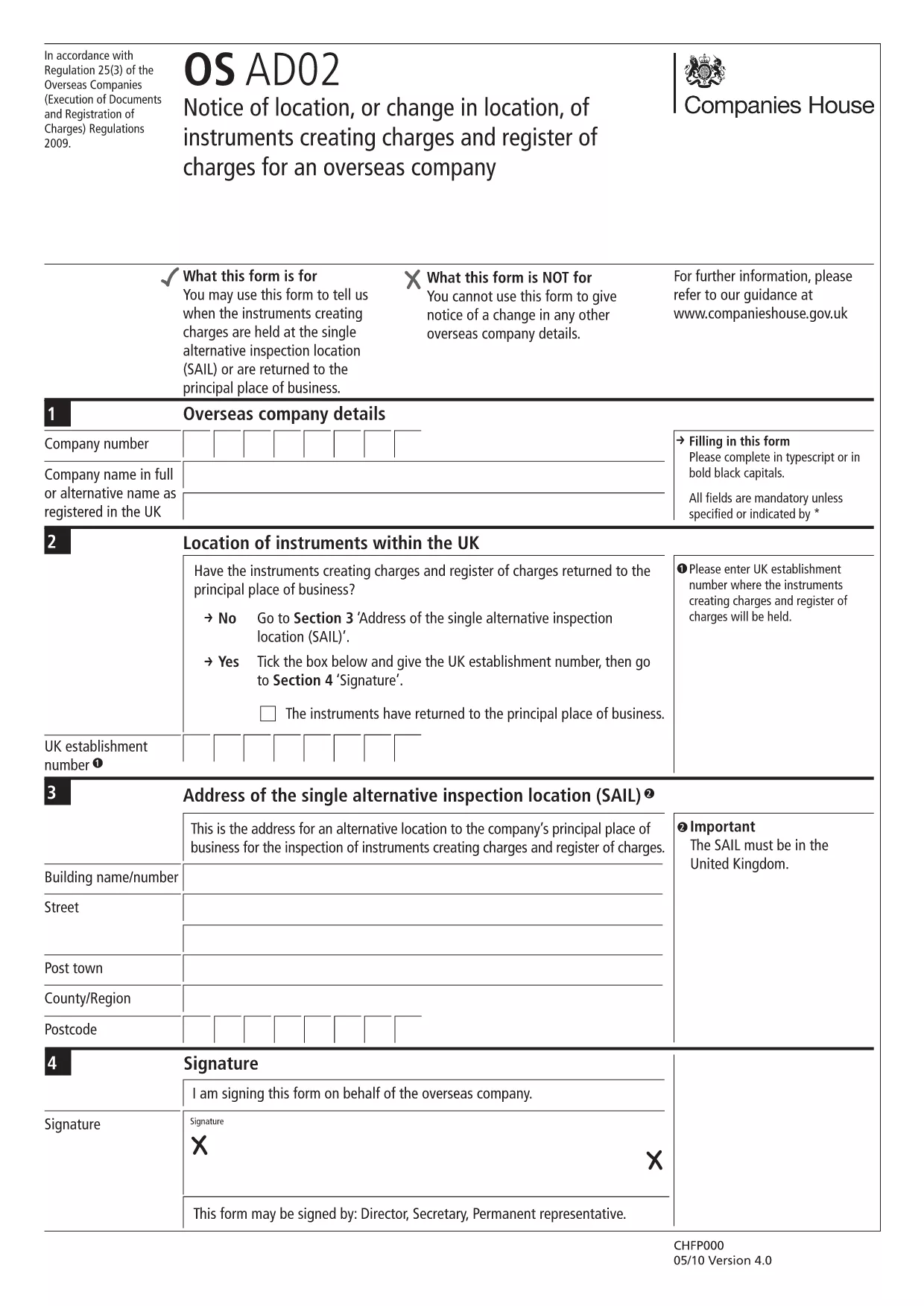
The EN-AD.02 (also referenced as OS AD02) is the official notice used to record the location, or any change in location, of instruments that create charges on the UK Register of Charges for overseas companies. Completing this form correctly ensures your charge is properly registered and publicly searchable.

Formize makes the EN-AD.02 form 100 % fillable online – no PDF editor required. Simply click the button below, let the Formize PDF Filler load, and start typing. All data is saved automatically, and you can download a completed copy or submit it directly to Companies House.

What Is EN-AD.02?

EN-AD.02 is a statutory document required by Companies House when an overseas company creates a charge over assets in the United Kingdom. The form captures details such as:

  • Company name and registration number
  • Type of instrument creating the charge
  • Exact location of the charge (or any change to that location)
  • Date of registration

How to Complete the EN-AD.02 Form Online

Follow the simple steps in the How‑To section below. The Formize PDF Filler loads the official PDF, turns every field into an interactive input, and validates dates and numeric entries for you.

Common Mistakes to Avoid

  • Leaving required fields blank: The form will not submit if mandatory sections are empty.
  • Mismatching dates: Ensure the “Date of Change” is later than the original registration date.
  • Incorrect charge description: Use the exact wording from the instrument to avoid rejection.

Where to Submit the Completed Form

After you finish, you can either:

  1. Download the signed PDF and upload it through the Companies House WebFiling service.
  2. Send the PDF by post to the Companies House office handling overseas charges.

Both methods require the form to be signed by an authorized representative of the overseas company.

คำถามที่พบบ่อย
  • What is the purpose of the EN-AD.02 form?

    It notifies Companies House of the location, or any change in location, of instruments that create charges on the UK Register of Charges for overseas companies.

  • Can I edit the EN-AD.02 PDF without Formize?

    Technically you could use a PDF editor, but Formize provides a secure, fillable version that validates data and prevents common errors.

  • Is an electronic signature accepted on EN-AD.02?

    Yes, Companies House accepts qualified electronic signatures. Upload the signed PDF through WebFiling or attach a scanned handwritten signature.

  • How long does it take for the completed form to be processed?

    Once submitted, Companies House usually updates the Register of Charges within 5‑7 business days.

  • Do I need to submit supporting documents with EN-AD.02?

    Only if the charge instrument references additional agreements. Include any annexes mentioned in the instrument to avoid delays.

  • What if I make a mistake after submitting?

    You can file a corrected EN-AD.02 using the same process, clearly marking it as an amendment and referencing the original filing reference number.

ทำอย่างไร

วิธีกรอก EN-AD.02 ฟรีทางออนไลน์ใน 5 ขั้นตอนง่ายๆ:

  1. 1
    Click the “Fill out this form” button
    Locate the bright button on this page and click it. The Formize PDF Filler will open in a new tab.
  2. 2
    Wait for the Formize PDF Filler to load
    The app loads the official EN-AD.02 PDF and automatically converts every field into an editable box.
  3. 3
    Enter the required information
    Type directly into each field. The filler validates dates, numbers, and required entries in real time.
  4. 4
    Review and sign
    Double‑check all entries, add an electronic signature if your organization uses one, and click “Save”.
  5. 5
    Download or submit
    Choose to download the completed PDF for your records or follow the on‑screen instructions to submit it to Companies House.
สร้างแอป PDF Filler
เกี่ยวกับ

เทมเพลต EN-AD.02

ด้วยชุดคุณสมบัติดั้งเดิมสำหรับการดูและกรอกเอกสาร PDF รวมกับประโยชน์ของเว็บแอปพลิเคชันและเค้าโครงที่ตอบสนอง คุณสามารถสร้าง EN-AD.02 ให้เสร็จภายในไม่กี่นาที

คุณสมบัติ

PDF ฟิลเลอร์

วิธีที่ง่ายที่สุดในการกรอกแบบฟอร์ม PDF ทางออนไลน์

  • กรอก EN-AD.02 อย่างรวดเร็ว
    กำลังมองหาวิธีเติม EN-AD.02 ทางออนไลน์อย่างรวดเร็วอยู่ใช่ไหม ด้วยตัวกรอกแบบฟอร์ม PDF ออนไลน์ฟรีของเรา คุณจะรู้วิธีแก้ไขและกรอกเอกสาร PDF นี้ในเวลาไม่ถึงนาที
  • โปรแกรมแก้ไข PDF ออนไลน์ที่ใช้งานง่าย
    เบื่อกับการพิมพ์ไฟล์ PDF เพื่อให้คุณสามารถแก้ไขได้ก่อนที่จะสแกนซ้ำและส่งกลับหรือไม่? แก้ไขเอกสาร PDF ออนไลน์ฟรี ใช้โปรแกรมแก้ไข PDF ออนไลน์ของเราเพื่อประหยัดเวลาและกระดาษ
  • เครื่องมือที่ยอดเยี่ยมสำหรับทุกแพลตฟอร์ม
    สงสัยวิธีเติม EN-AD.02 บน Mac หรืออาจใช้ตัวเติม PDF ฟรีได้อย่างไร เครื่องมือ PDF ออนไลน์ของเราทำงานได้บนทุกแพลตฟอร์ม
  • การจัดเก็บไฟล์ที่ปลอดภัย
    ไฟล์ "EN-AD.02" ที่เสร็จสมบูรณ์จะถูกจัดเก็บไว้ในฐานข้อมูลที่ปลอดภัยซึ่งจัดการโดย Amazon Cloud hosting คุณสามารถลบไฟล์ของคุณออกจากระบบของเราได้ตลอดเวลา ไม่ว่าในกรณีใด ไฟล์เหล่านี้จะถูกลบโดยอัตโนมัติหลังจากผ่านไป 24 ชั่วโมง
  • สนทนากับ EN-AD.02
    แชทกับ "EN-AD.02" บน Chatize ที่เป็นผู้ช่วยอ่าน PDF ฟรี ถามคำถามและรับคำตอบจาก "EN-AD.02" เพียงคลิกที่ปุ่ม แชทด้วยเอกสาร ด้านบน

ลบเซสชันการบรรจุ

ลบเซสชันการกรอกข้อมูลที่เลือกหรือไม่?ในกรณีนี้ความคืบหน้าในการกรอกแบบฟอร์มจะหายไป

ลบเซสชันการแก้ไข

ลบเซสชันการแก้ไขที่เลือกหรือไม่ ในกรณีนี้ ความคืบหน้าในการสร้างและแก้ไขแบบฟอร์มจะหายไป