hamburger-menu icon
เลือกภาษา

OS AD02 – Notice of Location or Change in Location of Charges

  1. ภาษา ภาษาอังกฤษ
  2. ประเทศ United Kingdom
  3. กิจกรรม Company Charges
  4. แผนก Companies House
OS AD02 – Notice of Location or Change in Location of Charges

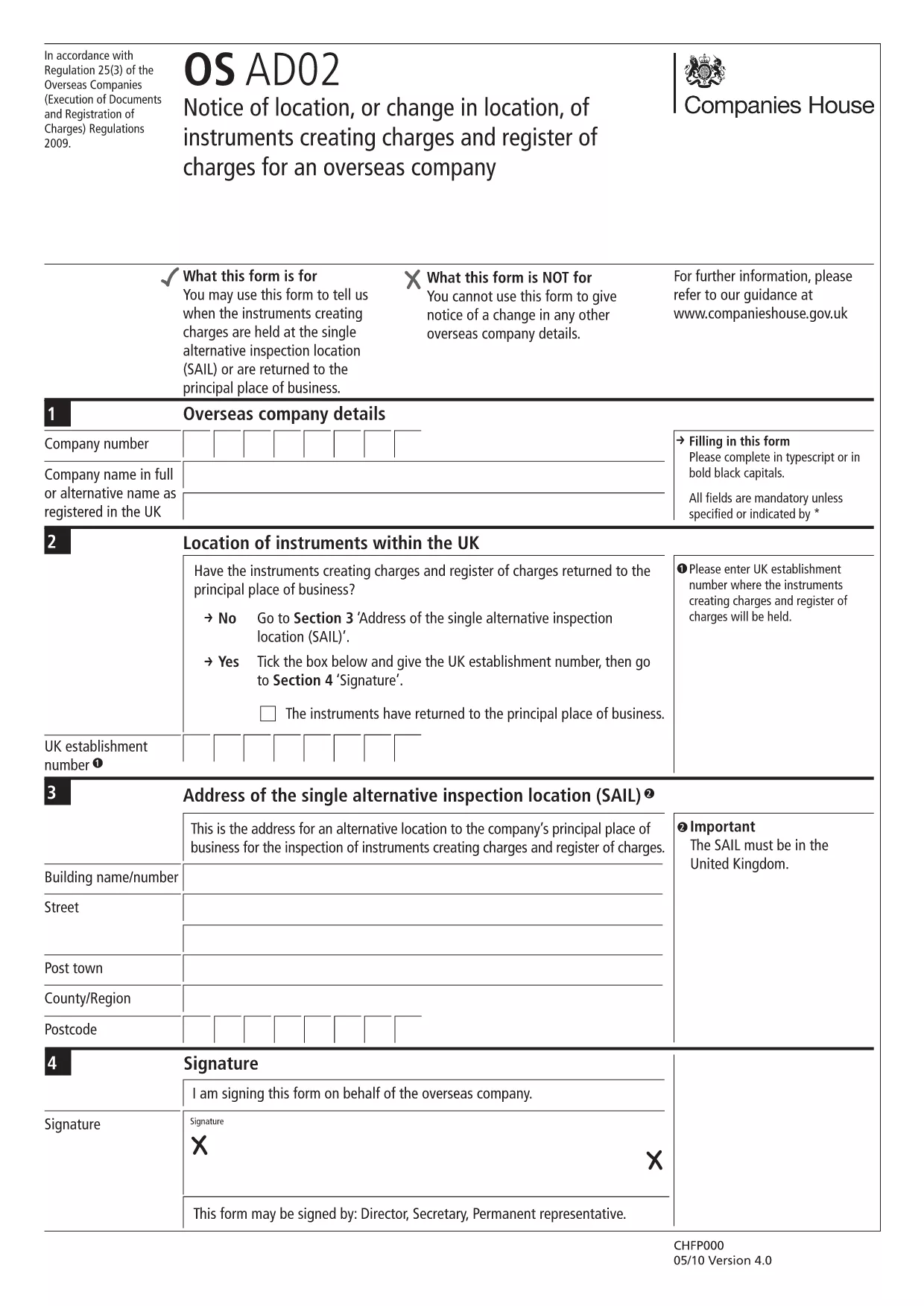
The OS AD02 (also referenced as en‑ad.02) is the official Companies House form used by overseas companies to notify a change of location for instruments that create charges, and to update the register of charges. This form is required whenever a charge‑creating instrument moves to a new jurisdiction or when the location details need correction.

What is the OS AD02 Form?

OS AD02 captures essential information about the charge, the instrument, and its new location. It ensures the public register remains accurate and that creditors can trace the security interests tied to a company.

How to Complete the OS AD02 Online

Instead of downloading the PDF and editing it manually, simply click the "Fill out this form" button on this page. The Formize PDF Filler app will load the fillable version of the OS AD02, allowing you to enter data directly in your browser.

  • Step 1: Click Fill out this form and wait for the Formize PDF Filler to load.
  • Step 2: Enter the company details, charge reference, and the new location information in the highlighted fields.
  • Step 3: Review each section for accuracy – the filler highlights required fields.
  • Step 4: Click Save & Download to obtain a completed PDF ready for submission.

Common Mistakes & Tips

To avoid delays, watch out for these frequent errors:

  • Leaving the date of change blank – the field is mandatory.
  • Mismatching the charge reference number with the one on the original filing.
  • Using an outdated address format for the new jurisdiction.
  • Failing to sign the form or attach a digital signature where required.

Tip: Use the built‑in validation in the Formize filler; it will flag incomplete or incorrectly formatted entries before you download.

Where to Submit the Completed Form

Once you have the finished PDF, submit it to Companies House via their online filing portal or by post to the address indicated on the form. Keep a copy for your records.

Need help? Refer to the Companies House guidance notes linked at the bottom of the form.

คำถามที่พบบ่อย
  • What is the purpose of the OS AD02 form?

    It notifies Companies House of a change in location for instruments that create charges, keeping the public register up‑to‑date.

  • Can I edit the OS AD02 after downloading it?

    Yes, but using the Formize fillable version is faster and reduces errors compared to editing a static PDF.

  • Is a digital signature accepted on the OS AD02?

    Companies House accepts a digital signature if it complies with their e‑signing standards; the Formize filler supports adding a digital signature.

  • How long does it take for Companies House to process the OS AD02?

    Processing typically takes 5‑7 business days after a correct submission, but you can track the status online.

  • What should I do if I make a mistake after submission?

    Submit an amended OS AD02 with the corrected details, clearly marking it as an amendment.

  • Do I need to pay a fee to file OS AD02?

    No, filing the OS AD02 notice of location is free of charge.

  • Can I submit the form on behalf of another company?

    Yes, provided you have proper authorisation and include the authorised signatory’s details.

  • Is the OS AD02 form available in languages other than English?

    The official version is only in English; however, you may attach a certified translation if required.

ทำอย่างไร

วิธีกรอก OS AD02 ฟรีทางออนไลน์ใน 5 ขั้นตอนง่ายๆ:

  1. 1
    Open the Fillable Form
    Click the "Fill out this form" button on the page. The Formize PDF Filler app will load the OS AD02 directly in your browser.
  2. 2
    Enter Required Information
    Complete each highlighted field: company details, charge reference, old and new locations, and the effective date of the change.
  3. 3
    Validate Your Entries
    Use the built‑in validation to ensure all mandatory fields are filled and formatted correctly.
  4. 4
    Save and Download
    When all data is correct, click "Save & Download" to get a completed PDF ready for submission to Companies House.
  5. 5
    Submit the Form
    Upload the PDF via the Companies House online portal or mail it to the address shown on the form.
สร้างแอป PDF Filler
เกี่ยวกับ

เทมเพลต OS AD02

ด้วยชุดคุณสมบัติดั้งเดิมสำหรับการดูและกรอกเอกสาร PDF รวมกับประโยชน์ของเว็บแอปพลิเคชันและเค้าโครงที่ตอบสนอง คุณสามารถสร้าง OS AD02 ให้เสร็จภายในไม่กี่นาที

คุณสมบัติ

PDF ฟิลเลอร์

วิธีที่ง่ายที่สุดในการกรอกแบบฟอร์ม PDF ทางออนไลน์

  • กรอก OS AD02 อย่างรวดเร็ว
    กำลังมองหาวิธีเติม OS AD02 ทางออนไลน์อย่างรวดเร็วอยู่ใช่ไหม ด้วยตัวกรอกแบบฟอร์ม PDF ออนไลน์ฟรีของเรา คุณจะรู้วิธีแก้ไขและกรอกเอกสาร PDF นี้ในเวลาไม่ถึงนาที
  • โปรแกรมแก้ไข PDF ออนไลน์ที่ใช้งานง่าย
    เบื่อกับการพิมพ์ไฟล์ PDF เพื่อให้คุณสามารถแก้ไขได้ก่อนที่จะสแกนซ้ำและส่งกลับหรือไม่? แก้ไขเอกสาร PDF ออนไลน์ฟรี ใช้โปรแกรมแก้ไข PDF ออนไลน์ของเราเพื่อประหยัดเวลาและกระดาษ
  • เครื่องมือที่ยอดเยี่ยมสำหรับทุกแพลตฟอร์ม
    สงสัยวิธีเติม OS AD02 บน Mac หรืออาจใช้ตัวเติม PDF ฟรีได้อย่างไร เครื่องมือ PDF ออนไลน์ของเราทำงานได้บนทุกแพลตฟอร์ม
  • การจัดเก็บไฟล์ที่ปลอดภัย
    ไฟล์ "OS AD02" ที่เสร็จสมบูรณ์จะถูกจัดเก็บไว้ในฐานข้อมูลที่ปลอดภัยซึ่งจัดการโดย Amazon Cloud hosting คุณสามารถลบไฟล์ของคุณออกจากระบบของเราได้ตลอดเวลา ไม่ว่าในกรณีใด ไฟล์เหล่านี้จะถูกลบโดยอัตโนมัติหลังจากผ่านไป 24 ชั่วโมง
  • สนทนากับ OS AD02
    แชทกับ "OS AD02" บน Chatize ที่เป็นผู้ช่วยอ่าน PDF ฟรี ถามคำถามและรับคำตอบจาก "OS AD02" เพียงคลิกที่ปุ่ม แชทด้วยเอกสาร ด้านบน

ลบเซสชันการบรรจุ

ลบเซสชันการกรอกข้อมูลที่เลือกหรือไม่?ในกรณีนี้ความคืบหน้าในการกรอกแบบฟอร์มจะหายไป

ลบเซสชันการแก้ไข

ลบเซสชันการแก้ไขที่เลือกหรือไม่ ในกรณีนี้ ความคืบหน้าในการสร้างและแก้ไขแบบฟอร์มจะหายไป