hamburger-menu icon
เลือกภาษา

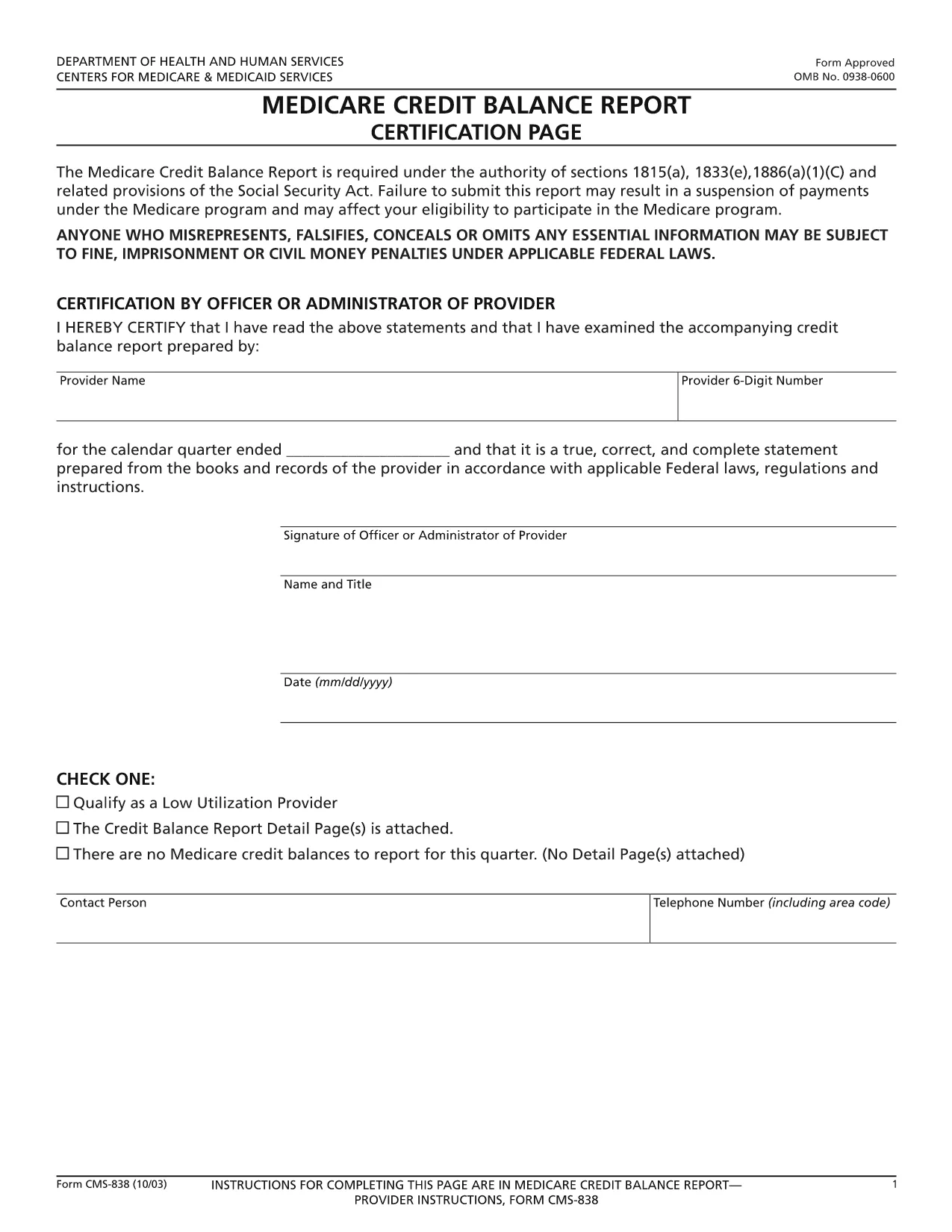
CMS‑838 Medicare Credit Balance Report – Fillable PDF

  1. ภาษา ภาษาอังกฤษ
  2. ประเทศ สหรัฐอเมริกา
  3. แผนก Centers for Medicare & Medicaid Services
  4. กิจกรรม Medicare
CMS‑838 Medicare Credit Balance Report – Fillable PDF

The CMS‑838 Medicare Credit Balance Report is the official form used by providers and suppliers to report excess or improper Medicare payments. Completing this form accurately helps you avoid penalties and ensures timely reimbursement.

What Is the CMS‑838 Form?

Form CMS‑838 captures detailed information about credit balances, over‑payments, and any adjustments that need to be reported back to the Centers for Medicare & Medicaid Services (CMS). It is a required filing for anyone who has received a Medicare credit balance during the reporting period.

Who Must File the CMS‑838?

  • Hospitals, clinics, and independent practice sites that have received Medicare credit balances.
  • Durable medical equipment (DME) suppliers and home health agencies.
  • Any Medicare‑eligible entity that identifies an over‑payment and must report it to CMS.

How to Complete the Fillable CMS‑838 Online

Instead of downloading the PDF and editing it in a separate program, simply click the “Fill out this form” button on this page. The Formize PDF Filler app will load the fillable version directly in your browser.

  1. Click Fill out this form and wait for the Formize editor to appear.
  2. Enter the required data in each field – the form validates entries in real time.
  3. Save your progress at any time; the app stores a secure copy in your browser.
  4. When finished, click Submit to download the completed PDF, then upload it to the CMS portal as instructed.

Common Mistakes to Avoid

  • Leaving mandatory fields blank: The Formize filler highlights missing required fields before you can submit.
  • Mismatched dates: Ensure the reporting period matches the dates on your credit balance statements.
  • Incorrect provider identifiers: Double‑check your NPI and TIN numbers.
  • Failing to attach supporting documentation: Upload any audit reports or reconciliation sheets as separate files when you submit to CMS.

Download the Fillable PDF

Ready to start? Click the button below to open the fillable CMS‑838 form instantly. No software download required – just a modern web browser.

คำถามที่พบบ่อย
  • What is the purpose of the CMS‑838 form?

    The CMS‑838 reports any Medicare credit balances, over‑payments, or adjustments that a provider must return to CMS. It helps maintain compliance and prevents future penalties.

  • Can I edit the CMS‑838 after I download it?

    Yes, but using the Formize fillable version is recommended. It prevents formatting errors and ensures all required fields are completed before you submit.

  • Do I need a digital signature on the CMS‑838?

    CMS accepts a typed signature in the fillable PDF. After completing the form, you can add a digital signature within the Formize app or print, sign, and scan the document.

  • How often must the CMS‑838 be filed?

    The form is required each time a credit balance is identified. Most providers file it quarterly, but frequency depends on your organization’s payment cycle.

  • What supporting documents should I attach?

    Include reconciliation statements, audit reports, and any correspondence with Medicare that explains the credit balance. Attach them as separate PDFs when you submit to the CMS portal.

  • Is there a fee to use the Formize PDF filler?

    No. Formize offers the fillable CMS‑838 at no cost. You only need an internet connection and a modern web browser.

ทำอย่างไร

วิธีกรอก CMS-838 ฟรีทางออนไลน์ใน 4 ขั้นตอนง่ายๆ:

  1. 1
    Open the Fillable Form
    Click the “Fill out this form” button on the page. The Formize PDF Filler app loads the CMS‑838 directly in your browser.
  2. 2
    Enter Required Information
    Complete each highlighted field. Real‑time validation ensures numbers, dates, and identifiers are entered correctly.
  3. 3
    Save and Review
    Use the “Save” option to store a draft. Review all entries, paying special attention to mandatory sections.
  4. 4
    Download and Submit
    When the form is complete, click “Download PDF” to save a copy, then upload it to the CMS portal as instructed in your provider handbook.
สร้างแอป PDF Filler
เกี่ยวกับ

เทมเพลต CMS-838

ด้วยชุดคุณสมบัติดั้งเดิมสำหรับการดูและกรอกเอกสาร PDF รวมกับประโยชน์ของเว็บแอปพลิเคชันและเค้าโครงที่ตอบสนอง คุณสามารถสร้าง CMS-838 ให้เสร็จภายในไม่กี่นาที

คุณสมบัติ

PDF ฟิลเลอร์

วิธีที่ง่ายที่สุดในการกรอกแบบฟอร์ม PDF ทางออนไลน์

  • กรอก CMS-838 อย่างรวดเร็ว
    กำลังมองหาวิธีเติม CMS-838 ทางออนไลน์อย่างรวดเร็วอยู่ใช่ไหม ด้วยตัวกรอกแบบฟอร์ม PDF ออนไลน์ฟรีของเรา คุณจะรู้วิธีแก้ไขและกรอกเอกสาร PDF นี้ในเวลาไม่ถึงนาที
  • โปรแกรมแก้ไข PDF ออนไลน์ที่ใช้งานง่าย
    เบื่อกับการพิมพ์ไฟล์ PDF เพื่อให้คุณสามารถแก้ไขได้ก่อนที่จะสแกนซ้ำและส่งกลับหรือไม่? แก้ไขเอกสาร PDF ออนไลน์ฟรี ใช้โปรแกรมแก้ไข PDF ออนไลน์ของเราเพื่อประหยัดเวลาและกระดาษ
  • เครื่องมือที่ยอดเยี่ยมสำหรับทุกแพลตฟอร์ม
    สงสัยวิธีเติม CMS-838 บน Mac หรืออาจใช้ตัวเติม PDF ฟรีได้อย่างไร เครื่องมือ PDF ออนไลน์ของเราทำงานได้บนทุกแพลตฟอร์ม
  • การจัดเก็บไฟล์ที่ปลอดภัย
    ไฟล์ "CMS-838" ที่เสร็จสมบูรณ์จะถูกจัดเก็บไว้ในฐานข้อมูลที่ปลอดภัยซึ่งจัดการโดย Amazon Cloud hosting คุณสามารถลบไฟล์ของคุณออกจากระบบของเราได้ตลอดเวลา ไม่ว่าในกรณีใด ไฟล์เหล่านี้จะถูกลบโดยอัตโนมัติหลังจากผ่านไป 24 ชั่วโมง
  • สนทนากับ CMS-838
    แชทกับ "CMS-838" บน Chatize ที่เป็นผู้ช่วยอ่าน PDF ฟรี ถามคำถามและรับคำตอบจาก "CMS-838" เพียงคลิกที่ปุ่ม แชทด้วยเอกสาร ด้านบน

ลบเซสชันการบรรจุ

ลบเซสชันการกรอกข้อมูลที่เลือกหรือไม่?ในกรณีนี้ความคืบหน้าในการกรอกแบบฟอร์มจะหายไป

ลบเซสชันการแก้ไข

ลบเซสชันการแก้ไขที่เลือกหรือไม่ ในกรณีนี้ ความคืบหน้าในการสร้างและแก้ไขแบบฟอร์มจะหายไป