
hamburger-menu icon
เลือกภาษา

Secure Test Declaration – Fillable PDF Form

  1. ภาษา ภาษาอังกฤษ
  2. ประเทศ สหรัฐอเมริกา
  3. แผนก สำนักงานลิขสิทธิ์
Secure Test Declaration – Fillable PDF Form

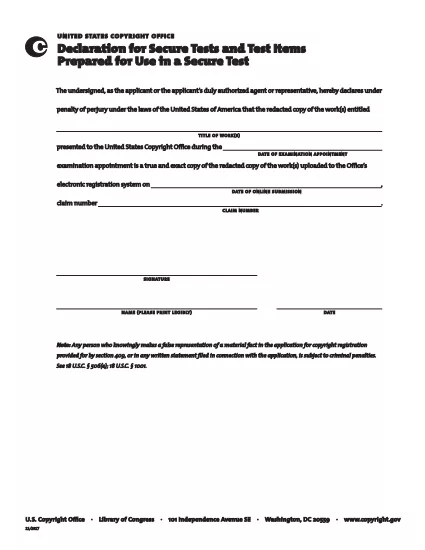
The Secure Test Declaration is a legally‑required statement used by the United States Copyright Office to certify that a test item is protected and will be handled securely. Our fillable PDF version lets you complete the form quickly, accurately, and without installing any extra software.

With Formize’s integrated PDF Filler, you can open the document directly in your browser, enter the required information, and save or print a certified copy. This eliminates the hassle of downloading, editing, and re‑uploading static PDFs.

Below you’ll find a brief overview of the form’s sections, tips for avoiding common errors, and step‑by‑step instructions for completing the declaration online.

What Is a Secure Test Declaration?

A Secure Test Declaration confirms that the test material you are submitting is confidential, that you have the authority to submit it, and that you understand the penalties for false statements. It is commonly required for copyrighted works that involve proprietary testing methods or confidential data.

Key Sections of the Form

  • Applicant Information – Name, address, and contact details.
  • Test Description – Title, purpose, and nature of the test.
  • Security Measures – How the test will be protected.
  • Declaration Statement – Signature line confirming truthfulness.

How to Fill Out the Secure Test Declaration Online

Instead of downloading the PDF and opening it in a separate editor, simply click the "Fill out this form" button on this page. The Formize PDF Filler app will load automatically, allowing you to complete every field directly in your browser.

Common Mistakes to Avoid

  • Leaving required fields blank – the filler will highlight missing information.
  • Using an unofficial signature image – type your name in the signature field for a legally accepted electronic signature.
  • Submitting outdated contact details – double‑check phone numbers and email addresses before saving.

Where to Submit the Completed Form

After saving the completed declaration, you can either:

  1. Upload the PDF through the Copyright Office’s online portal.
  2. Print, sign physically (if required), and mail it to the address listed on the form.

For most users, the electronic submission option is faster and provides immediate confirmation of receipt.

คำถามที่พบบ่อย
  • Do I need Adobe Acrobat to fill out the Secure Test Declaration?

    No. Formize’s online PDF Filler works in any modern browser, so you don’t need Acrobat or any other software.

  • Can I edit the form after I’ve saved it?

    Yes. Open the saved PDF with Formize again, make any necessary changes, and re‑save.

  • Is an electronic signature accepted by the Copyright Office?

    For the Secure Test Declaration, an electronic signature entered through the Formize filler is considered valid, provided the form is submitted electronically.

  • What happens if I submit incomplete information?

    The filler will highlight missing required fields before you can save. Submitting an incomplete form may delay processing.

  • Is there a fee to download or use the Secure Test Declaration form?

    The PDF download and online filling are free. Any filing fees are set by the Copyright Office and are paid separately during submission.

ทำอย่างไร

วิธีกรอก secure test declaration ฟรีทางออนไลน์ใน 4 ขั้นตอนง่ายๆ:

  1. 1
    Open the Fillable Form
    Click the "Fill out this form" button on the page. The Formize PDF Filler loads in a new tab.
  2. 2
    Enter Your Information
    Complete each highlighted field – the filler will guide you through Applicant Information, Test Description, and Security Measures.
  3. 3
    Sign Electronically
    Type your name in the signature field. The system records a timestamp for legal validity.
  4. 4
    Save and Submit
    Click "Save PDF" to download a copy, then upload it to the Copyright Office portal or print and mail as instructed.
สร้างแอป PDF Filler
เกี่ยวกับ

แบบฟอร์มสำนักงานลิขสิทธิ์

secure test declaration เป็นหนึ่งในแบบฟอร์มอย่างเป็นทางการที่สำนักงานลิขสิทธิ์ของสหรัฐอเมริกา ซึ่งเป็นแผนกหนึ่งของหอสมุดแห่งชาติใช้ในการลงทะเบียนและปกป้องลิขสิทธิ์ สำนักงานลิขสิทธิ์มีหน้าที่รับผิดชอบในการบริหารกฎหมายลิขสิทธิ์ในสหรัฐอเมริกา รวมถึงการจดทะเบียนลิขสิทธิ์ การบันทึกการโอนลิขสิทธิ์และใบอนุญาต และการให้ข้อมูลและบริการที่เกี่ยวข้องกับลิขสิทธิ์

ต่อไปนี้เป็นตัวอย่างแบบฟอร์มของสำนักงานลิขสิทธิ์:

ใบสมัครจดทะเบียนลิขสิทธิ์: นี่คือแบบฟอร์มหลักที่ใช้ในการจดทะเบียนลิขสิทธิ์กับสำนักงานลิขสิทธิ์ของสหรัฐอเมริกา แบบฟอร์มการสมัครต่างๆ มีให้สำหรับงานประเภทต่างๆ เช่น งานวรรณกรรม ทัศนศิลป์ ประพันธ์เพลง งานบันทึกเสียง ภาพยนตร์ และอื่นๆ แอปพลิเคชันรวบรวมข้อมูลเกี่ยวกับผลงานที่ลงทะเบียน ผู้เขียน ผู้อ้างสิทธิ์ และรายละเอียดอื่นๆ ที่เกี่ยวข้อง

แบบฟอร์มบันทึกเอกสาร: แบบฟอร์มเหล่านี้ใช้เพื่อบันทึกการโอนลิขสิทธิ์ เช่น การมอบหมายหรือใบอนุญาต กับสำนักงานลิขสิทธิ์ พวกเขาจัดให้มีวิธีการสร้างบันทึกสาธารณะเกี่ยวกับการโอนความเป็นเจ้าของลิขสิทธิ์

แบบฟอร์มไดเรกทอรีตัวแทนที่กำหนดของ DMCA: แบบฟอร์มนี้ใช้เพื่อแต่งตั้งตัวแทนกับสำนักงานลิขสิทธิ์ภายใต้ Digital Millennium Copyright Act (DMCA) ตัวแทนที่ได้รับมอบหมายมีหน้าที่รับผิดชอบในการรับและจัดการการแจ้งลบเนื้อหาที่เกี่ยวข้องกับการละเมิดลิขสิทธิ์ออนไลน์

ตารางค่าธรรมเนียมสำนักงานลิขสิทธิ์: แม้ว่าจะไม่ใช่แบบฟอร์มเฉพาะเจาะจง ตารางค่าธรรมเนียมจะให้ข้อมูลเกี่ยวกับค่าธรรมเนียมที่เกี่ยวข้องกับบริการด้านลิขสิทธิ์ต่างๆ รวมถึงการจดทะเบียน การบันทึก และบริการอื่นๆ ที่เกี่ยวข้อง

โปรดทราบว่าแบบฟอร์มและข้อกำหนดเฉพาะอาจเปลี่ยนแปลงเมื่อเวลาผ่านไป และอาจต้องใช้แบบฟอร์มที่แตกต่างกันสำหรับการจดทะเบียนลิขสิทธิ์หรือบริการประเภทต่างๆ ขอแนะนำให้ไปที่เว็บไซต์อย่างเป็นทางการของสำนักงานลิขสิทธิ์ของสหรัฐอเมริกา (www.copyright.gov) หรือปรึกษากับผู้เชี่ยวชาญด้านกฎหมายที่เชี่ยวชาญด้านกฎหมายลิขสิทธิ์เพื่อรับข้อมูลที่ถูกต้องและเป็นปัจจุบัน เกี่ยวกับแบบฟอร์มสำนักงานลิขสิทธิ์เฉพาะที่เกี่ยวข้องกับความต้องการด้านลิขสิทธิ์ของคุณ

คุณสมบัติ

PDF ฟิลเลอร์

วิธีที่ง่ายที่สุดในการกรอกแบบฟอร์ม PDF ทางออนไลน์

  • กรอก secure test declaration อย่างรวดเร็ว
    กำลังมองหาวิธีเติม secure test declaration ทางออนไลน์อย่างรวดเร็วอยู่ใช่ไหม ด้วยตัวกรอกแบบฟอร์ม PDF ออนไลน์ฟรีของเรา คุณจะรู้วิธีแก้ไขและกรอกเอกสาร PDF นี้ในเวลาไม่ถึงนาที
  • โปรแกรมแก้ไข PDF ออนไลน์ที่ใช้งานง่าย
    เบื่อกับการพิมพ์ไฟล์ PDF เพื่อให้คุณสามารถแก้ไขได้ก่อนที่จะสแกนซ้ำและส่งกลับหรือไม่? แก้ไขเอกสาร PDF ออนไลน์ฟรี ใช้โปรแกรมแก้ไข PDF ออนไลน์ของเราเพื่อประหยัดเวลาและกระดาษ
  • เครื่องมือที่ยอดเยี่ยมสำหรับทุกแพลตฟอร์ม
    สงสัยวิธีเติม secure test declaration บน Mac หรืออาจใช้ตัวเติม PDF ฟรีได้อย่างไร เครื่องมือ PDF ออนไลน์ของเราทำงานได้บนทุกแพลตฟอร์ม
  • การจัดเก็บไฟล์ที่ปลอดภัย
    ไฟล์ "secure test declaration" ที่เสร็จสมบูรณ์จะถูกจัดเก็บไว้ในฐานข้อมูลที่ปลอดภัยซึ่งจัดการโดย Amazon Cloud hosting คุณสามารถลบไฟล์ของคุณออกจากระบบของเราได้ตลอดเวลา ไม่ว่าในกรณีใด ไฟล์เหล่านี้จะถูกลบโดยอัตโนมัติหลังจากผ่านไป 24 ชั่วโมง
  • สนทนากับ secure test declaration
    แชทกับ "secure test declaration" บน Chatize ที่เป็นผู้ช่วยอ่าน PDF ฟรี ถามคำถามและรับคำตอบจาก "secure test declaration" เพียงคลิกที่ปุ่ม แชทด้วยเอกสาร ด้านบน

ลบเซสชันการบรรจุ

ลบเซสชันการกรอกข้อมูลที่เลือกหรือไม่?ในกรณีนี้ความคืบหน้าในการกรอกแบบฟอร์มจะหายไป

ลบเซสชันการแก้ไข

ลบเซสชันการแก้ไขที่เลือกหรือไม่ ในกรณีนี้ ความคืบหน้าในการสร้างและแก้ไขแบบฟอร์มจะหายไป