
hamburger-menu icon
เลือกภาษา

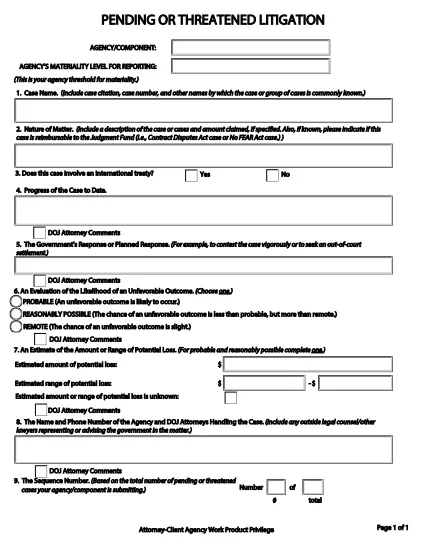
Pending or Threatened Litigation Form (Fillable PDF)

  1. ภาษา ภาษาอังกฤษ
  2. ประเทศ สหรัฐอเมริกา
  3. แผนก กระทรวงยุติธรรม
  4. หน่วยงาน กองโยธา
Pending or Threatened Litigation Form (Fillable PDF)

The Pending or Threatened Litigation Form is a required reporting document for federal agencies that need to disclose pending or threatened legal actions. Historically the form is provided as a static PDF, but with Formize you can complete it directly in your browser—no Adobe Acrobat or other editor needed.

This page gives you everything you need to know: what the form covers, step‑by‑step instructions for filling it out, common pitfalls to avoid, and a direct link to the official PDF supplied by the U.S. Department of Justice.

When you click the Fill out this form button below, Formize’s PDF Filler app loads the official document, transforms it into a fillable web form, and saves your entries securely.

Key sections of the form include:

  • Case identification and docket numbers
  • Agency or component submitting the report
  • Attorney‑client privilege and work‑product claims
  • Brief description of the litigation or threat

Accurate completion helps your agency stay compliant with DOJ reporting requirements and ensures transparency for congressional oversight.

คำถามที่พบบ่อย
  • Do I need Adobe Acrobat to fill out this form?

    No. Formize converts the PDF into a web‑based fillable form, so any modern browser is sufficient.

  • Is the information I enter saved securely?

    Yes. All data is stored temporarily in your browser session and never shared with third parties unless you choose to download or submit it.

  • Can I edit the form after I’ve saved it?

    Absolutely. Use the **Save** button to create a draft, then return to the same URL to continue editing.

  • What if I make a mistake in a field?

    Formize highlights validation errors instantly. You can correct the entry before saving or downloading the final PDF.

  • Is this the official DOJ form?

    Yes. The PDF linked below is the exact version provided by the U.S. Department of Justice (Civil Division).

  • Can I print a hard copy after filling it out?

    After completing the form, click **Download** to get a filled PDF, then print it like any standard document.

  • Do I need an account to use Formize?

    No account is required for one‑time use. Simply click the button, fill the form, and download or submit as needed.

ทำอย่างไร

วิธีกรอก pending litigation form ฟรีทางออนไลน์ใน 4 ขั้นตอนง่ายๆ:

  1. 1
    Open the Fillable Form
    Click the **Fill out this form** button on this page. Formize will load the official DOJ PDF directly in your browser.
  2. 2
    Enter Required Information
    Type into each field—case numbers, agency name, privilege claims, and a concise case description. The interface validates required fields in real time.
  3. 3
    Save & Review
    Use the **Save** button to store a draft. Review all entries for accuracy; Formize highlights any missing or incorrectly formatted data.
  4. 4
    Submit or Print
    When finished, you can either download a completed PDF for internal filing or submit the form electronically if your agency’s workflow allows it.
สร้างแอป PDF Filler
เกี่ยวกับ

แบบฟอร์มกระทรวงยุติธรรม (DOJ)

pending litigation form เป็นหนึ่งในแบบฟอร์มอย่างเป็นทางการที่ใช้โดยกระทรวงยุติธรรมของสหรัฐอเมริกา รวมถึงหน่วยงาน หน่วยงาน และส่วนประกอบต่างๆ DOJ เป็นแผนกบริหารของรัฐบาลกลางที่รับผิดชอบในการบังคับใช้กฎหมายของรัฐบาลกลาง ปกป้องผลประโยชน์ของสหรัฐอเมริกาในเรื่องกฎหมาย และบริหารจัดการความยุติธรรม

นี่คือตัวอย่างแบบฟอร์มของกระทรวงยุติธรรม:

ใบสมัครเพื่อขอความช่วยเหลือจากรัฐบาลกลาง (SF-424): แบบฟอร์มนี้ใช้โดยองค์กรที่สมัครขอรับเงินช่วยเหลือจากรัฐบาลกลางหรือความช่วยเหลือทางการเงินที่บริหารโดย DOJ หรือส่วนประกอบต่างๆ รวบรวมข้อมูลเกี่ยวกับองค์กร โครงการที่เสนอ และงบประมาณ

แบบฟอร์มการร้องเรียนสิทธิพลเมือง: แบบฟอร์มนี้ใช้เพื่อยื่นเรื่องร้องเรียนต่อแผนกสิทธิพลเมืองของ DOJ เกี่ยวกับข้อกล่าวหาการละเมิดกฎหมายสิทธิพลเมือง เช่น การเลือกปฏิบัติเนื่องจากเชื้อชาติ เพศ ความทุพพลภาพ หรือชาติกำเนิด

แบบฟอร์มการแจ้งเหยื่อ: แบบฟอร์มนี้ใช้เพื่อขอการแจ้งเตือนเกี่ยวกับสถานะและการดำเนินคดีอาญาของรัฐบาลกลาง ซึ่งเป็นส่วนหนึ่งของความพยายามของ DOJ ในการให้ข้อมูลและการสนับสนุนแก่เหยื่ออาชญากรรม

แบบฟอร์มตรวจคนเข้าเมือง: สำนักงานบริหารเพื่อการตรวจคนเข้าเมือง (EOIR) ของ DOJ ทำหน้าที่ดูแลศาลตรวจคนเข้าเมืองและการดำเนินการที่เกี่ยวข้องกับการตรวจคนเข้าเมือง แบบฟอร์มต่างๆ ใช้ในการดำเนินคดีของศาลตรวจคนเข้าเมือง เช่น แบบฟอร์ม EOIR-42B สำหรับการยื่นคำร้องเพื่อบรรเทาทุกข์จากการถูกถอดถอน หรือแบบฟอร์ม EOIR-28 สำหรับการอุทธรณ์

แบบฟอร์ม ATF: สำนักแอลกอฮอล์ ยาสูบ อาวุธปืน และวัตถุระเบิด (ATF) ซึ่งเป็นส่วนประกอบของ DOJ มีแบบฟอร์มของตนเองเพื่อวัตถุประสงค์ต่างๆ ดังที่ได้กล่าวไว้ในการตอบกลับครั้งก่อน

แบบฟอร์มสำนักงานปราบปรามยาเสพติด (DEA): DEA ซึ่งเป็นอีกองค์ประกอบหนึ่งของ DOJ ใช้แบบฟอร์มของตนเองสำหรับเรื่องที่เกี่ยวข้องกับสารควบคุม รวมถึงข้อกำหนดในการขอจดทะเบียน การรายงาน และการเก็บบันทึก

ตัวอย่างเหล่านี้เน้นแบบฟอร์ม DOJ สองสามประเภท แต่แบบฟอร์มเฉพาะที่ใช้โดยกระทรวงยุติธรรมอาจแตกต่างกันไป ขึ้นอยู่กับแผนก หน่วยงาน หรือส่วนประกอบที่เกี่ยวข้อง และลักษณะของบริการหรือการดำเนินการ ขอแนะนำให้ปรึกษาเว็บไซต์อย่างเป็นทางการของแผนกหรือหน่วยงานเฉพาะภายใน DOJ หรือขอคำแนะนำทางกฎหมายเพื่อรับข้อมูลที่ถูกต้องและทันสมัยเกี่ยวกับแบบฟอร์ม DOJ เฉพาะที่เกี่ยวข้องกับสถานการณ์ของคุณ

คุณสมบัติ

PDF ฟิลเลอร์

วิธีที่ง่ายที่สุดในการกรอกแบบฟอร์ม PDF ทางออนไลน์

  • กรอก pending litigation form อย่างรวดเร็ว
    กำลังมองหาวิธีเติม pending litigation form ทางออนไลน์อย่างรวดเร็วอยู่ใช่ไหม ด้วยตัวกรอกแบบฟอร์ม PDF ออนไลน์ฟรีของเรา คุณจะรู้วิธีแก้ไขและกรอกเอกสาร PDF นี้ในเวลาไม่ถึงนาที
  • โปรแกรมแก้ไข PDF ออนไลน์ที่ใช้งานง่าย
    เบื่อกับการพิมพ์ไฟล์ PDF เพื่อให้คุณสามารถแก้ไขได้ก่อนที่จะสแกนซ้ำและส่งกลับหรือไม่? แก้ไขเอกสาร PDF ออนไลน์ฟรี ใช้โปรแกรมแก้ไข PDF ออนไลน์ของเราเพื่อประหยัดเวลาและกระดาษ
  • เครื่องมือที่ยอดเยี่ยมสำหรับทุกแพลตฟอร์ม
    สงสัยวิธีเติม pending litigation form บน Mac หรืออาจใช้ตัวเติม PDF ฟรีได้อย่างไร เครื่องมือ PDF ออนไลน์ของเราทำงานได้บนทุกแพลตฟอร์ม
  • การจัดเก็บไฟล์ที่ปลอดภัย
    ไฟล์ "pending litigation form" ที่เสร็จสมบูรณ์จะถูกจัดเก็บไว้ในฐานข้อมูลที่ปลอดภัยซึ่งจัดการโดย Amazon Cloud hosting คุณสามารถลบไฟล์ของคุณออกจากระบบของเราได้ตลอดเวลา ไม่ว่าในกรณีใด ไฟล์เหล่านี้จะถูกลบโดยอัตโนมัติหลังจากผ่านไป 24 ชั่วโมง
  • สนทนากับ pending litigation form
    แชทกับ "pending litigation form" บน Chatize ที่เป็นผู้ช่วยอ่าน PDF ฟรี ถามคำถามและรับคำตอบจาก "pending litigation form" เพียงคลิกที่ปุ่ม แชทด้วยเอกสาร ด้านบน

ลบเซสชันการบรรจุ

ลบเซสชันการกรอกข้อมูลที่เลือกหรือไม่?ในกรณีนี้ความคืบหน้าในการกรอกแบบฟอร์มจะหายไป

ลบเซสชันการแก้ไข

ลบเซสชันการแก้ไขที่เลือกหรือไม่ ในกรณีนี้ ความคืบหน้าในการสร้างและแก้ไขแบบฟอร์มจะหายไป