hamburger-menu icon
เลือกภาษา

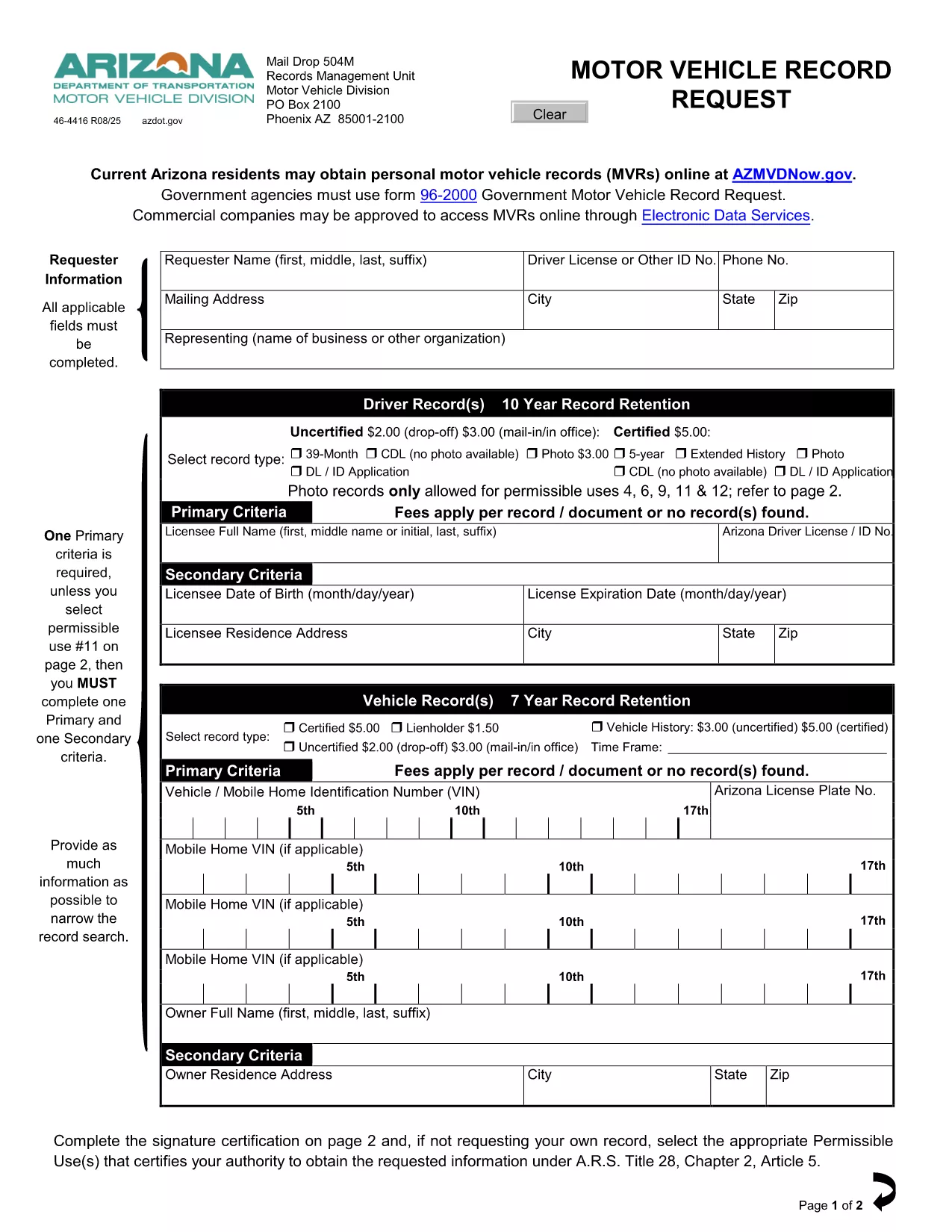
Driving Record Request Form – Fillable PDF

  1. ภาษา ภาษาอังกฤษ
  2. ประเทศ สหรัฐอเมริกา
  3. กิจกรรม Driving Records
  4. แผนก Department of Motor Vehicles
Driving Record Request Form – Fillable PDF

A driving record (also called a Motor Vehicle Record or MVR) is the official summary of a driver’s licensing history, traffic violations, suspensions, and accidents. Employers, insurance companies, and individuals often need a certified copy for background checks, insurance quotes, or personal review.

This page provides the exact fillable PDF used by many state motor vehicle departments. Instead of printing, signing, and mailing the paper form, you can complete it instantly in your browser with Formize’s PDF Filler app.

The form complies with the Federal Driver’s Privacy Protection Act (DPPA) and lists all permissible uses, ensuring your request is legally valid.

Below you’ll find step‑by‑step instructions, tips to avoid common errors, and answers to the most frequently asked questions about driving record requests.

คำถามที่พบบ่อย
  • What is a permissible use for a driving record?

    Permissible uses include employment screening, insurance underwriting, court orders, and personal review. The form lists all approved purposes per DPPA.

  • Do I need a notarized signature?

    For most states, a notarized signature is required only for certified copies. The fillable PDF lets you add a digital signature; you can still mail the form for notarization if needed.

  • How long does it take to receive the record?

    Processing time varies by state—typically 5‑10 business days for mailed requests and 2‑3 days for electronic submissions where available.

  • Can I request a record for someone else?

    Only if you have a documented permissible use and the person’s written consent. The form includes a consent section you must complete.

  • Is there a fee for the request?

    Yes. Most states charge a small fee (e.g., $3 for an uncertified three‑year record, $5 for a certified five‑year record). Check the form’s fee schedule for exact amounts.

  • What if I make a mistake on the form?

    With Formize you can edit any field before saving. If you’ve already submitted a paper copy, you’ll need to request a new form or contact the DMV for corrections.

  • Do I need to provide my Social Security number?

    Only the last four digits are required for identity verification. The form explains exactly what information is mandatory.

ทำอย่างไร

วิธีกรอก driving record request ฟรีทางออนไลน์ใน 4 ขั้นตอนง่ายๆ:

  1. 1
    Click the Fill‑out Button
    On this page, click the bright “Fill out this form” button. The Formize PDF Filler app will open in a new tab.
  2. 2
    Wait for the Formize PDF Filler to Load
    The app loads the fillable PDF instantly. You’ll see all fields highlighted and ready for input.
  3. 3
    Enter Your Information
    Type directly into each field—name, driver’s license number, address, and the purpose of the request. The app validates dates and formats for you.
  4. 4
    Save, Print, or Submit
    When you’re done, click “Save PDF” to download a completed copy, or print it for mailing. No extra software or printer driver is required.
สร้างแอป PDF Filler
เกี่ยวกับ

เทมเพลต driving record request

ด้วยชุดคุณสมบัติดั้งเดิมสำหรับการดูและกรอกเอกสาร PDF รวมกับประโยชน์ของเว็บแอปพลิเคชันและเค้าโครงที่ตอบสนอง คุณสามารถสร้าง driving record request ให้เสร็จภายในไม่กี่นาที

คุณสมบัติ

PDF ฟิลเลอร์

วิธีที่ง่ายที่สุดในการกรอกแบบฟอร์ม PDF ทางออนไลน์

  • กรอก driving record request อย่างรวดเร็ว
    กำลังมองหาวิธีเติม driving record request ทางออนไลน์อย่างรวดเร็วอยู่ใช่ไหม ด้วยตัวกรอกแบบฟอร์ม PDF ออนไลน์ฟรีของเรา คุณจะรู้วิธีแก้ไขและกรอกเอกสาร PDF นี้ในเวลาไม่ถึงนาที
  • โปรแกรมแก้ไข PDF ออนไลน์ที่ใช้งานง่าย
    เบื่อกับการพิมพ์ไฟล์ PDF เพื่อให้คุณสามารถแก้ไขได้ก่อนที่จะสแกนซ้ำและส่งกลับหรือไม่? แก้ไขเอกสาร PDF ออนไลน์ฟรี ใช้โปรแกรมแก้ไข PDF ออนไลน์ของเราเพื่อประหยัดเวลาและกระดาษ
  • เครื่องมือที่ยอดเยี่ยมสำหรับทุกแพลตฟอร์ม
    สงสัยวิธีเติม driving record request บน Mac หรืออาจใช้ตัวเติม PDF ฟรีได้อย่างไร เครื่องมือ PDF ออนไลน์ของเราทำงานได้บนทุกแพลตฟอร์ม
  • การจัดเก็บไฟล์ที่ปลอดภัย
    ไฟล์ "driving record request" ที่เสร็จสมบูรณ์จะถูกจัดเก็บไว้ในฐานข้อมูลที่ปลอดภัยซึ่งจัดการโดย Amazon Cloud hosting คุณสามารถลบไฟล์ของคุณออกจากระบบของเราได้ตลอดเวลา ไม่ว่าในกรณีใด ไฟล์เหล่านี้จะถูกลบโดยอัตโนมัติหลังจากผ่านไป 24 ชั่วโมง
  • สนทนากับ driving record request
    แชทกับ "driving record request" บน Chatize ที่เป็นผู้ช่วยอ่าน PDF ฟรี ถามคำถามและรับคำตอบจาก "driving record request" เพียงคลิกที่ปุ่ม แชทด้วยเอกสาร ด้านบน

ลบเซสชันการบรรจุ

ลบเซสชันการกรอกข้อมูลที่เลือกหรือไม่?ในกรณีนี้ความคืบหน้าในการกรอกแบบฟอร์มจะหายไป

ลบเซสชันการแก้ไข

ลบเซสชันการแก้ไขที่เลือกหรือไม่ ในกรณีนี้ ความคืบหน้าในการสร้างและแก้ไขแบบฟอร์มจะหายไป