hamburger-menu icon
เลือกภาษา

Lifetime History Request Form – Fillable PDF

  1. ภาษา ภาษาอังกฤษ
  2. ประเทศ สหรัฐอเมริกา
  3. กิจกรรม Vehicle Records
  4. แผนก Department of Motor Vehicles
Lifetime History Request Form – Fillable PDF

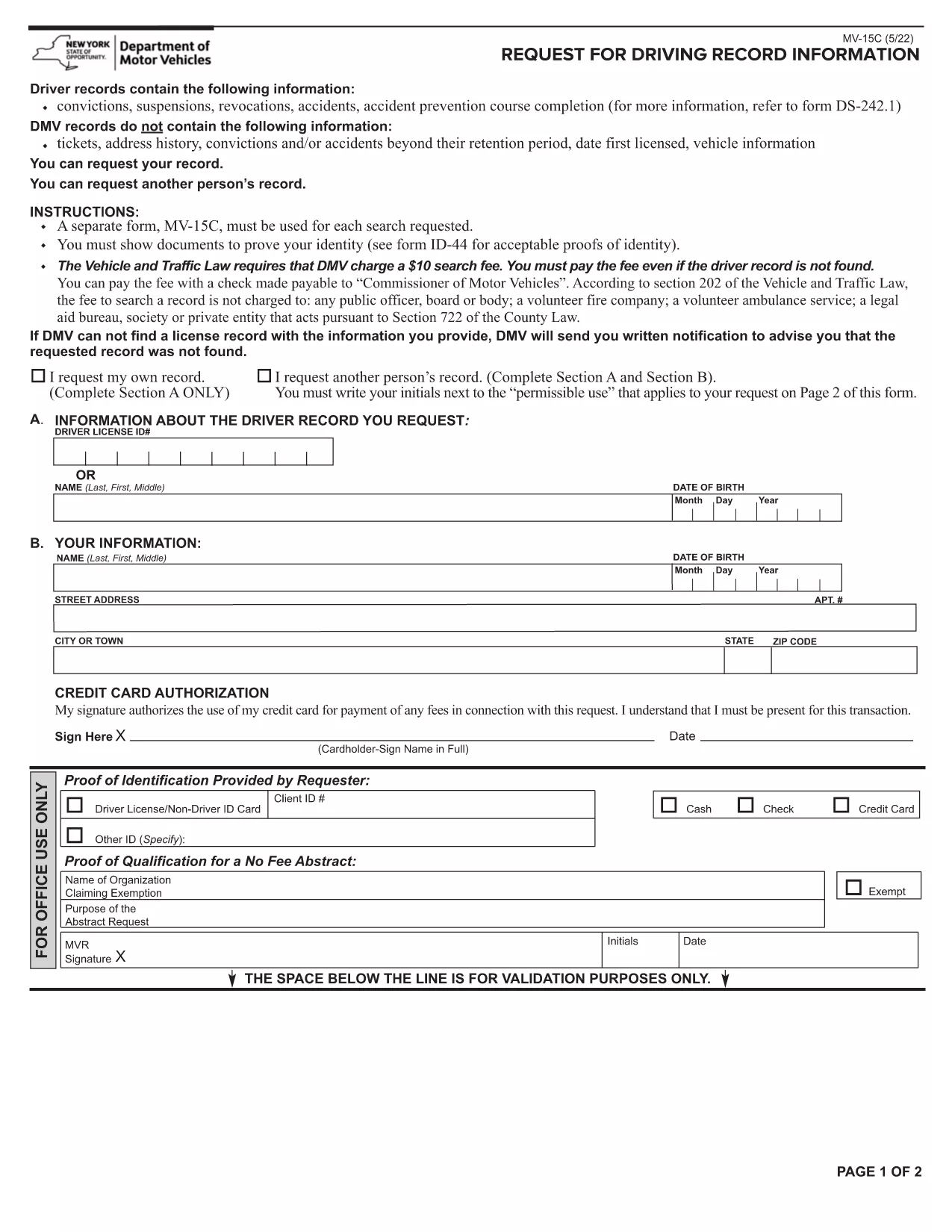
Need a complete record of every ticket, suspension, or accident ever listed on your driving file? The Lifetime History Request Form lets you request a full, permanent abstract of your motor vehicle history from the New York State Department of Motor Vehicles (DMV).

What Is a Lifetime History Request Form?

This form (PDF MV‑15C) is the official DMV request used to obtain a Lifetime Driving Record. Unlike a standard abstract that only shows recent activity, a lifetime record includes every conviction, accident, and point ever recorded.

Who Needs a Lifetime Driving Record?

  • Employers conducting background checks for commercial driver positions.
  • Insurance companies assessing risk for high‑value policies.
  • Legal professionals needing a complete history for court cases.
  • Drivers who suspect errors in their current record and need proof of correction.

How to Fill Out the Form Online with Formize

Instead of printing, signing, and scanning, you can complete the form directly in your browser:

  1. Click the "Fill out this form" button on this page.
  2. Wait a few seconds while the Formize PDF Filler app loads.
  3. Enter your personal information exactly as it appears on your driver's license.
  4. Choose the Lifetime Record option, review the fee, and submit.
  5. When the DMV processes your request, you’ll receive a downloadable PDF via email.

Common Mistakes to Avoid

  • Incorrect ID numbers: Double‑check your Client ID and license number.
  • Missing signature: The Formize filler adds a digital signature field—make sure to sign before submitting.
  • Wrong record type: Select "Lifetime" rather than "Standard" if you need the full history.

Download, Save, and Submit Your Completed Form

After you finish filling the form, click Download PDF to keep a copy for your records. You can then mail the signed form with payment, or follow the DMV’s online payment instructions directly from the filler.

Need a quick start? The fillable PDF is ready below.

คำถามที่พบบ่อย
  • What is the difference between a standard and a lifetime driving record?

    A standard record shows recent activity (typically the last 3‑5 years). A lifetime record includes every violation, accident, and suspension ever recorded on your file.

  • How long does it take to receive the lifetime record?

    Processing usually takes 5‑7 business days after the DMV receives your completed form and payment.

  • Can I request a lifetime record for someone else?

    Only the record holder or a legally authorized representative may request a lifetime record, and proper consent documentation is required.

  • Is there a fee for the lifetime history request?

    Yes, the DMV charges a fee (currently $10) for a lifetime abstract. The exact amount is displayed in the form before you submit.

  • Do I need to print the PDF after filling it online?

    No. The Formize filler lets you sign digitally and submit electronically. You can download a copy for your records if you wish.

  • What identification is required with the request?

    You must provide your driver’s license number, date of birth, and a valid photo ID (driver’s license or passport) when the DMV verifies your identity.

  • Can I correct errors on my lifetime record?

    Yes. After receiving your record, you can file a correction request with the DMV if you find inaccurate information.

  • Is the form available for other states?

    This specific MV‑15C form is for New York State. Other states have their own versions; check the local DMV website for details.

ทำอย่างไร

วิธีกรอก lifetime history request form ฟรีทางออนไลน์ใน 5 ขั้นตอนง่ายๆ:

  1. 1
    Open the Fillable Form
    Click the "Fill out this form" button on the page. The Formize PDF Filler will open in a new tab.
  2. 2
    Enter Your Information
    Complete each field – name, address, driver’s license number, and date of birth – exactly as shown on your ID.
  3. 3
    Select Lifetime Record
    Choose the "Lifetime" option from the record‑type dropdown and verify the applicable fee.
  4. 4
    Sign and Submit
    Use the digital signature field, then click "Submit". The form will be securely sent to the DMV.
  5. 5
    Download Confirmation
    When the DMV processes your request, you’ll receive a confirmation email with a downloadable copy of your lifetime record.
สร้างแอป PDF Filler
เกี่ยวกับ

เทมเพลต lifetime history request form

ด้วยชุดคุณสมบัติดั้งเดิมสำหรับการดูและกรอกเอกสาร PDF รวมกับประโยชน์ของเว็บแอปพลิเคชันและเค้าโครงที่ตอบสนอง คุณสามารถสร้าง lifetime history request form ให้เสร็จภายในไม่กี่นาที

คุณสมบัติ

PDF ฟิลเลอร์

วิธีที่ง่ายที่สุดในการกรอกแบบฟอร์ม PDF ทางออนไลน์

  • กรอก lifetime history request form อย่างรวดเร็ว
    กำลังมองหาวิธีเติม lifetime history request form ทางออนไลน์อย่างรวดเร็วอยู่ใช่ไหม ด้วยตัวกรอกแบบฟอร์ม PDF ออนไลน์ฟรีของเรา คุณจะรู้วิธีแก้ไขและกรอกเอกสาร PDF นี้ในเวลาไม่ถึงนาที
  • โปรแกรมแก้ไข PDF ออนไลน์ที่ใช้งานง่าย
    เบื่อกับการพิมพ์ไฟล์ PDF เพื่อให้คุณสามารถแก้ไขได้ก่อนที่จะสแกนซ้ำและส่งกลับหรือไม่? แก้ไขเอกสาร PDF ออนไลน์ฟรี ใช้โปรแกรมแก้ไข PDF ออนไลน์ของเราเพื่อประหยัดเวลาและกระดาษ
  • เครื่องมือที่ยอดเยี่ยมสำหรับทุกแพลตฟอร์ม
    สงสัยวิธีเติม lifetime history request form บน Mac หรืออาจใช้ตัวเติม PDF ฟรีได้อย่างไร เครื่องมือ PDF ออนไลน์ของเราทำงานได้บนทุกแพลตฟอร์ม
  • การจัดเก็บไฟล์ที่ปลอดภัย
    ไฟล์ "lifetime history request form" ที่เสร็จสมบูรณ์จะถูกจัดเก็บไว้ในฐานข้อมูลที่ปลอดภัยซึ่งจัดการโดย Amazon Cloud hosting คุณสามารถลบไฟล์ของคุณออกจากระบบของเราได้ตลอดเวลา ไม่ว่าในกรณีใด ไฟล์เหล่านี้จะถูกลบโดยอัตโนมัติหลังจากผ่านไป 24 ชั่วโมง
  • สนทนากับ lifetime history request form
    แชทกับ "lifetime history request form" บน Chatize ที่เป็นผู้ช่วยอ่าน PDF ฟรี ถามคำถามและรับคำตอบจาก "lifetime history request form" เพียงคลิกที่ปุ่ม แชทด้วยเอกสาร ด้านบน

ลบเซสชันการบรรจุ

ลบเซสชันการกรอกข้อมูลที่เลือกหรือไม่?ในกรณีนี้ความคืบหน้าในการกรอกแบบฟอร์มจะหายไป

ลบเซสชันการแก้ไข

ลบเซสชันการแก้ไขที่เลือกหรือไม่ ในกรณีนี้ ความคืบหน้าในการสร้างและแก้ไขแบบฟอร์มจะหายไป