
hamburger-menu icon
เลือกภาษา

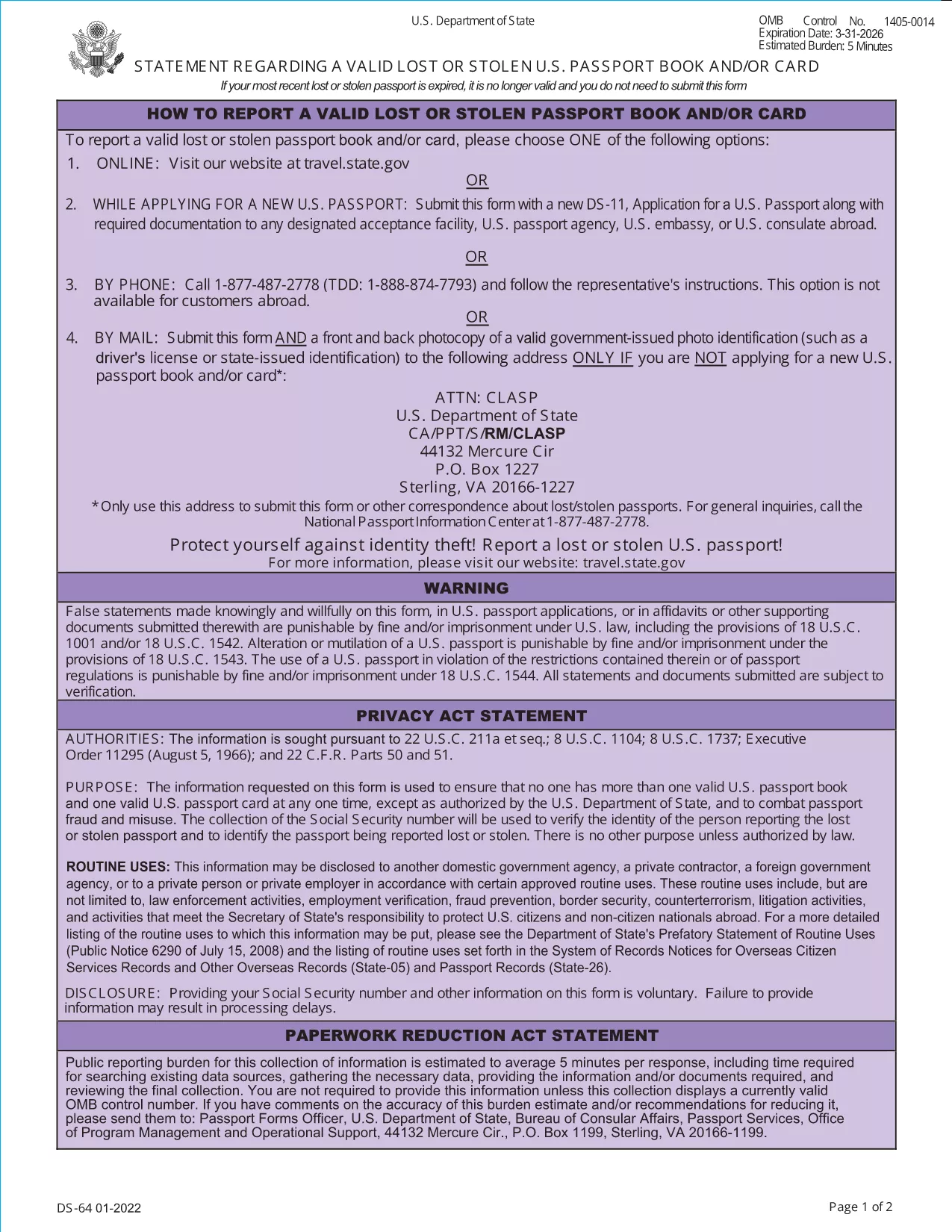
DS-64 Statement – Lost or Stolen U.S. Passport Fillable Form

  1. ภาษา ภาษาอังกฤษ
  2. ประเทศ สหรัฐอเมริกา
  3. แผนก หน่วยงาน
  4. กิจกรรม Passports
DS-64 Statement – Lost or Stolen U.S. Passport Fillable Form

If your U.S. passport has been lost or stolen, the Department of State requires you to submit the DS-64, Statement Regarding a Lost or Stolen Passport. This official PDF can now be filled out directly on our site, saved, and printed without any extra software.

What Is the DS-64 Form?

The DS-64 is a short, one‑page declaration that tells the State Department that your passport is no longer in your possession. It includes basic personal details, the passport number (if known), and the circumstances of the loss or theft. Submitting this form protects you from fraud and allows the State Department to cancel the missing document.

How to Complete the DS-64 Online with Formize

Follow these simple steps to fill the form instantly:

  • Click the "Fill out this form" button on this page.
  • Wait a few seconds while the Formize PDF Filler app loads.
  • Enter the required information in the highlighted fields.
  • Review your entries, then click Save & Download to get a completed PDF.
  • Print the PDF and sign it before submission.

Common Mistakes to Avoid

  • Leaving the passport number blank: If you truly don’t know it, write "000000000" rather than leaving the field empty.
  • Forgetting to sign: The form is not valid without a handwritten signature.
  • Providing inaccurate dates: Give the best estimate if you can’t recall the exact issue date.
  • Submitting an unsigned PDF: Print, sign, and then scan or mail the original.

Where to Submit the Completed Form

After printing and signing, mail the DS-64 to the Consular Lost and Stolen Passport Unit (CLASP). Include any supporting documentation, such as a police report for stolen passports. If you are filing a replacement application (DS‑11), attach the DS‑64 to that packet.

Need Help? Quick Resources

U.S. Department of State – Official Forms
Passport Fees & Processing Times

คำถามที่พบบ่อย
  • Do I need a passport number if I don’t know it?

    If the number is unknown, write nine zeros (000000000). The State Department accepts this placeholder for lost or stolen passports.

  • Can I submit the DS-64 electronically?

    The DS-64 must be signed by hand. You can fill it out online, download, print, and sign before mailing it to the CLASP.

  • How long does it take for the lost passport to be cancelled?

    Cancellation is usually processed within 5–7 business days after the CLASP receives your signed DS‑64.

  • Do I need to fill out a DS‑11 as well?

    Yes, if you are applying for a replacement passport you must submit a DS‑11 together with the completed DS‑64.

  • Is there a fee for filing the DS‑64?

    There is no separate fee for the DS‑64 itself. Fees apply only to the replacement passport application (DS‑11).

  • What if my passport was stolen abroad?

    Report the theft to the local police, obtain a report, and then submit the DS‑64 to the U.S. Embassy or Consulate along with your replacement application.

  • Can I use the same DS‑64 for multiple lost passports?

    Each lost or stolen passport requires its own DS‑64 statement. Submit a separate form for each incident.

ทำอย่างไร

วิธีกรอก lost passport form ฟรีทางออนไลน์ใน 5 ขั้นตอนง่ายๆ:

  1. 1
    Open the Fillable Form
    Click the "Fill out this form" button on this page. The Formize PDF Filler will open in a new window.
  2. 2
    Enter Your Information
    Type your personal details, passport number (or 000000000 if unknown), and describe how the passport was lost or stolen.
  3. 3
    Save and Download
    After completing all fields, click "Save & Download". The filled PDF will be saved to your device.
  4. 4
    Print and Sign
    Print the downloaded PDF and add your handwritten signature in the designated area.
  5. 5
    Submit to CLASP
    Mail the signed form to the Consular Lost and Stolen Passport Unit (CLASP) along with any required supporting documents.
สร้างแอป PDF Filler
เกี่ยวกับ

แบบฟอร์มกระทรวงการต่างประเทศ (DOS)

lost passport form เป็นหนึ่งในแบบฟอร์มใบสมัครที่กระทรวงการต่างประเทศสหรัฐอเมริกา (DOS) ใช้เพื่อรวบรวมข้อมูลและประมวลผลบริการต่างๆ ที่เกี่ยวข้องกับการเดินทางระหว่างประเทศ วีซ่า หนังสือเดินทาง และบริการกงสุล DOS มีหน้าที่รับผิดชอบในการจัดการนโยบายต่างประเทศของสหรัฐฯ ความสัมพันธ์ระหว่างประเทศ และให้บริการแก่พลเมืองสหรัฐฯ และชาวต่างชาติ

นี่คือตัวอย่างบางส่วนของแบบฟอร์มของกระทรวงการต่างประเทศ:

แบบฟอร์มการสมัครหนังสือเดินทาง: แบบฟอร์มเหล่านี้ใช้เพื่อขอหนังสือเดินทางสหรัฐอเมริกา ซึ่งเป็นเอกสารราชการที่ออกโดยรัฐบาลที่อนุญาตให้บุคคลเดินทางระหว่างประเทศได้ แบบฟอร์มการสมัครหนังสือเดินทางจะรวบรวมข้อมูลส่วนบุคคล รายละเอียดเกี่ยวกับสัญชาติ ตัวตน และข้อมูลที่จำเป็นอื่นๆ

แบบฟอร์มการสมัครวีซ่าชั่วคราว: DOS ดูแลการออกวีซ่าชั่วคราว ซึ่งอนุญาตให้ชาวต่างชาติเข้ามาเยี่ยมชมสหรัฐอเมริกาชั่วคราวเพื่อวัตถุประสงค์ต่างๆ เช่น การท่องเที่ยว ธุรกิจ การศึกษา หรือการทำงาน แบบฟอร์มคำร้องขอวีซ่าชั่วคราว เช่น DS-160, DS-156 หรือ DS-260 ใช้เพื่อรวบรวมข้อมูลเกี่ยวกับรายละเอียดส่วนบุคคลของผู้สมัคร ประวัติการเดินทาง วัตถุประสงค์ในการเดินทาง และข้อมูลอื่น ๆ ที่เกี่ยวข้อง

แบบฟอร์มการสมัครวีซ่าผู้อพยพ: สำหรับบุคคลที่ประสงค์จะย้ายถิ่นฐานไปยังสหรัฐอเมริกา เราจะใช้แบบฟอร์มการสมัครวีซ่าผู้อพยพ แบบฟอร์มเหล่านี้รวบรวมข้อมูลโดยละเอียดเกี่ยวกับประวัติส่วนตัวของผู้สมัคร สมาชิกในครอบครัว ประวัติการทำงาน และข้อมูลอื่น ๆ ที่เกี่ยวข้อง ตัวอย่าง ได้แก่ แบบฟอร์ม DS-260 สำหรับการย้ายถิ่นฐานตามครอบครัว หรือแบบฟอร์ม DS-230 สำหรับผู้ถูกรางวัลลอตเตอรีวีซ่าประเภทความหลากหลาย

แบบฟอร์มรายงานกงสุลการเกิดในต่างประเทศ (CRBA): แบบฟอร์มนี้ใช้ เพื่อบันทึกการเกิดของเด็กที่เป็นพลเมืองสหรัฐฯ ในต่างประเทศให้กับผู้ปกครองที่เป็นพลเมืองสหรัฐฯ รวบรวมข้อมูลเกี่ยวกับเด็ก ผู้ปกครอง และเอกสารประกอบ

แบบฟอร์มหนังสือรับรองการสนับสนุน: เมื่อให้การสนับสนุนผู้อพยพไปยังสหรัฐอเมริกา พลเมืองสหรัฐฯ หรือผู้อยู่อาศัยถาวรตามกฎหมายอาจต้องส่งแบบฟอร์มหนังสือรับรองการสนับสนุน แบบฟอร์มนี้ เช่น I-864 หรือ I-134 ใช้เพื่อแสดงให้เห็นถึงความสามารถทางการเงินในการสนับสนุนผู้ประสงค์จะย้ายถิ่นฐาน และป้องกันไม่ให้กลายเป็นค่าใช้จ่ายสาธารณะ

แบบฟอร์มบริการกงสุล: DOS ให้บริการด้านกงสุลต่างๆ แก่พลเมืองสหรัฐฯ และชาวต่างชาติ เช่น บริการรับรองเอกสาร คำร้องขอความช่วยเหลือฉุกเฉิน หรือการสละสัญชาติสหรัฐฯ มีการใช้แบบฟอร์มเฉพาะสำหรับบริการเหล่านี้ รวมถึงแบบฟอร์ม DS-11, DS-3053 หรือ DS-4079 ขึ้นอยู่กับลักษณะของบริการที่ร้องขอ

สิ่งสำคัญคือต้องทราบว่าแบบฟอร์มเฉพาะที่กระทรวงการต่างประเทศสหรัฐฯ ใช้สามารถเปลี่ยนแปลงได้เมื่อเวลาผ่านไป และบริการต่างๆ อาจต้องใช้แบบฟอร์มที่แตกต่างกัน ขอแนะนำให้เยี่ยมชมเว็บไซต์อย่างเป็นทางการของกระทรวงการต่างประเทศสหรัฐฯ หรือปรึกษากับสถานทูตหรือสถานกงสุลสหรัฐฯ ที่ใกล้ที่สุดเพื่อรับข้อมูลที่เป็นปัจจุบันและถูกต้องที่สุดเกี่ยวกับแบบฟอร์มเฉพาะที่จำเป็นสำหรับบริการต่างๆ

คุณสมบัติ

PDF ฟิลเลอร์

วิธีที่ง่ายที่สุดในการกรอกแบบฟอร์ม PDF ทางออนไลน์

  • กรอก lost passport form อย่างรวดเร็ว
    กำลังมองหาวิธีเติม lost passport form ทางออนไลน์อย่างรวดเร็วอยู่ใช่ไหม ด้วยตัวกรอกแบบฟอร์ม PDF ออนไลน์ฟรีของเรา คุณจะรู้วิธีแก้ไขและกรอกเอกสาร PDF นี้ในเวลาไม่ถึงนาที
  • โปรแกรมแก้ไข PDF ออนไลน์ที่ใช้งานง่าย
    เบื่อกับการพิมพ์ไฟล์ PDF เพื่อให้คุณสามารถแก้ไขได้ก่อนที่จะสแกนซ้ำและส่งกลับหรือไม่? แก้ไขเอกสาร PDF ออนไลน์ฟรี ใช้โปรแกรมแก้ไข PDF ออนไลน์ของเราเพื่อประหยัดเวลาและกระดาษ
  • เครื่องมือที่ยอดเยี่ยมสำหรับทุกแพลตฟอร์ม
    สงสัยวิธีเติม lost passport form บน Mac หรืออาจใช้ตัวเติม PDF ฟรีได้อย่างไร เครื่องมือ PDF ออนไลน์ของเราทำงานได้บนทุกแพลตฟอร์ม
  • การจัดเก็บไฟล์ที่ปลอดภัย
    ไฟล์ "lost passport form" ที่เสร็จสมบูรณ์จะถูกจัดเก็บไว้ในฐานข้อมูลที่ปลอดภัยซึ่งจัดการโดย Amazon Cloud hosting คุณสามารถลบไฟล์ของคุณออกจากระบบของเราได้ตลอดเวลา ไม่ว่าในกรณีใด ไฟล์เหล่านี้จะถูกลบโดยอัตโนมัติหลังจากผ่านไป 24 ชั่วโมง
  • สนทนากับ lost passport form
    แชทกับ "lost passport form" บน Chatize ที่เป็นผู้ช่วยอ่าน PDF ฟรี ถามคำถามและรับคำตอบจาก "lost passport form" เพียงคลิกที่ปุ่ม แชทด้วยเอกสาร ด้านบน

ลบเซสชันการบรรจุ

ลบเซสชันการกรอกข้อมูลที่เลือกหรือไม่?ในกรณีนี้ความคืบหน้าในการกรอกแบบฟอร์มจะหายไป

ลบเซสชันการแก้ไข

ลบเซสชันการแก้ไขที่เลือกหรือไม่ ในกรณีนี้ ความคืบหน้าในการสร้างและแก้ไขแบบฟอร์มจะหายไป