
hamburger-menu icon
เลือกภาษา

Passport Renewal Application – Fillable DS-11 PDF

  1. ภาษา ภาษาอังกฤษ
  2. ประเทศ สหรัฐอเมริกา
  3. แผนก หน่วยงาน
  4. กิจกรรม Passports
Passport Renewal Application – Fillable DS-11 PDF

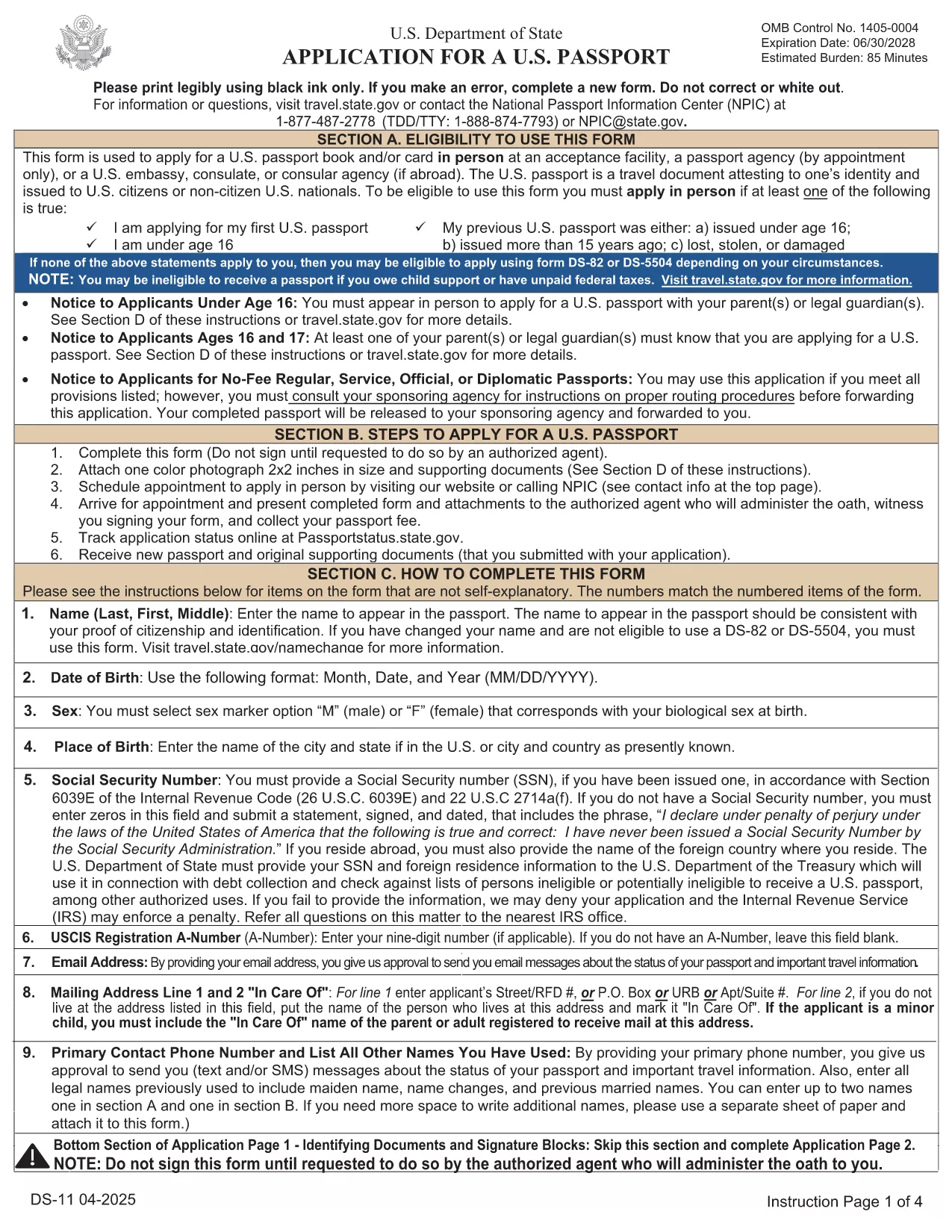
Renewing your U.S. passport has never been easier. With Formize’s fillable PDF version of the official DS‑11 application, you can complete the entire form online, avoid common errors, and print a clean copy ready for submission.

Why Use a Fillable PDF Form

Traditional paper forms require you to print, write, and re‑write if you make a mistake. A fillable PDF lets you:

  • Enter data directly on your computer or tablet.
  • Save a draft and return later.
  • Validate required fields instantly, reducing the chance of rejection.
  • Print a professional‑looking document that meets State Department standards.

Step‑by‑Step Guide to Complete the DS‑11 Form

Follow the simple steps below instead of downloading the PDF and opening a separate editor.

  • Click "Fill out this form" on this page.
  • Wait a few seconds while the Formize PDF Filler app loads.
  • Enter all requested information in each field. The app highlights missing or incorrectly formatted entries.
  • Review the completed form, add your signature electronically, and click Save & Download.
  • Print the final PDF on white, 8.5" x 11" paper and submit it with your supporting documents.

Common Mistakes to Avoid

  • Leaving the "Middle Name" field blank when you have one – the State Department requires the full legal name.
  • Using a non‑official photo (must be 2" x 2", color, taken within the last six months).
  • Forgetting to sign the form in the designated area – an unsigned form is automatically rejected.
  • Submitting an outdated form version – always use the latest PDF provided by Formize.

Where to Submit Your Completed Form

After printing, mail your DS‑11 renewal package to the appropriate address listed on the U.S. Department of State website. If you need expedited service, use the designated Express or Agency address.

Need help? Review the FAQs below or contact your local passport acceptance facility.

คำถามที่พบบ่อย
  • Can I use the DS‑11 form for a passport renewal?

    Yes, the DS‑11 is accepted for renewals when your previous passport was lost, stolen, or damaged, or if you do not meet the eligibility criteria for DS‑82.

  • What is the difference between DS‑11 and DS‑82?

    DS‑11 is the standard application used for first‑time applicants and certain renewal situations. DS‑82 is a simpler renewal form for eligible adults with an undamaged passport that is still valid or expired less than 5 years.

  • How long does the renewal process take?

    Standard processing takes 8‑11 weeks. Expedited service (for an additional fee) reduces the time to 5‑7 weeks, and urgent appointments can be arranged at a passport agency.

  • Do I need to bring my old passport?

    Yes. Submit your most recent passport with the completed DS‑11 form. If the passport is damaged or lost, you must include a signed statement and any supporting documentation.

  • What fees are required for a renewal?

    As of 2024, the adult passport book fee is $130 for standard service and $210 for expedited service. Additional fees apply for passport cards and optional services.

  • Can I submit the form electronically?

    No. The DS‑11 must be printed, signed, and mailed with supporting documents. However, you can complete the form online using the fillable PDF to avoid errors.

  • What photo specifications are required?

    A 2" x 2" color photo taken within the last six months, with a plain white background, full face view, and no glasses.

  • Where can I find a passport acceptance facility?

    Use the State Department’s online locator to find post offices, libraries, and other authorized facilities near you.

ทำอย่างไร

วิธีกรอก passport renewal ฟรีทางออนไลน์ใน 5 ขั้นตอนง่ายๆ:

  1. 1
    Open the Fillable Form
    Click the "Fill out this form" button on the page. The Formize PDF Filler loads directly in your browser.
  2. 2
    Enter Your Information
    Type your details into each highlighted field. The tool checks for required data and formatting in real time.
  3. 3
    Review and Sign
    Double‑check every entry, add your electronic signature, and confirm that the photo meets the guidelines.
  4. 4
    Save or Download
    Click "Save & Download" to get a printable PDF copy of your completed DS‑11 form.
  5. 5
    Print and Submit
    Print the PDF on white 8.5" x 11" paper, attach your supporting documents, and mail it to the address provided by the U.S. Department of State.
สร้างแอป PDF Filler
เกี่ยวกับ

แบบฟอร์มกระทรวงการต่างประเทศ (DOS)

passport renewal เป็นหนึ่งในแบบฟอร์มใบสมัครที่กระทรวงการต่างประเทศสหรัฐอเมริกา (DOS) ใช้เพื่อรวบรวมข้อมูลและประมวลผลบริการต่างๆ ที่เกี่ยวข้องกับการเดินทางระหว่างประเทศ วีซ่า หนังสือเดินทาง และบริการกงสุล DOS มีหน้าที่รับผิดชอบในการจัดการนโยบายต่างประเทศของสหรัฐฯ ความสัมพันธ์ระหว่างประเทศ และให้บริการแก่พลเมืองสหรัฐฯ และชาวต่างชาติ

นี่คือตัวอย่างบางส่วนของแบบฟอร์มของกระทรวงการต่างประเทศ:

แบบฟอร์มการสมัครหนังสือเดินทาง: แบบฟอร์มเหล่านี้ใช้เพื่อขอหนังสือเดินทางสหรัฐอเมริกา ซึ่งเป็นเอกสารราชการที่ออกโดยรัฐบาลที่อนุญาตให้บุคคลเดินทางระหว่างประเทศได้ แบบฟอร์มการสมัครหนังสือเดินทางจะรวบรวมข้อมูลส่วนบุคคล รายละเอียดเกี่ยวกับสัญชาติ ตัวตน และข้อมูลที่จำเป็นอื่นๆ

แบบฟอร์มการสมัครวีซ่าชั่วคราว: DOS ดูแลการออกวีซ่าชั่วคราว ซึ่งอนุญาตให้ชาวต่างชาติเข้ามาเยี่ยมชมสหรัฐอเมริกาชั่วคราวเพื่อวัตถุประสงค์ต่างๆ เช่น การท่องเที่ยว ธุรกิจ การศึกษา หรือการทำงาน แบบฟอร์มคำร้องขอวีซ่าชั่วคราว เช่น DS-160, DS-156 หรือ DS-260 ใช้เพื่อรวบรวมข้อมูลเกี่ยวกับรายละเอียดส่วนบุคคลของผู้สมัคร ประวัติการเดินทาง วัตถุประสงค์ในการเดินทาง และข้อมูลอื่น ๆ ที่เกี่ยวข้อง

แบบฟอร์มการสมัครวีซ่าผู้อพยพ: สำหรับบุคคลที่ประสงค์จะย้ายถิ่นฐานไปยังสหรัฐอเมริกา เราจะใช้แบบฟอร์มการสมัครวีซ่าผู้อพยพ แบบฟอร์มเหล่านี้รวบรวมข้อมูลโดยละเอียดเกี่ยวกับประวัติส่วนตัวของผู้สมัคร สมาชิกในครอบครัว ประวัติการทำงาน และข้อมูลอื่น ๆ ที่เกี่ยวข้อง ตัวอย่าง ได้แก่ แบบฟอร์ม DS-260 สำหรับการย้ายถิ่นฐานตามครอบครัว หรือแบบฟอร์ม DS-230 สำหรับผู้ถูกรางวัลลอตเตอรีวีซ่าประเภทความหลากหลาย

แบบฟอร์มรายงานกงสุลการเกิดในต่างประเทศ (CRBA): แบบฟอร์มนี้ใช้ เพื่อบันทึกการเกิดของเด็กที่เป็นพลเมืองสหรัฐฯ ในต่างประเทศให้กับผู้ปกครองที่เป็นพลเมืองสหรัฐฯ รวบรวมข้อมูลเกี่ยวกับเด็ก ผู้ปกครอง และเอกสารประกอบ

แบบฟอร์มหนังสือรับรองการสนับสนุน: เมื่อให้การสนับสนุนผู้อพยพไปยังสหรัฐอเมริกา พลเมืองสหรัฐฯ หรือผู้อยู่อาศัยถาวรตามกฎหมายอาจต้องส่งแบบฟอร์มหนังสือรับรองการสนับสนุน แบบฟอร์มนี้ เช่น I-864 หรือ I-134 ใช้เพื่อแสดงให้เห็นถึงความสามารถทางการเงินในการสนับสนุนผู้ประสงค์จะย้ายถิ่นฐาน และป้องกันไม่ให้กลายเป็นค่าใช้จ่ายสาธารณะ

แบบฟอร์มบริการกงสุล: DOS ให้บริการด้านกงสุลต่างๆ แก่พลเมืองสหรัฐฯ และชาวต่างชาติ เช่น บริการรับรองเอกสาร คำร้องขอความช่วยเหลือฉุกเฉิน หรือการสละสัญชาติสหรัฐฯ มีการใช้แบบฟอร์มเฉพาะสำหรับบริการเหล่านี้ รวมถึงแบบฟอร์ม DS-11, DS-3053 หรือ DS-4079 ขึ้นอยู่กับลักษณะของบริการที่ร้องขอ

สิ่งสำคัญคือต้องทราบว่าแบบฟอร์มเฉพาะที่กระทรวงการต่างประเทศสหรัฐฯ ใช้สามารถเปลี่ยนแปลงได้เมื่อเวลาผ่านไป และบริการต่างๆ อาจต้องใช้แบบฟอร์มที่แตกต่างกัน ขอแนะนำให้เยี่ยมชมเว็บไซต์อย่างเป็นทางการของกระทรวงการต่างประเทศสหรัฐฯ หรือปรึกษากับสถานทูตหรือสถานกงสุลสหรัฐฯ ที่ใกล้ที่สุดเพื่อรับข้อมูลที่เป็นปัจจุบันและถูกต้องที่สุดเกี่ยวกับแบบฟอร์มเฉพาะที่จำเป็นสำหรับบริการต่างๆ

คุณสมบัติ

PDF ฟิลเลอร์

วิธีที่ง่ายที่สุดในการกรอกแบบฟอร์ม PDF ทางออนไลน์

  • กรอก passport renewal อย่างรวดเร็ว
    กำลังมองหาวิธีเติม passport renewal ทางออนไลน์อย่างรวดเร็วอยู่ใช่ไหม ด้วยตัวกรอกแบบฟอร์ม PDF ออนไลน์ฟรีของเรา คุณจะรู้วิธีแก้ไขและกรอกเอกสาร PDF นี้ในเวลาไม่ถึงนาที
  • โปรแกรมแก้ไข PDF ออนไลน์ที่ใช้งานง่าย
    เบื่อกับการพิมพ์ไฟล์ PDF เพื่อให้คุณสามารถแก้ไขได้ก่อนที่จะสแกนซ้ำและส่งกลับหรือไม่? แก้ไขเอกสาร PDF ออนไลน์ฟรี ใช้โปรแกรมแก้ไข PDF ออนไลน์ของเราเพื่อประหยัดเวลาและกระดาษ
  • เครื่องมือที่ยอดเยี่ยมสำหรับทุกแพลตฟอร์ม
    สงสัยวิธีเติม passport renewal บน Mac หรืออาจใช้ตัวเติม PDF ฟรีได้อย่างไร เครื่องมือ PDF ออนไลน์ของเราทำงานได้บนทุกแพลตฟอร์ม
  • การจัดเก็บไฟล์ที่ปลอดภัย
    ไฟล์ "passport renewal" ที่เสร็จสมบูรณ์จะถูกจัดเก็บไว้ในฐานข้อมูลที่ปลอดภัยซึ่งจัดการโดย Amazon Cloud hosting คุณสามารถลบไฟล์ของคุณออกจากระบบของเราได้ตลอดเวลา ไม่ว่าในกรณีใด ไฟล์เหล่านี้จะถูกลบโดยอัตโนมัติหลังจากผ่านไป 24 ชั่วโมง
  • สนทนากับ passport renewal
    แชทกับ "passport renewal" บน Chatize ที่เป็นผู้ช่วยอ่าน PDF ฟรี ถามคำถามและรับคำตอบจาก "passport renewal" เพียงคลิกที่ปุ่ม แชทด้วยเอกสาร ด้านบน

ลบเซสชันการบรรจุ

ลบเซสชันการกรอกข้อมูลที่เลือกหรือไม่?ในกรณีนี้ความคืบหน้าในการกรอกแบบฟอร์มจะหายไป

ลบเซสชันการแก้ไข

ลบเซสชันการแก้ไขที่เลือกหรือไม่ ในกรณีนี้ ความคืบหน้าในการสร้างและแก้ไขแบบฟอร์มจะหายไป