
hamburger-menu icon
เลือกภาษา

MVR-3 Fillable PDF – North Carolina DMV Vehicle Form

  1. ภาษา ภาษาอังกฤษ
  2. ประเทศ สหรัฐอเมริกา
  3. กิจกรรม ทะเบียนรถ
  4. แผนก กรมขนส่ง
  5. สถานะ นอร์ทแคโรไลนา
MVR-3 Fillable PDF – North Carolina DMV Vehicle Form

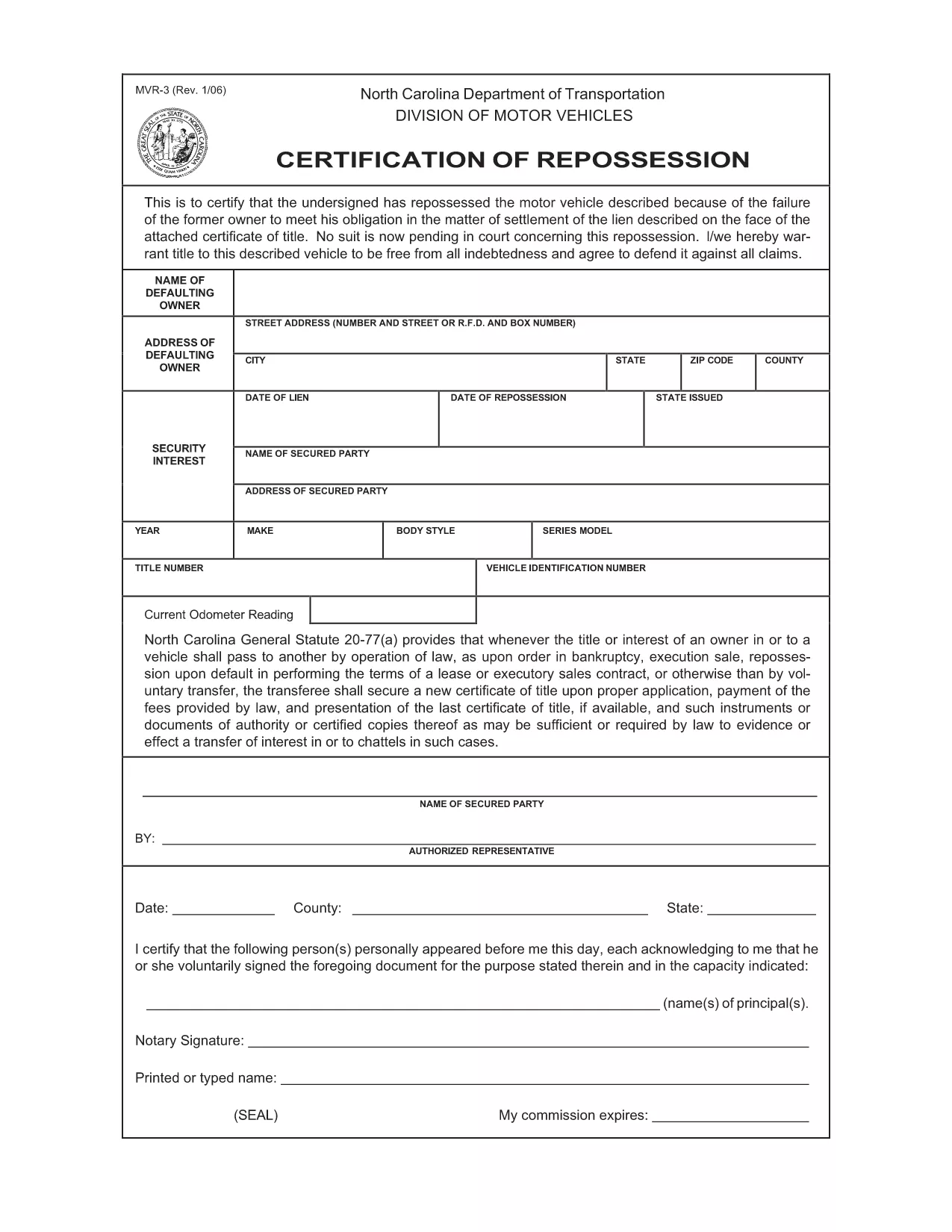
The MVR-3 is the official North Carolina Department of Transportation (NCDOT) vehicle registration application. Whether you’re registering a new vehicle, updating ownership information, or correcting a title, the MVR-3 is the required paperwork.

What Is the MVR-3 Form?

The MVR-3 collects essential vehicle details such as VIN, make, model, year, and current odometer reading. It also captures owner information, lienholder data, and any special exemptions.

Key Sections of the MVR-3

  • Section A – Owner Information: Name, address, driver’s license number.
  • Section B – Vehicle Details: VIN, year, make, model, body style.
  • Section C – Lienholder Data (if applicable): Name and address of the lienholder.
  • Section D – Certification & Signature: Owner’s signature and date.

How to Complete the Form Online

Instead of printing, downloading, and hand‑filling the PDF, use Formize’s built‑in filler:

  1. Click the "Fill out this form" button on this page.
  2. Wait a few seconds while the Formize PDF Filler loads the MVR-3.
  3. Enter your information directly into each field. The filler validates required entries in real time.
  4. Review the completed form for accuracy.
  5. Save a copy to your device or print it for submission at your local NCDOT office.

Common Mistakes & Tips

  • Incorrect VIN: Double‑check the 17‑character VIN; a single digit error can delay processing.
  • Missing Signature: The form is invalid without the owner’s signature and date.
  • Odometer Disclosure: Provide the exact current mileage; tampering can result in penalties.
  • Out‑of‑date Address: Ensure the mailing address matches the one on file with the DMV.

Download & Save Your Completed Form

After filling out the MVR-3 with Formize, you can download a PDF copy for your records or print it for immediate submission. Keep a saved copy in case the DMV requests additional information.

คำถามที่พบบ่อย
  • What is the purpose of the MVR-3 form?

    The MVR-3 is used to register a vehicle, transfer ownership, or correct title information with the North Carolina DMV.

  • Can I submit the MVR-3 electronically?

    North Carolina currently requires a printed and signed copy for most transactions, but you can fill it out online and print it yourself.

  • Do I need a notary for the MVR-3?

    No notary is required unless a lienholder specifically requests notarization on the lien section.

  • How long does it take for the DMV to process the MVR-3?

    Processing typically takes 7‑10 business days after the form is submitted, provided all information is correct.

  • What should I do if I make a mistake on the form?

    Cross out the error with a single line, initial it, and write the correct information. Alternatively, start a new form to avoid confusion.

  • Is there a fee associated with filing the MVR-3?

    Yes, filing fees vary depending on the transaction type (e.g., title transfer, registration renewal). Check the NCDOT fee schedule for current rates.

  • Where can I get help if I have questions about the MVR-3?

    Contact your local NCDOT office or visit the official NCDOT website for FAQs and contact information.

ทำอย่างไร

วิธีกรอก MVR-3 ฟรีทางออนไลน์ใน 5 ขั้นตอนง่ายๆ:

  1. 1
    Open the Fillable Form
    Click the "Fill out this form" button on the page to launch the Formize PDF Filler.
  2. 2
    Wait for the Filler to Load
    A short loading screen appears while the MVR-3 PDF is prepared for editing.
  3. 3
    Enter Your Information
    Type directly into each highlighted field. Required fields are marked with an asterisk.
  4. 4
    Review and Validate
    Check every section for completeness. The filler will alert you to any missing or invalid entries.
  5. 5
    Save or Print
    Download the completed PDF to your device or print it for submission at your local NCDOT office.
สร้างแอป PDF Filler
เกี่ยวกับ

แบบฟอร์มทะเบียนรถ

หากคุณเป็นเจ้าของหรือเช่ายานยนต์ รถพ่วงหรือเรือ คุณต้องปฏิบัติตามข้อผูกพันบางประการเพื่อให้ยานพาหนะของคุณจดทะเบียนถูกต้องตามกฎหมายและปลอดภัย

MVR-3 เป็นหนึ่งในแบบฟอร์มการจดทะเบียนรถยนต์ที่เป็นเอกสารที่ใช้ในการจดทะเบียนยานยนต์กับหน่วยงานของรัฐหรือจังหวัดที่เกี่ยวข้อง แบบฟอร์มเหล่านี้มักจำเป็นเมื่อบุคคลซื้อยานพาหนะใหม่หรือใช้แล้ว หรือเมื่อพวกเขาย้ายไปยังรัฐหรือจังหวัดใหม่ด้วยยานพาหนะ

ข้อกำหนดและแบบฟอร์มที่จำเป็นสำหรับการจดทะเบียนรถอาจแตกต่างกันไปตามสถานที่ แต่โดยทั่วไปแล้ว กระบวนการเกี่ยวข้องกับการให้ข้อมูลเกี่ยวกับรถ เจ้าของ และภาระผูกพันใดๆ ของรถ

เมื่อส่งแบบฟอร์มการจดทะเบียนและค่าธรรมเนียมแล้ว หน่วยงานของรัฐหรือหน่วยงานระดับจังหวัดจะออกใบรับรองการจดทะเบียนหรือป้ายทะเบียนให้กับเจ้าของรถ การจดทะเบียนนี้ทำให้รถสามารถใช้งานบนถนนสาธารณะและทางหลวงได้อย่างถูกกฎหมาย

คุณสมบัติ

PDF ฟิลเลอร์

วิธีที่ง่ายที่สุดในการกรอกแบบฟอร์ม PDF ทางออนไลน์

  • กรอก MVR-3 อย่างรวดเร็ว
    กำลังมองหาวิธีเติม MVR-3 ทางออนไลน์อย่างรวดเร็วอยู่ใช่ไหม ด้วยตัวกรอกแบบฟอร์ม PDF ออนไลน์ฟรีของเรา คุณจะรู้วิธีแก้ไขและกรอกเอกสาร PDF นี้ในเวลาไม่ถึงนาที
  • โปรแกรมแก้ไข PDF ออนไลน์ที่ใช้งานง่าย
    เบื่อกับการพิมพ์ไฟล์ PDF เพื่อให้คุณสามารถแก้ไขได้ก่อนที่จะสแกนซ้ำและส่งกลับหรือไม่? แก้ไขเอกสาร PDF ออนไลน์ฟรี ใช้โปรแกรมแก้ไข PDF ออนไลน์ของเราเพื่อประหยัดเวลาและกระดาษ
  • เครื่องมือที่ยอดเยี่ยมสำหรับทุกแพลตฟอร์ม
    สงสัยวิธีเติม MVR-3 บน Mac หรืออาจใช้ตัวเติม PDF ฟรีได้อย่างไร เครื่องมือ PDF ออนไลน์ของเราทำงานได้บนทุกแพลตฟอร์ม
  • การจัดเก็บไฟล์ที่ปลอดภัย
    ไฟล์ "MVR-3" ที่เสร็จสมบูรณ์จะถูกจัดเก็บไว้ในฐานข้อมูลที่ปลอดภัยซึ่งจัดการโดย Amazon Cloud hosting คุณสามารถลบไฟล์ของคุณออกจากระบบของเราได้ตลอดเวลา ไม่ว่าในกรณีใด ไฟล์เหล่านี้จะถูกลบโดยอัตโนมัติหลังจากผ่านไป 24 ชั่วโมง
  • สนทนากับ MVR-3
    แชทกับ "MVR-3" บน Chatize ที่เป็นผู้ช่วยอ่าน PDF ฟรี ถามคำถามและรับคำตอบจาก "MVR-3" เพียงคลิกที่ปุ่ม แชทด้วยเอกสาร ด้านบน

ลบเซสชันการบรรจุ

ลบเซสชันการกรอกข้อมูลที่เลือกหรือไม่?ในกรณีนี้ความคืบหน้าในการกรอกแบบฟอร์มจะหายไป

ลบเซสชันการแก้ไข

ลบเซสชันการแก้ไขที่เลือกหรือไม่ ในกรณีนี้ ความคืบหน้าในการสร้างและแก้ไขแบบฟอร์มจะหายไป