
hamburger-menu icon
เลือกภาษา

Virginia DL-145 Driver’s License Form – Fillable PDF

  1. ภาษา ภาษาอังกฤษ
  2. ประเทศ สหรัฐอเมริกา
  3. กิจกรรม ใบขับขี่
  4. แผนก DMV
Virginia DL-145 Driver’s License Form – Fillable PDF

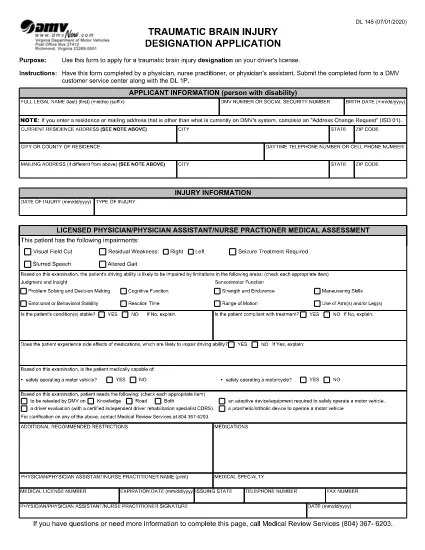
What Is the DL-145 Form?

The DL-145 is the official Virginia Department of Motor Vehicles (DMV) application used to request a driver’s license, learner’s permit, or ID card. It gathers personal information, residency proof, and eligibility details required by state law.

How to Complete the DL-145 Online

Instead of printing, filling out by hand, and scanning, you can complete the DL-145 instantly on our page:

  1. Click the Fill out this form button below.
  2. Wait a few seconds while the Formize PDF Filler app loads the fillable version of the DL-145.
  3. Enter your information in the interactive fields – the form saves your progress automatically.
  4. When you’re done, choose to download a completed PDF or print it directly for submission.

Common Mistakes to Avoid

  • Incorrect address format: Use the exact street address as it appears on your utility bill or lease.
  • Missing signatures: The applicant and any required sponsors must sign the designated fields.
  • Out‑of‑date documents: Ensure all supporting documents (e.g., birth certificate, SSN card) are current and legible.
  • Skipping required checkboxes: The DMV validates each required box; unselected boxes cause delays.

Where to Submit the Completed Form

After you download the filled DL-145, bring it to any Virginia DMV customer service center along with the required supporting documents and payment. Some locations also accept mail‑in submissions; check the Virginia DMV website for specific instructions.

Why Use Formize’s Fillable PDF

Formize provides a secure, browser‑based PDF filler that eliminates the need for third‑party software. Benefits include:

  • Instant loading – no downloads or installations.
  • Auto‑save feature prevents data loss.
  • Fully compliant with Virginia DMV formatting requirements.
  • Free and accessible from any device.
คำถามที่พบบ่อย
  • Is the DL-145 form available for free?

    Yes. The Virginia DMV provides the DL-145 PDF at no cost, and Formize lets you fill it out online for free.

  • Can I save my progress and finish later?

    The Formize filler auto‑saves your data while the browser session is open. For longer breaks, download a partially completed PDF and reopen it later.

  • Do I need special software to use the fillable PDF?

    No. The Formize PDF Filler runs entirely in your web browser—no Adobe Acrobat or other editor required.

  • What documents must I bring with the completed DL-145?

    Typically you need proof of identity, residency, Social Security number, and any applicable fee receipts. Check the Virginia DMV checklist for the exact list.

  • Can I submit the DL-145 electronically?

    The Virginia DMV still requires a printed, signed form for most license types. Some renewals may be completed online, but the DL-145 itself is submitted in person or by mail.

  • What if I make a mistake after downloading?

    You can reopen the downloaded PDF in any standard PDF editor, correct the error, and re‑print. Alternatively, start a new session in Formize and fill the form again.

  • Is my personal information safe when using Formize?

    Formize processes data locally in your browser and does not store any personal information on its servers.

ทำอย่างไร

วิธีกรอก DL-145 ฟรีทางออนไลน์ใน 5 ขั้นตอนง่ายๆ:

  1. 1
    Open the Fillable Form
    Click the "Fill out this form" button on the page. The Formize PDF Filler will open the DL-145 in your browser.
  2. 2
    Enter Your Information
    Fill each field with accurate data. The form automatically saves your entries as you type.
  3. 3
    Review & Validate
    Double‑check all entries, especially signatures and checkboxes, to ensure the DMV accepts the form.
  4. 4
    Download or Print
    When finished, click "Download" to save a copy or "Print" to produce a hard copy for submission.
  5. 5
    Submit to the DMV
    Take the printed form and required documents to a Virginia DMV office or follow the mail‑in instructions on the DMV website.
สร้างแอป PDF Filler
เกี่ยวกับ

แบบฟอร์มคำร้องขอทำใบขับขี่

ในประเทศส่วนใหญ่ จำเป็นต้องมีใบขับขี่ก่อนออกเดินทาง การขอใบขับขี่เป็นก้าวสำคัญสำหรับผู้ที่ต้องการขับรถ

DL-145 เป็นหนึ่งในแบบฟอร์มคำขอใบขับขี่ซึ่งเป็นเอกสารที่ใช้ในการรวบรวมข้อมูลจากผู้ที่ต้องการขอใบอนุญาตขับรถ โดยปกติจะมีฟิลด์สำหรับชื่อผู้สมัคร วันเกิด หมายเลขประจำตัวประชาชน ข้อมูลติดต่อ ตลอดจนประวัติใบขับขี่และประสบการณ์ของพวกเขา

คุณสมบัติ

PDF ฟิลเลอร์

วิธีที่ง่ายที่สุดในการกรอกแบบฟอร์ม PDF ทางออนไลน์

  • กรอก DL-145 อย่างรวดเร็ว
    กำลังมองหาวิธีเติม DL-145 ทางออนไลน์อย่างรวดเร็วอยู่ใช่ไหม ด้วยตัวกรอกแบบฟอร์ม PDF ออนไลน์ฟรีของเรา คุณจะรู้วิธีแก้ไขและกรอกเอกสาร PDF นี้ในเวลาไม่ถึงนาที
  • โปรแกรมแก้ไข PDF ออนไลน์ที่ใช้งานง่าย
    เบื่อกับการพิมพ์ไฟล์ PDF เพื่อให้คุณสามารถแก้ไขได้ก่อนที่จะสแกนซ้ำและส่งกลับหรือไม่? แก้ไขเอกสาร PDF ออนไลน์ฟรี ใช้โปรแกรมแก้ไข PDF ออนไลน์ของเราเพื่อประหยัดเวลาและกระดาษ
  • เครื่องมือที่ยอดเยี่ยมสำหรับทุกแพลตฟอร์ม
    สงสัยวิธีเติม DL-145 บน Mac หรืออาจใช้ตัวเติม PDF ฟรีได้อย่างไร เครื่องมือ PDF ออนไลน์ของเราทำงานได้บนทุกแพลตฟอร์ม
  • การจัดเก็บไฟล์ที่ปลอดภัย
    ไฟล์ "DL-145" ที่เสร็จสมบูรณ์จะถูกจัดเก็บไว้ในฐานข้อมูลที่ปลอดภัยซึ่งจัดการโดย Amazon Cloud hosting คุณสามารถลบไฟล์ของคุณออกจากระบบของเราได้ตลอดเวลา ไม่ว่าในกรณีใด ไฟล์เหล่านี้จะถูกลบโดยอัตโนมัติหลังจากผ่านไป 24 ชั่วโมง
  • สนทนากับ DL-145
    แชทกับ "DL-145" บน Chatize ที่เป็นผู้ช่วยอ่าน PDF ฟรี ถามคำถามและรับคำตอบจาก "DL-145" เพียงคลิกที่ปุ่ม แชทด้วยเอกสาร ด้านบน

ลบเซสชันการบรรจุ

ลบเซสชันการกรอกข้อมูลที่เลือกหรือไม่?ในกรณีนี้ความคืบหน้าในการกรอกแบบฟอร์มจะหายไป

ลบเซสชันการแก้ไข

ลบเซสชันการแก้ไขที่เลือกหรือไม่ ในกรณีนี้ ความคืบหน้าในการสร้างและแก้ไขแบบฟอร์มจะหายไป