
hamburger-menu icon
เลือกภาษา

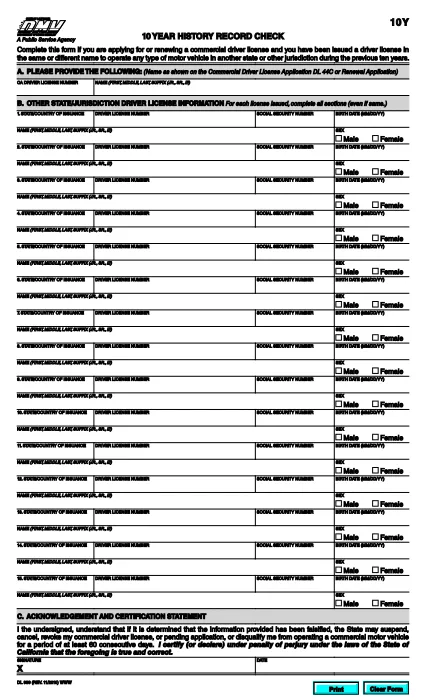
California DMV DL 939 – 10‑Year History Record Check Form

  1. ภาษา ภาษาอังกฤษ
  2. ประเทศ สหรัฐอเมริกา
  3. กิจกรรม ใบขับขี่
  4. สถานะ แคลิฟอร์เนีย
California DMV DL 939 – 10‑Year History Record Check Form

The DL 939 is the California Department of Motor Vehicles (DMV) 10‑Year History Record Check form. It is required when you are applying for or renewing a commercial driver’s license (CDL) and need to disclose any driver’s licenses you have held in the past ten years, even if they were issued in a different name or state.

What Is the DL 939 Form?

Form DL 939 collects detailed information about your driving history, including:

  • All driver’s licenses issued in the last ten years
  • Names, dates of issue, and issuing jurisdictions
  • Any suspensions, revocations, or restrictions

Providing accurate data helps the DMV verify your eligibility for a CDL and prevents delays in processing your application.

How to Complete the DL 939 Online with Formize

Instead of downloading, printing, and scanning the PDF, you can fill it out instantly on our site:

  1. Click the “Fill out this form” button below the PDF preview.
  2. Wait a few seconds while the Formize PDF Filler app loads.
  3. Enter the requested information into each fillable field. The interface mirrors the original DMV layout, so you’ll know exactly where to type.
  4. Review your entries for accuracy (see the “Common Mistakes” section).
  5. When you’re satisfied, click Save & Download to get a completed PDF ready for upload or printing.

Common Mistakes to Avoid

  • Leaving fields blank: Every license you held in the past ten years must be listed, even if it was cancelled.
  • Mismatching dates: Use the exact issue and expiration dates shown on your original licenses.
  • Incorrect name spelling: Include name variations (e.g., maiden name) exactly as they appear on the original documents.
  • Skipping the “Signature” field: The form is not valid without a signature or electronic acknowledgment.

Where to Submit the Completed Form

After you download the filled PDF, attach it to your CDL application packet and submit it to your nearest California DMV office or upload it through the DMV’s online portal, if available.

Need help? Review the FAQ section below or contact your local DMV office for clarification.

คำถามที่พบบ่อย
  • Who needs to fill out DL 939?

    Anyone applying for or renewing a commercial driver’s license in California who has held any driver’s license in the past ten years, even in another state or under a different name.

  • Can I submit the form electronically?

    Yes. After completing the form with Formize, you can upload the saved PDF directly to the California DMV’s online portal or email it if your local office accepts electronic submissions.

  • What happens if I leave a previous license out?

    Omitting a license can delay your CDL processing, cause a denial, or lead to penalties for providing incomplete information.

  • Is there a fee to use Formize’s PDF filler?

    No. Formize provides a free, secure filler for all California DMV forms, including DL 939.

  • Do I need a digital signature?

    If you fill the form online, you can add an electronic signature using the filler’s built‑in signature tool. The DMV accepts this as long as it’s clearly marked.

  • How long is the DL 939 valid?

    The completed DL 939 is valid for the duration of the specific CDL application or renewal it accompanies. It does not have an independent expiration date.

ทำอย่างไร

วิธีกรอก DL 939 ฟรีทางออนไลน์ใน 5 ขั้นตอนง่ายๆ:

  1. 1
    Open the Form
    Click the “Fill out this form” button on the page. The Formize PDF Filler will open in a new window.
  2. 2
    Load the PDF Filler
    Wait a few seconds while the filler loads the DL 939 template. All fields become editable.
  3. 3
    Enter Your Information
    Type the required data into each field, matching the original DMV records exactly.
  4. 4
    Review & Save
    Check every entry for accuracy, then click “Save & Download” to get a completed PDF.
  5. 5
    Submit the Form
    Attach the saved PDF to your CDL application or upload it through the California DMV online portal.
สร้างแอป PDF Filler
เกี่ยวกับ

แบบฟอร์มคำร้องขอทำใบขับขี่

ในประเทศส่วนใหญ่ จำเป็นต้องมีใบขับขี่ก่อนออกเดินทาง การขอใบขับขี่เป็นก้าวสำคัญสำหรับผู้ที่ต้องการขับรถ

DL 939 เป็นหนึ่งในแบบฟอร์มคำขอใบขับขี่ซึ่งเป็นเอกสารที่ใช้ในการรวบรวมข้อมูลจากผู้ที่ต้องการขอใบอนุญาตขับรถ โดยปกติจะมีฟิลด์สำหรับชื่อผู้สมัคร วันเกิด หมายเลขประจำตัวประชาชน ข้อมูลติดต่อ ตลอดจนประวัติใบขับขี่และประสบการณ์ของพวกเขา

คุณสมบัติ

PDF ฟิลเลอร์

วิธีที่ง่ายที่สุดในการกรอกแบบฟอร์ม PDF ทางออนไลน์

  • กรอก DL 939 อย่างรวดเร็ว
    กำลังมองหาวิธีเติม DL 939 ทางออนไลน์อย่างรวดเร็วอยู่ใช่ไหม ด้วยตัวกรอกแบบฟอร์ม PDF ออนไลน์ฟรีของเรา คุณจะรู้วิธีแก้ไขและกรอกเอกสาร PDF นี้ในเวลาไม่ถึงนาที
  • โปรแกรมแก้ไข PDF ออนไลน์ที่ใช้งานง่าย
    เบื่อกับการพิมพ์ไฟล์ PDF เพื่อให้คุณสามารถแก้ไขได้ก่อนที่จะสแกนซ้ำและส่งกลับหรือไม่? แก้ไขเอกสาร PDF ออนไลน์ฟรี ใช้โปรแกรมแก้ไข PDF ออนไลน์ของเราเพื่อประหยัดเวลาและกระดาษ
  • เครื่องมือที่ยอดเยี่ยมสำหรับทุกแพลตฟอร์ม
    สงสัยวิธีเติม DL 939 บน Mac หรืออาจใช้ตัวเติม PDF ฟรีได้อย่างไร เครื่องมือ PDF ออนไลน์ของเราทำงานได้บนทุกแพลตฟอร์ม
  • การจัดเก็บไฟล์ที่ปลอดภัย
    ไฟล์ "DL 939" ที่เสร็จสมบูรณ์จะถูกจัดเก็บไว้ในฐานข้อมูลที่ปลอดภัยซึ่งจัดการโดย Amazon Cloud hosting คุณสามารถลบไฟล์ของคุณออกจากระบบของเราได้ตลอดเวลา ไม่ว่าในกรณีใด ไฟล์เหล่านี้จะถูกลบโดยอัตโนมัติหลังจากผ่านไป 24 ชั่วโมง
  • สนทนากับ DL 939
    แชทกับ "DL 939" บน Chatize ที่เป็นผู้ช่วยอ่าน PDF ฟรี ถามคำถามและรับคำตอบจาก "DL 939" เพียงคลิกที่ปุ่ม แชทด้วยเอกสาร ด้านบน

ลบเซสชันการบรรจุ

ลบเซสชันการกรอกข้อมูลที่เลือกหรือไม่?ในกรณีนี้ความคืบหน้าในการกรอกแบบฟอร์มจะหายไป

ลบเซสชันการแก้ไข

ลบเซสชันการแก้ไขที่เลือกหรือไม่ ในกรณีนี้ ความคืบหน้าในการสร้างและแก้ไขแบบฟอร์มจะหายไป