
hamburger-menu icon
เลือกภาษา

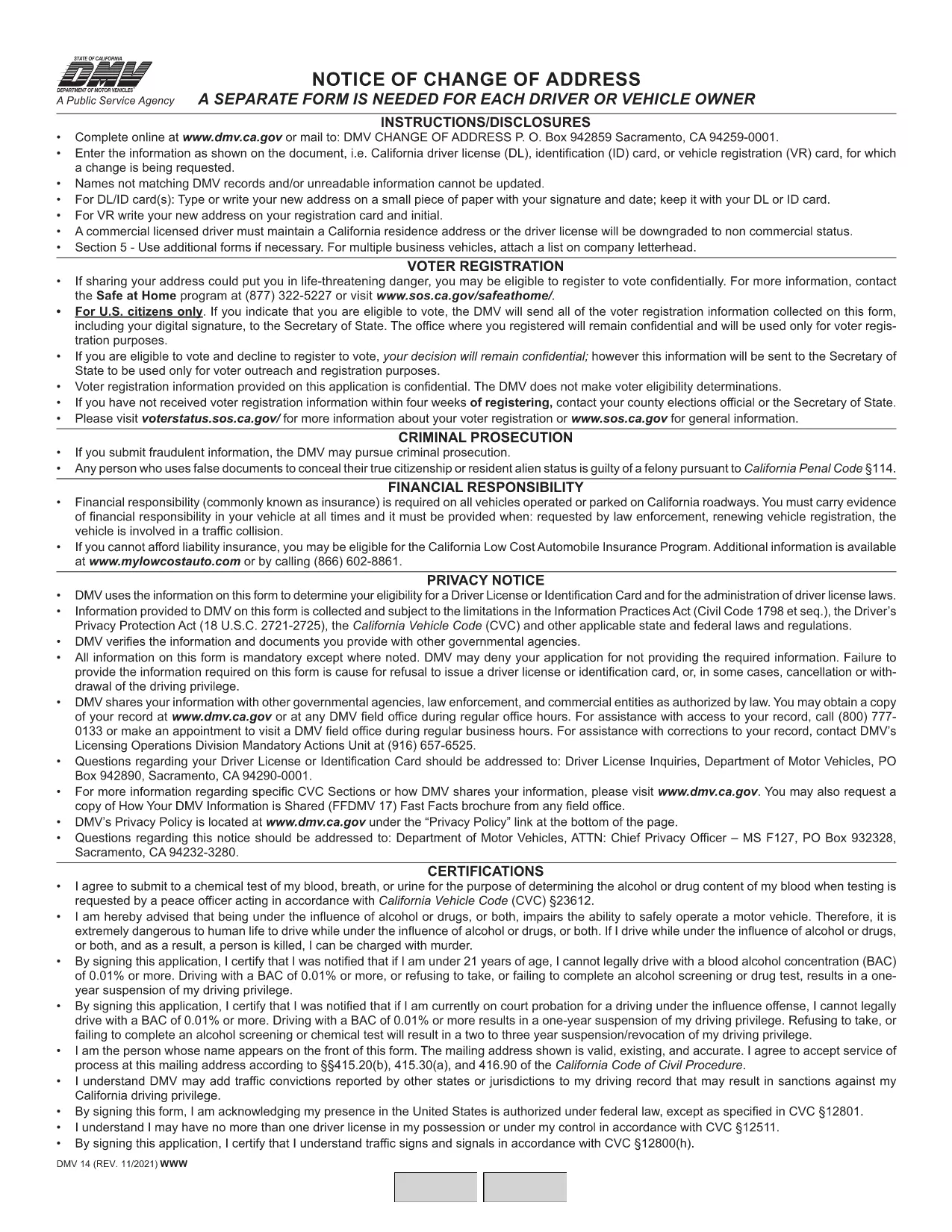
California DMV Form 14 – Notice of Change of Address

  1. ภาษา ภาษาอังกฤษ
  2. ประเทศ สหรัฐอเมริกา
  3. กิจกรรม ใบขับขี่
  4. สถานะ แคลิฟอร์เนีย
California DMV Form 14 – Notice of Change of Address

When you move in California, the Department of Motor Vehicles (DMV) requires you to update your address on your driver license or identification card. Form DMV‑14, also called the “Notice of Change of Address,” is the official document used for this purpose.

What Is DMV Form 14?

Form DMV‑14 is a short, printable notice that captures your new residential address, mailing address (if different), and vehicle information. The form is required for:

  • Driver licenses
  • Identification cards
  • Vehicle registrations

Submitting the form promptly helps the DMV keep your records current and ensures you receive important notices, renewal reminders, and traffic citations.

How to Fill Out the Form Online with Formize

Instead of downloading the PDF, printing it, and manually filling it in, you can complete the form instantly on our site:

  1. Click the "Fill out this form" button below the description.
  2. Our Formize PDF Filler app will load the fillable version of DMV‑14.
  3. Enter your information in the highlighted fields (address, phone, vehicle details, etc.).
  4. Review the completed form and click Submit to download a completed PDF or share it directly with the DMV.

All data stays in your browser; we never store personal details.

Common Mistakes to Avoid

  • Using the wrong ink color: If you print the form, use black or dark blue ink only.
  • Leaving fields blank: Every field marked with an asterisk (*) is mandatory.
  • Incorrect ZIP code: Double‑check the ZIP code for both old and new addresses.
  • Signing the wrong section: The signature must appear on the "Driver/Owner Signature" line.

Where to Submit Your Completed Form

After you’ve filled out and saved the PDF, you have three submission options:

  1. Mail: Send the form to DMV, P.O. Box 942859, Sacramento, CA 94259‑0001.
  2. In‑person: Bring the printed form to any California DMV office.
  3. Online (recommended): Upload the completed PDF through the California DMV website under "Change of Address".

Updating your address online is the fastest way to have the change processed, usually within 5‑7 business days.

คำถามที่พบบ่อย
  • Do I need to submit Form DMV‑14 for every vehicle I own?

    No. You only need to submit the form once for the primary address change. The DMV will automatically update the address on all vehicles linked to your driver license.

  • Can I file Form DMV‑14 online without printing?

    Yes. Use the Formize PDF Filler on this page to complete the form digitally, then download the finished PDF or upload it directly to the DMV website.

  • How long does it take for the address change to be processed?

    When submitted online, the DMV typically updates your records within 5‑7 business days. Mail submissions may take longer.

  • Is there a fee to change my address with Form DMV‑14?

    Changing your address on a driver license or ID card is free. However, if you need a new card with the updated address, a replacement fee applies.

  • What should I do if I make a mistake on the form?

    If you catch an error before submitting, simply correct it in the fillable PDF and re‑save. If you have already mailed the form, fill out a new Form DMV‑14 with the correct information.

ทำอย่างไร

วิธีกรอก DMV Form 14 ฟรีทางออนไลน์ใน 4 ขั้นตอนง่ายๆ:

  1. 1
    Open the Fillable Form
    Click the "Fill out this form" button on the page. The Formize PDF Filler will open the DMV‑14 document in your browser.
  2. 2
    Enter Your New Address
    Type your new residential address, mailing address (if different), and any vehicle information into the highlighted fields.
  3. 3
    Review and Sign
    Double‑check all entries for accuracy, then add your electronic signature using the signature field.
  4. 4
    Download or Submit
    Click "Download PDF" to save a copy, or use the "Submit to DMV" option to upload the completed form directly to the California DMV portal.
สร้างแอป PDF Filler
เกี่ยวกับ

แบบฟอร์มคำร้องขอทำใบขับขี่

DMV Form 14 คือหนึ่งในแบบฟอร์มใบขับขี่ที่เป็นเอกสารที่ใช้ในการยื่นขอใบขับขี่หรือขอบริการต่างๆ ที่เกี่ยวข้องกับใบขับขี่ โดยทั่วไปแบบฟอร์มเหล่านี้จัดทำโดยแผนกหรือหน่วยงานที่รับผิดชอบในการออกใบอนุญาตขับขี่ในเขตอำนาจศาลเฉพาะ เช่น Department of Motor Vehicles (DMV) ในสหรัฐอเมริกา

แบบฟอร์มใบขับขี่ทั่วไปประกอบด้วย:

ใบสมัครใบขับขี่: แบบฟอร์มนี้ใช้เพื่อขอใบขับขี่ใหม่หรือต่ออายุใบขับขี่ที่มีอยู่ โดยปกติแล้วจะต้องใช้ข้อมูลส่วนบุคคล เช่น ชื่อ ที่อยู่ วันเกิด และหมายเลขประกันสังคม

เอกสารประจำตัว: เขตอำนาจศาลบางแห่งกำหนดให้มีเอกสารประจำตัวเฉพาะเพื่อยืนยันตัวตนและถิ่นที่อยู่ของผู้สมัคร ซึ่งอาจรวมถึงแบบฟอร์มต่างๆ เช่น สูติบัตร หนังสือเดินทาง หรือบัตรประกันสังคม

การตรวจสายตา: การยื่นขอใบอนุญาตขับรถจำนวนมากจำเป็นต้องมีแบบฟอร์มตรวจสายตา ซึ่งผู้เชี่ยวชาญทางการแพทย์หรือผู้เชี่ยวชาญด้านการดูแลสายตาที่ได้รับอนุญาตจะรับรองว่าผู้สมัครมีคุณสมบัติตรงตามข้อกำหนดด้านการมองเห็นขั้นต่ำในการขับขี่

แบบฟอร์มการศึกษาของผู้ขับขี่: ในบางกรณี บุคคลอาจต้องแสดงหลักฐานการสำเร็จหลักสูตรการศึกษาของผู้ขับขี่ เช่น ใบรับรองการสำเร็จการศึกษาของผู้ขับขี่ หรือแบบฟอร์มที่ลงนามโดยผู้สอน

การประเมินทางการแพทย์: อาการทางการแพทย์บางอย่างอาจต้องใช้แบบฟอร์มเพิ่มเติมซึ่งผู้เชี่ยวชาญด้านสุขภาพต้องกรอก แบบฟอร์มเหล่านี้จะตรวจสอบสมรรถภาพทางร่างกายและจิตใจของผู้สมัครในการขับขี่

แบบฟอร์มการเปลี่ยนแปลงที่อยู่: หากผู้ถือใบอนุญาตขับขี่ย้ายไปยังที่อยู่ใหม่ พวกเขาอาจต้องกรอกแบบฟอร์มการเปลี่ยนแปลงที่อยู่เพื่ออัปเดตข้อมูลใบอนุญาตขับขี่ของตน

สามารถรับแบบฟอร์มใบอนุญาตขับรถได้จากสำนักงาน DMV ในพื้นที่หรือดาวน์โหลดจากเว็บไซต์ของพวกเขา สิ่งสำคัญคือต้องกรอกและส่งแบบฟอร์มที่จำเป็นอย่างระมัดระวังพร้อมกับเอกสารประกอบเพื่อให้แน่ใจว่าการสมัครหรือกระบวนการบริการราบรื่น

คุณสมบัติ

PDF ฟิลเลอร์

วิธีที่ง่ายที่สุดในการกรอกแบบฟอร์ม PDF ทางออนไลน์

  • กรอก DMV Form 14 อย่างรวดเร็ว
    กำลังมองหาวิธีเติม DMV Form 14 ทางออนไลน์อย่างรวดเร็วอยู่ใช่ไหม ด้วยตัวกรอกแบบฟอร์ม PDF ออนไลน์ฟรีของเรา คุณจะรู้วิธีแก้ไขและกรอกเอกสาร PDF นี้ในเวลาไม่ถึงนาที
  • โปรแกรมแก้ไข PDF ออนไลน์ที่ใช้งานง่าย
    เบื่อกับการพิมพ์ไฟล์ PDF เพื่อให้คุณสามารถแก้ไขได้ก่อนที่จะสแกนซ้ำและส่งกลับหรือไม่? แก้ไขเอกสาร PDF ออนไลน์ฟรี ใช้โปรแกรมแก้ไข PDF ออนไลน์ของเราเพื่อประหยัดเวลาและกระดาษ
  • เครื่องมือที่ยอดเยี่ยมสำหรับทุกแพลตฟอร์ม
    สงสัยวิธีเติม DMV Form 14 บน Mac หรืออาจใช้ตัวเติม PDF ฟรีได้อย่างไร เครื่องมือ PDF ออนไลน์ของเราทำงานได้บนทุกแพลตฟอร์ม
  • การจัดเก็บไฟล์ที่ปลอดภัย
    ไฟล์ "DMV Form 14" ที่เสร็จสมบูรณ์จะถูกจัดเก็บไว้ในฐานข้อมูลที่ปลอดภัยซึ่งจัดการโดย Amazon Cloud hosting คุณสามารถลบไฟล์ของคุณออกจากระบบของเราได้ตลอดเวลา ไม่ว่าในกรณีใด ไฟล์เหล่านี้จะถูกลบโดยอัตโนมัติหลังจากผ่านไป 24 ชั่วโมง
  • สนทนากับ DMV Form 14
    แชทกับ "DMV Form 14" บน Chatize ที่เป็นผู้ช่วยอ่าน PDF ฟรี ถามคำถามและรับคำตอบจาก "DMV Form 14" เพียงคลิกที่ปุ่ม แชทด้วยเอกสาร ด้านบน

ลบเซสชันการบรรจุ

ลบเซสชันการกรอกข้อมูลที่เลือกหรือไม่?ในกรณีนี้ความคืบหน้าในการกรอกแบบฟอร์มจะหายไป

ลบเซสชันการแก้ไข

ลบเซสชันการแก้ไขที่เลือกหรือไม่ ในกรณีนี้ ความคืบหน้าในการสร้างและแก้ไขแบบฟอร์มจะหายไป