
hamburger-menu icon
เลือกภาษา

Nevada DMV Form 301 – Certification of Attendance (Fillable PDF)

  1. ภาษา ภาษาอังกฤษ
  2. ประเทศ สหรัฐอเมริกา
  3. กิจกรรม ใบขับขี่
  4. สถานะ เนวาดา
Nevada DMV Form 301 – Certification of Attendance (Fillable PDF)

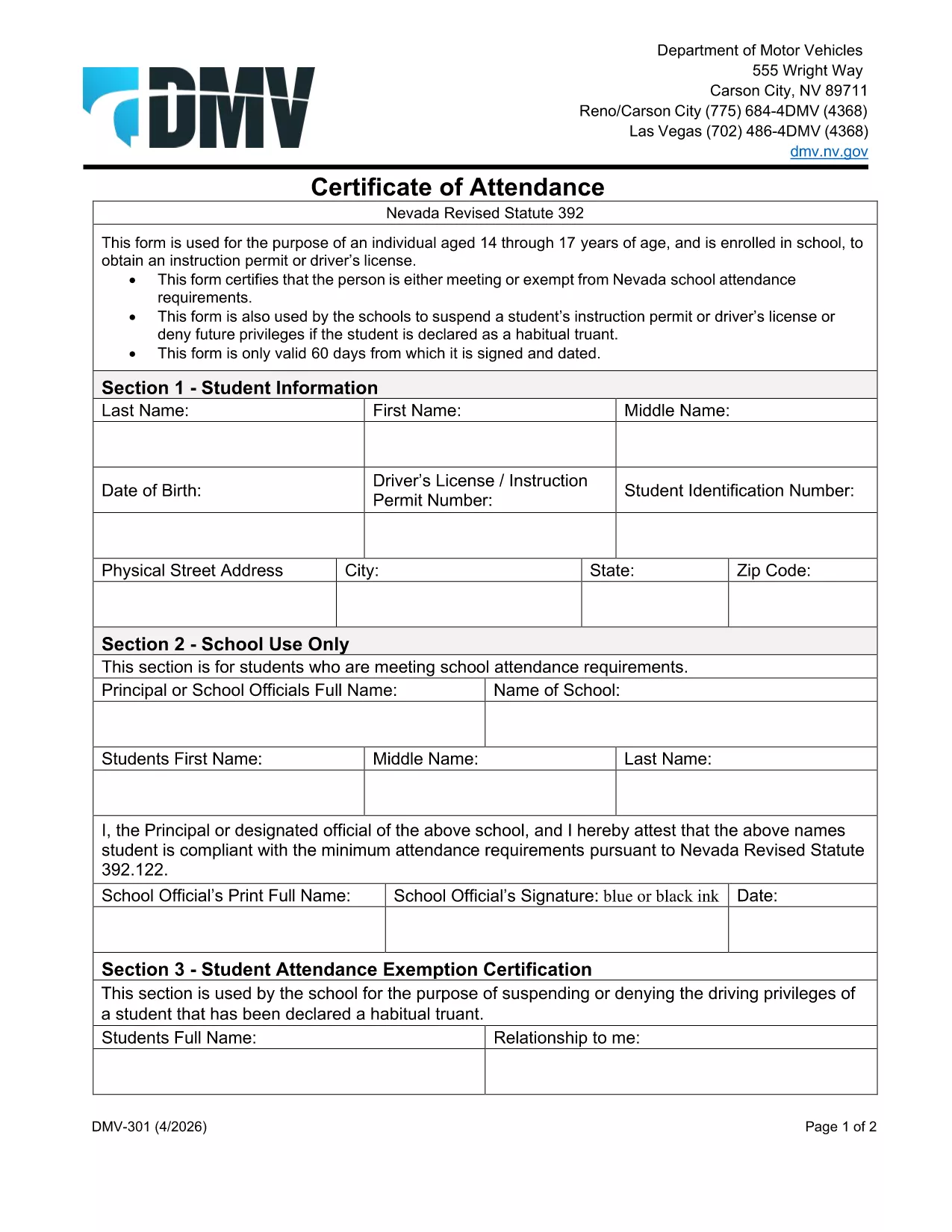
The Nevada Department of Motor Vehicles (DMV) requires Form 301 – Certification of Attendance for teens ages 14‑18 who are enrolled in school and are applying for an instruction permit or driver’s license. This form verifies that the student meets the state’s school attendance requirements or is exempt.

What Is DMV Form 301?

Form 301 is a short, one‑page certificate completed by the student, a parent/guardian, and the school. It is used to:

  • Confirm regular school attendance
  • Document any legal exemption
  • Allow the DMV to issue an instruction permit or driver’s license

How to Complete the Certification of Attendance

Follow the simple steps below. The form is fully fillable online, so you don’t need any PDF editor.

  1. Click the "Fill out this form" button on this page.
  2. Wait a few seconds while the Formize PDF Filler app loads the fillable DMV 301 PDF.
  3. Enter the student’s printed name, date of birth, and school information in the designated fields.
  4. Have the parent/guardian sign the required section electronically.
  5. If you are a school administrator, complete the "School Use Only" part and add the school seal.
  6. When all fields are completed, click Save to download a completed copy, or click Print to bring a hard copy to the DMV.

Common Mistakes to Avoid

To ensure your form is accepted, avoid these frequent errors:

  • Leaving any required field blank – the filler will highlight missing data.
  • Using an illegible signature – the electronic signature must be clear.
  • Submitting an outdated school name or address – verify the information with your school office.
  • Forgetting to date the form – the DMV requires a current date.

Where to Submit the Form

After you’ve filled and signed Form 301, bring the printed copy (or a secured digital version on a tablet) to any Nevada DMV office together with the required identification documents. The form is accepted at all DMV locations across Nevada.

Download the Fillable PDF Instantly

Ready to start? Click the button above, let Formize load the fillable PDF, and complete the Certification of Attendance in minutes.

คำถามที่พบบ่อย
  • Who needs to complete DMV Form 301?

    Any Nevada resident between 14 and 18 years old who is enrolled in school and is applying for an instruction permit or driver’s license must submit a completed Form 301.

  • Can I fill out Form 301 on a mobile device?

    Yes. The Formize PDF Filler works on smartphones, tablets, and computers, allowing you to complete the form on any device.

  • Do I need a physical signature?

    The DMV accepts an electronic signature entered through the fillable PDF. Print the form with the signature if you prefer a hard copy.

  • What if my school does not have a seal?

    If the school lacks an official seal, have the school administrator write the school name and date in the "School Use Only" section and sign it.

  • How long is the Certification of Attendance valid?

    The form is valid for the specific permit or license application it accompanies. If the application is delayed, a new form may be required.

  • Where can I submit the completed Form 301?

    Bring the completed form to any Nevada DMV office, or submit it as part of your online permit application if the DMV offers that option.

  • Is there a fee to download the PDF?

    No. The PDF is provided free of charge; you only pay the standard DMV fees for the permit or license.

ทำอย่างไร

วิธีกรอก DMV 301 ฟรีทางออนไลน์ใน 4 ขั้นตอนง่ายๆ:

  1. 1
    Open the Fillable Form
    Click the "Fill out this form" button on the page. The Formize PDF Filler app will load the DMV 301 PDF automatically.
  2. 2
    Enter Required Information
    Type the student's name, date of birth, school details, and any exemption notes directly into the highlighted fields.
  3. 3
    Add Signatures
    Use your mouse or touchscreen to sign the parent/guardian section. School officials can add their signature and seal if needed.
  4. 4
    Save or Print
    When all fields are completed, click "Save" to download the completed PDF or "Print" to obtain a hard‑copy for the DMV.
สร้างแอป PDF Filler
เกี่ยวกับ

แบบฟอร์มคำร้องขอทำใบขับขี่

DMV 301 คือหนึ่งในแบบฟอร์มใบขับขี่ที่เป็นเอกสารที่ใช้ในการยื่นขอใบขับขี่หรือขอบริการต่างๆ ที่เกี่ยวข้องกับใบขับขี่ โดยทั่วไปแบบฟอร์มเหล่านี้จัดทำโดยแผนกหรือหน่วยงานที่รับผิดชอบในการออกใบอนุญาตขับขี่ในเขตอำนาจศาลเฉพาะ เช่น Department of Motor Vehicles (DMV) ในสหรัฐอเมริกา

แบบฟอร์มใบขับขี่ทั่วไปประกอบด้วย:

ใบสมัครใบขับขี่: แบบฟอร์มนี้ใช้เพื่อขอใบขับขี่ใหม่หรือต่ออายุใบขับขี่ที่มีอยู่ โดยปกติแล้วจะต้องใช้ข้อมูลส่วนบุคคล เช่น ชื่อ ที่อยู่ วันเกิด และหมายเลขประกันสังคม

เอกสารประจำตัว: เขตอำนาจศาลบางแห่งกำหนดให้มีเอกสารประจำตัวเฉพาะเพื่อยืนยันตัวตนและถิ่นที่อยู่ของผู้สมัคร ซึ่งอาจรวมถึงแบบฟอร์มต่างๆ เช่น สูติบัตร หนังสือเดินทาง หรือบัตรประกันสังคม

การตรวจสายตา: การยื่นขอใบอนุญาตขับรถจำนวนมากจำเป็นต้องมีแบบฟอร์มตรวจสายตา ซึ่งผู้เชี่ยวชาญทางการแพทย์หรือผู้เชี่ยวชาญด้านการดูแลสายตาที่ได้รับอนุญาตจะรับรองว่าผู้สมัครมีคุณสมบัติตรงตามข้อกำหนดด้านการมองเห็นขั้นต่ำในการขับขี่

แบบฟอร์มการศึกษาของผู้ขับขี่: ในบางกรณี บุคคลอาจต้องแสดงหลักฐานการสำเร็จหลักสูตรการศึกษาของผู้ขับขี่ เช่น ใบรับรองการสำเร็จการศึกษาของผู้ขับขี่ หรือแบบฟอร์มที่ลงนามโดยผู้สอน

การประเมินทางการแพทย์: อาการทางการแพทย์บางอย่างอาจต้องใช้แบบฟอร์มเพิ่มเติมซึ่งผู้เชี่ยวชาญด้านสุขภาพต้องกรอก แบบฟอร์มเหล่านี้จะตรวจสอบสมรรถภาพทางร่างกายและจิตใจของผู้สมัครในการขับขี่

แบบฟอร์มการเปลี่ยนแปลงที่อยู่: หากผู้ถือใบอนุญาตขับขี่ย้ายไปยังที่อยู่ใหม่ พวกเขาอาจต้องกรอกแบบฟอร์มการเปลี่ยนแปลงที่อยู่เพื่ออัปเดตข้อมูลใบอนุญาตขับขี่ของตน

สามารถรับแบบฟอร์มใบอนุญาตขับรถได้จากสำนักงาน DMV ในพื้นที่หรือดาวน์โหลดจากเว็บไซต์ของพวกเขา สิ่งสำคัญคือต้องกรอกและส่งแบบฟอร์มที่จำเป็นอย่างระมัดระวังพร้อมกับเอกสารประกอบเพื่อให้แน่ใจว่าการสมัครหรือกระบวนการบริการราบรื่น

คุณสมบัติ

PDF ฟิลเลอร์

วิธีที่ง่ายที่สุดในการกรอกแบบฟอร์ม PDF ทางออนไลน์

  • กรอก DMV 301 อย่างรวดเร็ว
    กำลังมองหาวิธีเติม DMV 301 ทางออนไลน์อย่างรวดเร็วอยู่ใช่ไหม ด้วยตัวกรอกแบบฟอร์ม PDF ออนไลน์ฟรีของเรา คุณจะรู้วิธีแก้ไขและกรอกเอกสาร PDF นี้ในเวลาไม่ถึงนาที
  • โปรแกรมแก้ไข PDF ออนไลน์ที่ใช้งานง่าย
    เบื่อกับการพิมพ์ไฟล์ PDF เพื่อให้คุณสามารถแก้ไขได้ก่อนที่จะสแกนซ้ำและส่งกลับหรือไม่? แก้ไขเอกสาร PDF ออนไลน์ฟรี ใช้โปรแกรมแก้ไข PDF ออนไลน์ของเราเพื่อประหยัดเวลาและกระดาษ
  • เครื่องมือที่ยอดเยี่ยมสำหรับทุกแพลตฟอร์ม
    สงสัยวิธีเติม DMV 301 บน Mac หรืออาจใช้ตัวเติม PDF ฟรีได้อย่างไร เครื่องมือ PDF ออนไลน์ของเราทำงานได้บนทุกแพลตฟอร์ม
  • การจัดเก็บไฟล์ที่ปลอดภัย
    ไฟล์ "DMV 301" ที่เสร็จสมบูรณ์จะถูกจัดเก็บไว้ในฐานข้อมูลที่ปลอดภัยซึ่งจัดการโดย Amazon Cloud hosting คุณสามารถลบไฟล์ของคุณออกจากระบบของเราได้ตลอดเวลา ไม่ว่าในกรณีใด ไฟล์เหล่านี้จะถูกลบโดยอัตโนมัติหลังจากผ่านไป 24 ชั่วโมง
  • สนทนากับ DMV 301
    แชทกับ "DMV 301" บน Chatize ที่เป็นผู้ช่วยอ่าน PDF ฟรี ถามคำถามและรับคำตอบจาก "DMV 301" เพียงคลิกที่ปุ่ม แชทด้วยเอกสาร ด้านบน

ลบเซสชันการบรรจุ

ลบเซสชันการกรอกข้อมูลที่เลือกหรือไม่?ในกรณีนี้ความคืบหน้าในการกรอกแบบฟอร์มจะหายไป

ลบเซสชันการแก้ไข

ลบเซสชันการแก้ไขที่เลือกหรือไม่ ในกรณีนี้ ความคืบหน้าในการสร้างและแก้ไขแบบฟอร์มจะหายไป