
hamburger-menu icon
เลือกภาษา

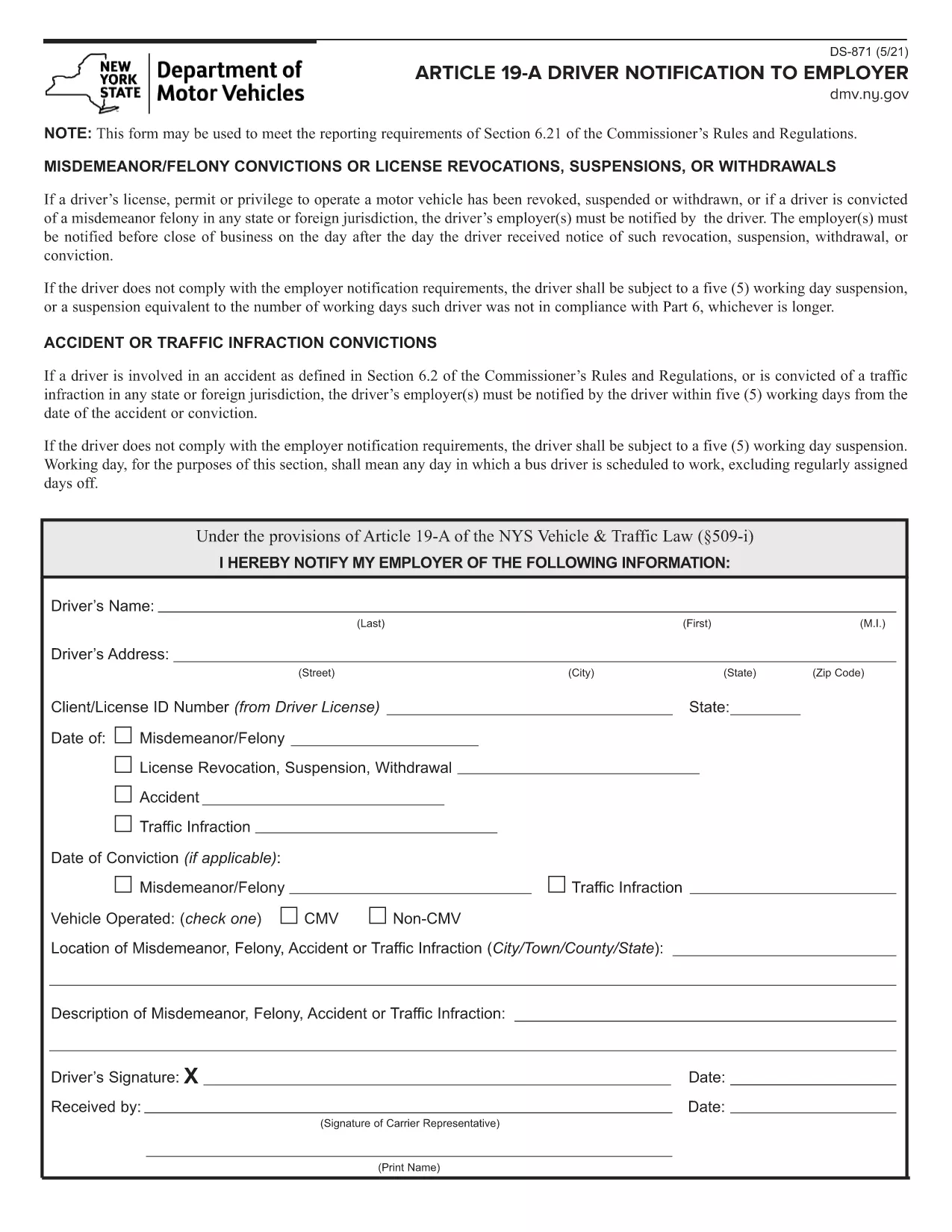
DS-871 Driver Notification to Employer (Fillable PDF)

  1. ภาษา ภาษาอังกฤษ
  2. ประเทศ สหรัฐอเมริกา
  3. กิจกรรม ใบขับขี่
  4. สถานะ นิวยอร์ก
DS-871 Driver Notification to Employer (Fillable PDF)

The DS-871 is the New York State Department of Motor Vehicles (DMV) form used by drivers to notify their employer of a suspension, revocation, or restriction under Article 19‑A. Employers need this documentation to stay compliant with state regulations.

This page offers a fillable PDF version of the DS-871, so you can complete the form directly in your browser without printing, scanning, or using a separate PDF editor. The Formize PDF Filler loads instantly, preserves your data, and lets you download a clean, signed copy ready for submission.

Below you’ll find a quick overview of the form, step‑by‑step instructions for filling it out online, common pitfalls to watch for, and guidance on where to send the finished document.

คำถามที่พบบ่อย
  • What is the purpose of Form DS‑871?

    DS‑871 satisfies the New York DMV’s requirement that drivers notify their employer of any license suspension, revocation, or restriction under Article 19‑A.

  • Do I need a printer to use the fillable PDF?

    No. The form is fully editable online via the Formize PDF Filler. You only need to print a copy if your employer specifically requests a hard copy.

  • Can I save my progress and finish later?

    Yes. The Formize app lets you download a draft PDF that retains your entered data, so you can reopen it later and continue editing.

  • Is an electronic signature accepted?

    Most New York DMV employers accept an electronic signature created with the Formize signature tool. Check with your HR department if a wet‑ink signature is required.

  • Where should I send the completed DS‑871?

    Send the completed form to your employer’s HR or safety department. Keep a copy for your records in case the DMV requests proof of notification.

  • What if I make a mistake after submitting?

    Download a new copy of the fillable PDF, correct the error, and resend the updated version. The DMV does not require a specific form revision number.

  • Is there a filing fee for DS‑871?

    No. The DS‑871 is a free notification form; there is no charge to download or submit it.

  • Do I need to attach additional documents?

    Only attach supporting documents if your employer requests proof of the suspension (e.g., a copy of the DMV notice).

ทำอย่างไร

วิธีกรอก DS-871 ฟรีทางออนไลน์ใน 4 ขั้นตอนง่ายๆ:

  1. 1
    Open the Fillable Form
    Click the **Fill out this form** button on this page. The Formize PDF Filler app will load the DS‑871 PDF directly in your browser.
  2. 2
    Enter Your Information
    Type your name, license number, employer details, and the reason for the notification into the highlighted fields. All data is saved automatically as you type.
  3. 3
    Review and Sign
    Check each field for accuracy. Use the built‑in signature tool to add your electronic signature if required.
  4. 4
    Download or Email
    When you’re satisfied, click **Download PDF** to save a copy or **Email PDF** to send it straight to your employer.
สร้างแอป PDF Filler
เกี่ยวกับ

แบบฟอร์มคำร้องขอทำใบขับขี่

ในประเทศส่วนใหญ่ จำเป็นต้องมีใบขับขี่ก่อนออกเดินทาง การขอใบขับขี่เป็นก้าวสำคัญสำหรับผู้ที่ต้องการขับรถ

DS-871 เป็นหนึ่งในแบบฟอร์มคำขอใบขับขี่ซึ่งเป็นเอกสารที่ใช้ในการรวบรวมข้อมูลจากผู้ที่ต้องการขอใบอนุญาตขับรถ โดยปกติจะมีฟิลด์สำหรับชื่อผู้สมัคร วันเกิด หมายเลขประจำตัวประชาชน ข้อมูลติดต่อ ตลอดจนประวัติใบขับขี่และประสบการณ์ของพวกเขา

คุณสมบัติ

PDF ฟิลเลอร์

วิธีที่ง่ายที่สุดในการกรอกแบบฟอร์ม PDF ทางออนไลน์

  • กรอก DS-871 อย่างรวดเร็ว
    กำลังมองหาวิธีเติม DS-871 ทางออนไลน์อย่างรวดเร็วอยู่ใช่ไหม ด้วยตัวกรอกแบบฟอร์ม PDF ออนไลน์ฟรีของเรา คุณจะรู้วิธีแก้ไขและกรอกเอกสาร PDF นี้ในเวลาไม่ถึงนาที
  • โปรแกรมแก้ไข PDF ออนไลน์ที่ใช้งานง่าย
    เบื่อกับการพิมพ์ไฟล์ PDF เพื่อให้คุณสามารถแก้ไขได้ก่อนที่จะสแกนซ้ำและส่งกลับหรือไม่? แก้ไขเอกสาร PDF ออนไลน์ฟรี ใช้โปรแกรมแก้ไข PDF ออนไลน์ของเราเพื่อประหยัดเวลาและกระดาษ
  • เครื่องมือที่ยอดเยี่ยมสำหรับทุกแพลตฟอร์ม
    สงสัยวิธีเติม DS-871 บน Mac หรืออาจใช้ตัวเติม PDF ฟรีได้อย่างไร เครื่องมือ PDF ออนไลน์ของเราทำงานได้บนทุกแพลตฟอร์ม
  • การจัดเก็บไฟล์ที่ปลอดภัย
    ไฟล์ "DS-871" ที่เสร็จสมบูรณ์จะถูกจัดเก็บไว้ในฐานข้อมูลที่ปลอดภัยซึ่งจัดการโดย Amazon Cloud hosting คุณสามารถลบไฟล์ของคุณออกจากระบบของเราได้ตลอดเวลา ไม่ว่าในกรณีใด ไฟล์เหล่านี้จะถูกลบโดยอัตโนมัติหลังจากผ่านไป 24 ชั่วโมง
  • สนทนากับ DS-871
    แชทกับ "DS-871" บน Chatize ที่เป็นผู้ช่วยอ่าน PDF ฟรี ถามคำถามและรับคำตอบจาก "DS-871" เพียงคลิกที่ปุ่ม แชทด้วยเอกสาร ด้านบน

ลบเซสชันการบรรจุ

ลบเซสชันการกรอกข้อมูลที่เลือกหรือไม่?ในกรณีนี้ความคืบหน้าในการกรอกแบบฟอร์มจะหายไป

ลบเซสชันการแก้ไข

ลบเซสชันการแก้ไขที่เลือกหรือไม่ ในกรณีนี้ ความคืบหน้าในการสร้างและแก้ไขแบบฟอร์มจะหายไป