
hamburger-menu icon
เลือกภาษา

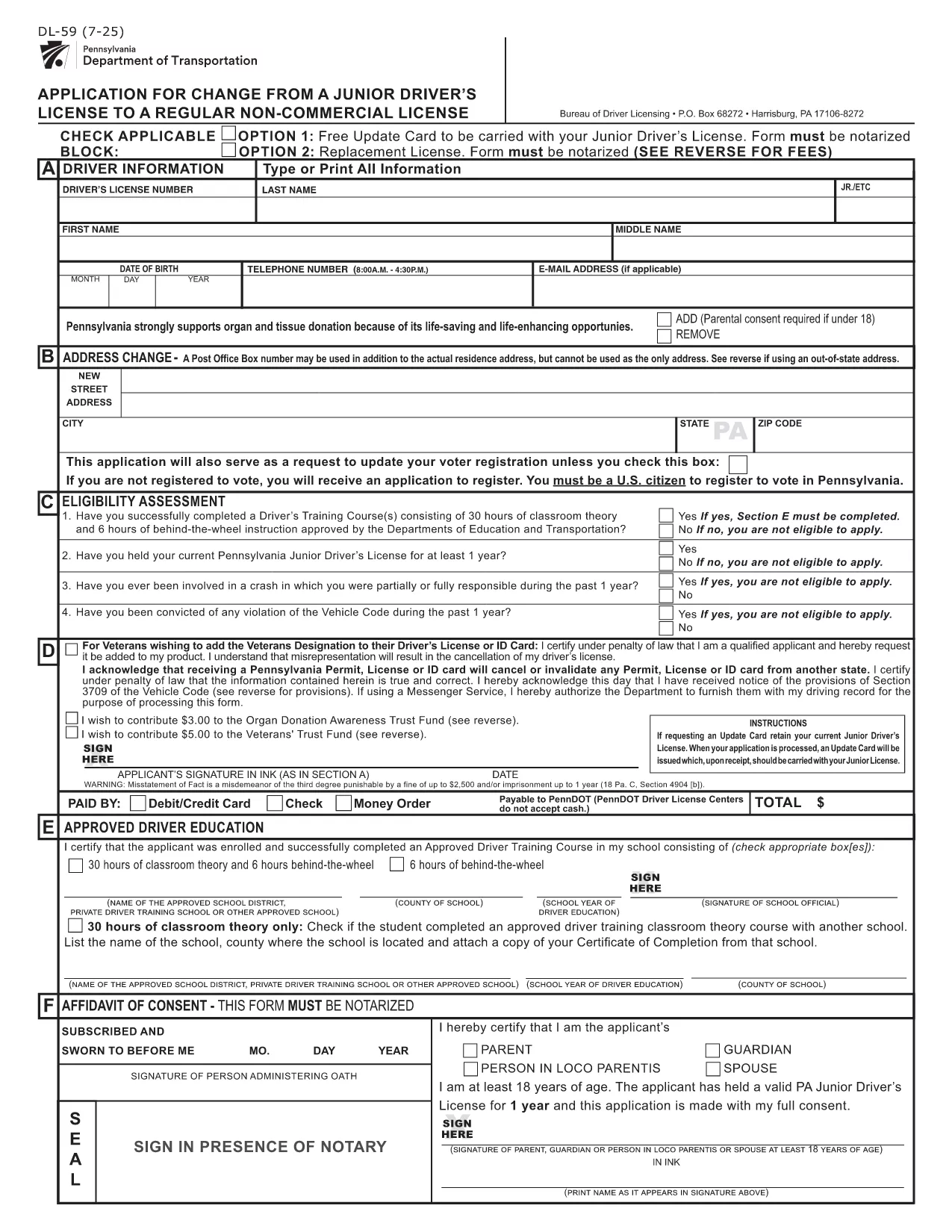
PennDOT DL-59 – Junior Driver License Upgrade Form

  1. ภาษา ภาษาอังกฤษ
  2. ประเทศ สหรัฐอเมริกา
  3. กิจกรรม ใบขับขี่
  4. สถานะ เพนซิลเวเนีย
PennDOT DL-59 – Junior Driver License Upgrade Form

The DL-59 is the Pennsylvania Department of Transportation (PennDOT) application used to change a junior driver’s license to a regular non‑commercial license. Whether you’re turning 18, adding a new class, or simply need an updated ID, the DL-59 streamlines the process.

What Is the DL-59 Form?

This official PennDOT PDF collects personal details, eye color, height, and the new license class you’re requesting. It must be signed and, in some cases, notarized before submission.

How to Complete the DL-59 Online

Instead of downloading, printing, and scanning, use Formize’s built‑in PDF filler:

  1. Click the "Fill out this form" button on this page.
  2. Wait a few seconds while the Formize PDF Filler app loads.
  3. Enter the required information directly into the fillable fields.
  4. Review the completed form for accuracy.
  5. Save or print the finished PDF and submit it to PennDOT.

Common Mistakes to Avoid

  • Leaving the eye color or height fields blank – PennDOT uses these as fraud‑prevention identifiers.
  • Forgetting to sign the form in the designated area.
  • Submitting an outdated address; always double‑check your mailing address.
  • Not notarizing when a notary seal is required (e.g., certain name changes).

Where to Submit Your Completed Form

Mail the finished DL-59 to the address listed on the form or deliver it in person to any PennDOT Driver License Center. Include the appropriate fee (usually $12‑$17) unless you qualify for a free update.

Download the Official Fillable PDF

If you prefer the traditional route, you can still download the official form below. It is fully fillable and compatible with most PDF editors.

คำถามที่พบบ่อย
  • Who needs to fill out the DL-59 form?

    Anyone who holds a Pennsylvania junior driver’s license and wants to upgrade to a regular non‑commercial license, typically after turning 18 or adding a new class.

  • Is the DL-59 form free?

    The form itself is free to download, but PennDOT charges a processing fee (usually $12‑$17) unless you qualify for a fee‑waiver update.

  • Do I need a notary for the DL-59?

    A notary is required only if the form includes a name change or other circumstances that PennDOT specifies. Check the form’s instructions.

  • Can I submit the DL-59 electronically?

    PennDOT currently accepts only printed and mailed or in‑person submissions. Use the fillable PDF to avoid errors before printing.

  • How long does it take to process the upgrade?

    Processing typically takes 7‑10 business days after PennDOT receives the completed form and payment.

  • What documents should I attach?

    Include proof of residency, a copy of your current junior license, and any required fee payment receipt.

  • What if I make a mistake after submitting?

    Contact your local PennDOT Driver License Center to request a correction; you may need to submit a new DL-59.

ทำอย่างไร

วิธีกรอก DL-59 ฟรีทางออนไลน์ใน 5 ขั้นตอนง่ายๆ:

  1. 1
    Open the Fillable Form
    Click the "Fill out this form" button on the page. The Formize PDF Filler will open in a new window.
  2. 2
    Enter Your Information
    Type directly into each highlighted field—personal details, eye color, height, and the new license class.
  3. 3
    Review and Sign
    Double‑check every entry, then use the built‑in signature tool to add your signature.
  4. 4
    Save or Print
    Save the completed PDF to your device or print it for submission to PennDOT.
  5. 5
    Submit to PennDOT
    Mail or deliver the form along with any required fees to the address shown on the PDF.
สร้างแอป PDF Filler
เกี่ยวกับ

แบบฟอร์มคำร้องขอทำใบขับขี่

DL-59 คือหนึ่งในแบบฟอร์มใบขับขี่ที่เป็นเอกสารที่ใช้ในการยื่นขอใบขับขี่หรือขอบริการต่างๆ ที่เกี่ยวข้องกับใบขับขี่ โดยทั่วไปแบบฟอร์มเหล่านี้จัดทำโดยแผนกหรือหน่วยงานที่รับผิดชอบในการออกใบอนุญาตขับขี่ในเขตอำนาจศาลเฉพาะ เช่น Department of Motor Vehicles (DMV) ในสหรัฐอเมริกา

แบบฟอร์มใบขับขี่ทั่วไปประกอบด้วย:

ใบสมัครใบขับขี่: แบบฟอร์มนี้ใช้เพื่อขอใบขับขี่ใหม่หรือต่ออายุใบขับขี่ที่มีอยู่ โดยปกติแล้วจะต้องใช้ข้อมูลส่วนบุคคล เช่น ชื่อ ที่อยู่ วันเกิด และหมายเลขประกันสังคม

เอกสารประจำตัว: เขตอำนาจศาลบางแห่งกำหนดให้มีเอกสารประจำตัวเฉพาะเพื่อยืนยันตัวตนและถิ่นที่อยู่ของผู้สมัคร ซึ่งอาจรวมถึงแบบฟอร์มต่างๆ เช่น สูติบัตร หนังสือเดินทาง หรือบัตรประกันสังคม

การตรวจสายตา: การยื่นขอใบอนุญาตขับรถจำนวนมากจำเป็นต้องมีแบบฟอร์มตรวจสายตา ซึ่งผู้เชี่ยวชาญทางการแพทย์หรือผู้เชี่ยวชาญด้านการดูแลสายตาที่ได้รับอนุญาตจะรับรองว่าผู้สมัครมีคุณสมบัติตรงตามข้อกำหนดด้านการมองเห็นขั้นต่ำในการขับขี่

แบบฟอร์มการศึกษาของผู้ขับขี่: ในบางกรณี บุคคลอาจต้องแสดงหลักฐานการสำเร็จหลักสูตรการศึกษาของผู้ขับขี่ เช่น ใบรับรองการสำเร็จการศึกษาของผู้ขับขี่ หรือแบบฟอร์มที่ลงนามโดยผู้สอน

การประเมินทางการแพทย์: อาการทางการแพทย์บางอย่างอาจต้องใช้แบบฟอร์มเพิ่มเติมซึ่งผู้เชี่ยวชาญด้านสุขภาพต้องกรอก แบบฟอร์มเหล่านี้จะตรวจสอบสมรรถภาพทางร่างกายและจิตใจของผู้สมัครในการขับขี่

แบบฟอร์มการเปลี่ยนแปลงที่อยู่: หากผู้ถือใบอนุญาตขับขี่ย้ายไปยังที่อยู่ใหม่ พวกเขาอาจต้องกรอกแบบฟอร์มการเปลี่ยนแปลงที่อยู่เพื่ออัปเดตข้อมูลใบอนุญาตขับขี่ของตน

สามารถรับแบบฟอร์มใบอนุญาตขับรถได้จากสำนักงาน DMV ในพื้นที่หรือดาวน์โหลดจากเว็บไซต์ของพวกเขา สิ่งสำคัญคือต้องกรอกและส่งแบบฟอร์มที่จำเป็นอย่างระมัดระวังพร้อมกับเอกสารประกอบเพื่อให้แน่ใจว่าการสมัครหรือกระบวนการบริการราบรื่น

คุณสมบัติ

PDF ฟิลเลอร์

วิธีที่ง่ายที่สุดในการกรอกแบบฟอร์ม PDF ทางออนไลน์

  • กรอก DL-59 อย่างรวดเร็ว
    กำลังมองหาวิธีเติม DL-59 ทางออนไลน์อย่างรวดเร็วอยู่ใช่ไหม ด้วยตัวกรอกแบบฟอร์ม PDF ออนไลน์ฟรีของเรา คุณจะรู้วิธีแก้ไขและกรอกเอกสาร PDF นี้ในเวลาไม่ถึงนาที
  • โปรแกรมแก้ไข PDF ออนไลน์ที่ใช้งานง่าย
    เบื่อกับการพิมพ์ไฟล์ PDF เพื่อให้คุณสามารถแก้ไขได้ก่อนที่จะสแกนซ้ำและส่งกลับหรือไม่? แก้ไขเอกสาร PDF ออนไลน์ฟรี ใช้โปรแกรมแก้ไข PDF ออนไลน์ของเราเพื่อประหยัดเวลาและกระดาษ
  • เครื่องมือที่ยอดเยี่ยมสำหรับทุกแพลตฟอร์ม
    สงสัยวิธีเติม DL-59 บน Mac หรืออาจใช้ตัวเติม PDF ฟรีได้อย่างไร เครื่องมือ PDF ออนไลน์ของเราทำงานได้บนทุกแพลตฟอร์ม
  • การจัดเก็บไฟล์ที่ปลอดภัย
    ไฟล์ "DL-59" ที่เสร็จสมบูรณ์จะถูกจัดเก็บไว้ในฐานข้อมูลที่ปลอดภัยซึ่งจัดการโดย Amazon Cloud hosting คุณสามารถลบไฟล์ของคุณออกจากระบบของเราได้ตลอดเวลา ไม่ว่าในกรณีใด ไฟล์เหล่านี้จะถูกลบโดยอัตโนมัติหลังจากผ่านไป 24 ชั่วโมง
  • สนทนากับ DL-59
    แชทกับ "DL-59" บน Chatize ที่เป็นผู้ช่วยอ่าน PDF ฟรี ถามคำถามและรับคำตอบจาก "DL-59" เพียงคลิกที่ปุ่ม แชทด้วยเอกสาร ด้านบน

ลบเซสชันการบรรจุ

ลบเซสชันการกรอกข้อมูลที่เลือกหรือไม่?ในกรณีนี้ความคืบหน้าในการกรอกแบบฟอร์มจะหายไป

ลบเซสชันการแก้ไข

ลบเซสชันการแก้ไขที่เลือกหรือไม่ ในกรณีนี้ ความคืบหน้าในการสร้างและแก้ไขแบบฟอร์มจะหายไป