
hamburger-menu icon
เลือกภาษา

DI-17 Classroom Instruction Attendance Roster (Fillable PDF)

  1. ประเทศ สหรัฐอเมริกา
  2. ภาษา ภาษาอังกฤษ
  3. กิจกรรม ใบขับขี่
  4. สถานะ เวอร์จิเนีย
DI-17 Classroom Instruction Attendance Roster (Fillable PDF)

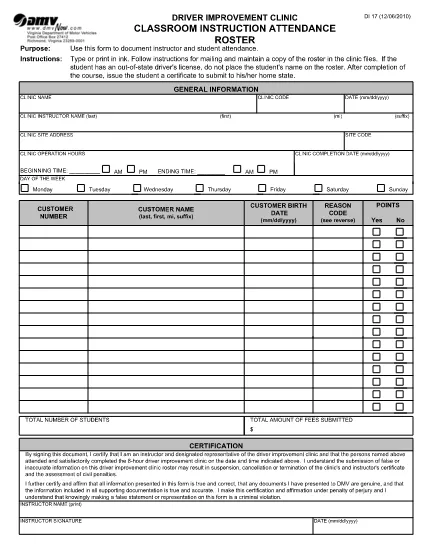
The DI-17 is the Virginia Department of Motor Vehicles (DMV) form used to record attendance for classroom driver‑education instruction. Schools, driving instructors, and training programs must submit this roster within 24 hours of completing a class.

What Is the DI-17 Form?

DI-17 captures essential details such as the instructor’s name, student information, dates of instruction, and the specific curriculum covered. It ensures compliance with Virginia DMV regulations and helps verify that learners have met the required training hours before taking the road‑skills test.

How to Complete the DI-17 Online

With Formize’s fillable PDF technology you can complete the DI‑17 directly in your browser—no extra software needed. Follow the simple steps below:

  • Click the Fill out this form button on this page.
  • Wait for the Formize PDF Filler app to load (usually a few seconds).
  • Enter all required fields exactly as they appear on the original paper form.
  • Use the Save button to store a copy on your device or in the cloud.
  • When finished, click Download to get the completed PDF ready for submission.

Common Errors to Avoid

Even a small mistake can delay processing. Keep these tips in mind:

  • Incorrect dates: Verify the class date matches the DMV’s calendar.
  • Missing signatures: Both the instructor and each student must sign.
  • Illegible handwriting: The fillable fields ensure clear, legible text.
  • Wrong form version: Use the latest DI‑17 PDF provided by the Virginia DMV (the link below is always up‑to‑date).

Submit Your Completed DI-17

After saving the filled PDF, upload it to the Virginia DMV Extranet portal or email it according to your organization’s instructions. The DMV requires receipt within 24 hours of the class.

Why Use Formize Fillable PDF

Formize turns static PDFs into interactive, web‑based forms. Benefits include:

  • Instant access: No downloads or installations.
  • Data accuracy: Built‑in validation reduces entry errors.
  • Secure storage: Your completed form is saved locally or to cloud storage of your choice.
  • Compliance‑ready: The PDF matches the official DMV layout exactly.

Ready to start? Click the button below and fill out the DI‑17 in seconds.

คำถามที่พบบ่อย
  • What is the purpose of the DI‑17 form?

    The DI‑17 records attendance for classroom driver‑education instruction and verifies that students have completed the required training before taking the road‑skills test.

  • Can I fill out the DI‑17 on a mobile device?

    Yes. Formize’s fillable PDF works on smartphones and tablets with any modern browser.

  • Do I need Adobe Acrobat to complete the DI‑17?

    No. The Formize PDF Filler runs entirely in the browser, eliminating the need for separate PDF editors.

  • How soon must the DI‑17 be submitted after a class?

    Virginia DMV requires the completed DI‑17 to be submitted within 24 hours of the class date.

  • What if I make a mistake after saving the form?

    Open the saved PDF again in the Formize filler, correct the error, and re‑save before submitting.

  • Is the DI‑17 form free to download?

    Yes. The official DI‑17 PDF is provided by the Virginia DMV at no cost.

  • Do I need a DMV account to use the fillable version?

    No. You can fill out and download the PDF without a DMV login; however, submission through the Extranet may require an authorized account.

  • Can I print the completed DI‑17 after filling it online?

    Absolutely. After saving, you can print the PDF for your records or to submit a hard copy if required.

ทำอย่างไร

วิธีกรอก DI-17 ฟรีทางออนไลน์ใน 5 ขั้นตอนง่ายๆ:

  1. 1
    Click the Fill‑out Button
    On this page, press the “Fill out this form” button to launch the Formize PDF Filler.
  2. 2
    Wait for the Filler to Load
    The web app loads the DI‑17 PDF in a few seconds. No download or installation is required.
  3. 3
    Enter Required Information
    Complete each fillable field with accurate data—dates, instructor name, student details, and signatures.
  4. 4
    Review and Save
    Double‑check all entries, then click Save to store a copy on your device or cloud storage.
  5. 5
    Download or Submit
    Download the finished PDF and upload it to the Virginia DMV Extranet portal, or follow your organization’s submission guidelines.
สร้างแอป PDF Filler
เกี่ยวกับ

แบบฟอร์มคำร้องขอทำใบขับขี่

ในประเทศส่วนใหญ่ จำเป็นต้องมีใบขับขี่ก่อนออกเดินทาง การขอใบขับขี่เป็นก้าวสำคัญสำหรับผู้ที่ต้องการขับรถ

DI-17 เป็นหนึ่งในแบบฟอร์มคำขอใบขับขี่ซึ่งเป็นเอกสารที่ใช้ในการรวบรวมข้อมูลจากผู้ที่ต้องการขอใบอนุญาตขับรถ โดยปกติจะมีฟิลด์สำหรับชื่อผู้สมัคร วันเกิด หมายเลขประจำตัวประชาชน ข้อมูลติดต่อ ตลอดจนประวัติใบขับขี่และประสบการณ์ของพวกเขา

คุณสมบัติ

PDF ฟิลเลอร์

วิธีที่ง่ายที่สุดในการกรอกแบบฟอร์ม PDF ทางออนไลน์

  • กรอก DI-17 อย่างรวดเร็ว
    กำลังมองหาวิธีเติม DI-17 ทางออนไลน์อย่างรวดเร็วอยู่ใช่ไหม ด้วยตัวกรอกแบบฟอร์ม PDF ออนไลน์ฟรีของเรา คุณจะรู้วิธีแก้ไขและกรอกเอกสาร PDF นี้ในเวลาไม่ถึงนาที
  • โปรแกรมแก้ไข PDF ออนไลน์ที่ใช้งานง่าย
    เบื่อกับการพิมพ์ไฟล์ PDF เพื่อให้คุณสามารถแก้ไขได้ก่อนที่จะสแกนซ้ำและส่งกลับหรือไม่? แก้ไขเอกสาร PDF ออนไลน์ฟรี ใช้โปรแกรมแก้ไข PDF ออนไลน์ของเราเพื่อประหยัดเวลาและกระดาษ
  • เครื่องมือที่ยอดเยี่ยมสำหรับทุกแพลตฟอร์ม
    สงสัยวิธีเติม DI-17 บน Mac หรืออาจใช้ตัวเติม PDF ฟรีได้อย่างไร เครื่องมือ PDF ออนไลน์ของเราทำงานได้บนทุกแพลตฟอร์ม
  • การจัดเก็บไฟล์ที่ปลอดภัย
    ไฟล์ "DI-17" ที่เสร็จสมบูรณ์จะถูกจัดเก็บไว้ในฐานข้อมูลที่ปลอดภัยซึ่งจัดการโดย Amazon Cloud hosting คุณสามารถลบไฟล์ของคุณออกจากระบบของเราได้ตลอดเวลา ไม่ว่าในกรณีใด ไฟล์เหล่านี้จะถูกลบโดยอัตโนมัติหลังจากผ่านไป 24 ชั่วโมง
  • สนทนากับ DI-17
    แชทกับ "DI-17" บน Chatize ที่เป็นผู้ช่วยอ่าน PDF ฟรี ถามคำถามและรับคำตอบจาก "DI-17" เพียงคลิกที่ปุ่ม แชทด้วยเอกสาร ด้านบน

ลบเซสชันการบรรจุ

ลบเซสชันการกรอกข้อมูลที่เลือกหรือไม่?ในกรณีนี้ความคืบหน้าในการกรอกแบบฟอร์มจะหายไป

ลบเซสชันการแก้ไข

ลบเซสชันการแก้ไขที่เลือกหรือไม่ ในกรณีนี้ ความคืบหน้าในการสร้างและแก้ไขแบบฟอร์มจะหายไป