
hamburger-menu icon
เลือกภาษา

Virginia DMV DTS-22 Surety Bond Affidavit (Fillable PDF)

  1. ประเทศ สหรัฐอเมริกา
  2. ภาษา ภาษาอังกฤษ
  3. กิจกรรม ใบขับขี่
  4. สถานะ เวอร์จิเนีย
Virginia DMV DTS-22 Surety Bond Affidavit (Fillable PDF)

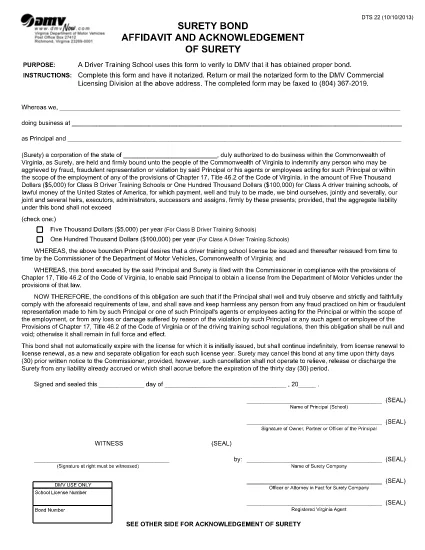
The DTS-22 is the Virginia Department of Motor Vehicles (DMV) Surety Bond Affidavit required by driver training schools and commercial licensing applicants. This form proves that the applicant has obtained the proper bond before operating a school or commercial vehicle program.

Our fillable PDF version lets you complete the entire affidavit directly in your browser—no printing, scanning, or manual data entry required. Once completed, you can download, print, and mail or fax the notarized form to the DMV Commercial Licensing Division.

What Is the DTS-22 Form?

The DTS-22 collects information about the applicant, the surety company, and the bond amount. It must be signed, notarized, and submitted with supporting documentation. Failure to provide a correctly completed form can delay licensing approval.

How to Fill Out the DTS-22 Online

Using the Formize PDF Filler, you can fill out every field, add dates, and insert your electronic signature. The tool validates required fields in real time, reducing errors before you print.

Common Mistakes to Avoid

  • Leaving any required field blank (the filler will highlight these).
  • Using a handwritten signature before notarization—sign only after the notary witnesses your signature.
  • Submitting the form on double‑sided paper; the DMV requires single‑sided printing.
  • Forgetting to include the bond number and surety company’s contact details.

Where to Submit the Completed Form

After notarizing, mail or fax the form to the DMV Commercial Licensing Division at the address listed on the form. You can also drop it off at any Virginia DMV office that handles commercial licensing.

Ready to start? Click the button below to launch the fillable PDF in the Formize PDF Filler app.

คำถามที่พบบ่อย
  • What is the purpose of the DTS-22 form?

    The DTS-22 certifies that a driver training school or commercial licensing applicant has secured a surety bond, a prerequisite for DMV approval.

  • Can I submit the DTS-22 electronically?

    No. The DMV requires a notarized hard copy. You can fill it out online, then print, notarize, and mail or fax the document.

  • Do I need a notary for the DTS-22?

    Yes. The applicant’s signature must be notarized before the form is submitted to the DMV.

  • What bond amount is required?

    The required bond amount varies by the type of training program. Refer to the instructions on the form or contact your surety provider for details.

  • How long does it take for the DMV to process the DTS-22?

    Processing time depends on the completeness of your submission. A correctly completed and notarized form is usually processed within 5‑7 business days.

  • Can I use a PDF editor instead of Formize?

    You can, but Formize’s fillable PDF ensures field validation and reduces errors. Using a standard PDF editor may miss required fields.

  • Where do I send the completed DTS-22?

    Mail or fax the notarized form to the DMV Commercial Licensing Division at the address printed on the form. Check the DMV website for the latest contact details.

ทำอย่างไร

วิธีกรอก DTS-22 form ฟรีทางออนไลน์ใน 5 ขั้นตอนง่ายๆ:

  1. 1
    Open the Fillable Form
    Click the "Fill out this form" button on the page. The Formize PDF Filler will open in a new tab.
  2. 2
    Load the Formize PDF Filler
    Wait a few seconds while the PDF Filler app loads the DTS-22 document.
  3. 3
    Complete All Required Fields
    Enter your information, bond details, and surety company data. Required fields are highlighted in real time.
  4. 4
    Add Your Signature
    Use the built‑in signature tool to place your electronic signature. Do not sign until a notary is present.
  5. 5
    Download or Print
    When finished, click "Download" to save the completed PDF, then print it for notarization and submission.
สร้างแอป PDF Filler
เกี่ยวกับ

แบบฟอร์มคำร้องขอทำใบขับขี่

DTS-22 form เป็นหนึ่งในแบบฟอร์มใบอนุญาตขับขี่ที่เป็นเอกสารที่ใช้ในกระบวนการขอรับหรือต่ออายุใบอนุญาตขับขี่ ซึ่งเป็นเอกสารที่ทางราชการออกให้อย่างเป็นทางการซึ่งอนุญาตให้บุคคลทั่วไปใช้ยานยนต์บนถนนสาธารณะได้ แบบฟอร์มเหล่านี้อาจแตกต่างกันไปขึ้นอยู่กับเขตอำนาจศาล แต่โดยทั่วไปจะมีดังต่อไปนี้:

แบบฟอร์มใบสมัคร: แบบฟอร์มนี้ใช้เพื่อขอใบขับขี่และโดยทั่วไปจะขอข้อมูลส่วนบุคคล เช่น ชื่อ ที่อยู่ วันเกิด และหมายเลขประกันสังคม

เอกสารประจำตัว: นอกเหนือจากแบบฟอร์มการสมัครแล้ว บุคคลทั่วไปจะต้องจัดเตรียมเอกสารประจำตัวที่เฉพาะเจาะจงเพื่อพิสูจน์ตัวตน ถิ่นที่อยู่ และการมีอยู่ตามกฎหมายในประเทศ ซึ่งอาจรวมถึงหนังสือเดินทาง สูติบัตร บัตรประกันสังคม หรือบัตรประจำตัวอื่นๆ ที่ออกโดยหน่วยงานราชการ

หลักฐานการอยู่อาศัย: เขตอำนาจศาลหลายแห่งกำหนดให้ผู้สมัครต้องแสดงหลักฐานการอยู่อาศัย เช่น ใบเสร็จค่าสาธารณูปโภค สัญญาเช่า หรือรายการเคลื่อนไหวของบัญชีธนาคาร เพื่อยืนยันที่อยู่ของตน

แบบฟอร์มการตรวจสุขภาพ: เขตอำนาจศาลบางแห่งอาจกำหนดให้ต้องมีการตรวจสุขภาพเพื่อให้แน่ใจว่าผู้สมัครมีคุณสมบัติตรงตามข้อกำหนดทางร่างกายและจิตใจที่จำเป็นสำหรับการขับขี่อย่างปลอดภัย โดยทั่วไปแล้วผู้เชี่ยวชาญทางการแพทย์จะกรอกแบบฟอร์มนี้

แบบฟอร์มการสำเร็จการศึกษาของผู้ขับรถ: สำหรับผู้ขับรถครั้งแรก อาจจำเป็นต้องสำเร็จหลักสูตรการศึกษาของผู้ขับรถ แบบฟอร์มหรือใบรับรองที่ระบุว่าสำเร็จมักจะจำเป็นในการยื่นขอใบขับขี่

แบบฟอร์มทดสอบการมองเห็น: การทดสอบการมองเห็นมักดำเนินการในระหว่างขั้นตอนการขอใบอนุญาตขับขี่ ผู้เชี่ยวชาญด้านการดูแลดวงตาหรือบุคลากรที่ได้รับอนุญาตจะประเมินการมองเห็นของผู้สมัครและกรอกแบบฟอร์มที่จำเป็น

โดยทั่วไปแบบฟอร์มเหล่านี้จะมีอยู่ที่กรมยานยนต์ (DMV) ในพื้นที่หรือหน่วยงานรัฐบาลที่เทียบเท่าซึ่งรับผิดชอบด้านใบขับขี่ สิ่งสำคัญคือต้องตรวจสอบข้อกำหนดและแบบฟอร์มเฉพาะที่เกี่ยวข้องกับเขตอำนาจศาลของคุณ เนื่องจากข้อกำหนดและแบบฟอร์มอาจแตกต่างกันไป

คุณสมบัติ

PDF ฟิลเลอร์

วิธีที่ง่ายที่สุดในการกรอกแบบฟอร์ม PDF ทางออนไลน์

  • กรอก DTS-22 form อย่างรวดเร็ว
    กำลังมองหาวิธีเติม DTS-22 form ทางออนไลน์อย่างรวดเร็วอยู่ใช่ไหม ด้วยตัวกรอกแบบฟอร์ม PDF ออนไลน์ฟรีของเรา คุณจะรู้วิธีแก้ไขและกรอกเอกสาร PDF นี้ในเวลาไม่ถึงนาที
  • โปรแกรมแก้ไข PDF ออนไลน์ที่ใช้งานง่าย
    เบื่อกับการพิมพ์ไฟล์ PDF เพื่อให้คุณสามารถแก้ไขได้ก่อนที่จะสแกนซ้ำและส่งกลับหรือไม่? แก้ไขเอกสาร PDF ออนไลน์ฟรี ใช้โปรแกรมแก้ไข PDF ออนไลน์ของเราเพื่อประหยัดเวลาและกระดาษ
  • เครื่องมือที่ยอดเยี่ยมสำหรับทุกแพลตฟอร์ม
    สงสัยวิธีเติม DTS-22 form บน Mac หรืออาจใช้ตัวเติม PDF ฟรีได้อย่างไร เครื่องมือ PDF ออนไลน์ของเราทำงานได้บนทุกแพลตฟอร์ม
  • การจัดเก็บไฟล์ที่ปลอดภัย
    ไฟล์ "DTS-22 form" ที่เสร็จสมบูรณ์จะถูกจัดเก็บไว้ในฐานข้อมูลที่ปลอดภัยซึ่งจัดการโดย Amazon Cloud hosting คุณสามารถลบไฟล์ของคุณออกจากระบบของเราได้ตลอดเวลา ไม่ว่าในกรณีใด ไฟล์เหล่านี้จะถูกลบโดยอัตโนมัติหลังจากผ่านไป 24 ชั่วโมง
  • สนทนากับ DTS-22 form
    แชทกับ "DTS-22 form" บน Chatize ที่เป็นผู้ช่วยอ่าน PDF ฟรี ถามคำถามและรับคำตอบจาก "DTS-22 form" เพียงคลิกที่ปุ่ม แชทด้วยเอกสาร ด้านบน

ลบเซสชันการบรรจุ

ลบเซสชันการกรอกข้อมูลที่เลือกหรือไม่?ในกรณีนี้ความคืบหน้าในการกรอกแบบฟอร์มจะหายไป

ลบเซสชันการแก้ไข

ลบเซสชันการแก้ไขที่เลือกหรือไม่ ในกรณีนี้ ความคืบหน้าในการสร้างและแก้ไขแบบฟอร์มจะหายไป