
hamburger-menu icon
เลือกภาษา

Wisconsin MV3112 Driver Instructor Application – Fillable PDF

  1. ภาษา ภาษาอังกฤษ
  2. ประเทศ สหรัฐอเมริกา
  3. กิจกรรม ใบขับขี่
  4. สถานะ วิสคอนซิน
Wisconsin MV3112 Driver Instructor Application – Fillable PDF

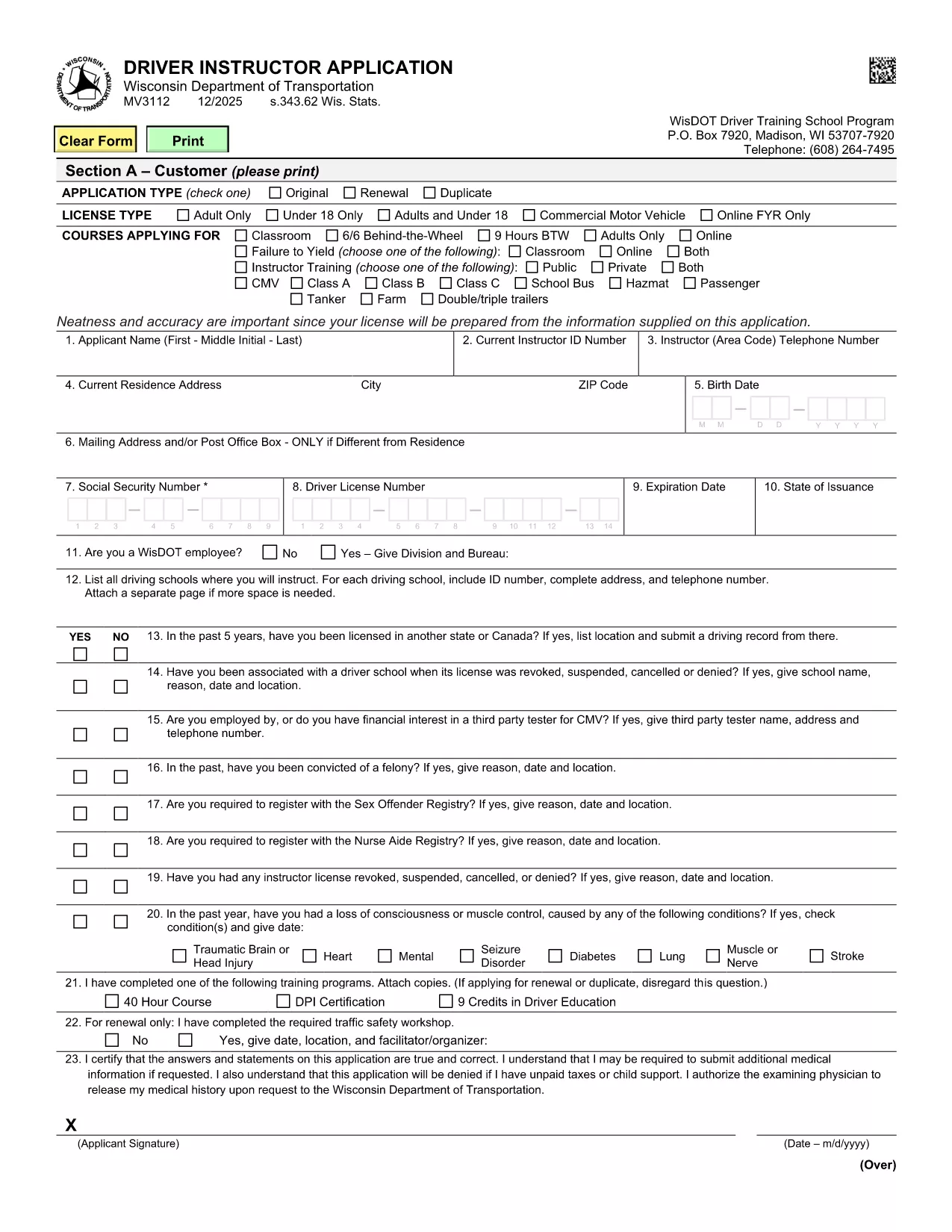
The MV3112 is the official Driver Instructor Application required by the Wisconsin Department of Transportation (WisDOT). Whether you’re starting a new driver‑training school or adding an instructor to an existing program, this form must be completed, signed, and submitted before you can begin teaching.

Formize makes the MV3112 completely fillable online. No more printing, scanning, or hand‑writing. Simply click the “Fill out this form” button, enter your information, and download a completed PDF ready for submission.

What Is the MV3112 Form?

The MV3112 collects personal data, driving history, medical qualifications, and background information about the applicant. It also includes a certification section where you attest that all statements are true and that you meet WisDOT’s eligibility criteria.

How to Complete the MV3112 Online

Follow these quick steps to fill the form using Formize’s PDF Filler:

  • Click the Fill out this form button on this page.
  • Wait for the Formize PDF Filler to load (a few seconds).
  • Enter all required information in the highlighted fields.
  • Upload any supporting documents (e.g., medical clearance, driver record).
  • Save the completed PDF, print it, sign where required, and mail it to WisDOT.

Common Mistakes to Avoid

Even a small error can delay your application. Keep these tips in mind:

  • Missing signatures: Every signature box must be signed in ink after printing.
  • Incomplete medical info: Attach the most recent medical examination if requested.
  • Incorrect fee amount: Verify the current fee on WisDOT’s website before mailing.
  • Out‑of‑date driver record: Use a driver record dated within the last 90 days.

Submission Guidelines & Fees

After you’ve filled and printed the form, mail it to:

Wisconsin Department of Transportation
Division of Driver Services
P.O. Box 7448
Madison, WI 53707‑7448

Include the application fee (check the latest WisDOT fee schedule) and any required medical documentation. Processing typically takes 10‑14 business days.

Need Help? Frequently Asked Questions

Below are answers to the most common questions about the MV3112.

คำถามที่พบบ่อย
  • Who is eligible to use the MV3112 form?

    Any individual who wishes to become a licensed driver instructor in Wisconsin, including those starting a new school or joining an existing one.

  • Do I need a medical examination?

    A medical exam is required only if WisDOT requests it. Attach a current medical report (within 60 days) when requested.

  • What is the application fee?

    The fee varies; check WisDOT’s current fee schedule on their website before submitting the form.

  • Can I submit the MV3112 electronically?

    WisDOT currently requires a printed, signed copy. The online filler speeds up data entry, but you must mail the final PDF.

  • How long does processing take?

    Standard processing is 10‑14 business days after WisDOT receives the complete, signed application.

  • What should I do if I make a mistake on the form?

    Correct any errors before printing. If you discover a mistake after mailing, contact WisDOT to request a replacement form.

  • Is there a deadline for submitting the MV3112?

    There is no fixed deadline, but you should submit the application before you begin any instructor activities to avoid penalties.

  • Where can I find additional guidance?

    Visit the WisDOT Driver Services website for detailed instructions, fee information, and contact details for further assistance.

ทำอย่างไร

วิธีกรอก MV3112 ฟรีทางออนไลน์ใน 5 ขั้นตอนง่ายๆ:

  1. 1
    Open the Fillable Form
    Click the “Fill out this form” button on this page. The Formize PDF Filler will open in a new tab.
  2. 2
    Enter Your Information
    Type your details into each highlighted field. Use the drop‑down menus where available for easy selection.
  3. 3
    Upload Supporting Documents
    Attach required files such as medical clearance or a recent driver record using the upload icons.
  4. 4
    Save and Print
    When every field is completed, click “Save PDF”. Print the document, sign the required sections in ink, and prepare it for mailing.
  5. 5
    Submit to WisDOT
    Mail the signed PDF along with the application fee to the WisDOT address listed on the form.
สร้างแอป PDF Filler
เกี่ยวกับ

แบบฟอร์มคำร้องขอทำใบขับขี่

ในประเทศส่วนใหญ่ จำเป็นต้องมีใบขับขี่ก่อนออกเดินทาง การขอใบขับขี่เป็นก้าวสำคัญสำหรับผู้ที่ต้องการขับรถ

MV3112 เป็นหนึ่งในแบบฟอร์มคำขอใบขับขี่ซึ่งเป็นเอกสารที่ใช้ในการรวบรวมข้อมูลจากผู้ที่ต้องการขอใบอนุญาตขับรถ โดยปกติจะมีฟิลด์สำหรับชื่อผู้สมัคร วันเกิด หมายเลขประจำตัวประชาชน ข้อมูลติดต่อ ตลอดจนประวัติใบขับขี่และประสบการณ์ของพวกเขา

คุณสมบัติ

PDF ฟิลเลอร์

วิธีที่ง่ายที่สุดในการกรอกแบบฟอร์ม PDF ทางออนไลน์

  • กรอก MV3112 อย่างรวดเร็ว
    กำลังมองหาวิธีเติม MV3112 ทางออนไลน์อย่างรวดเร็วอยู่ใช่ไหม ด้วยตัวกรอกแบบฟอร์ม PDF ออนไลน์ฟรีของเรา คุณจะรู้วิธีแก้ไขและกรอกเอกสาร PDF นี้ในเวลาไม่ถึงนาที
  • โปรแกรมแก้ไข PDF ออนไลน์ที่ใช้งานง่าย
    เบื่อกับการพิมพ์ไฟล์ PDF เพื่อให้คุณสามารถแก้ไขได้ก่อนที่จะสแกนซ้ำและส่งกลับหรือไม่? แก้ไขเอกสาร PDF ออนไลน์ฟรี ใช้โปรแกรมแก้ไข PDF ออนไลน์ของเราเพื่อประหยัดเวลาและกระดาษ
  • เครื่องมือที่ยอดเยี่ยมสำหรับทุกแพลตฟอร์ม
    สงสัยวิธีเติม MV3112 บน Mac หรืออาจใช้ตัวเติม PDF ฟรีได้อย่างไร เครื่องมือ PDF ออนไลน์ของเราทำงานได้บนทุกแพลตฟอร์ม
  • การจัดเก็บไฟล์ที่ปลอดภัย
    ไฟล์ "MV3112" ที่เสร็จสมบูรณ์จะถูกจัดเก็บไว้ในฐานข้อมูลที่ปลอดภัยซึ่งจัดการโดย Amazon Cloud hosting คุณสามารถลบไฟล์ของคุณออกจากระบบของเราได้ตลอดเวลา ไม่ว่าในกรณีใด ไฟล์เหล่านี้จะถูกลบโดยอัตโนมัติหลังจากผ่านไป 24 ชั่วโมง
  • สนทนากับ MV3112
    แชทกับ "MV3112" บน Chatize ที่เป็นผู้ช่วยอ่าน PDF ฟรี ถามคำถามและรับคำตอบจาก "MV3112" เพียงคลิกที่ปุ่ม แชทด้วยเอกสาร ด้านบน

ลบเซสชันการบรรจุ

ลบเซสชันการกรอกข้อมูลที่เลือกหรือไม่?ในกรณีนี้ความคืบหน้าในการกรอกแบบฟอร์มจะหายไป

ลบเซสชันการแก้ไข

ลบเซสชันการแก้ไขที่เลือกหรือไม่ ในกรณีนี้ ความคืบหน้าในการสร้างและแก้ไขแบบฟอร์มจะหายไป