hamburger-menu icon
เลือกภาษา

UNM Undergraduate Application Form (Fillable PDF)

  1. ภาษา ภาษาอังกฤษ
  2. ประเทศ สหรัฐอเมริกา
  3. กิจกรรม College Admissions
  4. แผนก Education
UNM Undergraduate Application Form (Fillable PDF)

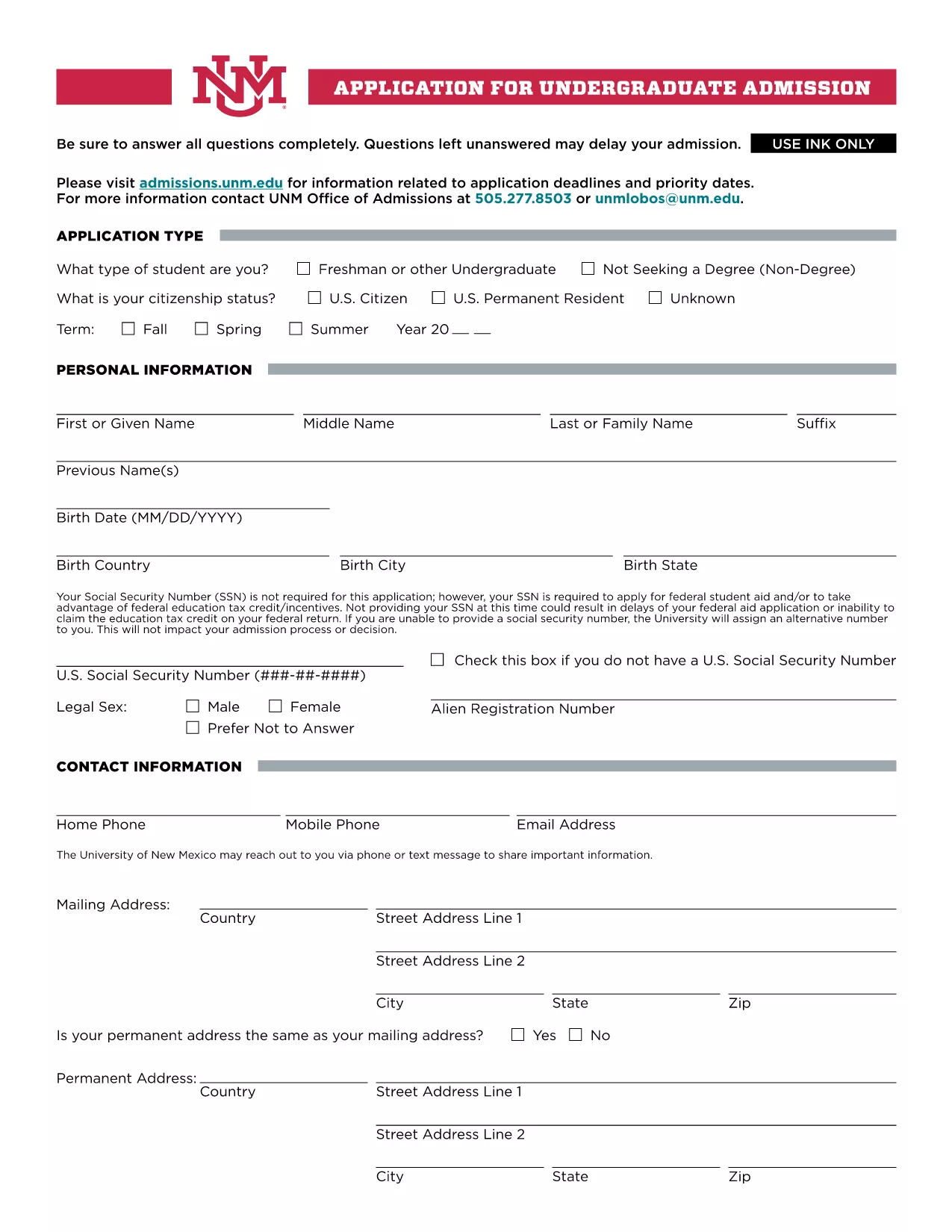
Welcome to the official landing page for the UNM Undergraduate Application Form. This fillable PDF lets prospective students apply to the University of New Mexico quickly, securely, and without the need for any additional software.

Our integrated Fill out this form button launches the Formize PDF Filler app directly in your browser, so you can complete every section, save your progress, and submit the application with just a few clicks.

Why Choose the Fillable UNM Application Form?

The fillable version offers several advantages over a static PDF:

  • Instant validation: The form checks required fields and formatting as you type.
  • Save & resume: You can pause, close your browser, and return later without losing data.
  • Environmentally friendly: No printing needed unless you choose to keep a hard copy.
  • Secure transmission: Your information is encrypted during the online submission.

How to Complete the Form Online

Follow these simple steps to fill out the UNM application:

  1. Click the Fill out this form button above.
  2. Wait a few seconds while the Formize PDF Filler loads.
  3. Enter your personal, academic, and residency information in the highlighted fields.
  4. Upload required documents (transcripts, test scores, etc.) using the attachment icons.
  5. Review each section, correct any validation warnings, and click Submit when you’re ready.

Common Mistakes to Avoid

  • Leaving the Social Security Number blank if you plan to apply for federal aid – the form will warn you.
  • Submitting outdated transcripts; always upload the most recent official copy.
  • Skipping the “Signature” field – the digital signature is required for processing.
  • Exceeding the file size limit for uploads; compress large PDFs before attaching.

Submission & Next Steps

After you submit, you will receive an automated confirmation email with a reference number. The UNM admissions office will review your application and contact you if additional information is needed. Keep an eye on your email and the UNM applicant portal for status updates.

Ready to start? Click the button below and let Formize handle the rest.

คำถามที่พบบ่อย
  • Do I need to provide my Social Security Number?

    The SSN is not required for the basic application, but it is mandatory if you plan to apply for federal student aid or claim education tax credits.

  • Can I save my progress and finish later?

    Yes. The Formize PDF Filler lets you save a draft in your browser. When you return, simply reload the form and continue where you left off.

  • What file formats are accepted for supporting documents?

    PDF, JPEG, and PNG files are accepted. Each file must be under 5 MB to ensure successful upload.

  • How do I know my application was received?

    After submission, you will receive an automatic confirmation email with a reference number. You can also check the status in the UNM applicant portal.

  • Is there a deadline for the undergraduate application?

    UNM’s regular admission deadline is March 1 for fall enrollment. Check the UNM admissions website for special program deadlines.

  • Can I print a hard copy after completing the form online?

    Absolutely. Once you finish, use the “Print” option in the Formize toolbar to generate a printable PDF version.

  • What should I do if I encounter an error while filling the form?

    Refresh the page and try again. If the problem persists, clear your browser cache or try a different browser.

  • Is there a fee to use the fillable PDF?

    No. The fillable UNM application form and the Formize PDF Filler are completely free to use.

ทำอย่างไร

วิธีกรอก UNM application form ฟรีทางออนไลน์ใน 5 ขั้นตอนง่ายๆ:

  1. 1
    Open the Fillable Form
    Click the “Fill out this form” button on the page. The Formize PDF Filler will open in a new browser tab.
  2. 2
    Load the Form
    Wait a few seconds while the PDF loads. All fillable fields will be highlighted for easy entry.
  3. 3
    Enter Your Information
    Complete each section—personal data, academic history, residency, and any required test scores.
  4. 4
    Attach Supporting Documents
    Use the attachment icons to upload transcripts, test scores, and other required files.
  5. 5
    Review & Submit
    Double‑check all entries, resolve any validation warnings, then click the Submit button to send your application securely.
สร้างแอป PDF Filler
เกี่ยวกับ

เทมเพลต UNM application form

ด้วยชุดคุณสมบัติดั้งเดิมสำหรับการดูและกรอกเอกสาร PDF รวมกับประโยชน์ของเว็บแอปพลิเคชันและเค้าโครงที่ตอบสนอง คุณสามารถสร้าง UNM application form ให้เสร็จภายในไม่กี่นาที

คุณสมบัติ

PDF ฟิลเลอร์

วิธีที่ง่ายที่สุดในการกรอกแบบฟอร์ม PDF ทางออนไลน์

  • กรอก UNM application form อย่างรวดเร็ว
    กำลังมองหาวิธีเติม UNM application form ทางออนไลน์อย่างรวดเร็วอยู่ใช่ไหม ด้วยตัวกรอกแบบฟอร์ม PDF ออนไลน์ฟรีของเรา คุณจะรู้วิธีแก้ไขและกรอกเอกสาร PDF นี้ในเวลาไม่ถึงนาที
  • โปรแกรมแก้ไข PDF ออนไลน์ที่ใช้งานง่าย
    เบื่อกับการพิมพ์ไฟล์ PDF เพื่อให้คุณสามารถแก้ไขได้ก่อนที่จะสแกนซ้ำและส่งกลับหรือไม่? แก้ไขเอกสาร PDF ออนไลน์ฟรี ใช้โปรแกรมแก้ไข PDF ออนไลน์ของเราเพื่อประหยัดเวลาและกระดาษ
  • เครื่องมือที่ยอดเยี่ยมสำหรับทุกแพลตฟอร์ม
    สงสัยวิธีเติม UNM application form บน Mac หรืออาจใช้ตัวเติม PDF ฟรีได้อย่างไร เครื่องมือ PDF ออนไลน์ของเราทำงานได้บนทุกแพลตฟอร์ม
  • การจัดเก็บไฟล์ที่ปลอดภัย
    ไฟล์ "UNM application form" ที่เสร็จสมบูรณ์จะถูกจัดเก็บไว้ในฐานข้อมูลที่ปลอดภัยซึ่งจัดการโดย Amazon Cloud hosting คุณสามารถลบไฟล์ของคุณออกจากระบบของเราได้ตลอดเวลา ไม่ว่าในกรณีใด ไฟล์เหล่านี้จะถูกลบโดยอัตโนมัติหลังจากผ่านไป 24 ชั่วโมง
  • สนทนากับ UNM application form
    แชทกับ "UNM application form" บน Chatize ที่เป็นผู้ช่วยอ่าน PDF ฟรี ถามคำถามและรับคำตอบจาก "UNM application form" เพียงคลิกที่ปุ่ม แชทด้วยเอกสาร ด้านบน

ลบเซสชันการบรรจุ

ลบเซสชันการกรอกข้อมูลที่เลือกหรือไม่?ในกรณีนี้ความคืบหน้าในการกรอกแบบฟอร์มจะหายไป

ลบเซสชันการแก้ไข

ลบเซสชันการแก้ไขที่เลือกหรือไม่ ในกรณีนี้ ความคืบหน้าในการสร้างและแก้ไขแบบฟอร์มจะหายไป