
hamburger-menu icon
เลือกภาษา

Georgia MV-300 – Request Cancellation of Temporary Operating Permit

  1. ประเทศ สหรัฐอเมริกา
  2. ภาษา ภาษาอังกฤษ
  3. แผนก Georgia Department of Revenue
  4. กิจกรรม ทะเบียนรถ
Georgia MV-300 – Request Cancellation of Temporary Operating Permit

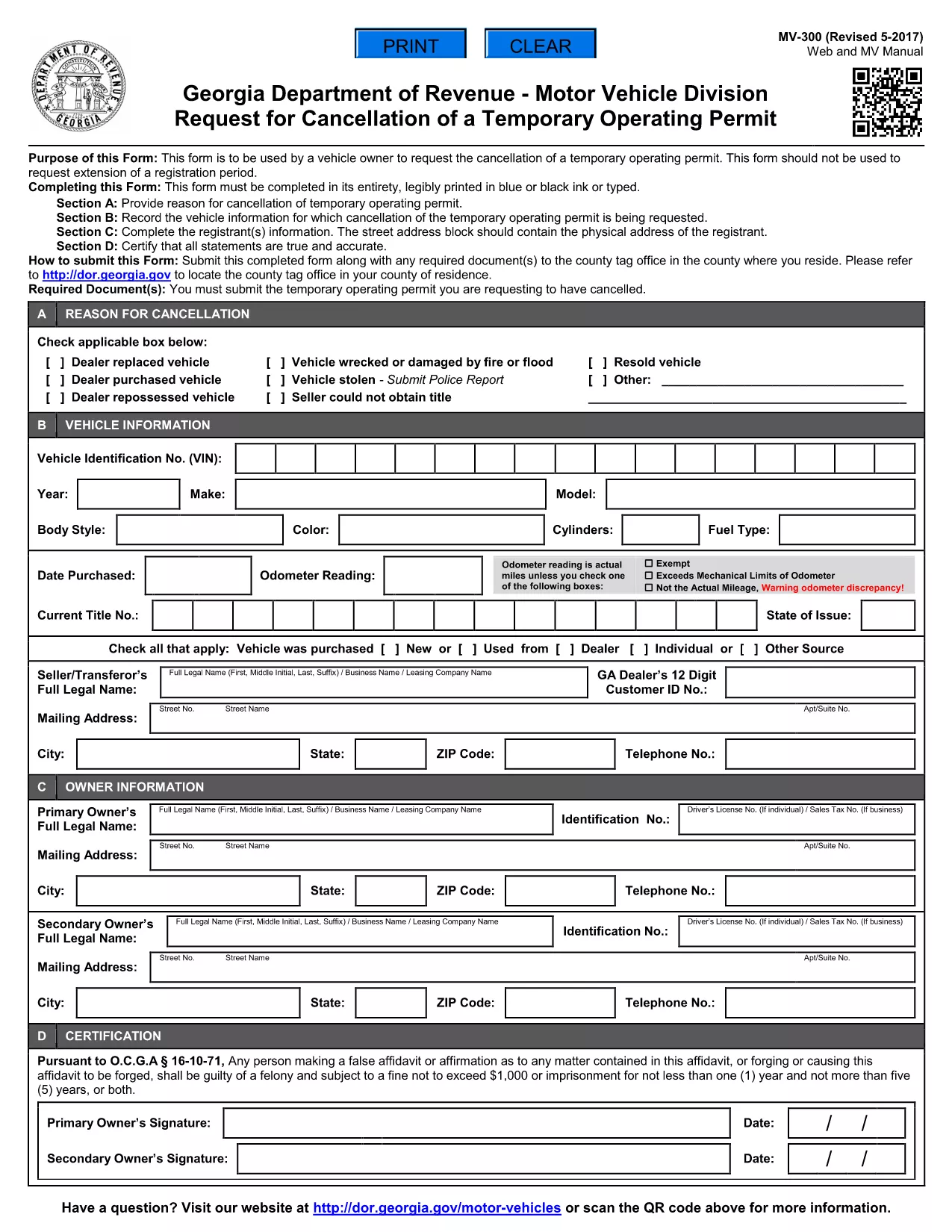
The MV-300 is the official Georgia Department of Revenue Motor Vehicle Division form used to request the cancellation of a temporary operating permit. Whether you’re a dealer, fleet manager, or private vehicle owner, you can now complete this form entirely online with Formize’s fillable PDF tool.

What Is the MV-300 Form?

The MV-300 serves a single purpose: to formally request the termination of a temporary operating permit issued by the Georgia Department of Revenue. It is not intended for extensions, renewals, or any other type of permit request.

How to Complete the MV-300 Online

Follow these simple steps to fill out the MV-300 without leaving your browser:

  • Click the "Fill out this form" button on this page.
  • Wait a few seconds while the Formize PDF Filler app loads the fillable version of the MV-300.
  • Enter the required information in each field (vehicle details, permit number, owner signature, etc.).
  • Review the completed form for accuracy.
  • Click Submit to download the finished PDF or to email it directly to the Motor Vehicle Division.

Common Mistakes to Avoid

  • Using the wrong form: MV-300 is only for cancellation, not for extensions.
  • Leaving required fields blank: Every field marked with an asterisk (*) must be completed.
  • Incorrect permit number: Verify the number on your temporary permit before entering it.
  • Missing signatures: Both the vehicle owner and the authorized dealer must sign.

Where to Submit the Completed Form

After you’ve filled out and saved the PDF, you have two submission options:

  • Mail: Send the printed form to the address listed on the form’s instructions.
  • Electronic: Email a scanned copy to mvforms@dor.ga.gov (if your local office accepts electronic submissions).

Need Help? Frequently Asked Questions

Below are answers to the most common questions about the MV-300.

คำถามที่พบบ่อย
  • Can I use the MV-300 to extend a temporary operating permit?

    No. The MV-300 is strictly for cancellation. For extensions, you must use the appropriate renewal form.

  • Do I need a notary for the MV-300?

    A notary is not required for the MV-300, but the signatures must be legible and match the names on the permit.

  • What if I lose my temporary operating permit?

    Contact the Georgia Department of Revenue for a replacement permit number before completing the MV-300.

  • Is there a filing fee for cancelling a temporary permit?

    There is no fee to submit the MV-300 cancellation request.

  • How long does it take for the cancellation to be processed?

    Processing typically takes 5‑7 business days after the department receives the completed form.

  • Can I fill out the MV-300 on a mobile device?

    Yes. The Formize PDF Filler works on smartphones and tablets, making it easy to complete the form anywhere.

ทำอย่างไร

วิธีกรอก MV-300 ฟรีทางออนไลน์ใน 4 ขั้นตอนง่ายๆ:

  1. 1
    Open the Fillable Form
    Click the "Fill out this form" button on this page. The Formize PDF Filler will open in a new window.
  2. 2
    Enter Your Information
    Type directly into each field – vehicle details, permit number, owner contact info, and signatures.
  3. 3
    Review and Save
    Check that all required fields are completed, then click "Save" to download the finished PDF to your device.
  4. 4
    Submit to the Motor Vehicle Division
    Mail or email the completed PDF according to the instructions on the form.
สร้างแอป PDF Filler
เกี่ยวกับ

แบบฟอร์มทะเบียนรถ

MV-300 เป็นหนึ่งในแบบฟอร์ม DMV หรือที่เรียกว่าแบบฟอร์มกรมยานยนต์ ซึ่งเป็นเอกสารที่ใช้ในธุรกรรมและกระบวนการต่างๆ ที่เกี่ยวข้องกับยานยนต์ DMV เป็นหน่วยงานรัฐบาลที่รับผิดชอบในการออกใบอนุญาตขับขี่ ทะเบียนรถยนต์ และการบังคับใช้กฎหมายเกี่ยวกับยานยนต์ แบบฟอร์ม DMV เฉพาะที่มีอยู่อาจแตกต่างกันไปตามเขตอำนาจศาล แต่นี่คือตัวอย่างทั่วไปบางส่วน:

แบบฟอร์มใบขับขี่: แบบฟอร์มเหล่านี้ใช้เพื่อขอใบขับขี่หรือขอเปลี่ยนแปลงหรือต่ออายุ โดยทั่วไปพวกเขาต้องการข้อมูลส่วนบุคคล หลักฐานแสดงตัวตน และอาจรวมถึงส่วนสำหรับข้อมูลทางการแพทย์หรือประวัติการขับขี่

แบบฟอร์มทะเบียนยานพาหนะ: แบบฟอร์มเหล่านี้ใช้เพื่อลงทะเบียนยานยนต์กับ DMV พวกเขาต้องการข้อมูลยานพาหนะ รายละเอียดการเป็นเจ้าของ และหลักฐานการประกันภัย

แบบฟอร์มการโอนกรรมสิทธิ์: เมื่อซื้อหรือขายยานพาหนะ แบบฟอร์มเหล่านี้จะใช้เพื่อโอนกรรมสิทธิ์จากฝ่ายหนึ่งไปยังอีกฝ่ายหนึ่ง พวกเขาต้องการข้อมูลเกี่ยวกับผู้ซื้อ ผู้ขาย รายละเอียดยานพาหนะ และอาจรวมถึงใบเสร็จการขายด้วย

แบบฟอร์มการยินยอมรับผิดของยานพาหนะ: เมื่อขายหรือโอนกรรมสิทธิ์ยานพาหนะ แบบฟอร์มเหล่านี้จะแจ้งให้ DMV ทราบว่าผู้ขายไม่ต้องรับผิดชอบต่อยานพาหนะอีกต่อไป ช่วยปกป้องผู้ขายจากความรับผิดต่ออุบัติเหตุหรือเหตุการณ์ที่เกี่ยวข้องกับรถยนต์หลังการขาย

แบบฟอร์มการต่ออายุป้ายทะเบียนและทะเบียน: แบบฟอร์มเหล่านี้ใช้เพื่อต่ออายุทะเบียนรถยนต์หรือขอป้ายทะเบียนใหม่ โดยทั่วไปพวกเขาต้องการข้อมูลเกี่ยวกับเจ้าของที่ลงทะเบียน รายละเอียดการลงทะเบียนปัจจุบัน และการชำระค่าธรรมเนียมที่เกี่ยวข้อง

แบบฟอร์มขอบันทึกการขับขี่: แบบฟอร์มเหล่านี้อนุญาตให้บุคคลขอบันทึกการขับขี่ของตนจาก DMV ซึ่งให้ข้อมูลเกี่ยวกับการละเมิดการขับขี่ สถานะใบอนุญาต และรายละเอียดอื่นๆ ที่เกี่ยวข้อง

แบบฟอร์มป้ายทะเบียนแบบพิเศษหรือเฉพาะบุคคล: แบบฟอร์มเหล่านี้ใช้เพื่อใช้กับป้ายทะเบียนส่วนบุคคลหรือแบบพิเศษ ซึ่งอนุญาตให้บุคคลต่างๆ ปรับแต่งป้ายทะเบียนด้วยอักขระหรือการออกแบบเฉพาะ

นี่เป็นเพียงตัวอย่างเล็กๆ น้อยๆ ของแบบฟอร์มต่างๆ ที่อาจมีให้ผ่าน DMV แบบฟอร์มและข้อกำหนดเฉพาะอาจแตกต่างกันไปตามเขตอำนาจศาล ดังนั้นคุณควรปรึกษาเว็บไซต์ DMV ในพื้นที่หรือไปที่สำนักงาน DMV เพื่อรับแบบฟอร์มที่ถูกต้องสำหรับความต้องการเฉพาะของคุณ

คุณสมบัติ

PDF ฟิลเลอร์

วิธีที่ง่ายที่สุดในการกรอกแบบฟอร์ม PDF ทางออนไลน์

  • กรอก MV-300 อย่างรวดเร็ว
    กำลังมองหาวิธีเติม MV-300 ทางออนไลน์อย่างรวดเร็วอยู่ใช่ไหม ด้วยตัวกรอกแบบฟอร์ม PDF ออนไลน์ฟรีของเรา คุณจะรู้วิธีแก้ไขและกรอกเอกสาร PDF นี้ในเวลาไม่ถึงนาที
  • โปรแกรมแก้ไข PDF ออนไลน์ที่ใช้งานง่าย
    เบื่อกับการพิมพ์ไฟล์ PDF เพื่อให้คุณสามารถแก้ไขได้ก่อนที่จะสแกนซ้ำและส่งกลับหรือไม่? แก้ไขเอกสาร PDF ออนไลน์ฟรี ใช้โปรแกรมแก้ไข PDF ออนไลน์ของเราเพื่อประหยัดเวลาและกระดาษ
  • เครื่องมือที่ยอดเยี่ยมสำหรับทุกแพลตฟอร์ม
    สงสัยวิธีเติม MV-300 บน Mac หรืออาจใช้ตัวเติม PDF ฟรีได้อย่างไร เครื่องมือ PDF ออนไลน์ของเราทำงานได้บนทุกแพลตฟอร์ม
  • การจัดเก็บไฟล์ที่ปลอดภัย
    ไฟล์ "MV-300" ที่เสร็จสมบูรณ์จะถูกจัดเก็บไว้ในฐานข้อมูลที่ปลอดภัยซึ่งจัดการโดย Amazon Cloud hosting คุณสามารถลบไฟล์ของคุณออกจากระบบของเราได้ตลอดเวลา ไม่ว่าในกรณีใด ไฟล์เหล่านี้จะถูกลบโดยอัตโนมัติหลังจากผ่านไป 24 ชั่วโมง
  • สนทนากับ MV-300
    แชทกับ "MV-300" บน Chatize ที่เป็นผู้ช่วยอ่าน PDF ฟรี ถามคำถามและรับคำตอบจาก "MV-300" เพียงคลิกที่ปุ่ม แชทด้วยเอกสาร ด้านบน

ลบเซสชันการบรรจุ

ลบเซสชันการกรอกข้อมูลที่เลือกหรือไม่?ในกรณีนี้ความคืบหน้าในการกรอกแบบฟอร์มจะหายไป

ลบเซสชันการแก้ไข

ลบเซสชันการแก้ไขที่เลือกหรือไม่ ในกรณีนี้ ความคืบหน้าในการสร้างและแก้ไขแบบฟอร์มจะหายไป