
hamburger-menu icon
เลือกภาษา

Form 14568-F – Fillable PDF for IRS VCP Compliance

  1. ประเทศ สหรัฐอเมริกา
  2. ภาษา ภาษาอังกฤษ
  3. กิจกรรม ภาษี
  4. แผนก IRS
Form 14568-F – Fillable PDF for IRS VCP Compliance

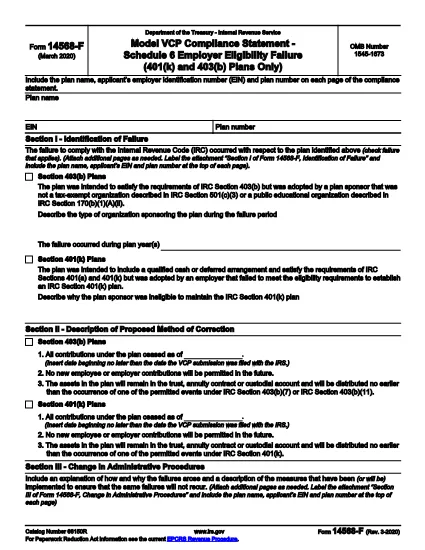
The IRS Form 14568-F (Model Voluntary Correction Program (VCP) Compliance Statement) is used by retirement‑plan sponsors to describe qualification failures and proposed corrective actions. Formize.com offers a secure, fillable PDF version so you can complete the form directly in your browser—no extra software required.

What Is Form 14568-F?

Form 14568-F is part of the IRS’s VCP process. It allows plan sponsors to:

  • Identify specific plan failures under the Internal Revenue Code.
  • Provide a detailed correction method for each failure.
  • Explain how participants will be notified, if needed.

How to Fill Out Form 14568-F Online

Follow these simple steps to complete the form using Formize’s PDF filler:

  1. Click the "Fill out this form" button on this page.
  2. Wait a few seconds while the Formize PDF Filler app loads.
  3. Enter the required information in each fillable field (plan name, EIN, failure description, etc.).
  4. Use the Save button to store your progress or the Download button to get a completed copy.
  5. Submit the completed PDF to the IRS as part of your VCP submission.

Common Mistakes to Avoid

  • Leaving fields blank: Every required field must be completed; otherwise the IRS will reject the statement.
  • Mismatched EIN or plan number: Double‑check the numbers against your plan documents.
  • Incorrect failure codes: Use the IRS guidance to select the right code for each failure.
  • Missing signatures: The plan sponsor or authorized officer must sign the form.

Download the Official PDF

If you prefer to work offline, you can download the official IRS PDF directly from the link below. The file is the same one used by Formize’s online filler.

Download Form 14568-F (PDF)

FAQs About Form 14568-F

Below are answers to the most common questions plan sponsors ask about this form.

คำถามที่พบบ่อย
  • What is the purpose of Form 14568-F?

    Form 14568-F is the Model VCP Compliance Statement used by plan sponsors to detail qualification failures and propose corrective actions for IRS approval.

  • Do I need a PDF editor to complete this form?

    No. With Formize’s online filler you can fill out the form directly in your browser—no separate PDF editor is required.

  • Can I save my progress and return later?

    Yes. The filler allows you to save your work locally and resume editing at any time before you download the final PDF.

  • Is the PDF version on Formize the official IRS form?

    Absolutely. The download link points to the official IRS PDF (f14568f.pdf), ensuring you are using the correct, up‑to‑date version.

  • What common errors cause the IRS to reject Form 14568-F?

    Typical reasons include missing required fields, incorrect EIN or plan number, wrong failure codes, and missing signatures.

  • How long do I have to submit the VCP after filing this statement?

    Generally, corrective actions must be completed within 150 days of filing the compliance statement, though special timing rules may apply to governmental plans.

  • Is there a fee to use Formize’s PDF filler?

    Formize offers a free basic filler for IRS forms like 14568-F. Advanced features may require a subscription, but filling out this form is free.

ทำอย่างไร

วิธีกรอก Form 14568-F ฟรีทางออนไลน์ใน 5 ขั้นตอนง่ายๆ:

  1. 1
    Click the Fill‑out Button
    Press the “Fill out this form” button on this page to launch Formize’s secure PDF filler.
  2. 2
    Wait for the App to Load
    A brief loading screen appears while the filler initializes. This usually takes only a few seconds.
  3. 3
    Enter Your Information
    Complete each fillable field—plan name, EIN, failure description, corrective actions, and signatures.
  4. 4
    Save or Download
    When you’re finished, click “Save” to keep a copy in your browser or “Download” to get a completed PDF file.
  5. 5
    Submit to the IRS
    Attach the finished Form 14568-F to your VCP submission according to IRS filing guidelines.
สร้างแอป PDF Filler
เกี่ยวกับ

แบบฟอร์มภาษี

Form 14568-F เป็นหนึ่งในแบบฟอร์มภาษีที่เป็นเอกสารที่ใช้ในการรายงานข้อมูลที่เกี่ยวข้องกับภาษีไปยังหน่วยงานด้านภาษีที่เกี่ยวข้อง มีแบบฟอร์มภาษีหลายประเภท รวมถึงแบบฟอร์มภาษีของรัฐบาลกลาง รัฐ และท้องถิ่น ซึ่งอาจแตกต่างกันไปขึ้นอยู่กับสถานการณ์และสถานที่ของผู้เสียภาษี

คุณสมบัติ

PDF ฟิลเลอร์

วิธีที่ง่ายที่สุดในการกรอกแบบฟอร์ม PDF ทางออนไลน์

  • กรอก Form 14568-F อย่างรวดเร็ว
    กำลังมองหาวิธีเติม Form 14568-F ทางออนไลน์อย่างรวดเร็วอยู่ใช่ไหม ด้วยตัวกรอกแบบฟอร์ม PDF ออนไลน์ฟรีของเรา คุณจะรู้วิธีแก้ไขและกรอกเอกสาร PDF นี้ในเวลาไม่ถึงนาที
  • โปรแกรมแก้ไข PDF ออนไลน์ที่ใช้งานง่าย
    เบื่อกับการพิมพ์ไฟล์ PDF เพื่อให้คุณสามารถแก้ไขได้ก่อนที่จะสแกนซ้ำและส่งกลับหรือไม่? แก้ไขเอกสาร PDF ออนไลน์ฟรี ใช้โปรแกรมแก้ไข PDF ออนไลน์ของเราเพื่อประหยัดเวลาและกระดาษ
  • เครื่องมือที่ยอดเยี่ยมสำหรับทุกแพลตฟอร์ม
    สงสัยวิธีเติม Form 14568-F บน Mac หรืออาจใช้ตัวเติม PDF ฟรีได้อย่างไร เครื่องมือ PDF ออนไลน์ของเราทำงานได้บนทุกแพลตฟอร์ม
  • การจัดเก็บไฟล์ที่ปลอดภัย
    ไฟล์ "Form 14568-F" ที่เสร็จสมบูรณ์จะถูกจัดเก็บไว้ในฐานข้อมูลที่ปลอดภัยซึ่งจัดการโดย Amazon Cloud hosting คุณสามารถลบไฟล์ของคุณออกจากระบบของเราได้ตลอดเวลา ไม่ว่าในกรณีใด ไฟล์เหล่านี้จะถูกลบโดยอัตโนมัติหลังจากผ่านไป 24 ชั่วโมง
  • สนทนากับ Form 14568-F
    แชทกับ "Form 14568-F" บน Chatize ที่เป็นผู้ช่วยอ่าน PDF ฟรี ถามคำถามและรับคำตอบจาก "Form 14568-F" เพียงคลิกที่ปุ่ม แชทด้วยเอกสาร ด้านบน

ลบเซสชันการบรรจุ

ลบเซสชันการกรอกข้อมูลที่เลือกหรือไม่?ในกรณีนี้ความคืบหน้าในการกรอกแบบฟอร์มจะหายไป

ลบเซสชันการแก้ไข

ลบเซสชันการแก้ไขที่เลือกหรือไม่ ในกรณีนี้ ความคืบหน้าในการสร้างและแก้ไขแบบฟอร์มจะหายไป